Some deliveries may take a little longer than usual due to regional shipping conditions.

DOWNLOAD THE APP


Customer Services
Copyright © 2025 Desertcart Holdings Limited
DOWNLOAD THE APP

📡 Stay Connected, Stay Ahead — Signal Boosting Made Effortless
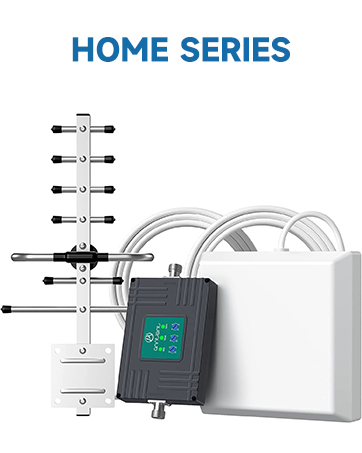
This FCC-approved cell phone signal booster amplifies 5G, 4G, and LTE signals on bands 5, 12, 13, and 17, supporting all major US carriers. Designed for up to 4,500 sq ft coverage, it features a directional outside antenna and smart auto-level control for stable, high-quality reception. Easy to install with no drilling required, it includes an app to help you aim the antenna precisely. Ideal for professionals working remotely or anyone craving reliable connectivity in low-signal areas.


| ASIN | B07ML28SWS |
| Best Sellers Rank | #27,769 in Cell Phones & Accessories ( See Top 100 in Cell Phones & Accessories ) #31 in Cell Phone Signal Boosters |
| Color | Grey |
| Customer Reviews | 3.8 3.8 out of 5 stars (1,775) |
| Date First Available | January 1, 2019 |
| Is Discontinued By Manufacturer | No |
| Item Weight | 4.73 pounds |
| Item model number | N30-PY |
| Manufacturer | ANNTLENT Ltd. |
| Other display features | Wireless |
| Package Dimensions | 14.61 x 8.78 x 5.28 inches |
| Special features | APP Help Install, LED Indicator |
| Whats in the box | N30 Booster, Outside Directional Antenna, Inside Panel Antenna, Window Entry Cable, 3 Loger Cables (2 x 16', 1 x 33'), Power Supply, Waterproof Tape, Cable Management Tape |
S**E
Fast and easy setup except for the outdoor antenna
Our verizon signal has been really bad for the 5 years that we have been out here in East Texas at our farm. We bought a $30/month satellite phone with HughesNet to get good service. Then, we bought this booster, and we now have 3 and 4 bars on our iPhones. The product specs say up to 4500 sq. ft. of coverage, but then they specify according to outside signal strength. We only get the minimal of about 800 sq. ft. coverage inside. But, we are happy with that. We have good coverage in our den, which is where our computer is and our TV and where we spend most of our time. I started calling relatives 300 miles away, and we talked for 30 minutes without the disruptions that we had previously experienced with our Verizon cell phones. The hardest part is installing the outside antenna. I put it outside my door and placed it on a tree to face the cell phone tower, and it worked fine. All 3 LEDs lit up green with total 65 dB boost. Now I have to wire it through the wall and mount the antenna onto the roof. My temporary setup has the outside antenna about 35 feet from the inside antenna. They say to keep them about 50 feet apart, but it is working fine at 35 feet. I looked up other products that could cover more sq. ft., but they are all based on the outside signal. My wife wanted me to return this product and get one that would cover more sq. ft. in the home. When I looked them up, I found the same signal boost from a product twice the price. So, I don't know. We decided to stay with this product. It works great. We have twice the signal strength now, and that was what we wanted in the first place. Update 3-21-2021 I finished the project the next day, threading the antenna wire through a hole in our brick wall that I had drilled years ago for our home security camera system. Luckily, one end of the antenna wire has a small connector, about 3/8 inch diameter. The other end is about 3/4 to 1 inch diameter, which would not fit through our cluttered 2-inch hole, which has 8 coax cables in it already. The included 50-foot extension wire worked fine. It went around a corner and up to the high point of the roof. I couldn't flush mount it to point upwards because of the shingles, so I mounted it pointing downwards. I wasn't sure if that side of our house was pointing exactly westward to the cell phone tower 8 miles away. When we plugged it all in, it seemed to work even better than the temporary setup, which was 4 feet off the ground. The antenna is now 20 feet high and about 35 feet away from the inside antenna. One other thing that worried me was which way to point the antenna. This side or that side. Apparently it does not matter. I had it point both ways, and each way worked fine. I just pulled my iPhone out of my holster and checked the bars. I'm at my computer about 4 feet from the inside antenna. It shows 3 bars. Then, I walked to the inside antenna and held my phone up to it, and it showed 4 bars. Not bad considering my previous number of bars was zero.
J**D
Good functionality, setup easy, app is terrible
Purchased for my new house that gets 1 bar or less of cellular coverage (Verizon) and lots of dropped calls. Setup of the antenna itself and indoor hardware is pretty easy - just plug and go. My only complaint is that I spent about an hour or two trying to get their app to work to calibrate/point the antenna in the right direction. As far as I can tell it is entirely broken and I gave up. I did find an iPhone app that could tell me the general location of the nearest towers on a map, plugged their coordinates into google maps, and then used that to get a general bearing. I get about 40-60 mbps down (plenty for streaming movies, browsing the web, etc.) and 1-2 mbps up (I’d like more but again, plenty for general purpose web use) The latency is pretty good as well, around 50-60 ms. If I wanted better upload speeds I would need to purchase a more powerful and directional antenna like the Bolton long ranger, but for a single channel cheap antenna I think this would will be fine for now.
W**W
The device works great in our rural location.
The device works great in our rural location. Prior to this, we had an old 3G booster that I had installed about 12 or so years ago. Back then, it helped a little. However, in recent years I noticed it was not really helping, which is likely due to Verizon's changeover to 4G and then 5G. I researched all of this, with respect to boosters and also talked with a Verizon store rep who gave me other pointers. It is very important to find out which cellular bands are being used in the area and where the cell towers are so that you can (1) know if a booster will even help, (2) know which booster to buy, based on the bands it works with, and (3) know how to aim the antenna. While the "bars" indicator will help, you may learn that in the "settings" menu, your phone has another signal strength meter that measures the signal in "dB". Additionally, by downloading one of the Cell tower locator apps (just check online), you can determine tower location and which bands they use. For the installation, I used the provided cables. I installed the outside antenna at a height that is probably about 8 to 10 ft higher than the inside antenna, and probably about 30 to 35 ft horizontally. I think the manual recommends 25ft higher or, alternatively, 50 ft horizontally. Neither of these was practical for me. When I checked the signal strength (in dB), using the recommended App from the instructions, it was within tolerance. Before getting this new booster, we had only 1 out of 5 bars (sometimes 2 bars), which basically only allowed for phone calls. (In the early years, when the old booster worked, we could get 2 or 3 bars.) Now, with the new booster, we have 3 to 4 bars (out of 5) of strength inside the home. Even out in the yard we have about 2 to 3 bars of strength versus only 1. This is with Verizon. However, the booster even improved AT&T cell service a little. Before, we had 0 to 1 bars, which basically was "no service". Now, we have about 2 bars. (I ordered the specific device that worked more so for Verizon bands, since that is what we subscribe to. Visitors may have AT&T or other carriers though.) On Verizon service, I can now even use my laptop with VPN, using my phone as a hotspot, whereas before, the VPN would not work. The data transfer is a little slow since this is a cellular network (vs. FIOS or cable). My VPN and certain web services detects this and simply indicates that it is adapting for the "metered" service. Regardless, it is great just to be able to have the connectivity that 3 or 4 bars allows. We have had the booster for about a month now and it is great. Younger family members who rely more on their smartphones have even indicated that the service is great, even though the data transfer is a little slow.
Trustpilot
2 weeks ago
2 weeks ago