We remain fully operational. Our teams are working around the clock to ensure your deliveries continue safely.

DOWNLOAD THE APP


Customer Services
Copyright © 2025 Desertcart Holdings Limited
DOWNLOAD THE APP


👶 Keep every precious moment in sight—smart, sleek, and always watching.
The Nooie Baby Monitor IPC100 is a compact, WiFi-enabled 360° camera designed for indoor baby monitoring. Featuring 1080P HD video with 32-foot night vision, AI-powered motion tracking, and two-way audio, it offers real-time alerts and remote control via the Nooie app. Compatible with iOS and Android, it supports microSD recording and cloud storage options, making it a versatile, affordable choice for modern parents seeking comprehensive home monitoring.


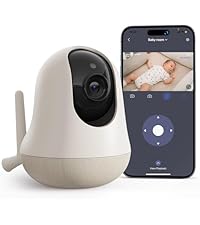


| ASIN | B08L9JYTQC |
| ASIN | B08L9JYTQC |
| Batteries Included? | No |
| Batteries Required? | No |
| Best Sellers Rank | #14,332 in Baby Products ( See Top 100 in Baby Products ) #31 in Smart Baby Monitors |
| Color | white |
| Colour | white |
| Compatible devices | Smartphone |
| Connectivity protocol | Wi-Fi |
| Controller type | Amazon Alexa |
| Customer Reviews | 4.1 4.1 out of 5 stars (16,183) |
| Customer reviews | 4.1 4.1 out of 5 stars (16,183) |
| Date First Available | 19 May 2022 |
| Date First Available | 19 May 2022 |
| Form factor | Dome |
| Frame rate | 15 fps |
| Included components | Nooie 360 Cam, Power Adaptor, Power Cable, Wall Mount Plate, Screws & Anchors, Quick Start Guide, SD Card |
| Indoor/outdoor use | Indoor |
| Item Weight | 259 g |
| Item dimensions L x W x H | 7.8 x 7.8 x 12.4 centimeters |
| Item model number | IPC100 |
| Item model number | IPC100 |
| Manufacturer | nooie life |
| Manufacturer | nooie life |
| Material | Plastic |
| Mounting type | Surface Mount wall mount |
| Night vision range | 32 Feet |
| Number of Items | 1 |
| Number of channels | 2 |
| Part number | IPC100-SD |
| Power source | Corded Electric |
| Product Dimensions | 7.8 x 7.8 x 12.44 cm; 258.55 g |
| Product Dimensions | 7.8 x 7.8 x 12.44 cm; 258.55 g |
| Size | 1 Count (Pack of 1) |
| Special Features | motion sensor, HD resolution, nitht vision, imagn sensor, frame rate, local recording, portable |
| Specific uses | Baby Care, Inside |
| Style | 1 pack (SD card included) |
| Video capture resolution | 1080p |
| Voltage | 5 Volts |
| Wattage | 2 watts |
| Wireless communication technologies | Wi-Fi |
| light-source-type | LED |
| tech_spec_battery_description_toys | Internal, Non-replaceable Lithium-Ion |
B**L
Puedes bajar a ver la TV y las alertas te dirán si se mueven o hacen ruido los niños, y les puedes hablar por ahí. Lo recomiendo mucho
C**E
I have the Nooie 1080P indoor camera and I've been quite happy with it so I had to give this 360-degree model a try. It takes the features of the static camera and adds the ability to pan and tilt the camera either manually or you can enable motion tracking easily through the app. I wrote a review for the static camera and many of the features carry over including its great video quality so if you've read that review, some of this will seem familiar. Setup - Setup was very simple using your phone or tablet, running the free Nooie Cam app. You first need to verify that your phone is connected to the 2.4Ghz access point in your home where you will be using the camera. You then simply start the Nooie Cam app and select the +Camera button. You select the Nooie Cam 360 option and it will walk you through the remaining, simple steps. Basically, you assure the camera is on, enter the password for the wireless access point/router your phone is currently connected to (this is the same one you will be connecting the camera to), click Next, and a QR code appears on the screen of your phone. You now hold the screen of your phone in front of the Nooie camera's lens and it provides an audible tone and LED light indicator when it is finished reading the QR code. The app will now inform you that it is pairing and will begin a countdown. When complete, the app will inform you that pairing has completed. It's that simple. Use - Now that the camera has been added, you simply select it to view the camera. To hear audio from the camera, you select the speaker icon within the app and now you are able to see and hear what's going on around the camera. The camera also has a built-in speaker that allows you to press the microphone button within the app and then speak through it. This is very useful and/or just fun depending on where you locate the camera. For example, I have the camera in my living room where my cat typically spends a good part of her day. If you have cats, I'm guessing yours is similar where she doesn't have one place that she always lays within a room. She instead has multiple locations that she'll randomly select. With this 360 degree camera, either from home, from work, a restaurant, wherever I have WiFi or cellular access I can pan the camera from left to right and up or down. It's range is great where you can literally place the camera in the center of the room and, from the app, turn it from it's left side behind it all the way around front, through to the right side behind it just by swiping across the screen with the camera's image live the whole time. You can pan it around to see the entire room. Beyond this, you have the ability to tilt the camera up and down from the app as well by swiping up and down on the camera's image live. I can scan the room for my cat, locate her, and then touch the microphone to talk to her. Being a cat, she chooses whether she wants to respond or not. Sometimes her ears just perk up and she whines (which you can hear through the camera's built-in microphone), but other times she'll choose to walk over to the camera and give it some love. :) If you choose to use the Motion Tracking feature, if your cat, or anything really, moves in front of the camera's lens, the camera will follow it. As the moving option moves close to the edge of the camera's current visibility, the camera will move to center the moving object within it's vew and continue doing this until the moving object either stops moving or moves behind something where the camera can no longer see it. One thing to note with automatic Motion Tracking is the camera can pan 360 degrees. If something moves and the camera ends up pointing in a different direction than the next moving object. The next moving option must move in front of the lens at some point for the camera to see it and start tracking it. Depending on where you mount the camera and your use, this may be fine or it may not. So, definitely think about this before placing the camera if you plan to enable Motion Tracking. Video and audio can be recorded to either a microSD card or to the cloud. Cloud storage is a paid service. Given my usage, microSD recording is fine for me so I haven't tried the cloud storage option. MicroSD recordings are easily accessed through the app via a scrollable tape across the bottom of the screen. You select the day and then scroll through to the time you would like to view. If at any time you are viewing live video or recorded video from the app and you would like to save the video to your device, you simply press the camera icon on screen to set the start point, continue watching the video as it plays, and press the icon again when you'd like to stop and the video will be saved to your device. It's VERY easy! Like other security cameras, you can also setup notifications based on sound and/or motion. This too is easy to configure by selecting None, Low, Medium, or High for each option and then selecting the timeframe that you would like to receive notifications. Note that you can enable disable notifications by day, but each day only has one start time and one end time that can be selected. Meaning, you cannot setup notifications from 8am-5pm and then again 10pm to midnight for the same day. You could do one or the other, but not both. I don't see this as a problem for me, but it's worth noting depending on your use case. There are a few additional notable settings. First is the ability to enable/disable audio recording. I haven't done much testing with this, but I'd imagine this could save some space on your microSD card, allowing you to possibly record more video if disabled. Second is the ability to enable/disable the small LED light on the camera. If you placed the camera in a visible location in your home, you may want to disable the LED to avoid the distraction of it. Last, there is a Rotate Image option. So, if you need to mount the camera under an overhang, cabinet, etc., you can simple tap this button to flip the image for mounting the camera upside down and now viewing it live or recorded video will display right-side up. Customer Service - I reached out to Nooie's customer service prior to purchasing my previous camera as I had a number of questions. I received quick, thorough responses the same day, shortly after I had sent them. I worked with Julia who was great to work with. Very friendly, personable, and understanding. Julia's customer service was great and made the decision to purchase this camera a complete no-brainer. As I'm sure many of you know, when you have questions or something goes wrong you really find out what a company is made of. I'm happy to say Nooie's support is great! Regarding this camera, I had a few questions for Nooie support prior to purchasing it and received the same great, prompt responses. This proved even moreso that their support is great! It wasn't just a one time fluke with the first camera. Summary - This camera works great and has clear video. The two-way communication capability is an added bonus and could open up its use to more than just a security camera. It's ability to automatically track motion as well as it's ability to turn 360 degrees while automatically tracking motion and/or by manually swiping the screen coupled with it's low price point of under $40 makes this a great buy in my book! I am definitely glad that I added this camera to my home. It will work well keeping track of not only the cat, but I can see when my teenager comes and goes when I'm not home.
H**T
Buena, lo malo es que siempre debe estar conectada a una fuente de energía y se calienta, si tuviera batería recargable le daría 5 estrellas
B**H
We love our Nooie camera, we bought this after much deliberation and couldn't be happier. The main reason we bought it is so grandparents could keep up with our daughters daily activities, the picture quality at daytime and night mode are fantastic, the motion following is just about fast enough to keep up with a toddler, the sound quality in and out are reasonable, but not amazing, we didn't expect it to be fantastic given its size. The app only allows the camera to be shared with 3 users plus the owner which is okay for us, but may not be enough if you want to use this camera for sharing with multiple users. Unfortunately despite having an SD card in that meets their requirements it never appears to record anything to playback later! im still trying so hopefully changing some settings might work, but it isn't quite as simple as plug in and record (at least not for me) Overall a fantastic product and just what we wanted. We might get a second to add to different rooms.
M**I
المشاكل اللي واجهتها : التعليق حيث انها دائما توقف الشاشة مع ان الاتصال بالانترنت عندي جداً عالي وان كان لا يوجد تعليق تاخير من ثانيتن الى 5 ثواني الدقه ليست عاليه والرؤية الليلية ليس عاليه ولا يوجد خيار تشغيل الرؤية الليلية دوماً حيث اوقات تطفا وتشتغل الرؤية الليلة لو فيه اناره خافته مقارنة بمنتجات اخرى نفس السعر ، لاحظة انها ترافع حرارة العدسه بطريقه غريبه جربت وحده ثانيه من شركة imou كانت اكثر عملية منها استخدامي لها كان مراقبة ابني في المهد
Trustpilot
1 week ago
4 days ago