

Desert Online General Trading LLC
Dubai, United Arab Emirates
Desert Online General Trading LLC
Dubai, United Arab Emirates



O**K
Excellent controller.
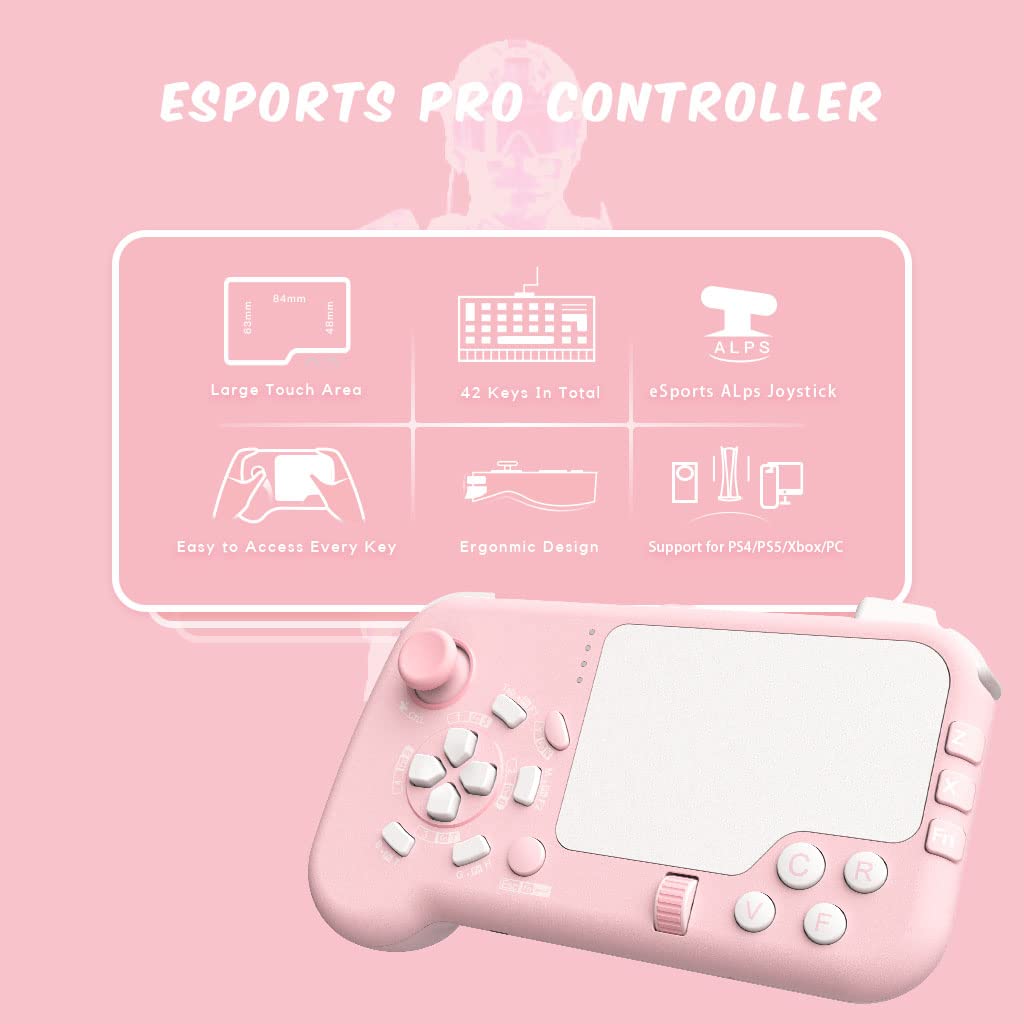
I like it.However, the bottom right-hand corner of the trackpad is blocked by two buttons.The bottom portion of the trackpad is the most used area for swiping. To have it blocked causes swipes to be higher on the trackpad, than normal.There are only three buttons on the back and one of them is not very easy to press.At least four buttons, on the back are needed.There is no gyroscope, although a JoyCon can be used with rewasd key-mapper.I normally use the Asus Rog 6, for games. It has four buttons on top, plus two of my own.It has four more on the back.The button placement needs to be similar to the Asus Rog 6.Three in a row, on each side, on top are needed.The most terrible part of this, "gaming" controller, is that the mouse trackpad clicks down. That makes it very difficult to get consistent swiping when gaming.It shouldn't click down at all, and the reason I returned it.I tried to find a way to lock the trackpad. It was plastic welded on the inside of the controller. I was not able to.A separate trackpad is available on Amazon and fits perfectly on top of this controller. Just disable the two top buttons in the bottom right-hand corner and two or three on the left of the trackpad with rewasd key-mapper. It is a good way to be able to use this with PlayerUnkown Battlegrounds in the first person perspective. The JoyCon gyroscope add-on is necessary for "serious" gaming.https://a.co/d/1SmcYLmI am currently using my Asus Rog 6 with the rewasd mobile application, for computer games, instead of this controller.
J**Z
Comfortable but layouts weird?
It's great for somone who prefers an analog stick for movement. It also looks pretty cool in my opinion. I would recommend getting some finger sleeves if you really want to get the most accuracy out of your aim.some of the but choices are mapped strongly. The triggers especially should be reversed but I haven't found any software that would allow for such a change. Basically means if you ever need to use mouse the right and left click will always be reversed which is pretty dumb. Also scroll wheel isn't in the best spot ergonomic and uusablilty should be looked at.
N**B
A+ Concept, B- Execution
This device fixes one of the biggest criticisms I've always had with typical game controllers; the clumsy, imprecise right analog stick. I've been looking for something like this that replaces the right stick with a trackball or trackpad for some time and unfortunately missed the boat on the Steam Controller, so I was thrilled when I randomly stumbled upon this gamepad.As a concept, it's fantastic. It's basically bridging the gap between a console-style controller and PC-style mouse and keyboard controls. It's got the handheld form factor of a console controller with a generally familiar left joystick and button configuration, but with all the common left-hand keyboard inputs you'd typically use while gaming, all within (relatively) easy reach. There's even a scroll wheel (which can be clicked for Mouse 3), and the touchpad itself can be clicked for Mouse 4. A built-in function key multiplies the amount of functions built into many of the existing keys, and the touchpad itself gives far, far accurate control than a typical thumb stick. All-in-all, it utilizes the space of the device extremely well, and even fits in several innovative extra features (like dual shoulder bumpers, extra triggers for the middle and ring finger) that Nintendo, Sony, and Microsoft could take a few inspirations from.In practical terms, the execution is good, but not quite great. The left hand portion is pretty comfortable in the hand, with the three triggers all falling in comfortable positions and the hand-grip being adequately bulbous to fill out the hand. The buttons feel pretty good under the fingers with the exception of some of the lower keys (like B, G, and Esc) being a bit of a stretch to reach. Depending on the game you're playing, it's a bit of a bummer having to take your hand off the movement keys (ie, joystick) to press the number keys, like if you're switching weapons or abilities; this problem is made worse when you have to press keys 5, 6, 7, or 8, since you then ALSO have to take your RIGHT thumb off the trackpad to hold the Function Key to turn the 1, 2, 3, and 4 buttons into 5, 6, 7, and 8, so you lose control of your two primary inputs when needing to switch to those higher numbers. And if your game's hotbar goes up to 9 or 10, those options sadly don't exist. I wonder if it might've been better to put a full number row above the trackpad, as I really wish there were a way to press the number keys without having to stop moving.The right hand side is dedicated mainly to the touchpad, which is surprisingly responsive -- a definite upgrade from a thumb stick, but perhaps not quite as precise as a typical mouse. The right side however is weirdly lacking a proper trigger button in favor of mapping Right Click and E onto the shoulder bumper, and also doesn't have a matching trigger for the ring finger. It feels like the Function Key should've been put on a trigger for your ring finger on the right hand side, instead of being a face button that you have to press with your thumb. Otherwise, the lack of a proper hand-grip on the right side means you have to kind of awkwardly hold that side of the device as if it were a large smart phone or small tablet, which leaves a lot of open, unsupported space between your fingers and the device. In my case, I found that repeatedly squeezing the shoulder buttons and space-button-rear-trigger on that side of the device caused my ring and pinky fingers to curl a little awkwardly, while having to brace the edge of the device against my palm to hold it in place. After a few hours, I was feeling some discomfort in my right hand, which I feel could've been alleviated by putting a hand grip on that side similar to the one on the left.As for who this gamepad will appeal to: it seems like you have to be in that very narrow spectrum of console gamers who want more precise aiming without sacrificing the hand-held form factor of a typical controller (and play a lot of games that support keyboard and mouse control), or PC gamers who want some of the comforts of a handheld controller without completely sacrificing all the functionality of keyboard and mouse controls. For most typical console or PC gamers, I'd say this ShotPad is more of a fun gimmick -- a novelty -- than anything else, since it bridges the gap between the two without really capturing the best capabilities of either a console-style controller (which gives you a true analog, 360-degree joystick; multi-step analog triggers; rumble; gyro) or keyboard and mouse (far fewer total keys including virtually no function keys or right-hand keys; and trackpad aiming isn't as fast or precise as a mouse).Personally, I really like it. It's not perfect and has definite room for improvement, but it's fun to use and pretty effective for what it is. In the grand scheme of things I'd prefer to stick with my keyboard and mouse for PC gaming, but I'll probably mix the ShotPad in from time to time just for the fun of it, depending on the game. And in the future, if I play any console games that support keyboard and mouse controls, it probably WILL be go-to choice over a regular console controller.
J**R
Didn't know what I was missing!!
Full disclosure...I am not a hardcore gamer. I like old games, traditional joysticks and keyboard/mouse controls. I bought this controller for three reasons: old FPS games, GOG downloads that don't always jive with a joystick, and Fortnite. Did A LOT of homework before I purchased, and loved it before I got it, warts and all. This is exactly what it says, keyboard and mouse in a gamepad. First thing I did was open a Word doc and try everything out. Have already played Fornite, Delta Force, Rogue Squadron 3D, Interstate '76, and Wolfenstein (original). I have spent decades wishing I could play old keyboard/mouse FPS with some sort of joystick/gamepad. This is it, folks!! I LOVE IT!! WASD controls into a highly responsive joystick, and tremendous potential for remapping keyboard keys onto this layout. Ergonomics could always be better (see other reviews), and for that reason; I tried to give it four stars. But, after a couple hours of play, without serious inconvenience, I had to give it five stars. It's not for everyone, but it is for me and other rare gamers like me. If you're old school, take the plunge; I doubt you'll be disappointed. I also think it was well thought out. I thought some of the layout (especially the mouse buttons) was a little archaic, and had plans to re-map for certain games as soon as I got it. Once in hand, the design made total sense; and I left the mouse buttons as-is. In my opinion, neither a gimmick, nor a novelty -- rather a legitimate solution to the inconvenience of keyboard/mouse games we've all just gotten used to dealing with. I'm buying a second, just to make sure I have a back-up if it goes off the market.
Trustpilot
3 weeks ago
2 weeks ago
1 month ago
3 weeks ago