We remain fully operational. Our teams are working around the clock to ensure your deliveries continue safely.

DOWNLOAD THE APP


Customer Services
Copyright © 2025 Desertcart Holdings Limited
DOWNLOAD THE APP
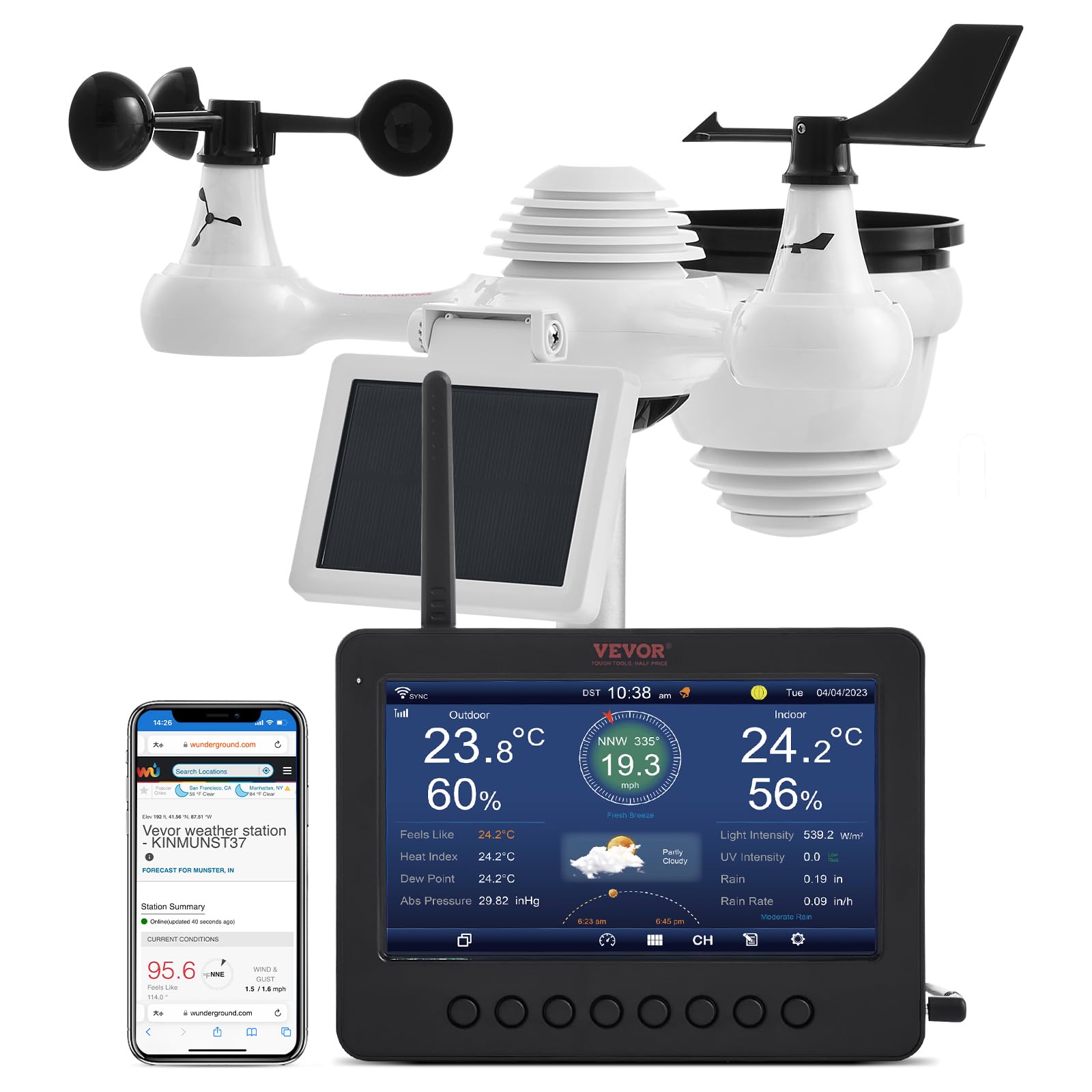
🌦️ Own the weather, wherever you are — smart, sleek, solar-powered precision!
The VEVOR 7-in-1 Wi-Fi Solar Self-Charging Weather Station combines advanced multi-sensor technology with a vibrant 7-inch TFT color display and robust 100-meter wireless transmission. Designed for professionals who demand precise indoor/outdoor monitoring of temperature, humidity, wind, and rainfall, it features seamless Wi-Fi connectivity to Weather Underground and WeatherCloud for real-time data access. Powered sustainably by a solar panel and rechargeable batteries, this IPX6 waterproof station ensures continuous, reliable weather insights with smart alerts and effortless setup.


| ASIN | B0DBHNZTZ7 |
| Are Batteries Included | Yes |
| Batteries | 3 Nonstandard Battery batteries required. (included) |
| Batteries required | Yes |
| Best Sellers Rank | #73,999 in Patio, Lawn & Garden ( See Top 100 in Patio, Lawn & Garden ) #126 in Weather Stations |
| Brand | VEVOR |
| Color | black |
| Connectivity Technology | Wi-Fi |
| Customer Reviews | 3.7 3.7 out of 5 stars (179) |
| Display Type | LCD |
| Finish Type | smooth |
| Finish types | smooth |
| Included Components | Instruction Manual |
| Item Weight | 3 pounds |
| Item model number | YT60233 |
| Manufacturer | VEVOR |
| Material | Aluminum |
| Number of Batteries | 3 Nonstandard Battery batteries required. (included) |
| Package Dimensions | 17.63 x 14.13 x 7.17 inches |
| Power Source | Solar Powered |
| Recommended Uses For Product | Garden |
| Sensor Technology | Anemometer and Vane |
| Shape | Rectangular |
| Special Feature | Weather Resistant |
| Specific Uses For Product | Wind Speed |
| Style | 7.0"TFT WiFi Weather Station |
| Temperature Accuracy | 1 °C |
| UPC | 197988096658 |
| Upper Temperature Rating | 50 Degrees Celsius |
J**C
Works, Excellent bang for buck. I compared to other devices & seems accurate.
All working and connected and uploading to Weather Underground and Weathercloud. Issues Encountered and Solved was Connecting to the Internet (Below is the solution) The wifi is only located in the 7 Inch TFT display (if wifi option selected). The weatherstation transmits RF to the TFT display and will work without the internet. To connect the TFT to the net you must have 1.) a 2.4Gig wireless router and know its password 2.) a separate wireless device that connects to the TFT display. The steps are 1. Enable "connect mode" on wireless on TFT display, the screen displays you are connected (this mode lasts about 5 minutes then goes back to normal display. When configuing the TFT screen must be left in the "connected" screen and must be restarted again until you get the other steps done otherwise it won't connect when the main screen is being displayed) 2. I used a windows laptop and with it's wireless I connected to the TFT display; after connecting 3. Open a web browser on that laptop and enter 192.168.1.1 (this will connect you to the TFT config display- again, you must have TFT in connect mode screen) 4. A TFT config screen will open on your browser; You can now config: With a drop-down find your wireless router and select 5. enter router password 6. put in you weather underground id and pin (must have already gone online and setup free account to get id and pin. 7. put in you weathercloud id and pin (must have already gone online and setup free account to get id and pin. 8. Save this info. This alone will save to the TFT display and enable it to connect to your router, and stay connected and synced to the internet and then automatically upload your data to these websites. 9. I did all this and it didn't work so I repeated all steps above and it finally worked and has continued to work very well. all this info is in the manual, but my android phone just couln't display the config screen on a web browser (don't know why), so I used a laptop and got it to display on that. 5 stars based on price and overall result.
D**Y
Read the instructions!
Fairly easy to install, instructions are all in English and are adequate. Plugged it in and the unit found the weathervane right away. Connecting it up to the internet was easy, but you’ll need to re-read the instructions a few times. Lots of weather information, excellent screen although it doesn’t have a battery backup. Connecting to weather underground and weathercloud was challenging, my advice is to use your computer and cut and paste the passwords. No app, just browser information once you’re logged in.
R**Y
Poor instructions and poor online functionality make this cheap WS cost time and frustration.
This weather station seems to work well as long as all you want to do with it is read weather conditions off of the included information panel. ALL of the online functionality is, and I'm not exaggerating, the absolute biggest tech nightmare I have ever experienced in my 55 years (and I understand that some folks my age are not tech savvy but that's not me... I build own computers, one of my four degrees include web design, and even at 55 I'm still the family tech support). The manufacturer requires you to first input an alarming amount of information about your wifi network just to get the device to connect to the internet (although once we got the bars up to indicate connectivity no software updates or patches were forthcoming). The connectivity to your wifi doesn't seem to do anything except make the red x in the connectivity indicator in the upper left of the screen go away. Then they expect you to sign up for two separate websites... Weather Underground and Weather Cloud. Then you go through a series of steps to generate keys and you discover that this weather station is not one of the approved or recommended systems that works with said websites so you find yourself choosing "other" a lot. The manufacturer doesn't tell you the name of the software used so you're left flying blind with that. And then finally after you do everything right and follow the directions scrupulously both websites will refuse to connect to your weather station and will show either "Disconnected" or "Unlinked" on your profiles under devices. I did some research trying to solve the issue and several reddit users found that they just had to keep deleting and reinserting all the device information on the weather station and the websites until it magically just worked. One of the users literally said "I wish I could tell you what I did or that I did something different to finally make it work but I just kept reinputting the same information and deleting the device when it failed until it finally just worked." As with many cheaper products the customer service is not really a thing that exists. But again, if you just want to know what's going on outside your door it seems OK for that.
P**N
Works great, just don't assume the stickers on the unit are correct.
It arrived earlier than expected and was packaged well. It was very easy to assemble, however it had some stickers on it to mark the wind speed side vs the wind direction side. They were incorrect on the unit I received. I assembled it and mounted it on the pole and the wind speed never worked. I contacted vevor and they responded very quickly. They wanted me to send them a video of the unit in operation, which I did. They responded back it was being sent to technicians and they would get back to me. In the meantime after watching other videos and carefully looking at the drawings in the manual, it became apparent that the stickers had been reversed. After switching the windvane and the speed cups everything started working. So my warning is don;t assume the stickers are correct.
A**R
What no Batteries on the indoor unit. ????
No battery backup provided for the indoor unit. So for any power disruption requires one to go through the entire setup again. Plan 30 minutes to 1 hour. The station was difficult to get setup with weatherunderground. It took about a month for weatherunderground our information to get around to providing access. Would be good if the display would update the time displayed based on web access. Seems that once it is connected to the web one cannot set the time and the time displayed is incorrect.
L**N
Great weather station! Easy to setup and put together. Ability to add to several weather services online. Display is very clear and bright and data is transmitted by 2.4ghz rather than 430MHz as that could cause issues with the 70cm ham band and I wanted to avoid that.
H**N
Works well easy to set up. Wind speed indicator works great.
P**S
I have issues with the rain level it shows a much higher rain level, can i calibrate this, please support on this Thanks in advance Patrick (Netherlands)
M**O
Verry good station. No problems with signal from station to console up to 50m. Working just fine. Just mising batteries in console, and you can not power off the display true the night.
M**O
Veramente un bel prodotto, non pensavo di spendere così poco per avere una bella stazione barometrica di livello. Il fatto che la puoi collegare in cloud e tanta roba fuziona benissimo ed è precisa, le impostazioni non sono difficili, a parte la connessione in cloud che bisogna magiare un po' in informatica, ma non così difficile. Purtroppo arriva con manuale completamente in inglese, che se però andate sul sito ufficiale VEROR trovate il manuale in MULTILINGUE, e si capisce TUTTO. Ottimo prodotto lo consiglio a chi come me è appassionato di meteorologia.
Trustpilot
3 weeks ago
1 month ago