👓 Elevate your reality—see sharper, play harder, live brighter!
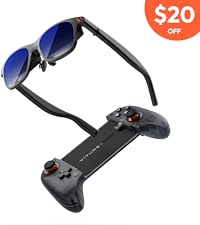
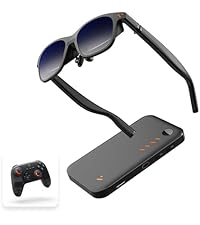
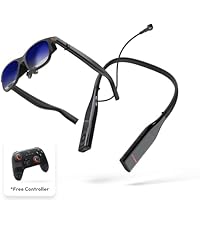
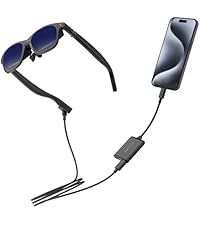
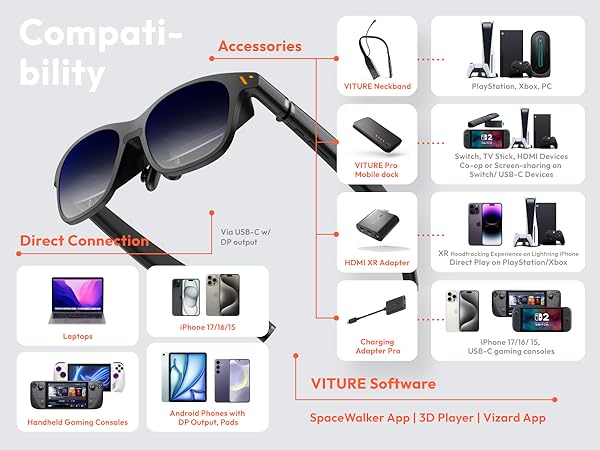
The VITURE Pro XR/AR Glasses deliver a groundbreaking immersive experience with a massive 135-inch 120Hz OLED display boasting over 1000 nits brightness. Designed for professionals and gamers alike, they feature built-in myopia adjustments, advanced electrochromic film to block external light, and premium Harman 3D spatial audio for private, crystal-clear sound. Compatible across iOS, Android, Mac, PC, Steam Deck, and Nintendo Switch 2, these glasses redefine portable XR with next-level clarity, comfort, and privacy.







| ASIN | B0D46WMKB1 |
| Additional Features | 3D Spatial Audio, Multiple Screens, VR Videos |
| Age Range Description | Adult |
| Best Sellers Rank | #153,586 in Electronics ( See Top 100 in Electronics ) #547 in Wearable Tech Glasses |
| Brand | VITURE |
| Color | Jet Black |
| Compatible Devices | iOS, Android, MacOS, Windows,,Nintendo Switch, PlayStation, XBox |
| Connectivity Technology | USB |
| Connector Type | USB Type C |
| Controller Type | App Control |
| Customer Reviews | 3.9 out of 5 stars 86 Reviews |
| Display Resolution Maximum | 1920x1080 |
| Display Type | OLED |
| Field Of View | 46 Degrees |
| Manufacturer | VITURE |
| Model Number | VITURE Pro Jet Black |
| Operating System | iOS, Android, MacOS, Windows,,Nintendo Switch, PlayStation, XBox |
| Platform | Android, Mac, Nintendo Switch, Nintendo Switch 2, PlayStation, Steam Deck, iOS |
| Refresh Rate | 120 |
| Resolution | 1920 × 1080 |
| Screen Size | 135 Inches |
| Sensor Technology | Accelerometer Gyroscope Magnetometer Proximity |
| UPC | 850047431783 |
| Unit Count | 1 Count |
| Warranty Description | 1 Year |
C**A
Premium experience and ahead of the competitors
Initial Impressions - Upon opening up the product it’s immediately apparent that the company cares about the user experience. The box felt premium and opened in a unique way. Weight and fitment - The glasses don’t have any kind of tilt adjustability although they came with 4 nose pads (including the ones on them) and I was able to get a good fit. The nose pads allow you to lower or raise the screen and using the one that fit me best, I am able to see the top and bottom of the screen. As for weight, they are heavier than you would first expect, but are able to carry it very well and I don’t find it to be an issue with long use sessions. Diopter adjustment - In the past I had tried Xreal glasses and had to return them because I would get some kind of motion sickness. I do not have that problem with these glasses. The diopter adjustment is fantastic and I am able to dial them in for my myopia. Adjustment is made through a dial on top of the glasses which can easily be done while wearing them. The dial doesn’t have markings, so you need to close one eye and adjust until it becomes clear and then do the other eye. I much prefer this to getting a prescription insert made because I am able to share/show these with to friends and then readjust them quickly. Screens - WOW. I had read some reviews about the brightness and they weren’t lying. The screens get extremely bright and I use them at about 60% brightness. In addition the oled panels have fantastic colors. There really are stunning. Paired with the electrochromic dimming I have always been able to get great viewing from them. Steam Deck - I mainly bought these to use with my Steam Deck and they are the perfect accessory. They take up a very minimal amount of space and are very easy to throw in my bag. For longer play sessions having the ability to look out rather than down at the Steam Deck has taken a lot of the strain off of my neck. For those of you who use the Decky, there is a plug-in called “XR Gaming” that allows you to pin the image in place. The developer mentioned that Viture provided him with the apk and his software works best with the Viture glasses. He also mentions that xreal did not and the image will drift while using xreal glasses. I think that’s a good sign of a company if they are willing to support and expand the community using them. Overall - If you are into having the new tech products I strongly recommend these. They enhance usability of the other items I own and above all else are just really cool.
M**Y
Nearly perfect
I bought these in hopes that they'd be better than the Xreal that I had previously and was not disappointed. I'm nearsighted, so had to fiddle with prescription inserts for the Xreal. These have the built in myopia correction dials and work much better. It also has a much sharper picture quality, higher refresh rate, and doesn't blur nearly as much around the edges. Perfect for gaming on a plane or in bed. There is still a little blurring in the corners that makes them unsuitable for prolonged PC use as a monitor replacement, but I don't really need them for that. The only thing I'm actually unhappy about is the connector cable, which uses a proprietary magnetic connector. It's angled in such a way as it sometimes comes undone while lying down, and will be difficult to replace when lost or worn out.
R**Y
Updated review - Changed my mind
Well, I originally gave these a 3 star review, and expressed some concerns over receiving an opened box item, and a feature on the Android system not working as expected. I was overall satisfied with the product, and recommended purchase but the company reached out because they wanted to make it right. Well they did that for sure. They went out of they way to ensure I got the product as advertised, and was completely happy with it. I would give the company 100% for their service, and that to me, makes or breaks a company. So even if an issue arises in the future, I am confident that Viture will take it seriously, and work to resolve it. I'm sold as a customer because I feel that my product will be supported for the long term. Now on to the glasses themselves. My first advice is to be patient. When you first put them on, they may nit give you the image you expected. Try different nose pads, sit the glasses a little higher or lower. Take some time to get used to where the image sits, and how to interact with the screens (stationary screens in 3D space, or screens that are fixed to the glasses that you can't "look away" from). Once you have that settled, you will find these are a game changer for many things. Consuming content on the go? Perfect. Hang these off your phone and watch movies on the airplane with better sound and larger screens than even the first class suites have. Catch up on the latest TikToks on the bus ride. And if you are uncomfortable with the immersive VR feeling, you can turn off the photochromatic dimming, and still see around you. Ideal for public transit. My top use for these is research and writing. Quite often I am doing research for articles or essays I need to write for university. I have a small 4:3 ratio laptop. Not ideal for reading, taking notes, and drafting an essay. But put these XR glasses on, set it up to a 3 screen display, and suddenly I have browse the internet and read journal articles on one screen, take notes or copy paste images into another screen, and draft the essay on the third screen. And I can do this on my small studio-apartment sized desk that barely has room for that laptop and a mouse. I can do it on board the ship where I work. I can set this three (technically 4 because the laptop screen still works as well) display workstation anywhere I can setup my computer. That alone is worth the price of the glasses. But then, I pull out the Switch to play some games after my work. The same perfect work tool just became a literal game-changer for gaming. But what am I rambling on for? You can read the product description, you know what these are capable of. Stop humming and hawing about it, and buy them! Just remember to give them time to get used to how they work and feel - it's a little different than physical screens, and it takes some time to get yoru head comfortable with the idea of floating screens :)
P**T
VITURE Pro XR/AR Glasses Review: A Glimpse into the Future with Room for Improvement
**VITURE Pro XR/AR Glasses Review: A Glimpse into the Future with Room for Improvement** I was genuinely excited to try the VITURE Pro XR/AR Glasses, hoping they would be the lightweight, portable AR display perfect for my daily commute and plane travels. After spending hours comparing different options like the Meta Quest 3 and XREAL, I settled on the VITURE glasses, anticipating a cutting-edge experience that blends convenience with advanced technology. **What I Liked:** 1. **Bright and Fairly Clear Display:** The screen is impressively bright, providing a vivid viewing experience. It's particularly engaging when used for gaming, offering an immersive feel that's quite enjoyable. 2. **Myopia Adjustment Works Well:** The built-in myopia settings are a thoughtful addition. They worked quite well for me, allowing for a customized focus without the need for prescription inserts. 3. **3 Degrees of Freedom (3DoF):** The inclusion of 3DoF adds an extra layer of immersion. It's almost akin to a VR experience like the Meta Quest 3, which is a significant plus for gaming enthusiasts. **Areas for Improvement:** 1. **Difficulty Reading Fine Text:** Despite the bright display, I found it incredibly hard to read fine text on apps like Reddit or WhatsApp. This seems less about screen resolution and more about optical aberrations, which hinder clarity. 2. **Inconsistent Clarity Across Field of View:** Even after extensive adjustments to the myopia settings, I couldn't achieve full clarity across the entire field of view. This inconsistency made it challenging to use the glasses for extended periods. 3. **Software Challenges with Spacewalker App:** The Spacewalker app didn't meet my expectations. On Android, I struggled to perform meaningful tasks, and the macOS version was riddled with bugs that hindered usability. The user experience needs significant refinement. 4. **Limited Field of View for Productivity:** Compared to my 15-inch MacBook Air M2, the glasses offer a smaller field of view. While the screen can be adjusted, doing so requires excessive head movement, leading to neck strain. Reading small text was less pleasant due to this limitation. 5. **Eye Strain After Prolonged Use:** After 1-2 hours of use, I started to feel eye strain. While it's less severe than with some VR devices like the Meta Quest 3, it's still a concern for long-term use. 6. **Unreliable Audio Functionality:** I encountered issues getting the audio to work consistently. It occasionally worked on Android but was unreliable on macOS. While I typically use noise-canceling headphones, seamless audio integration would enhance the overall experience. 7. **Streaming Difficulties:** Accessing services like Netflix and Prime Video proved challenging on both Android and macOS. This hindered the device's potential as a portable entertainment hub. **Final Thoughts:** I don't want to dismiss the VITURE Pro XR/AR Glasses entirely. For gamers, especially those using devices like the Steam Deck or Nintendo Switch, this could be a fun and immersive accessory. If the streaming issues can be resolved, it also holds promise as an entertainment device for media consumption on the go. However, for productivity purposes—like working during a commute—the glasses fall short. They don't effectively replace traditional monitors, especially when it comes to reading fine text without discomfort. I hope future iterations will address these shortcomings, perhaps with a larger field of view and higher-resolution displays. Reducing the need for excessive head movement and enhancing text clarity would make a significant difference. The VITURE Pro XR/AR Glasses offer a tantalizing glimpse into what's possible, and with some improvements, they could become a staple for both entertainment and productivity.
L**E
Five stars mobile gaming movies
I don't write many reviews but I had to this time. For on the go movies or games these things are fantastic. 120 htz oled No screen door Crisp The dont look bad Sound is amazing I hook them up to deck Lego or phone and they just work. Perfect for movies and on the go gaming. Cons. Took me several hours to get the fit just right. Reflection from bottom can be annoying if wearing light colored clothes. They are not good for reading slight bluring of text for me on the far sides. More so on the right lense. The screen in your eyes is so big you have to move your eyes to see bottom left or bottom right. It's like sitting a little to close to you monitor. Not really a con for games just wanted to point it out. I was on the fence for a long time to buy. I have been so disappointed in past with vr headset. Screen door motion sickness weight and how clumsy some are. I also wanted to go out in public and not be laughed at. Viture pro are perfect for me and I'm glad I decided to take a chance one more time. If you are a deck addict there is nothing more perfect than than a pair of viture pro XR.
K**E
These are not good.
This product has a really bad screen inside, the hue is shifted green, the speakers are so quiet on max volume and i can't hear anything. They're disorienting to use. These things should track the screen natively. not require an app do it. I don't see how its that difficult to do with no extra fluff. No matter what their marketing says, the edges are blurry. I bought these because I couldn't find much negative stuff about them online, but my experience only lasted about 15 minutes of using them before a return was required. These aren't good, they have too many issues. The only thing good about them was the myopia adjustment. but really it just feels like you are looking at a 27 inch computer monitor in your glasses, its not 135" no idea where they got that number from. Cool box and case though, I feel like that's where most of the 500 dollars went.
M**F
Amazing for having a large screen experience on anything, just figure out the correct nose piece
These are great for what they are. Putting a large screen in front of your face without much setup involved. My iphone, steamdeck, rog ally and laptop have all been plug in and it launches instantly as a screen. Once you figure out the best nose piece (this is probably the main thing to figure out) the picture clarity, screen size work extremely well. The active button to block the background passthrough works very well. I personally prefer using them in a darker environment as you can still see out the sides like you would normal sunglasses. They obviously are bigger than normal glasses and slightly heavier, but not enough that it became uncomfortable. For handheld gaming, these are amazing.
M**A
AMAZING Customer Service, Good Quality Product
So initially with the software, I had some issues and VITURE actually reached out To me individually to help resolve my issues because I mentioned the issues I was having in my initial review. Upon further adjustment with the software and the device I was able to get the screen Quality to look much better, and even though the software was still a bit tricky at first the glasses actually work pretty damn well for my Lenovo Legion GO now that the resolution is looking better. I do wish the screen was bigger and the software could use improvements, and so could the ease of use - a cheaper type - C to HDMI adapter would be nice. All in all love the customer support I received.
Trustpilot
1 week ago
2 months ago