We remain fully operational. Our teams are working around the clock to ensure your deliveries continue safely.

DOWNLOAD THE APP


Customer Services
Copyright © 2025 Desertcart Holdings Limited
DOWNLOAD THE APP

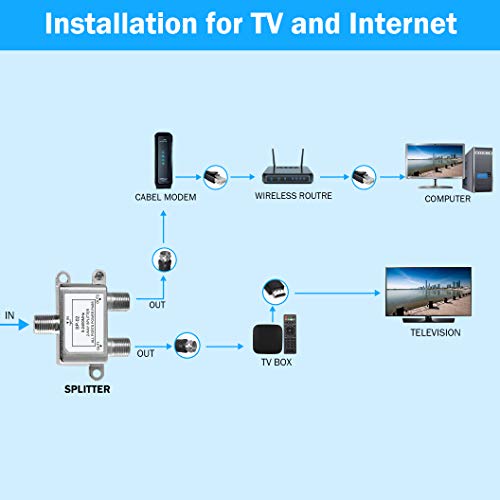

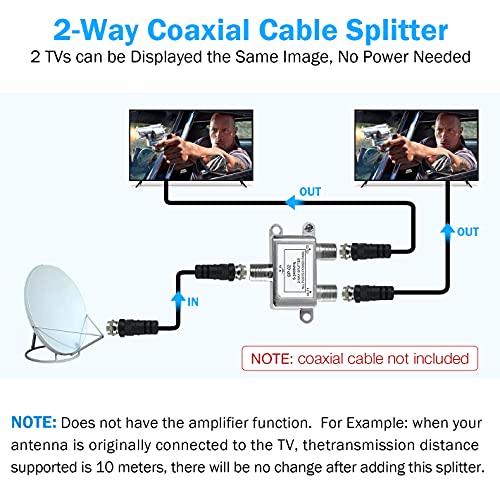
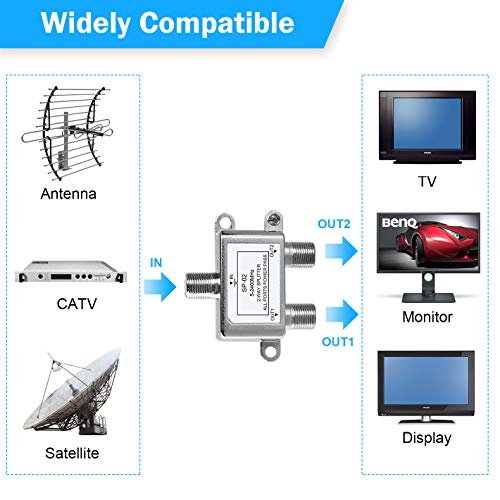
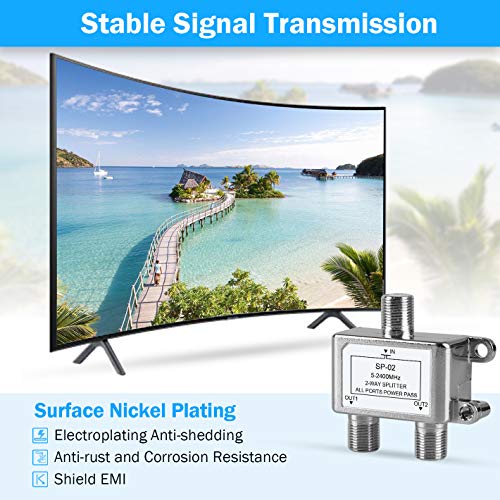


🔗 Connect More, Compromise Less – The Ultimate Coax Splitter for Your Digital Life
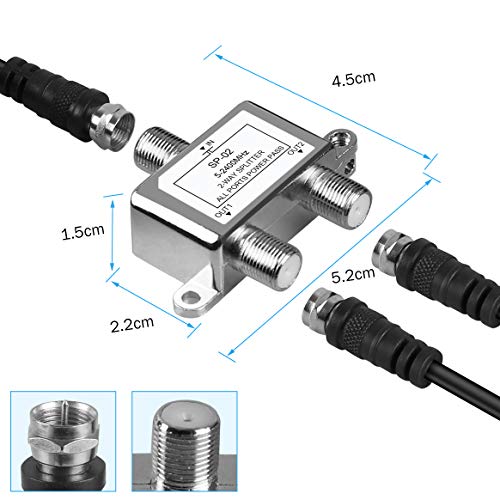
The NEWCARE Digital 2-Way Coaxial Cable Splitter delivers reliable signal distribution across a broad 5-2400MHz frequency range, compatible with RG6 cables and designed for satellite TV, CATV, and antenna systems. Compact and easy to install, this USA-made splitter ensures seamless multi-device connectivity without the need for external power, backed by strong user satisfaction.


| ASIN | B08QVF65D8 |
| Batteries Included | No |
| Batteries Required | No |
| Best Sellers Rank | #181,232 in Electronics ( See Top 100 in Electronics ) #149 in Splitters |
| Brand | NEWCARE |
| Compatible Devices | Television |
| Country of Origin | USA |
| Customer Reviews | 4.4 4.4 out of 5 stars (1,315) |
| Data Transfer Rate | 2.4 GHz |
| Date First Available | 7 August 2023 |
| Item Dimensions LxWxH | 5.2 x 4.5 x 1.5 Centimeters |
| Item Weight | 32 g |
| Item model number | 1x2 |
| Manufacturer | NEWCARE |
| Model | 1x2 |
| Number of items | 1 |
| Product Dimensions | 5.2 x 4.5 x 1.5 cm; 32 g |
| Type of cable or wire | Coaxial |
A**R
Not working properly for me
Guys can somebody help me. When I am connecting both the ports, the first port is saying no signal and second port is saying contact your service provider. But if I am connecting any one port at a time then it is working. Can anybody help me? Should I call for replacing the device?
A**R
works perfectly
S**R
Excellent. Did the trick.
P**.
It's a basic KVM switch. It has been plugged in for 4 hours now so too soon to tell how reliable it is, but so far the little it does do it does very well. If I could give 4.5 I would, but err on the side of 5. Read on... The Pros: - Fast switching: The switch keeps the HDMI ports open on the inactive PC, so it thinks there is a monitor connected. When you switch PCs, the switch is very quick. You don't have to wait for the graphics card to negotiate terms with the monitor, because this is retained between sessions. Sounds trivial, but most switches will not do this, and it can take 30s or more to stabilise the display after switching. This switch scores 10/10 for this. Since I switch between my personal and work laptops many times during the day, it really adds up. - Low profile: Having the ports all in a single row means they can fit it is a slimmer box. It fits really easily in the cable holder under my desk. - Power plug at the back: This sounds stupid but it irritates me. I like only have cables on the front of a device that need to be there. I don't know where this trend of putting power sockets on the front came from but this design gets a bonus point for that. - Many ways to switch. They really threw the door open on this one, with keyboard shortcuts, a button on the device and an IR remote. - General solidness of construction and operation: Its in a solid metal box, with a nice grain-textured finished. You turn it on and it works. When you switch, the action is solid and stable. The keyboard integration works well, but is a bit irritating (see Cons below). Everything it says it does, it does well. If/when it dies, I'll come back and edit this. If you're reading this, it is still running. Cons - Keyboard shortcut blocks Ctrl+Shift+Anything: This is very annoying. Many of the tools I use for work (and sometimes at home) use Ctrl+Shift shortcuts, and these are no longer available to me. Disabling shortcuts with Ctrl+Shift+K disables the shortcuts, but doesn't enable Ctrl+Shift. The workaround to this is to plug the keyboard into a non-keyboard USB port, and this effectively disables the shortcuts and I can still use the keyboard. This is where it would have lost half a star. - No power brick or HDMI cables. At this price point, I think you need to manage your expectations. Regardless of the cons above, I am very happy with this switch. It works very well, and if I'd paid double for it I would probably be writing the same review (but maybe dropped it to a 4).
R**Y
Works well, easy set up and i like the extended switch pad, makes switching between computer/screen set up so easy, very pleased
B**C
Ich nutze den Splitter, um das Signal meiner Spielekonsole gleichzeitig auf zwei Fernseher und einen Monitor zu übertragen. Einrichtung war total unkompliziert: HDMI-Kabel rein, USB-Strom anschließen – fertig. Das Bild kommt ohne Verzögerung an, alles synchron, keine Aussetzer oder Qualitätsverluste. Die Verarbeitung ist zwar eher leicht, aber wirkt stabil genug für den täglichen Gebrauch. Praktisch auch, dass das Gerät klein ist und hinter dem Fernseher kaum auffällt. Wichtig zu wissen: Es spiegelt das Signal nur – man kann also auf den angeschlossenen Bildschirmen nicht verschiedene Inhalte anzeigen. Für meinen Anwendungsfall aber genau richtig. Kleiner Hinweis: Es liegt nur das USB-Stromkabel bei, kein Netzteil – sollte man vorher wissen. Ansonsten klare Kaufempfehlung.
Trustpilot
1 month ago
3 weeks ago