


🖥️ Meshroom D: Where compact meets cool — build smarter, breathe better.
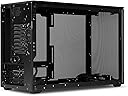
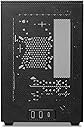
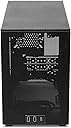
The SSUPD Meshroom D Mini-ITX case is a premium small form factor chassis featuring full mesh side panels for superior airflow within a compact 14.93-liter volume. Crafted from high-quality powder-coated SGCC steel, it offers tool-free external panel access and versatile mounting options for fans and power supplies, including support for medium ATX PSUs and inverted builds. Ideal for professionals seeking a sleek, efficient, and flexible ITX build.



| ASIN | B0C8DDR9JS |
| Best Sellers Rank | 227,641 in Computers & Accessories ( See Top 100 in Computers & Accessories ) 2,498 in Computer Cases |
| Guaranteed software updates until | unknown |
| Item model number | Meshroom D BK |
| Manufacturer | SSUPD |
| Product Dimensions | 24.64 x 16.76 x 36.32 cm; 3.23 kg |
J**R
Cool Case
Best little case ever, super efficient for air cooling, fun to build in and a lot of flexibility. A handy tip I would pass on is the internal power cable socket intrudes on the motherboard components. To get round the issue just take out the 2 screws holding it to the case and rotate the fitting 180deg and put the screws back in.
M**P
Surprisingly high quality and very easy to build in. You've got a lot of options for mounting fans and hardware almost anywhere you like, plus it can also fit a medium sized ATX PSU (would definitely recommend an SFX supply though). I managed to cram 3x 120mm fans and an 80mm fan in it with no issues. Additionally, the feet of the case can be moved to the top if you'd like to do an inverted build. In fact, they have extra holes for the power socket and for the power button so you can mount those inverted as well. Really the only thing I disliked is that the panels are a little fragile and can warp a little bit, and also the clips that the panels lock into are rather difficult to remove and relocate - but it's not bad enough to dock a star. Overall, if you're looking for a solid ITX case with lots of airflow, this is a solid option.
R**I
This is a great case. I managed a full size 2070 super, 280mm AIO and a standard ATX powersupply. Temps are great with plenty of airflow in this case (obviously) but it was definitely cramped. The clearance for the GPU power cables was a bit hairy, but it is absolutely doable. My main gripes with the case are the flimsy bottom mesh (should've been the same construction as the other panels), the wonky IO shield area, and the un-grommeted piping holes on the back. Aside from a little panel warping (to be expected) this is an excellent case for a smaller but still competent gaming rig.
J**R
I've just finished setting up my gaming rig with these incredible RGB fans and my powerhouse 3080 GPU, and honestly, I'm buzzing with excitement to dive into some Forza Horizon sessions! The vibrant colors and the sleek design of the setup have totally transformed my gaming vibe. What's even more amazing is how this build, despite packing such a punch, is housed in a case so compact that it slides perfectly into my TV cabinet. It's like having a secret gaming beast hidden right in my living room, ready to unleash its power at a moment's notice. Can't wait to rev up the engines in-game and see this setup in action!
R**S
For those who want smaller without (too much) compromise, this case is a neat alternative to slightly larger and more affordable cases. Pros: - You can disassemble nearly the entire chassis to get to where you need - The materials are pretty sturdy, save for the dust filter on the bottom - Several orientations for power buttons, passthrough power cables, PSU, and drives (you can also do an inverted layout! - Dual radiator support (280mm radiator in this form factor is nice) - mATX support with a $60 bracket (??? pricing) - Triple slot GPU support; 325mm length Cons: - The case is very narrow; using 2.5” and 3.5” drives are not advised with AIOs, and cable routing is fairly tough in that space - I ended up getting the wrong manual? I got the Meshroom S manual, but luckily the Meshroom D manual is available online. - Some I/O shields will not fit properly in the cutout. Mine was too small, so I could not use it. - The 120mm fan bracket solution is awkward; There are only two brackets for 120mm fans are included instead of the four possible places the brackets could go I had a great time building in it nonetheless; it was a challenge fitting a side AIO into this thing, along with my stock PSU cables. My advice: - Go air in this case, or at least use an AIO that does not have an in-line pump. - If using an AIO, mount it LAST, ensuring all the cables in the chassis have been routed to your liking. - If you care about I/O shields, use a motherboard that has one built in. - Get some custom length cables, and cut down on the amount of splitters and wiring as much as possible.
M**R
One word if you're new/experienced in ITX building....RESEARCH! I moved my iRacing PC from a Fractal Ridge case to this case because I need MAX SINGLE CORE performance from my 13600KF (that's how iRacing works, even at triple 1440p the GPU is only 50%-60% utilized), so I needed a case that focuses on cooling. Now the CPU stays happy at 5.4Ghz - 5.6Ghz (set to "Asus Enabled" on the mobo) at 1.21v @ 61 Celsius. iRacing now stays stable during the start of races, and fights. I prefer air cooling, as it allows better cable management (you can see in the pics), and air cooling technology has caught up or even exceeded AIO cooling nowadays. Other things to note: (If you have experiences with NR200 builds. Similar limitations when using a CPU tower cooler and a "fat" GPU.) -Silver Soul 135 (for 135mm height) CPU cooler. -Needed to use 180-degree PCIe connectors for my "FAT" 3080Ti. -A bottom-mounted slim 120mm fan to prevent GPU sagging to make this build work. (By default the case is setup for a 140mm fan, there's included brackets to make it 120mm.)
Trustpilot
1 week ago
5 days ago