Some deliveries may take a little longer than usual due to regional shipping conditions.

DOWNLOAD THE APP


Customer Services
Copyright © 2025 Desertcart Holdings Limited
DOWNLOAD THE APP

🚀 Elevate your workspace with the ultimate 49" curved powerhouse — see more, do more, be more!
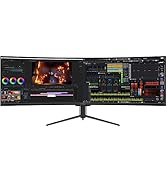
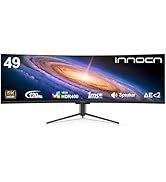
The INNOCN 49C1G is a 49-inch ultrawide curved gaming and productivity monitor featuring a 32:9 VA panel with 3840x1080 resolution and a fast 144Hz refresh rate. It boasts 99% sRGB color accuracy, HDR400 support, and an 1800R curvature designed to reduce eye fatigue. Connectivity is robust with USB-C (65W power delivery), DisplayPort 1.4, HDMI 2.1, and multiple USB ports, enabling seamless multitasking with PIP/PBP split-screen technology. Adjustable ergonomics and built-in speakers complete this cost-effective, high-performance display ideal for professionals and gamers seeking immersive visuals and enhanced productivity.








| ASIN | B0BY199WV7 |
| Aspect Ratio | 32:9 |
| Best Sellers Rank | #3,123 in Electronics ( See Top 100 in Electronics ) #132 in Computer Monitors |
| Customer Reviews | 4.2 4.2 out of 5 stars (499) |
| Date First Available | March 10, 2023 |
| Image brightness | 400 Candela |
| Item Weight | 35 pounds |
| Item model number | H3CQC-P |
| Manufacturer | Guangxi Century Innovation Display Electronics Co.,Ltd |
| Product Dimensions | 6.28 x 45.5 x 14.57 inches |
| Resolution | 3840 x 1080 |
| Standing screen display size | 49 Inches |
| Total Usb Ports | 3 |
P**A
Excellent product if you get the vision - 49" C1R 5120 x 1440P
The vision: Couldn't find any reviews on this model (it's very new) so decided to write one. Was considering LG or Samsung, but decided to take a chance on this one based on reviews of other INNOCN models. Their vision seems to be to focus on what matters, and cut costs where possible. The result is a 49" costing $300 less than other brands with comparable panel and specs. I'm ok with this proposition. What's lacking: No remote, no glossy back panel, no fancy LED lights in the back, and not great sounding integrated spekers (but at least you have speakers) = $300 discount. Do you need all that stuff anyway? I don't. Remote would be nice but I'll manage. What matters: The screen, oh the screen... It blew me away. I was concerned about VA panel and not ISP, but it looks incredible and I love it. The 1800R curve works perfectly for me, although I suspect I might like 1500R a bit better. The brightness is great, the colors look beautiful, the HDR in standard mode is perfect. Resolution is great around 109 PPI, and I don't see colors fade at the edges. I divide into 3 screens and it's efficient. Looks like a very high quality panel. I'm glad someone decided a 49" ultra-wide was a good idea, because it seriously is. I used two 27 in monitors for a long time, and although it's the equivalent screen area there's no comparison in how much more efficient this setup is. My hope is that the monitor is durable, and continues to work for a long time. Issues: Only issue was it wasn't waking up when my Mac Mini woke up from sleep. I had to turn on manually each time. It's a setting in the monitor. Turn off the "Auto Power" feature in "other Settings" and this fixes the problem. The monitor goes into standby instead of powering off completely when it detects no signal from the computer. I use USB-C cable. Last note to someone in Amazon: Reviews should be for the specific product, they should not be mixed for different models. Someone fix this. 6 MONTH UPDATE: 3/29/24: The monitor continues to work flawlessly. No glitches, no issues, turns on every time. When the time comes to buy another in the future, will definitely get 1500R if not 1000R. Also, higher PPI than 109 if available. Still very happy with the purchase.
F**T
Amazing upgrade for work and personal computing
UPDATE 12-30-2025: 1 year of use and it is still going strong, no issues. Great monitor for work! Original review: I looked on at the curved monitor craze with amusement for a few years before finally deciding to try it. At home I had been using one large 27” 4k monitor that I would toggle between my work Windows laptop and personal Mac laptop. Then I ended up adding another 24” Dell 1080 monitor to get more work real estate. Figured that would do for now but the mismatch and seam was a bit annoying. Found this INNOCN 49” curved monitor as a Black Friday deal and went for it. Easy setup, works perfectly for me. Not a gamer, so I’m not sure how well it would do there. But it works great via USB-C from my work Dell Latitude 5500 w/ the Thunderbolt support. And I have it going usb-c from the Mac to DisplayPort, which gives the faster 120mhz support. Easy to switch between inputs using the menu buttons. The stand legs are thin and unobtrusive. It doesn’t emit much heat at all. So far no odd behavior after about a month of daily use. Only mild annoyance is that after a time it seems to go to sleep and then it disconnects from the work laptop which causes all the windows to move back to the laptop screen when I log back in. I’m not sure if that is the monitor’s fault or a Dell thing. Regardless I highly recommend this as a solid basic and inexpensive 49” QHD curved monitor for productivity use. Just make sure your computer can support it, and remember it only has one USB-C input. But using DisplayPort is also available and would give you the better refresh rate, without the benefit of a wired USB keyboard/mouse connected straight to monitor.
N**S
The Oled monitor of my dreams!
An incredible Monitor with a beautiful screen clarity, oled making the color just pop out and stand out better than any other monitor I’ve ever had. Truly an awesome addition to anyone pc build! You get what you pay for here, big price, but a top tier screen!
R**R
Caused Eye Strain, Dizziness, and Nausea Physically Uncomfortable to Use!
Unfortunately, this monitor made me physically sick to use. Within a short amount of time, I experienced eye strain, dizziness, and nausea. I’ve used many monitors over the years and have never had this reaction before. I tried adjusting brightness, contrast, resolution, and refresh rate, but nothing improved the issue. There appears to be something about the display itself (possibly flicker or panel behavior) that caused significant discomfort. Because the box was discarded before I realized how severe the problem was, I wasn’t able to return it. That made this experience even more frustrating. A monitor should never cause physical symptoms, and for that reason, I cannot recommend this product—especially for anyone sensitive to eye strain or motion issues.
Trustpilot
1 week ago
3 weeks ago