


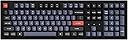
⌨️ Elevate your desk game with the K10 Pro — where pro productivity meets customizable style!
The Keychron K10 Pro is a full-size, wireless mechanical keyboard featuring 108 hot-swappable tactile brown switches, QMK/VIA programmability, and dual Bluetooth/USB-C connectivity. Designed for Mac, Windows, and Linux users, it boasts up to 100 hours of battery life, premium sound-dampening for a quiet yet responsive typing experience, and customizable RGB backlighting with durable double-shot PBT keycaps. Ideal for professionals and gamers seeking a versatile, high-performance keyboard that adapts to any workflow.


| ASIN | B0C2KGTD15 |
| Additional Features | Backlit, Ergonomic, Rechargeable |
| Antenna Location | Everyday Use |
| Best Sellers Rank | #1,576 in Computer Keyboards |
| Brand | Keychron |
| Button Quantity | 108 |
| Color | Brown Switch |
| Compatible Devices | Laptop, Tablet |
| Connectivity Technology | Bluetooth, USB |
| Customer Reviews | 4.4 out of 5 stars 224 Reviews |
| Enclosure Material | Polybutylene Terephthalate |
| Hand Orientation | Ambidextrous |
| Keyboard Backlighting Color Support | RGB |
| Keyboard Description | Full-Size Wireless Mechanical |
| Keyboard Layout | QWERTY |
| Manufacturer | Keychron |
| Mechanical Keyboard Switch Model | Keychron K Pro |
| Model Name | HS-K10P-H3 |
| Model Number | HS-K10P-H3 |
| Number of Batteries Required | 1 |
| Number of Keys | 108 |
| Number of Sections | 6 |
| Power Source | Battery Powered |
| Recommended Uses For Product | Everyday Use |
| Special Feature | Backlit, Ergonomic, Rechargeable |
| Style Name | Modern |
| Switch Type | Tactile |
| Unit Count | 1.0 Count |
P**O
Thock Thock Thock - Very enjoyable typing and gaming experience
I believe myself to be an edge case and this keyboard checked all my boxes. Wanted a silk smooth lower registered thocky sounding keyboard that was FULL sized and had the bare minimums of a macro function. In my professional life I draft alot of communications from email to chats to powerpoints etc. Simply I type... alot! The K10 is buttery smooth and silky.. the sounds it makes is very ASMR and makes me want to work more just to hear the series of sounds it makes as I type! WIN! I use excel quite extensively so much so its just faster to create on keyboard macros vs using excel's macro function. Smacking 1 key to select visible cells, or blanks only vs the 5-6 steps via hot key is a HUGE time saver! PLUS its a full sized keyboard so I have the Center area where insert home etc are and dont have to deal with "FN" key + button to trigger other standard keys. Yes.. I'm a numpad user... I easily beat all users loggin into their accounts when needing to enter in the 2 factor authenticator codes. From a gaming perspective it feels much better than my older generation keyboards ( I had Logitech G series keyboards and tried but returned red dragons). The Keyboard is SOLID.. nice weight .. has wireless bluetooth options which I dont use.. Snappy latency (but I'm usb c hardwired - so I dont know the feel if its via bluetooth). Has exactly the macro features I want need and can grow into utilizing VIA. My only complaints ...which is a small one... is that the LED's dont shine through the stock keycaps So when gaming in the dark... if you dont have full muscle memory of the keyboard and need to see what key you're on.. you may have trouble in the dark. Other than that .. would be nice if there was a Volume wheel or knob - that would literally for me make the perfect keyboard. I'm sure if I search someone out there is selling replacement keycaps that is translucent on the letters so it shines through but not ready to make that commitment yet as I dont need to look at the keyboard to type =) So a keyboard in the budget section of pro/gaming mechanical keyboards, that can expand and grow, and performs exceptionally with everything I've thrown at it and then some - look no further. This is the no fuss no muss so much so I bought a 2nd one so both the office and home I have the same enjoyable experience working and playing. Couldnt have asked for more in a keyboard at this price point!
N**K
Great beginner keyboard
I bought the Keychron K10 Pro after a very quick month-long progression thru nicer (what I now know are) membrane keyboards, to a big-brand mechanical keyboard, and finally to this entry-level hobby/enthusiast keyboard. This offers everything I needed. Full size (need 10-key, I’m an accountant), wired/wireless (although I REALY wish it had 2.4ghz), hot swap, per key RBG, south facing RBG and a host of other enticing features. This is my first brown switch and I’m not sure how I feel about it. I assume they are pretty standard for basic browns. I’m not sure who makes them but the switches have an embossed Keychron name on them so they are not Gateron (unless private label). Switches are bone dry, not pre lubed - but they feel ok for what they are I guess. Screw in stabilizers are lubed with I’m assuming dialectic grease or similar. The double shot key caps are fine although I’m not sure I love the OEM profile. I will probably swap them for something else. The RBG lighting is pretty great, it’s just a shame you can’t really see it with the stock key caps (not shine-thru). I do like it tho because I can have it on at my desk at work without looking like a 14 yo gamer bro. Things I’m less thrilled about. Thin plastic case (although the entire unit is very solid and hefty). The slide switches for the power, mode selection (feel cheap). Again, no 2.4ghz which would have made this thing legendary. Overall great experience with the board so far. Check out my media pics/vid! PS. I did the masking tape PCB mod and taped the (very hollow sounding/feeling) space bar. I was going to do kill/dyna mat but the silicone insert takes up pretty much the whole case. I was skeptical but the tape mod did improve the sound noticeably. Cheers!
D**C
Best mechanical keyboard hands down
I use for development, gaming, work and documents. This keyboard is absolutely perfect as it can be used as a wired device, and up to 3 blue tooth devices. I'm wired into my primary Linux machine, I use the blue tooth to connect to my windows laptop, my iMac and my Android phone. (4 devices 1 keyboard) Switching between blue tooth devices has been a perfectly acceptable experience for me the speed to change is reasonable. There is a physical switch to turn off blue tooth and switch to wired. I've had no issues with battery life. It is also possible to charge the keyboard while using at the same time. The RGB is really well done and controlled from the keyboard. That is not a deal breaker for me as I am not trying to use software to Steve my keyboard to other RGB lights in my computer. There are several animations available and each one has several color combinations as well as the ability to adjust brightness. They keys stay lit up for 10 minutes before turning off. That is perfect, as other keyboards turn off the backlighting after 30 seconds (good luck with that if you like to have a dim room). The mechanical keys are amazing. Perfect amount of travel and the right click and pressure. I have the low profile keys wich is a preference for me. The travel is slightly less which is something I like. There are plenty of options to have different tactile, pressure, travel and click. If the low profile keys are something you are considering, it is just slightly less travel (I believe 3mm compared to 4mm). I have the red keys, and I love them. The right amount of sound for me as I also use my keyboard for work and on conference calls. The downsides (which are not downsides for me) might be that it does not have adjustable get to change the angle of the keyboard as it sits on your desk. You do not control the rgb from an app. If you get low profile keys the key caps are slightly shorter so there is some light spill from the RGB lights. Lastly there are no dedicated media controls. Yes, it does have the function keys to adjust system volume. With respect to the downsides I listed above, none of those are a negative for me. I listed then because there may be some users that one of them could be a deal breaker. However after you factor in the cost, you can get a better keyboard. The upsides to this keyboard are everything. Mechanical keyboard in about any layout you could want. Choice of mechanical keys, RGB, the aluminum case is awesome. I also have friends who have keycron keyboard in different models and using blue switches. They all love their keyboard too.
C**E
Solid and delightful keyboard, with a few quibbles
I got this to replace my beloved Logitech K810, as it was closest I could find to a low profile, compact, wireless keyboard that could hold up to serious typing, gaming, and multi-platform use. Overall, although not perfect, I am very satisfied with this kb. I'm not necessarily an aficionado of mechanical keys, so that wasn't my main interest here. Mostly I wanted something that was accurate to type on and was compact without feeling crowded. Almost all other kb's out there fall into two categories: oversized slabs with unnecessary (for me) 10-key, or compact with mushy keys. I tried many other brands and styles before settling on this one. THE GOOD: very well built; this is a supremely solid and stable kb. There is no flex, nothing is mushy, it's the perfect weight, so won't be sliding around, nor does it weigh you down if traveling with it. The metal frame feels like it can withstand a lifetime of use and/or abuse. The mechanical keys themselves are very reliable and satisfying. As far as noise, they're certainly more noticeable than membrane keys, so you might catch the attention of your co-workers, but they are mild enough that it's not annoying. Overall, this kb "feels" great. I have multiple machines that I switch between (Mac/PC), and even a dual boot one, so the fact that this kb supports both platforms is a huge plus. There's a switch on the back to change the layout from Win to Mac, and it even comes with dedicated keys you can pop on for them. It's also designed to work wired or wirelesses. Using this kb across multiple machines, wired and Bluetooth, has been seamless. The lights are a joy. I don't really need a color changing lighted kb, but as it turns out, it's extremely nice to have. I initially got it because the K810 had backlit keys, and this was closest thing to that. I could've settled for the slightly cheaper white-light-only model, but decided to go for color, and am glad I did. From a functional standpoint, having backlighting is very useful in dark or dim situations, so I would recommend it for that alone. Having the bonus of all the color options, though, is pure fun. There are so many color modes and animations to choose from, it was an unexpected delight. The feature is probably more of a novelty, but being able to change your kb to suit your mood is just plain fun, even if isn't solely necessary. THE NOT-SO GOOD: As far as size, this kb is bigger than I had hoped, though in the world of mechanical kb's it's certainly svelte. This, ultimately, comes down to personal preference. I like having a compact keyboard for a variety of reasons, for example to leave room on my desk for my drawing tablet, mouse, trackball and other accessories cluttering it; I don't need a 10-key; plus I feel (for me at least) a compact kb is more ergonomic and results in less repetitive strain. Again, my personal high-water-mark is the K810. Sadly, even though this kb is low profile, and is 10-key-less, it's not exactly compact. In fact, the entire thing is actually slightly wider than my 16" Macbook Pro; which is odd to be using a keyboard that is physically larger than the device it's attached to. It takes up more space than I would like, feels just as spread out as a normal kb, so there's no benefit in terms of ergonomics. On the bright side, most people would find this ideal, since the spacing and layout are similar enough to a "full" kb, that using it is identical. Many people here have complained about the key shape, specifically how flat they are. Personally I don't mind this, but I can see how it would bother some. The keys are perfectly flat, and depending on how you type, this might lead to slippage. Most other kb's have a slightly concave surface, or ridges, or other features to keep your fingertips in place, but these are uniformly flat and smooth as glass. Again, this doesn't bother me, but it is noticeable and something to be aware of before buying. I do get plenty of mis-typed keys, though it's not from the flatness. The layout throws me off still, even after having this kb long enough to have acclimated. The right shift key is weirdly longer than the left, the "\" and backspace key are also longer than normal. I strongly dislike the placement of the arrow keys. And although it's nice to have the ins/del/home/etc buttons, they are taking up space on the right side while still leaving a glaring empty patch between them and the arrow keys. Studying laptop designs, I feel this wasted space could've been better used, and possibly lead to a reduction in the overall width (which, again, I'm slightly disappointed with). To be fair, most people aren't going to be bothered by this. My specific opinion is because I'm fond of the compact form, which this kb never claimed it was. The battery life isn't great. I knew that having lights would affect this, but I wasn't prepared for just how paltry the battery is. As a result, if I'm going to use it wirelessly, I will usually turn off the lights (which thankfully you can do), to save extra power. The Bluetooth connection is fine, though I find it "goes to sleep" too easily. I don't know what the timer is set to, but I'm constantly having to wait a few moments while my machine reconnects to it after a few idle moments. No doubt this is to conserve it's (already weak) battery, but for me it's a tad annoying. THE BAD: To be perfectly honest, there really isn't anything "bad" about this keyboard; I am genuinely very pleased with it. When I say "bad," though, it's because it has one tiny flaw, and I feel just a tiny bit deceived by it. This KB, despite having over 87 RGB lights, could not be bothered to have one single caps-lock light. As a result, I'm occasionally having to retype things because they caps lock is inadvertently on. I've noticed this trend in some Bluetooth kb's these days, because, I guess, they're relying on the OS to display a heads-up or something. This works some of the time, but is not consistent across systems, applications, or use-cases. The reason why I feel a tiny bit deceived? Before purchasing this kb, I specifically reached out and asked if it had a caps lock light, and the answer from the manufacturer was that yes it did; sadly, they were mistaken. Overall, however, I have to say that I am very impressed with this kb, and will definitely keep an eye on Keychron for the future. Have I finally found the perfect keyboard? Not yet, but this one is great in so many ways that I am more than happy each time I get to use it.
C**A
Excellent programmable keyboard
This was my first VIA-compatible keyboard, and honestly I'll never buy another that isn't. The keyboard has a nice weight to it and the feet grip the desktop well. The keyboard supports four layers; nominally, layers 0 and 1 are Mac-compatible, and layers 2 and 3 are Windows-compatible. However, these are just the defaults; VIA allows the keyboard to be so completely reprogrammed that you could make all four layers into Windows or Mac layers by assigning an extra function key. Speaking of extra keys, the keyboard includes four extra keys above the numeric keypad; these aren't programmed by default. I use them for macros. This was one of the features that drove me to this specific keyboard. The PrintScreen, Scroll Lock, and Pause keys are instead replaced by a screenshot key, a key to launch a virtual assistant voice interface, and the key to adjust lighting. I needed my Scroll Lock key back because I actually use it for Excel, and screen capture is a normal feature of PrintScreen these days. Minor downsides include that the usual indicator lights for Caps Lock, Scroll Lock, and Num Lock are replaced with a charge indicator, a BlueTooth indicator, and the Caps Lock indicator. Num Lock and Caps Lock both light up beneath the key when they are toggled. So far Scroll Lock doesn't but there may be a setting in VIA to enable it that I have missed thus far. The included keycaps are high quality but do not pass light from the south-facing LEDs; this surprised me. The in-house brown switches are hot-swappable, and have a light but noticeable tactile bump to them. The keyboard does sit a little high, which is fine for my use but worth mentioning if you prefer a low keyboard. All in all, it's a solid product.
G**N
Amazing
This is by far the best mechanical keyboard I have ever used. Apparently in the mechanical keyboard community, it is an "entry level" board. However, compared to the gaming mechanical keyboards that i have used, this feels better in every way. Things I think about when using it: - bluetooth is nice when I need it - very solid and heavy ( won't slide around) - keys feel great to type on - great sound. Not too loud but still very pleasant - highly mod-able! If you are looking to break into the mechanical keyboard scene, I definitely recommend this one.
B**M
Great keyboard
I am really enjoying this keyboard. I use mechanical keyboards and also the magic keyboard from apple. This keyboard is the perfect hybrid between the 2. I got the red/linear switches. The construction is solid. I didn't pay for the aluminum casing and it's fine that I didn't. They keyboard has a solid construction I'd expect from a good mechanical keyboard. The bluetooth connection is pretty reliable. It disconnects to save battery but is pretty quick to reconnect when you type a key. I haven't used it with multiple devices but I can see how that's an option. The lights don't bother me at all. I work from home so I don't need to be as concerned about it. Compared to the other gaming keyboards I've used the lights are very subtle. The keys for Mac integration are great. The home/end/delete are also useful. I use the screenshot button often in the top right of the keyboard. Overall I highly recommend this keyboard for office use. It wouldn't be my preference for gaming, but that's due to personal preference rather than any limitation.
S**S
I wanted to love this keyboard, but it has a fatal issue
I should have read the other reviews more critically. False key presses is a real thing. Apparently, when I type, occasionally, ever so slightly, my left palm touches the left control key. On every keyboard I've ever used (hint: I've been using computers since I'm 7, that's well over 30 years ago, I type over 100 words per minute with excellent accuracy), I've never had this problem. I'm old enough to remember when there were only mechanical keyboards. I've tested this extensively, and with the slightest of slight pressure, that key registers, which has disastrous effects when typing. If I'm typing the letter F, the find window pops up. If I'm typing W, well, that's Control-W and a window may close. Be very, very cautious buying this keyboard. It's a shame too. Without this problem, it's a fantastic keyboard. The switches are reasonably quiet, the typing action is pretty satisfying (except when you trigger than control key), the RGB lighting effects are amusing once in awhile, the battery life is decent (not great, not terrible), and the price is right. The layout is also great, with real inverted T arrow keys, and no odd key sizes. For an 87 key keyboard, but for the false key registers I would be petitioning Amazon to allow a six star review. Instead, it's in the corner collecting dust.
Trustpilot
1 month ago
3 weeks ago