Desert Online General Trading LLC
Dubai, United Arab Emirates
Desert Online General Trading LLC
Dubai, United Arab Emirates



🚀 Scan Smart, Live Smart!
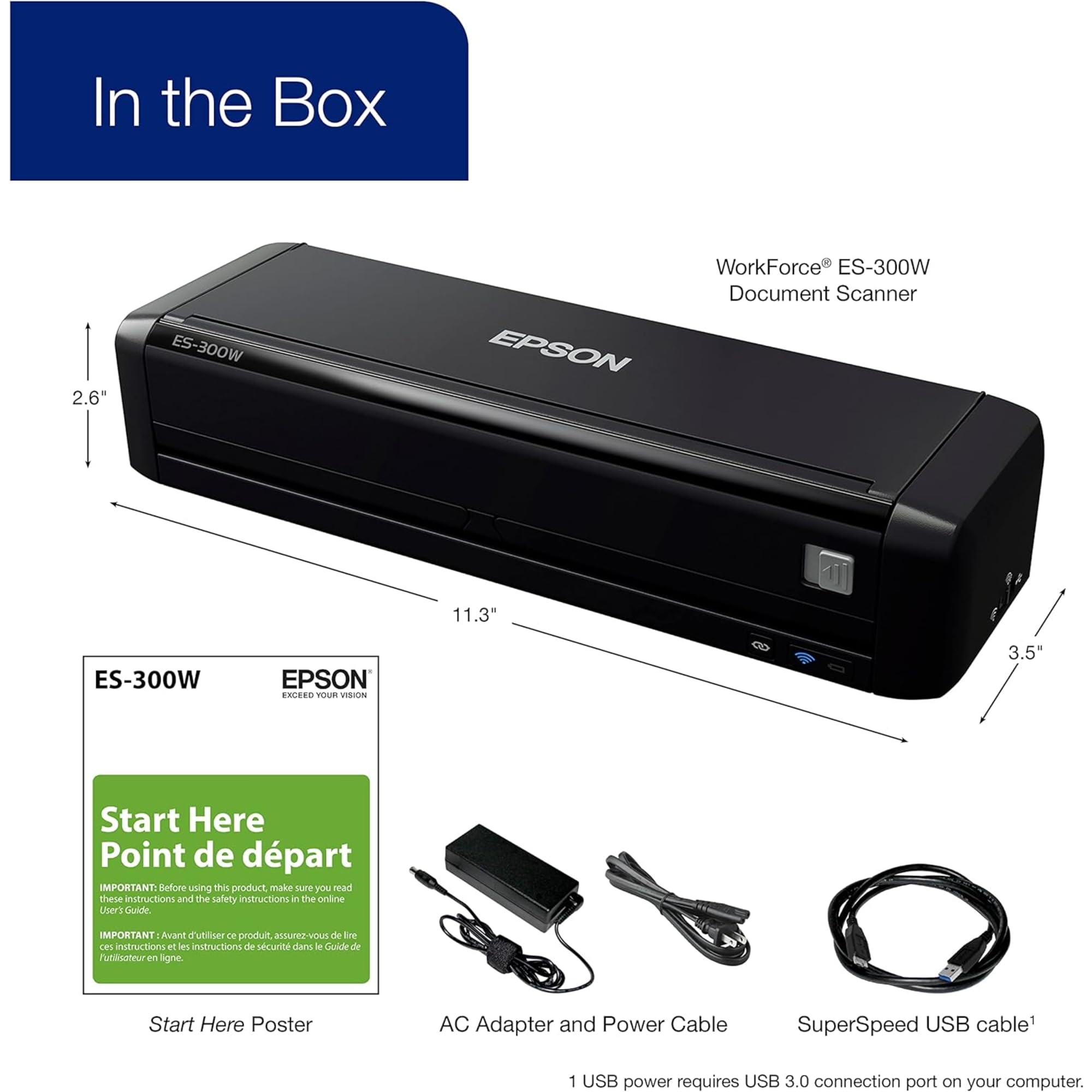
The Epson WorkForce ES-300W is a cutting-edge wireless color portable document scanner designed for professionals on the move. With its advanced features like duplex scanning, a 20-page auto document feeder, and compatibility with both PC and Mac, this scanner ensures efficiency and convenience. It supports various media types and offers intelligent image adjustments, making it the perfect tool for modern business needs.


| Item Weight | 2.9 Pounds |
| Item Dimensions D x W x H | 3.5"D x 11.3"W x 2.6"H |
| Minimum System Requirements | Windows 7 |
| Color Depth | 24 bpp |
| Standard Sheet Capacity | 20 |
| Paper Size | Letter |
| Optical Sensor Technology | CIS |
| Light Source Type | CCFL |
| Connection Type | Wi-Fi |
| Resolution | 1200 |
| Wattage | 8 watts |
| Supported Media Type | Receipt, Paper, Business Card |
| Scanner Type | Document |
T**R
Switch failed after 7 months of very infrequent use.
Update March 10, 2018.I received the replacement unit today and shipped off the defective unit. If anything this unit, although a refurbished unit, is even better than the original. No scuffs of any kind and not a speck of dust anywhere on it. The scans it makes are even better than the original. All things taken I am quite satisfied.I still believe the switch should be redesigned, but I'll be extremely careful of this one just in case something I did in the last 6 months contributed to the failure. (I can't think of anything, though.)I am now more familiar with the quirks of Epson Scan Utility 2 on my Mac and haven't had a problem with it in quite some time. There is also the fact that Hamrick's VueScan software now works with this scanner. For quick and dirty I use ESU2. For anything that requires a higher level of options I use VueScan Professional. The best of both worlds when using the USB interface.The WiFi scan software for iOS is still very primitive and prone to failure. If I required that function I would only give this three stars. One for the software and 5 for the hardware. The USB interface operates perfectly for me.It would seem to me that Epson likely doesn't have any intention of improving the iOS product, Epson DocumentScan. The last update was 7 months ago, before I purchased the scanner. The number of complaints about the Wi-Fi software are huge and I think one of the major reasons this isn't a 5-star rated product.===============Update March 3, 2018.I called Epson warranty service and after a 6 minute hold was connected to a very helpful representative. They are sending me a replacement unit and I'm to return the defective unit. Epson is paying for shipping both ways. As usual they needed a credit/debit card number to place a hold until the defective product is returned. At this point I am pleased with their service. I'll update further after I receive the replacement.===============March 2, 2018I have been using this scanner about three times a week since I purchased it in Aug 2017 and before today I would have given the hardware a 5 star rating and the software a 3 star rating.Yesterday I attempted a scan and the Epson Scan 2 program locked up. After three failures I noticed the function switch was in the AP position (center) and not the USB position (right). I could not move the switch to a location other than WiFi (left) or AP (center).I needed the scanner immediately and decided to open the unit, a very easy thing to do. Upon investigation I found that the small very delicate function switch had failed. It was lying in pieces in the unit. It is really quite a fragile part, far too fragile for something so important in a unit this expensive.I examined the functionality of the switch and found the two terminals that needed to be connected for the USB function and soldered them together. The unit is again working properly using the USB interface, but I have given up the capability of using either wireless function. To me this is a workable but not acceptable trade off. I won't be recommending this scanner to my friends and family until or unless Epson revises the design and uses a more durable switch.
F**K
Pretty decent once you know how you want to set it
We use the ES-200 at work so I thought for myself I'd get the wifi capable ES-300W. The three ES-200s we use at work each scan probably 100 or so pages a day for a busy front office, and I think we've only needed to replace the separator pad once or twice in the 5ish years we've had them. I haven't tried the wifi on this one but I read on a review it's only compatible with 2.4 ghz similar to Ring doorbell (at least my version from a few years ago). Someone explained to me once it has to do with the data download and you actually get better information on the slower speed, but I digress.What was driving me a little OCD about this scanner initially was how pages weren't scanning perfectly aligned. I didn't notice that on the ES-200 we use for work, but when I went back and checked files I saw it does do that. I searched everywhere on the problem, I hated getting crooked pages for my own personal use. But then I saw in the scan page of the program a drop down to choose from either Paper Skew or Content Skew. If you don't want crooked pages, ALWAYS use Content Skew. That would have saved me an hour or so of frustration! After I saw that each page came out perfect. It even straightened out my pages that were actually copied crooked. I would give this a 4.5 becauseI felt like that skew thing could have been better handled, and Content Skew should be default, but since I can't give that rating I bumped it to a 5 because I know it's worth more than a 4. Also like the ES-200 afaik it only lets you title a file AFTER it's been saved (why create that extra step??). On the plus side it's fast, can do multiple pages (if the pages are on thicker paper, it has more trouble grabbing those individually vs. as a group), and is easily portable (I bought the matching travel case as well to keep it clean and safe from cats 🐈). This is perfect for a transition into a more paperless world and decluttering my work space to hopefully declutter my mind with it!
Trustpilot
3 weeks ago
1 week ago