Desert Online General Trading LLC
Dubai, United Arab Emirates
Desert Online General Trading LLC
Dubai, United Arab Emirates

🎶 Split the Sound, Share the Vibe!
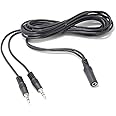
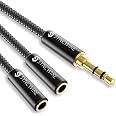
This 6ft 3.5mm Stereo Female to 2-male Y-splitter Audio Cable is designed for seamless audio sharing, featuring durable nickel-plated connectors and a flexible PVC jacket, all while being fully shielded to prevent EMI/RFI interference.
B**T
Yep, this cable handles two computers hooked to ONE speaker system
Saved me a ton of time shopping. The real cost of a thing is the hassle of setting it up or maintaining it. In this case, I have two Dell 780 machines on top of each other, and I wanted to 'share' the audio, monitors, and printers without learning how to create a network. NO MORE GIZMOS is my latest motto. Windows already eats my life in any flavor.So it took two minutes to plug my Dell stereo system line-out jack into the female end of this thingy, then plug the two males into each of the female line out jacks on the computers, and voila!Actually, both computers can be on at the same time, too. But I don't plan to use them that way.So Bob Russell's review here, was spot on. Now I can save space, hassle and time, by doing the same thing with my other computer stereo systems. As you probably know, the woofers take up a lot of space, as well as that Dell 'sound bar'. Best of all, since you can chain these cables, you can snake them wherever needed. I don't know what's the limit on how many can be hooked up, but I'm gonna find out.Just remember: the female end takes the line out cable from your stereo, and you plug the two males (or more) into the line-out jacks on your machines. Sweet.
R**H
You MUST use isolators with this cable! Then it's GREAT!
Please note, this cable by itself is NOT meant to merge two audio outputs! You will get noise and poor levels at best and at worst you'll damage an output. If you use isolators on both outputs, like this one, https://www.amazon.com/gp/product/B071W1K85Z/ it will work great! I am listening to this as I type this. I have one isolator on the mac, and another on the linux box, then THIS cable merging them into the amp. Sounds great! I can listen to sound from both and set the levels using the volume controls on each. You MUST use isolators to merge two audio outputs. Otherwise you're sending the outputs into each other and you'll get very different levels, noise, and you could damage an output. If you need to merge more outputs, use a mixer. But, for just two, this cable and two isolators is a good cheap simple alternative to a mixer. ELONN Ground Loop Isolator,3.5mm AUX Audio Noise Filter for Car Audio/Home Stereo System Work with iPod Zune iRiver and more
B**S
**TECHNICAL SPECIFIC REVIEW**
Okay so I purchased this to run my computer and Xbox 360 audio into once set of speakers. I also had a left/right audio adapter into 3.5mm jack from the console to one of the connectors on this adapter. So to get more specific, each unit had to have running power in order for this adapter to work without issues. As soon as one machine is powered down you lose a vast majority of sound output, some people have complained about this without giving resolution. To fix this simply unplug the non-powered connector and sound returns to normal, this works also for an extension cable. With both machines powered the audio can be controlled via each system and adjust the difference in volume between the systems. Hope this helps some before purchasing or even those who already did but not sure how to use.
B**0
Not what you may think...
Many people here intend to use this adapter to connect two audio SOURCES to something like one pair of headphones or maybe speakers. Let me make it clear... this is NOT going to work, at least not work well (garbled sound) and may even damage your devices. The reason is because if you use it this way, you're actually using it in "reverse." The real purpose of this adapter is to go from ONE input source to two outputs, in other words, the other way around. If you want something to combine two audio sources into one the right way, you need a powered mixer. Do a search for "mini audio mixer" and you'll find them. The smallest one I've come across are capable to "mix" four input sources to a headphone output. They're relatively inexpensive (less than $25). Also, most mixers only accept 1/4" phono plugs so if you want to use 1/8" connectors, you'll have to get adapters. So a search for "1/4 inch to 1/8 inch adapter." They're only a few dollars at the most. Be aware that buyers have asked sellers about using this and they've misled people into thinking that this will work - it won't and you'll be wasting your money or sending it back like I did.
D**R
Works but causes static in the audio.
This does the job but honestly I got what I paid for in this case. It works ok, but the connectors are not outstanding and introduce a lot of static to the audio if touched AT ALL.If you will be plugging this in to an out the way audio source that won't be messed with, bumped or jostled in any way then you will likely have no issues. If this is going to be used on anything that is not out of the way then expect to be let down. I use this to combine audio output from my laptop dock and desktop to a single pair of headphones at work.As I said it does the job but anytime I bump or shift the cable it causes static until it stops moving.In the end I am keeping it despite the static simply because it was the cable of this type I could find in the 6 foot length. If I could have lived with a shorter length I would have returned it for one of the alternate choices.
M**C
Two computers using one 5.1 speaker system fix. (3 of these)
Great product, using three of these cables to run two computers too a single 5.1 speaker system. I have a 32bit OS and 64 bit OS stand alone computer systems for development/testing (costly 32 bit tools that won't work in 64 bit environment). Each computer ts using it's own wireless keyboard and trackball, thought about a wireless speaker system and or another speaker system too -this came in about 150-500 dollars cheaper.There is no volume change (due to load) when both computers are powered on at the same time. I only work on one computer at a time via video-switch into a single monitor but do switch between each real-time.The seller is fantastic, sent one wrong cable (out of 3) the package was labeled wrong (said it was the correct one), they sent out a new one same day I found it!!! so, got a package of three on Thursday, got a replacement on Saturday!!
Trustpilot
1 week ago
3 weeks ago