Some deliveries may take a little longer than usual due to regional shipping conditions.

DOWNLOAD THE APP


Customer Services
Copyright © 2025 Desertcart Holdings Limited
DOWNLOAD THE APP


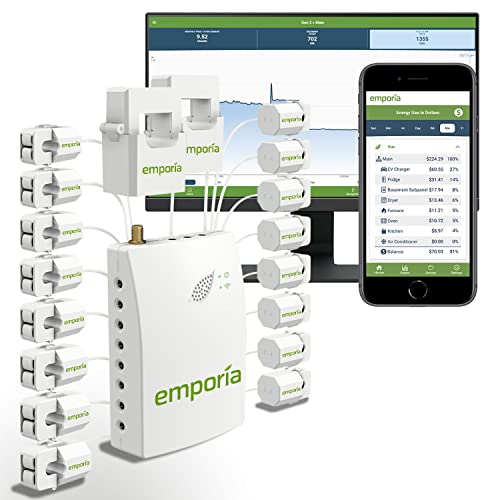

⚡ Empower your home with real-time energy mastery!
The Emporia Energy Smart Home Monitor is a cutting-edge energy management system featuring 16 clamp-on 50A sensors that provide highly accurate, real-time circuit-level electricity data. Compatible with most residential electrical panels and solar/net metering setups, it connects via 2.4GHz WiFi to deliver granular 1-second updates through a user-friendly mobile app. Designed for both DIY enthusiasts and professionals, it empowers homeowners to reduce energy waste, lower bills, and optimize appliance usage with actionable insights and alerts.


| ASIN | B08CJGPHL9 |
| Best Sellers Rank | #172,928 in Tools & Home Improvement ( See Top 100 in Tools & Home Improvement ) #106 in Power Monitors |
| Item model number | VEMT-16-50A-MX |
| Manufacturer | Emporia Renewable Energy Corp. |
| Package Dimensions | 22.4 x 16.69 x 11.71 cm; 453.59 g |
J**P
Great product, easy to install and just works. Regular updates. Highly recommend.
G**N
Having just dropped a sizeable chunk of our savings on 8.5kW of solar PV and a Tesla Powerwall, we've gotten very conscious of energy use in our home. I wanted a way to measure individual circuit consumption, and after trawling the internet, looking at the technologies and reading reviews, I decided that the Emporia Vue 2 was probably the best bet. Firstly, it's very accurate, as in +/- 1% accuracy from my experience so far. Being mains powered rather than battery powered, the unit can reference the measured circuit phase angle to give very accurate power consumption. Secondly, it's easy to install and setup, though UK consumer units pose certain challenges. More on that later... Thirdly, the App is really well thought out, easy to use, provides a phenomenal level of granularity and is easy to export .CSV data to manipulate in Excel for instance. The level of detail available will easily satisfy even the nerdiest of nerds! Rather than install the first unit in the house, I opted to install it in my garden Office/Workshop/ManCave so that I could tinker around, figure out how it all works and determine the best way to fit it without disrupting the main house supply. SWMBO works long hours from home, much of the time on conference calls, so killing the power/internet/network regularly whilst tinkering wasn't a viable option. The biggest challenge I had is that UK consumer units just don't have much free space in them. Just getting the sensors in there is a fairly tight fit. Trying to shoe-horn the excess sensor cabling, the unit itself and the wi-fi cable into my CU was impossible, so I had to get a little creative. In the end, I opted to mount the unit externally to the CU. I used one of the bottom, 20mm knock-outs, drilled it out to ~23mm and fitted a PG16 gland, which was just big enough to fiddle the (5) sensor plugs and power cables through. I also snipped the heatshrink off the WiFi lead and unscrewed the antenna from the cable, then fitted the antenna directly to the main unit. The unit has no wall mounts, so a few adhesive velcro pads hold it in place. One item the instructions don't cover is UK final ring circuits (ring mains). Reading between the lines in the instructions, you'd think that clamping 1 wire and using a 2.0 X multiplier would be the correct approach, right? Wrong. Ring circuits rarely balance properly. It depends very much on the circuit load and how close it is to one end of the ring vs the other. The right approach is to clamp both wires and use a 1.0 X multiplier. CT sensors measure Total current passing through the sensor, so will measure the sum of the current passing through each wire. Fitting this way gives much more accurate readings. The unit is really easy to configure. Connecting to WiFi is easy and the App is very intuitive. If you want to properly monitor power consumption in your home then this is by far the best option on the market.
W**E
I tried this system because I just installed a solar system on the house and wanted to track my net power usage through the grid. In Alberta you can switch plans throughout the year to take advantage of times when you're producing rather than importing power. This system gives me that data, and I can view it via a website or phone app, which works with no issues. What really attracted me to this was the fact I could also track 16 individual circuits as well. It's been very informative to see where I'm using power, and again the app / website is easy and convenient. Installation was pretty straight forward as long as you're comfortable working on your main panel. The app has a step by step guide which walks you through the install. I made a small mistake by hooking up both voltage sensors to the same leg of the panel, and it picked up the error and told me how to correct it. The biggest challenge is definitely dealing with all the extra CTs and wires and the main unit in the panel. I had to move a few breakers around to make room for the unit, and my panel is now completely stuffed with all the extra wires. But there's no way around that if you want to monitor your circuits at the breaker. I also like this unit because you have the option to switch it over to open source. I don't care too much, but if you don't like the idea of sending your private power consumption data to a distant web server, it's possible to re-flash the unit using ESPHome to make it fully open source so you can keep the monitoring local to your own network. Overall it's a great product and you get a lot of good, flexible hardware for the price.
J**N
I purchased this in March of 2021, and have enjoyed this product very much since then. The real time data logging is great, and can really help find areas that use excess electricity. Was pretty easy to setup in the breaker panel. Cut main breaker, installed unit, installed clamps, and then closed breaker box and powered up. One of my sensors was defective, and the company sent me one right away, free of charge. Everything worked perfectly after that. I initially did not have an EV, though in August I got one and this thing has been amazing at tracking energy usage for the EV. Was very easy in the software to rearrange a clamp and set it up for the EV charger. I ended up removing one that was a pretty unused circuit anyways. I am also a big fan of being able to export the data into CVV format. I have built a spreadsheet that breaks down monthly usage and % by circuit. I have also plotted an hour graph which shows me when my peak times of electricity use are during the day. Not necessary, but it helps me learn about my usage. A couple points of improvement I would wish for the future: 1) the export to CVV is completely manual. Not a big deal, but when I want to update my spreadsheets, it takes a few minutes to export and append into the spreadsheet. 2) I wish they had more support in terms of smart homes. Would be nice if there was an API that could be read from. It seems the app is the only way to read from the device in a live fashion. Would be nice if it featured a self-hosted server with all of the live data accessible from other sources. Overall a great product for an amazing price. App is pretty solid, device seems to work great, and quality customer service. Would definitely recommend to anyone looking to understand or learn from their energy usage habits!
流**離
よくある最近のパナソニックのコスモコンパクト21にとりつけしましたがctセンサーのスペースに苦戦 上部は余裕がありますが下のL2側はちょっとでもブレーカーより上に出ると蓋が閉まりません 本体の電源はブレーカーに開きがあったので直取りし 青と赤線はオープン(未接続) アプリ上で同一で線で繋がっているというようなメッセージがでますが無視し進めることができます。 また、データはクラウド上にあるようでスマホからどこでも見られ便利。 問題点 CTセンサーの作りが悪く動かないものが1つあったCTセンサーは多めの物を買いましょう 200V計測に 白(L1)、黒(L2)それぞれにctセンサーをつけ計測できますがまとめて消費電力が表示されないのでそれそれのポートで同数の出力が表示されみずらい
Trustpilot
2 weeks ago
1 day ago