
DOWNLOAD THE APP


Customer Services
Copyright © 2025 Desertcart Holdings Limited
DOWNLOAD THE APP






🚀 Elevate your workspace with seamless, silent, and secure networking!
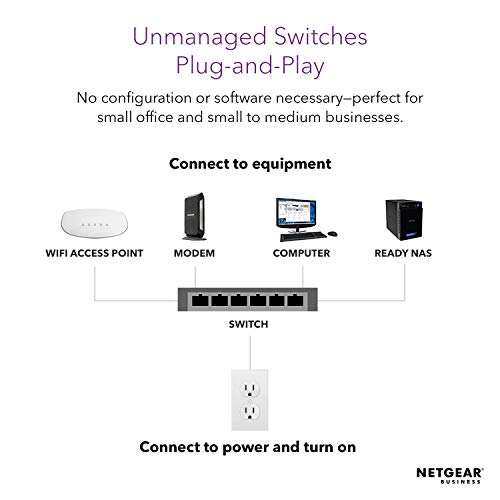
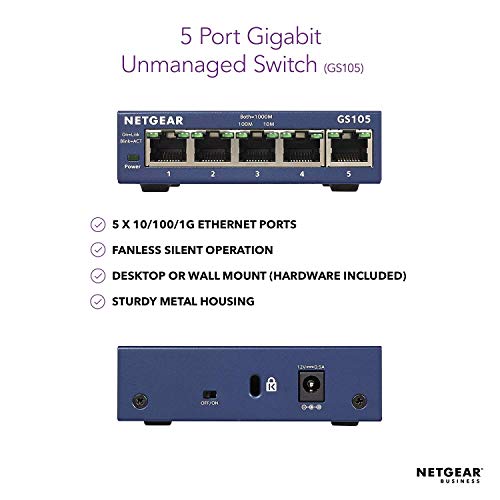
The NETGEAR GS105 is a compact 5-port Gigabit Ethernet switch designed for professionals needing reliable, high-speed wired connections. Featuring a rugged metal enclosure, silent fanless operation, and energy-efficient technology, it supports effortless plug-and-play setup. Backed by NETGEAR’s ProSAFE Lifetime Limited Hardware Warranty with next-day replacement and expert support, this switch is built to keep your home or office network running smoothly and efficiently.
| ASIN | B0000E5SEQ |
| Best Sellers Rank | #16,552 in Computers ( See Top 100 in Computers ) #112 in Network Switches |
| Case material type | Metal |
| Data transfer rate | 1 Gigabits Per Second |
| Global Trade Identification Number | 00606449029703, 00606449035995 |
| Interface type | RJ45 |
| Item model number | GS105UK |
| Item weight | 0.26 Kilograms |
| Language | English |
| Manufacturer | Netgear |
| Product dimensions | 9.9L x 9.4W x 2.8H centimeters |
| UPC | 606449035995 778888261928 606449029703 803982764058 606449029697 |
| Upper temperature rating | 50 Degrees Celsius |
D**J
NETGEAR GS105UK 5-PORT GIGABIT UNMANAGED ETHERNET SWITCH. (NOTE:- Please be aware that multiple different types/models of these Netgear switches are all foolishly grouped together under one single product review. Unless the review CLEARLY states the SPECIFIC model, you could be reading a review for a completely different model to the one you're looking to purchase)!!! ADDITIONALLY - Before I mention anything else, IF you do purchase the "GS105UK Unmanaged" - You MAY NEED to connect your router to PORT 5. (There's been conflicting info online regarding this issue for YEARS. Worse still, there's multiple versions of the GS105 as it's been in continuous production for years, in different variations, & released in countless nations. Some versions/variants ARE different to others!! (My last Netgear GS105 also inexplicably required the router in port 5 for example). Netgear's aging installation diagram shows the modem/router connected to a centre port. Many sources say it just doesn't matter which port, whilst others say the router must be connected to port 5!! (However, IF I don't use port 5 for my router on my switch & I connect another device there instead, it drops all other connections. Router in port 5, everything works exactly as it should regardless of connecting/disconnecting any other ports). With that out of the way.... As with many, I have an ever increasing number of devices in my home with internet connectivity that include ethernet. Router manufacturers insist on limiting available ethernet ports to 4 or in some cases only 2 & it's just not enough. If you just need additional ethernet ports without any other hassle, an unmanaged switch is an ideal solution. I've been networking PC's since the latter 1990's at a home/semi-enthusiast level or setting up for others. I've always prefered my static devices such as desktops, gaming consoles, TV, miscellaneous devices, (frequently laptops as well) to be hard wired for security, speed, & reliability, especially with some of my devices constantly file sharing, streaming, etc. My previous unmanaged switch recently died after many years solid service. I settled on another unmanaged switch for my current needs & for most who simply need extra ethernet ports, an unmanaged switch is all that's required. Given the low cost of these devices now, if I find a managed switch would be more beneficial I'll purchase one as required. I'm reasonably tech savvy, since installing the switch I've used a number of the most common tools freely & readily available for testing my home network for any issues. Thus far this new Netgear switch has performed admirably & I haven't run into any problems at all, (other than the port 5 nonsense). I've recently purchased a new router & swapped out all of my old ethernet cabling as well. I'm very happy with the performance of the switch & the entire network. The switch is very well made & they now have a full metal enclosure, (my last one was plastic). They are easily wall mountable for keeping the switch & all the additional cabling as tidy as is possible. The ports are all solid & to date I've only had one older Cat6 cable where the connector failed to lock in place. All of my newer Cat6a cables lock in securely, (which is just as well as it's considerably thicker than the 14 year old Cat6 it's replacing & the Cat6a is not particularly pliable). Otherwise, it's incredibly simple to use. Power up, connect your ethernet devices & that's it, no software or configuration necessary. (If you require greater control/options, purchase a managed switch)!! Each port simply has a pair of green lights to visually confirm the status of individual ports. The product is supplied in retail packaging with a quick start guide, (if memory serves the quick start guide hasn't changed in years). A power supply is also included, & a couple of small screws & raw plugs for wall/surface mounting. It's a good idea to register your switch on Netgear's website for warranty purposes, etc. Compared to a managed switch they are very simple but highly effective, they do their job perfectly well. I would happily recommend the GS105UK & gladly rate this updated metal variant at 5/5.
U**L
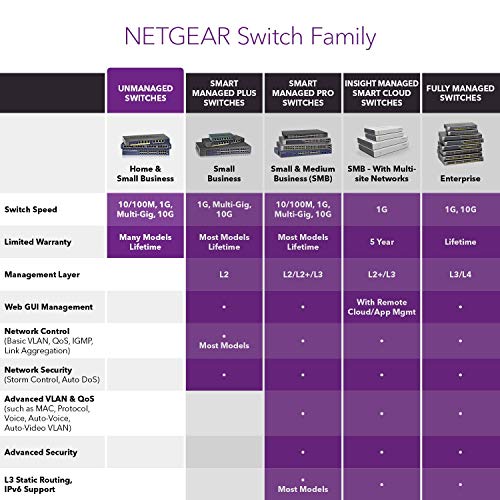
The GS108Ev3 is a Gigabit Web Managed Switch capable of connecting up to 8 devices together on your Home/Small Business Network. Upon the unboxing of the switch you are presented with the switch itself, a power adapter, a setup manual and a CD containing: ProSAFE Plus Configuration Utility GS108Ev3 installation guide Customer support information Quality Overall the NETGEAR GS108Ev3 feels solid. I have seen various 8-24 port switches and this is one of the most robust I have seen. Compared to my TP-LINK TL-SG1008D which was bought for around the same price the switch feels to have been built to a higher standard. Although most peoples switches will sit in a cabinet or somewhere deep in there attic this is a nice touch. Usability The NETGEAR GS108Ev3 contains the standard link lights which let you know if there is activity on the network. The best thing with this switch is the fact that it is web managed. What does managed mean? A managed switch allows you to have better control over your network and all the traffic moving through it, E.g If you have a smart TV which is only used for Netflix and other streaming services you can limit this to say 5mbps, this stops limits all bandwidth to this. This would be beneficial if you regularly game and don’t like ping spikes! Quality of Service (QoS) Quality of Service (QoS) allows you to allocate bandwidth to different ports E.g. If you have a smart TV which is only used for Netflix and other streaming services you can limit this to say 4mbps, this limits all bandwidth to 4mbps. This would be beneficial if you regularly games and don’t like ping spikes! By selecting QoS in NETGEARS ProSAFE Config Utility you can select different priorities in which to limit rate though these do not allocate a speed. The best way to allocate which speeds you need is to use the Rate Limit tab on the software under QoS this ensures you can limit each port to your liking. VLAN VLANs allows you to split the switch into different LANs, e.g. ports 1-4 could be VLAN 01 and 5-7 could be VLAN 01 with your internet connection provided to all on the switch. PC’s with access to VLAN 01 would not be able to access VLAN 02 and vice versa. This wouldn’t normally be needed in a home network. The software also provides the utility to view data transferred received, perform firmware updates, reboot the device, factory reset and cable fault testing which is very interesting. Ping Times Moving from my TP-Link 1200 Mbps powerline adapters I have noticed my ping drop from 45-50ms on League of Legends to 32-34ms 39-45ms on Battlefield 1 to 25-30ms My connections is 33mb down 6mb up on a fibre to the cabinet line. Conclusion I have had the switch for about 3 months now and it has performed very well, No issues have risen and the switch hasn’t needed to be rebooted once.
K**O
Easy to set up and ideal for my intended use, I have been using a Belkin version for several years but it had been playing up for a few weeks dropping connections and getting very hot so I decided it was time to change it. I didn’t need anything too big or with masses of ports as it is just used as an extension to my smart TV, Android box, Satellite TV box and a hardwire link for plugging in my wife’s laptop when she needs a windows update or something transferring off my main desktop PC and this looked ideal. Setup is simple and just a case of plugging everything in and it’s done depending on your setup, for me it was just a case of switching out the old and in with the new. The box is nice and compact and everything is well finished, the light indicators work as they should showing activity on each port when in use, the box has no internal fan but even after being on all day it is just warm so no issues with that, the speed seems good, solid and consistent through all ports when I gave them all a file transfer test. I have added a short video and will also add some pictures just showing the unboxing and then plugging in all the network cables, overall I am very pleased with this purchase it is ideal for replacing my old one at a reasonable price and I would certainly recommend it.
T**R
habe inzwischen mein gesamtes Haus mit Netgear-Netzwerkkomponenten ausgestattet. Dieses erfüllt im "sichtbaren" Bereich voll meine Erwartungen.
M**S
It's a decent little home switch, I run 4 in my 6 switch network . Handy for controlling broadcast storms, but not unbreakable. Basic vlan functionality, unlikely to be used by home users. Decent web interface and IOS releases. Only spoiled by some shocking reviews by pretend IT expwrts, who obviously don't have a clue about IT but can Google . Ignore them, those with a clue laugh at their hot air (why does it have a MAC...seriously, learn about the OSI model), if you need to attach multiple devices to a router, eliminate the risk of loops, it's a great priced rock steady little device at a low cost, buy it...oh, and its plug and play if you don't want to mess with configuration.
Trustpilot
4 days ago
2 days ago