

🎮 Elevate Your Entertainment Game with SofaBaton U1!
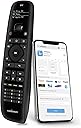
The SofaBaton U1 Universal Remote is a cutting-edge device that allows you to control up to 15 entertainment devices seamlessly. With compatibility for over 500,000 devices from 6,000 brands, it features Bluetooth and infrared connectivity, a user-friendly app for easy setup, and customizable macro keys for ultimate convenience. The OLED display and ergonomic design make it a stylish addition to any home entertainment setup.




| ASIN | B08FXK18BY |
| Additional Features | Universal |
| Battery Type | AA |
| Best Sellers Rank | #159,650 in Electronics ( See Top 100 in Electronics ) #11,948 in Remote Controls (Electronics) |
| Brand | SofaBaton |
| Button Quantity | 15 |
| Compatible Devices | Projector, Television |
| Connectivity Technology | Bluetooth, Infrared |
| Controller Type | Button Control, Voice Control |
| Customer Reviews | 3.6 out of 5 stars 2,651 Reviews |
| Manufacturer | SofaBaton |
| Max Number of Supported Devices | 15 |
| Maximum Number of Supported Devices | 15 |
| Maximum Range | 50 Feet |
| Model Name | U1 |
| Model Number | U1 |
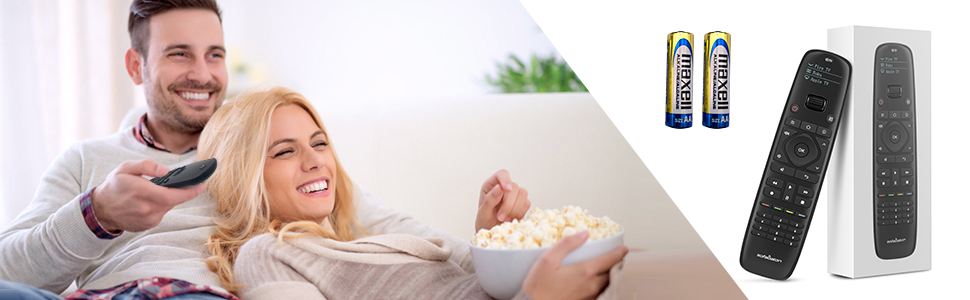
| Number of Batteries | 2 AA batteries required. (included) |
| Number of Buttons | 15 |
| Special Feature | Universal |
C**T
Quality Feel, Quality Function. BUY IT!!
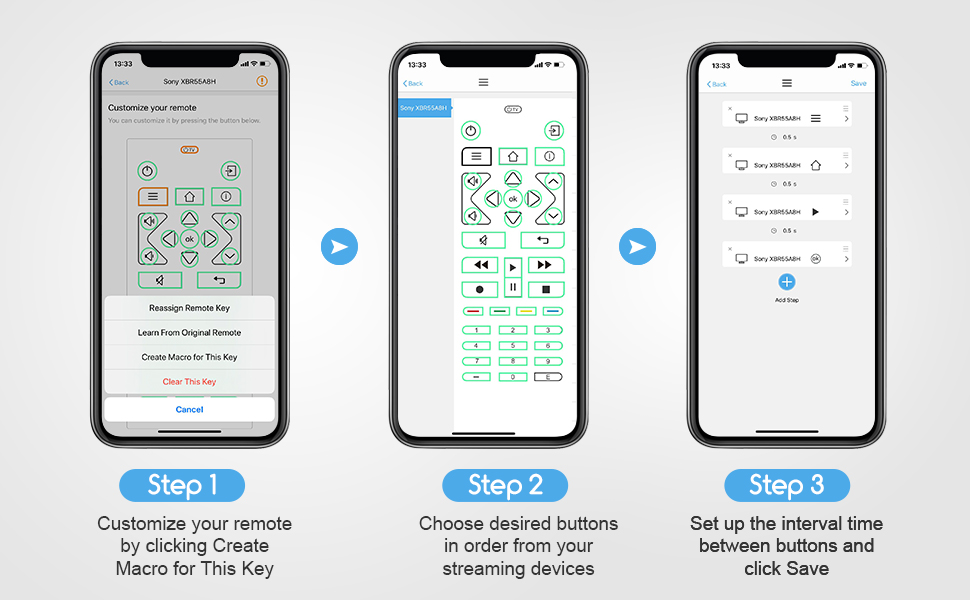
I have 3 things that needed to convert to this remote: LG TV, Pioneer Amp/Receiver, Fire TV. The remote first made me download the app, which is very user friendly. It walked me through pairing the remote with the app and was easy to get started. The search for device function is pretty slow and not very accurate. I put in my exact make "LG" and model number "UJ6300" and I got the spinning wheel for a long time. FIXED: Simply type in the make, NOT model of the unit. For example, I typed in "LG" only and it brought up 5 or 6 categories under "LG" or there was a list of "popular models." This is where you want to be. You can just scroll through all of that brand until you get to your model (in alphabetical order). So it helped a lot, because I was typing in UJ6300, but it was listed as 55UJ6300 (which still should have been found, but ok). Once I found the model, I let it program and BOOM! I was having an issue with the ARC function of either my TV or my Home Theater Receiver. The sound works fine, but the ARC function has faulted and I have to control the TV and Receiver with separate remotes. This solved that. I also have kids running around and one, in particular, loves to mess with the stereo buttons/inputs. Many times, the stereo gets bumped off of "TV" and onto something like "DVD." So I programmed one of the color buttons to be "TV INPUT" from the list. This way it doesn't matter what he changes it to, I can hit that button and bring it right back. TIP: Each time you program the remote to take over for an old remote, compare the two. Start testing buttons, etc. I found that the "back" button wasn't working. So, on the app, I used the diagram of the remote to choose the button that I assume is meant to be "back" and I found a list of all known commands. It was a quick fix: instead of "back" it needed to be "BACK." I know that's a little buggy...but anyone with common sense should be able to work it out. TIP: If there is a command that just isn't in the list and you can't figure it out, try "learn from original remote." On the app you choose the button in question from the diagram. Then choose the learn from original remote" option and follow the directions (basically just point the old and new remotes at each other and press/hold the button on the original remote while the sofabaton intercepts the signal and learns it). TIP: Use the 4 colored buttons as shortcuts (I programmed mine to Netflix, Prime Video, HDMI - Fire TV, and HDMI 3 (Game). TIP: If you use a separate audio system (Home Theater Amp/Receiver or Sound Bar), consider using macros for the volume and mute buttons. You can program the remote to know that even if you are on the "TV" mode, when you press one of these volume buttons, it automatically applies it to the sound system and not the TV. This is a nice shortcut to actually having to use the wheel to scroll down to the audio system and then change the volume. I programmed this macro for both my "TV" and "Fire TV" modes. TIP: Reprogram the very top "TV Power" button to be an "ALL POWER" button. Simply go through each mode and reprogram that "TV Power" button using a macro and select each mode's "power" setting with no input delays. This way, when you hit "TV Power" it will shut down all programmed devices. (You do need to be generous with pointing the remote towards all devices at once. I do have instances where one doesn't get the signal and gets left on. Just scroll the wheel to that device and hit the power button). My 4 year old was able to use this remote to find her shows within 30 seconds after I let her loose. It's not a complicated setup at all. 100% RECOMMEND
D**T
Finally, a remote that makes me feel like a tech wizard...
Let me just say — the SofaBaton U1 is almost the universal remote of my dreams. It’s sleek, it’s got buttons that light up, and it comes with a Smart App that lets you pretend you’re programming the Mars Rover, when really, you're just trying to get Netflix to work without switching three remotes like a caveman. 🛠 Setup: Oh sure, the setup process is “easy” — if you have a PhD in remote control anthropology. The app is smart, in the way your uncle says he’s “between jobs”: technically true, but not always functional. The pairing process involved me pointing my old remote at the SofaBaton like I was about to duel it. 10 minutes later, I had programmed the TV… and also somehow the garage door. 📺 Functionality: When it works, it’s magical. One button press and BAM — the soundbar turns on, the TV wakes up, the input switches, and I feel like Tony Stark. Except… sometimes, only the soundbar turns on. Other times, nothing happens except the remote vibrating like it’s saying, “Yeah nah, not today.” And don’t even try using it from across the room unless you have the precision aim of a Navy SEAL. One inch off and it’s like, “Sorry, I don’t speak that angle of infrared.” 📱 The App: The Smart App is both a blessing and a curse. You can customize buttons, add macros, rename devices — it’s great. But heaven help you if you tap the wrong thing. One slip and suddenly your "Watch TV" button is launching the Xbox and dimming your smart lights like you’re about to host a séance. 🧻 Build Quality: Feels good in the hand, and the buttons are backlit, which is nice — especially when you’re fumbling around in the dark trying to pause a movie during an awkward scene when someone walks into the room. But don’t drop it. I dropped mine once and it stared at me like, “Guess I’m retired now.” Final Thoughts: Would I recommend the SofaBaton U1? Sure! If you enjoy minor tech puzzles and pretending your living room is mission control, this one’s for you. It’s a great budget universal remote with just enough quirks to keep your evenings spicy. 4 out of 5 stars, with a bonus star for ambition and a minus star for making me question my sanity during setup.
T**R
Works amazingly - but just barely
DEC 14: So, I bought what appears to be a great little, fully customizable remote for my home theater, and it only has the koolest name ever! It's compact, looks elegantly designed, and sturdy, too. Half the price of the Logitech! Sign me up! What could go wrong?!?! Hmmm... it appears to have no support... whatsoever. If the remote's app dosen't address your specific concern, you're screwed. The company appears to be non-existent or bankrupt. Their website does not exist. Sofabaton.com appears to be owned by Alibabba.com. They have no web presence, Facebook, Instagram, or Twitter. Their phone number (in Orange County, CA) is dead.. ...too bad. Neat remote.... back to Amazon. DEC 22- So. I stuck with it. I watched a lot of YouTube videos about this remote, nothing spoke to my issues. BUT THEN... in the background of one video, as the presenter scrolled to their TV, he scrolled past mine! Not my serial number, as the app requires, but the model NAME, in TEXT. None of the other units had a text name, just... that one! I tried it, and it works BRILLIANTLY! <Happy dance!>🤩 I mapped what few buttons were not properly coded and moved a couple around. I set up each device, and got punch-through's going for vol, ch, & etc. buttons (Because that's just how I like it!). Nice. Their "tech support" still hasn't gotten back with me with the codes they were going to email me ("within 3 days!" of your call, the app states). Should you need to have to contact customer service, DO NOT CALL THE 1-800 #!! It goes nowhere. The other # (it registers to some poor lady in Portland, Or.), & just goes to an answering machine- but I did get a call back in ~1hr. They were not able to provide additional help. And, again, the codes for my model still aren't listed by its serial number in the highly touted "worldwide database". Customer service sucks everywhere these days. Logitech's service is horrible, but they have more web resources, troubleshooting aids, and much larger base of owners to interface with. I encourage you to click on SOFABATON's "support" page- what there is is marginally useful. WIN: LOGITECH So, what's it like to live with? I like it. ALOT! My experience lies mostly with the Logitech 665, another universal remote but this time with a color screen and more buttons than mission control! Programming the Logitech is awful. The app for the Sofabaton is actually really well designed for the programming phase of the operation... you can hop out of programming and test your changes, then hop back into the app pretty quickly. The Logitech requires physically connecting the remote to a computer, which requires some time, for each series of changes. Somehow, the Logitech takes this potentially better interface and makes making small changes a colossal pain! WIN: SOFABATON (Big!) The color-screened Logitech (and it's lighted charging base) WIN's hands down for looks, but neither feel really great in the hand- the cases creak when squeezed, and the rubberized buttons on both are mostly without shape, making it difficult to find the correct one in the dark. There are more intuitive controls on $10 remotes! WIN: NOBODY!! I could also do without the number pad (since cutting the cord, channel numbers are a thing of the past for me). Would I buy it again? I think so. Be realistic- this is Chinese stuff. "Your mileage may vary!", as they say. Support is questionable, if not non-existent, as I first experienced. If the setup identifies the components correctly, this can be a great little remote. In fact, it's pretty close to ideal for me. But beware... if you need help with the fiddly process of programming you're largely on your own. Bear with it, it's worth it. In the end, Logitech's additional Support options just are not any good, and thus cannot overcome the 3x bigger price. WIN: SOFABATON
G**G
It's just ok
There is some good and bads with this remote. Overall it's easy to program. The app (I used Android) worked well with my Pixel 4a running Android 12. I had no issues connecting the remote to the phone. My primary interest in this remote was using my nVidia Shield 2019 Pro which does not use IR, it's Bluetooth. That's where the Sofabaton caught my interest, since it supports Bluetooth. It worked pretty well with the Shield but I have a really buggy issue with the power button. It works sometimes and other times it has a mind of it's own. Another issue is when the remote is sleeping, waking it up, the keys don't work for several presses. I find that very annoying. It's random how many times I have to press a key before before the Shield starts responding. Once it's awake it works it's fine. The Shield remote does not have that issue. The Sofabaton would not work with my Pioneer receiver (LX-503). I sent them an email and the next day they told me they added it to their IR codes. It still did not work. So I had to manually learn each key. The learning process is straight forward but for whatever reason learning the Pioneer remote was extremely picky with the distance and angle of aiming the remotes at each other. It took me well over an hour to get it done. I also replaced the batteries in the Pioneer remote thinking that would help and it did not. Next I use AT&T uVerse set top box, once again the Sofabaton did not support it. I emailed support, they again added the IR codes the next day. It kinda worked but they fouled up a few buttons which required me to learn them using the AT&T remote. This remote had no issues like the Pioneer did, it learned them very easily. So my major complaint once it's programmed. The keys are not good quality. Sometimes they don't work when you press them hard enough. I find it annoying how many times I press the skip button and it does not respond until I press it harder. I am worried how bad they are going to get after a few months of use. Also the keys are not backlit. I really miss that feature. Next is the motion sensing on this remote. The LCD display keeps turning on with the slightest movement on my couch. The Shield remote also has a motion sensor and does not go off anywhere near as easily as this Sofabaton does. That worries me for battery life with the remote constantly turning on. Even my subwoofer can set this Sofabaton on from the vibration! The next issue is setups with a receiver for their sound. I don't use the TV speakers, all my sound goes through the receiver. So every device you program will have to be reprogrammed to use the correct codes for your receiver. There should be an option in the programming to say what device always controls your sound (vol+, vol- and mute). So when you select your TV for example it knows to always use the receiver codes for volume, not the TV. Support although they respond within a day usually has wrong answers. I had a confusion over the wheel on the remote for selecting the device. I thought once the device is in the LCD window you would have to press the wheel in to select it. It does have some click in it making you think it's a button. The simple answer it does not work that way. Support wanted to send me a new remote. Overall I found their support lacking in good answers.
R**N
Super replacement for a Harmony 650
The U1 is a great replacement for my old Harmony remote. The ease of setup was great. It had entries in the mobile app for all my equipment (Samsung, Marantz, Amino) that I wanted. It feels very solid and all the buttons have a nice click. Most positive points: Ease of setup out of the box, using a mobile application via bluetooth worked perfect. Icons and naming of the connected equipment Small but very useful display that shows the active device and shows if a signal is being send The ability to learn IR codes (but the fact that I needed that will come later) Solid feel of the device. Being able to add macro buttons Disadvantages Main disadvantage : Defined macros cannot be edited. If you want to change them you will have to rebuild them completely. My macro's are not very complex but even then I found this quite annoying For my Marantz the RC database was not completely correct, I fear this is a global problem because my harmony had exactly the same issues. However it was solved by learning the change channel keys from the original remote. The App and RC do not remember their connection, when reconfiguring you will have to 're-pair' the devices. The App therefore always feels as if you are 'unboxing' As you can see the disadvantages are on the setup side and are mostly minor (except for the macro editing, would be great to fix that in a next version of the app). I do not have bluetooth devices that need to be managed via my remote so I cannot judge that. However as a replacement for my Harmony (and all other remotes) this one is great
M**M
UPDATE: WORKS GREAT____
MACROS DONE...5 STARS...ALTHOUGH I WOULD PREFER TO SEE A NEW UNIT WITH BACKLIGHT KEYS AND RECHARGEABLE...Excellent customer support. CHANGING FROM 1 TO 4 STARS....After not having half my devices in their library or the learning function not working at all with original remotes....their customer service is very good. Best I have ever seen from an "Amazon Company"...All my devices are now in their library and were installed in the remote. As soon as Macros are done, I'll give it 5 stars...... ORIGINAL REVIEW: Well, I have been using Logitech Harmony or similar remotes for years...so I will say I know what I am doing. I have programmed at least six Harmony units multiple times (USB via computer). I still have them and they all work well. I have a very simple use for this new Bluetooth / IR remote. I must say I like the idea of using an iPhone and Bluetooth to program it....seems like a nice interface. ESPECIALLY IF IT WORKS. But NOT. Wanted the Bluetooth feature for ONLY Fire Stick. Everything else I have is IR. I have a very simple setup (bedroom, not my Home Theatre room) and ONLY 4 components ...a 5-year-old Visio TV, 5-year-old Viso Sound Bar, low-end Comcast Cable Box, and a one week old Fire Stick. The unit seems to find and connect to the COMCAST and FIRESTICK, everything I thnk tested so far works....so far so good. Then the problem: The remote app could not find the model number of BOTH Visio TV and Sound Bar. No worries....So, I used Plan B: the original Visio remotes to teach the new remote. Well, it either claimed a Learning Failure or when it claimed "Learning Success", the intended command (volume/power/whatever) did not function in the new remote. The original remotes are all in perfect working order with new batteries. So, for now, it's one star only....and a better rating for Ergonomics (although the numbers are too small for me). The app sent the Viso model numbers off to "Support". They claim 3-days they'll help me. i hope so...I'm hanging in there and REALLY hope I can change/improve my review in a few days.....
K**E
Nice idea, quality not so great!
I bought two of these Sofabaton U1's as a replacement for my two Harmony 650's which were starting to get button press problems. I have only opened one, programmed it and tried it out. The first thing you will notice about the Sofabaton is the poor build quality, which is not surprising given the price I guess. Most of the function keys seem to work OK with one glaring exception, the number buttons. Forget about trying to use the number buttons! They are so small and crammed together so closely you need a pencil or a toothpick to press them. Also, for the one I have been using, the #2 button doesn't work at all, hence the quality warning! I think these maybe fine as a stopgap remote when you can't find the one you want to use, but you can just see these things are not made to last very long. Since buying the Sofabaton I discovered the ButtonWorx repair kits for my Logitech Harmony 650's. These kits are amazing! After repairing both Harmony's they are now working like new! At $12 these kits are a very clever solution to keeping those high quality Harmony's working for a few more years! As for the Sofabaton, well it is still sitting on my office desk, it may get some use from time to time, but the numbers buttons are pretty much useless!
D**3
It works! Could use some improvements
Like many people, I have a table full of remotes, 3 of which are needed just to watch TV. I got tired of it and began searching for a truly universal remote. The last "universal" remote I bought was years ago, and they weren't terribly universal. Good: 1. Phone app makes it pretty easy to program even if there is a slight learning curve. It took me about 15 minutes to really figure it out, but once I did it was pretty easy, even for the Dish TV remote, which I had to program completely from scratch. 2. You can program any key to do just about anything with the learning from original remote option, which I had to do for the Dish TV remote. My Yamaha receiver and Hisense TV were already in their database. Even with those, I was able to remap some keys for more intuitive use. 3. Price point is pretty good. Paying $200 or more for a damn remote is just stupid. At under $50 this is a great deal for how much it can do. 4. Using the scroll wheel to select your device on an LCD screen is a nice feature. The illuminated screen makes it easy to see. Bad: 1. Phone app. I hate having to install more apps to my phone and giving up my email and phone number info. Not an hour after I installed it and registered my email, I got some damn sex spam mail that somehow avoided my spam filter, which is VERY rare. Maybe coincidence, but I'm not a big believer in coincidence. 2. Buttons: Could use a couple more buttons common to many remotes these days. Buttons are VERY stiff and often requires a second press to get to operate properly. Illuminated buttons would be a huge help. Seeing the button icons can be difficult (especially when you're getting old and your eyes are starting to go bad for reading) and keeping track of what each specially programmed button does on a remote that will be used on at least 3 different devices can be a little aggravating. Conclusion: It's a good remote that will absolutely replace just about every remote for every device in your home for a reasonable price. With some button improvements it would be an excellent remote. UPDATE: I was about to dock it another star as continued use has created increased annoyance. The buttons are just terrible. Takes an average of 5 presses to perform 3 actions given how difficult it is to press the buttons. Finger fatigue sets in real fast. However! I just found out how to edit my buttons so I can control functions from more than one device on the same profile. i.e. I can control the sound from my surround receiver even with the Dish receiver or TV being the active component. HUGE feature as I don't have to scroll back to my surround receiver just to adjust the volume. GOOD JOB! Buttons still suck more than any remote I've ever owned, so you broke even on add one minus one star.
Trustpilot
2 weeks ago
1 day ago