

Desert Online General Trading LLC
Dubai, United Arab Emirates
Desert Online General Trading LLC
Dubai, United Arab Emirates



🛡️ Protect your Surface Pro in style — see clearly, write smoothly, work confidently!
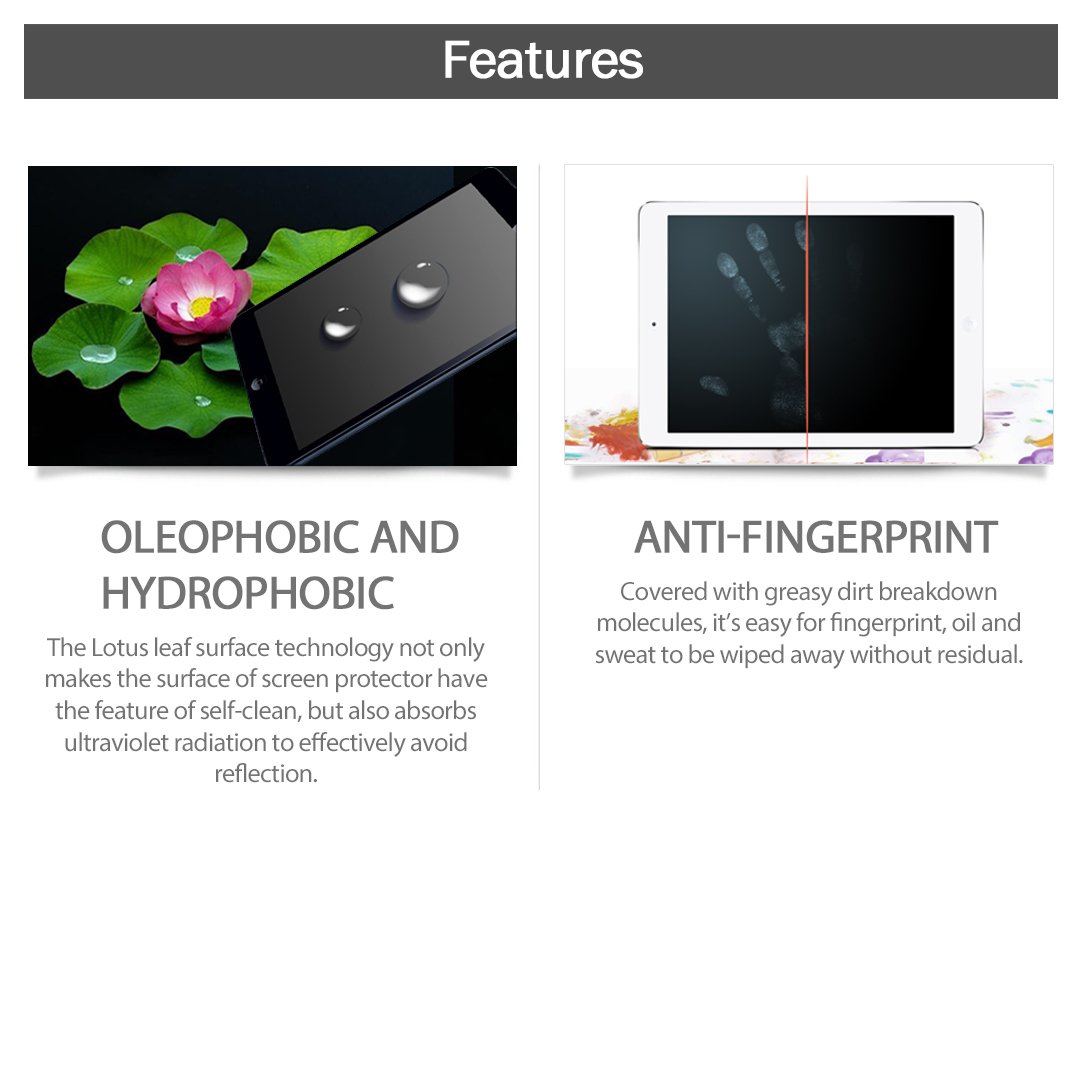
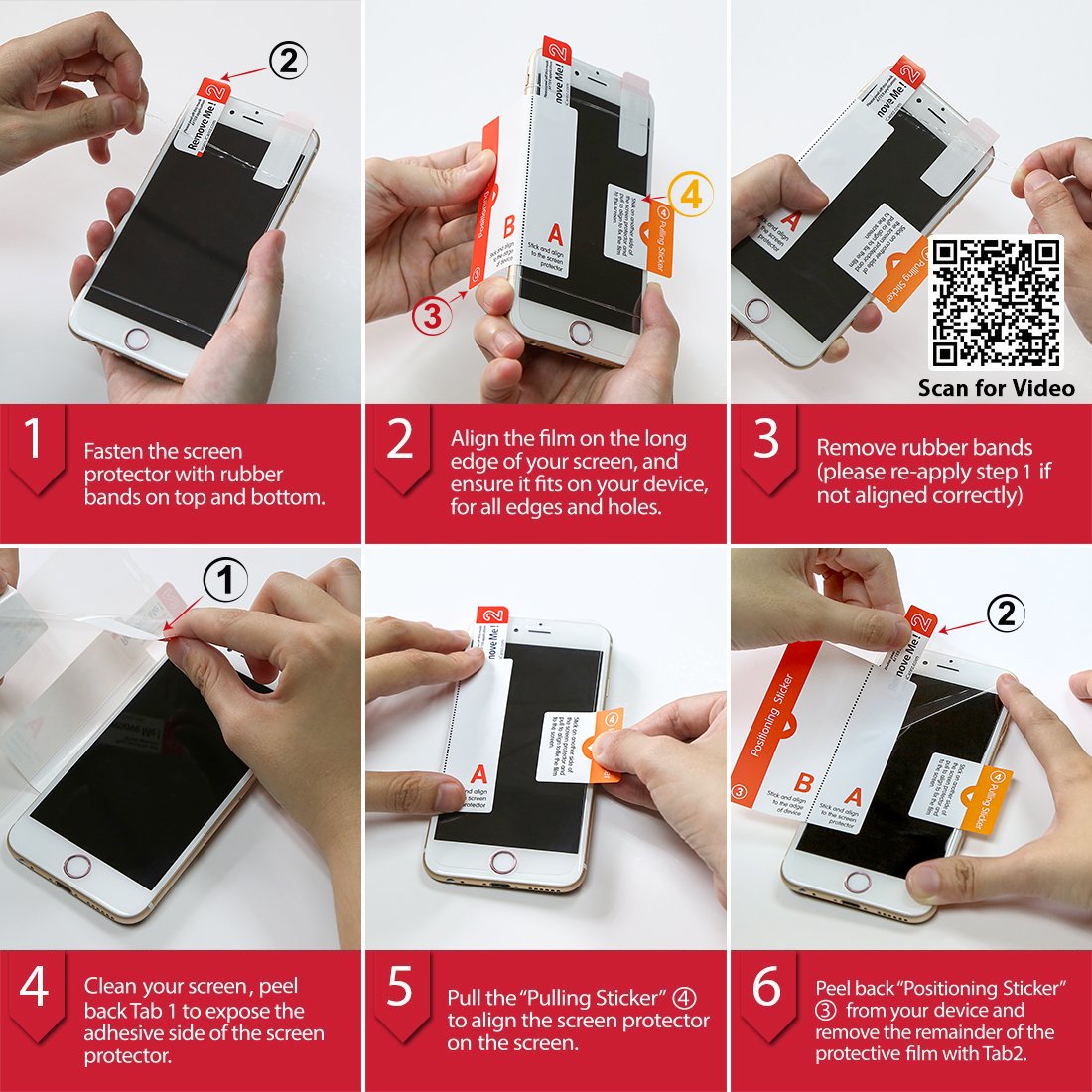
The iCarez Anti-Glare Screen Protector is a premium 12.3-inch matte PET film designed specifically for Surface Pro models 4 through 7. It features a hard-coated 3H-4H scratch-resistant surface, advanced anti-glare technology to reduce eye strain under bright light, and TrueTouch sensitivity for seamless stylus use. Easy to install with a bubble-free hinge method, it also includes oleophobic and hydrophobic coatings to keep your screen clean and clear, making it the perfect blend of protection and performance for professionals on the go.
| Standing screen display size | 12.3 Inches |
| Brand | iCarez |
| Series | iCarez Matte Screen Protector |
| Item model number | iC-SurfacePro4-AG-2 |
| Item Weight | 4.6 ounces |
| Product Dimensions | 13 x 8.5 x 0.2 inches |
| Item Dimensions LxWxH | 13 x 8.5 x 0.2 inches |
| Color | Clear |
| Manufacturer | iCarez |
| ASIN | B016F0VJ9Y |
| Is Discontinued By Manufacturer | No |
| Date First Available | October 10, 2015 |
G**T
TURN OFF ANY CIRCULATING AIR FIRST!
Otherwise you'll end up with dust specks between the glass and protective sheet. The more you try to remove them with the enclosed stickers, the worse they get. The how-to video was really helpful, all the stickers made it easy but it must've been made in a clean room. I followed the video step by step and the application would've worked if my furnace blower hadn't been on. A few dust particles got in and as I tried to remove them, more drifted or were attracted in. UGH. Product is good, just needs to be applied in a very clean room with no air movement. Glad there's a second protector since the dust monsters messed up the first one.
E**C
Good feel. Works okay on Surface Pro 3.
This screen protector is a good improvement for handwriting. I use my Surface primarily for handwritten notes and hate the slippery feel of the plain glass or glossy screen protector. This matte screen protector gives just enough friction to make writing better.The anti-glare property is good, but be aware that it does come at the cost of reducing screen brightness. If your primary use is watching videos, this may be an issue.Installation was very easy and it is one of the best installations I've done. I am not an expert, but ended up with no bubbles! I am using this protector on a Surface Pro 3 and it fits perfectly with the exception of the cutouts being a little large - not an issue because they are on the bezel anyway. I was happy to find another option besides what was available for the Pro 3.
A**
Great product but adult-proof installation.
Once I was able to get it on it was phenomenal. I followed their process on the first screen protector and it failed. Had to toss that one after 20 mins of attempting it. The second one I attempted the installation I always use for my phones or small devices but the screen is too big. 45 mins of trial and error and sticking away dust and bubbles and I finally got it on. Now that it is on it is great. I love the anti-glare and paper like texture, it’s great if you use your pen on the surface pro. Worth it for the money, all of the other paper like screen protectors were like $20 for one. It’s only downside is it’s horrible and complicated installation. If you take your time and practice patience like I did the reward is worth it.
J**L
Easy install and great design!
This is my first matte screen protector and I like it a lot. I decided to choose a matte screen protector after I saw my sister's iPad with one. It is very nice that there is no glare while reading inside or outside. One thing I notice between a gloss vs. matte screen protector is the clarity. Although the matte screen protector is still clear, I can see a "grainy" look to the display. It will be something I need to get used to and probably most people would not notice. Because I work in an industry that requires a critical eye, I can easily spot differences because I have a trained eye. Like I said, most people wouldn't even notice the "grainy" appearance.Regarding the install. This is a dry install, but the hinged install is quite a unique way to install the screen protector. Whoever thought up this design was genius! I typically prefer a wet install because I usually have to spend about a half hour installing because I find all those little pieces of dust on the screen AFTER I have installed the protector. Like I said, I have a trained eye. If there is even one little piece of dust, it would just irritate me to the point of ripping the protector off. When I installed this protector on my tablet, the hinged design reduced my positioning time by half. Then with the additional repositioning sticker and dust remover stickers, I was able to complete my install quickly. I thoroughly appreciated this type of install. It was less frustrating than the traditional dry install and even less frustrating than a wet install.I would recommend purchasing this product. In addition, this comes with 2 screen protectors, 2 clear rubberbands, a squeegee, microfiber cloth, and 2 sets of alcohol wipes, install stickers, re-position stickers, and dust remover stickers.
L**Z
Takes a bit
Blood,sweat, tears and an hour into installing the screen, it turned out really nice! You gotta deal with replacing the pen nubbin more often and pressing harder. But in my opinion it’s a fair trade since you’re able to see the screen way better in all sorts of lighting.It takes a while to install so be patient with taping all the small dust up after the first install, most likely you’ll need a couple lifts to get it completely clear and dustless. Some spots look like they’ll permanently have little bubble marks even though there’s no dust underneath, but they landed on the parts of the screen I don’t need visual clarity.
A**R
good product
good for making the screen matte, just know it kind of distorts the screen colors a bit. It really isnt a big deal unless you are doing photo/video editing.
V**R
If you have a surface pro 2017, you NEED one of these!
works great outside or with bright overhead lights. greatly reduced eye strain from glare. My computer was unusable outside and irritating to use in the office. now there is NO glare inside, and i can even use it outside. also very effective at reducing smudges from fingerprints.
R**N
I carez
works great!
A**R
Looks good.
Very nice.
A**G
Excellent, but...
Quality of the product is excellent, and comes with excellent instructions on how to install it. Also comes with helpful stickers to hold the protector in place while installing it to keep it lined up. I couldn't get all of the dust and lint out to prevent air bubbles, but got it darn close. It took 45 minutes to get it to that point, but it can be done.It has a nice matte look and feel to it, and does an excellent job at reducing all the glare!However the major drawback of this screen protector is that it isn't completely optically clear. Before, the screen of my Surface Pro was spectacularly clear, crisp, and the colors were vibrant. But now the colors are dulled a bit, and the clarity is a bit muddied. Most noticeably is a white screen is no longer just white; now it has a kind of old school tv static look to it, like you can see individual pixels having their white light refracted by the protector to create blues, greens, and pink specks everywhere. So now it basically looks like the screen on my 10 year old laptop.Unfortunately I'll have to peel this off before even really using it because the image quality is just too far out of whack for me.
Trustpilot
1 day ago
1 month ago