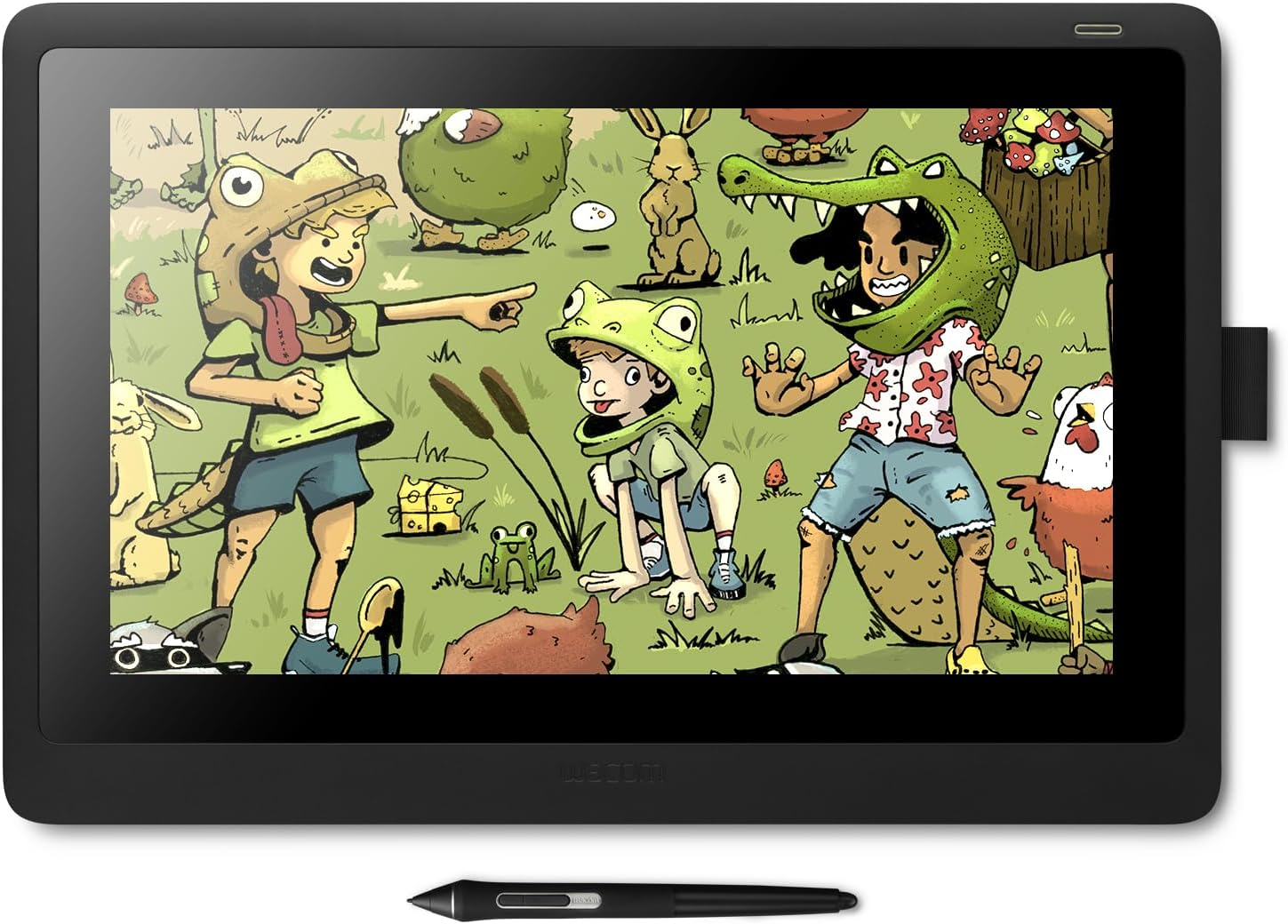
Cintiq 16
Product ID: 97571424
Details
- BrandWacom
- Connectivity TechnologyHDMI
- Operating SystemWindows 7
- Pressure Sensitivity8192 Levels
- Special FeatureAnti-Glare
⚡Tilt & lag-free pen tech
🖊️8192 pressure levels
🖥️15.6" Full HD display
Desertcart purchases this item on your behalf and handles shipping, customs, and support to Cyprus.
🎨 Elevate your art game with precision and style — don’t just draw, dominate.
The Wacom Cintiq 16 is a professional-grade creative pen display featuring a 15.6" Full HD anti-glare screen and the industry-leading Pro Pen 2 with 8192 pressure sensitivity levels and tilt recognition. Designed for artists, students, and professionals, it offers a natural drawing experience with minimal parallax, lightweight portability, and broad Mac/PC compatibility. Its ergonomic foldable legs and included accessories make it a complete, ready-to-use digital art solution that balances premium performance with affordability.


| ASIN | B07L77GTTY |
| Active Surface Area | 13.60" x 7.60" |
| Additional Features | Anti-Glare Glass |
| Best Sellers Rank | #145 in Computer Graphics Tablets |
| Brand | Wacom |
| Built-In Media | Wacom Cintiq 16 pen display, Wacom Pro Pen 2, Detachable pen holder with 3 replacement nibs (standard) and nib removal tool, 3-in-1 cable (1.8m), AC adaptor (12V, 3A, 36W), Power cable (1.8m), Quick Start Guide, Warranty card (Japan, Asia Pacific, China only), Regulation sheet |
| Color | Black |
| Compatible Devices | Mac, PC |
| Connectivity Technology | HDMI |
| Customer Reviews | 4.6 out of 5 stars 3,133 Reviews |
| Display Type | LCD |
| External Testing Certification | ANATEL |
| Global Trade Identification Number | 00753218986399 |
| Item Dimensions L x W | 11.2"L x 16.6"W |
| Item Type Name | Wacom Cintiq 16 Drawing Tablet with Screen (DTK1660K0A) |
| Item Weight | 4.19 Pounds |
| Manufacturer | Wacom Technology Corporation |
| Mfr Part Number | DTK1660K0A |
| Model Name | Wacom Cintiq 16 |
| Model Number | DTK1660K0A |
| Native Resolution | 1920x1080 |
| Operating System | Windows 7, macOS 10.12 Sierra |
| Pressure Sensitivity | 8192 Levels |
| Screen Size | 15.6 Inches |
| Special Feature | Anti-Glare Glass |
| Specific Uses For Product | Drawing |
| Target Audience | Student, Teacher |
| UPC | 753218986399 |
| Unit Count | 1.0 Count |
| Warranty Description | 1 year |
M**C
Perfect size and superb drawing experience.. and complements my Intous pro very well
Recently I bought an Intuos Pro M, after buying a cheap competitor which was worthless. . ( I have an older Wacom tablet and wanted to upgrade ) . I have using tablets for decades and always accepted the limitations. But the Pro Pen 2 really blew me away. So I decided to buy a drawing display. I was looking for something in the 22 inch range.. but 1920 x 1080 seemed too much of a tradeoff.. I think we are at a point in display technology where higher resolution will become very affordable for companies to incorporate into lower end consumer products. ( much like when flat screen technology and HD first started to become cheap ).... I opted for portability. I really like the Wacom One, but I didn't want to give up the Pro Pen 2.. which is really a major decision point ( unless android is something you must have ). The Cintiq 16 is perfect.. Light. Drawing area is a standard laptop screen size... the overall dimensions put it at the size of a 17 inch laptop... ( I stopped getting 17 inch laptops because it was not fun lugging around.. and bag selection is not great ). For the Cintiq 16 I will suffer with the size to drag it around. Setup was easy.. real easy with Windows 10.. I already had the Intuos Pro setup... so my desktop didn't need anything... my laptop wanted a newer driver.. I don't like the cable setup. My laptop does not have an HDMI port.. it is all USB-C... so I had to use a USB hub that Lenovo makes... it had everything on it.. but I had an issue with it seeing the Cintiq as a generic pnp monitor.. ( which I didn't notice utnil the Wacom driver wouldn't let me change display settings. ).. Turns out the fix was easy... I had to do a complete power down of the laptop.. so the hub would reset.. ( took me a while to find this solution.. very common with usb hubs ). But it worked. The cable though.. I wish there were an option to just get a USB-C cable. I would even buy it as an add on... The display on the Cintiq and color is not professional grade, but it is good enough. I have my laptop and desktop displays if I really need to tweak a drawing. The HD on a 16 inch looks great. Lag? I use Corel Painter.. My desktop is high end.. no problem... Laptop is not a gaming system, but it is also not a low end system.. It has an NVIDIA GPU... So no lag either... Could I stream videos and use Painter and not have pen lag... probably not. ( with my Intous Pro I do get lag if I get crazy with having a youtube video up while trying to draw.. with the Cintiq I have had videos up and it didn't lag. might be that Intuos has multi touch ). one other minor thing I noticed.. The Cintiq looks better if it is an extended display and not duplicated. not sure if it is my desktop system and drivers for my graphics cards.. maybe I need to tweak something.. but it is a cleaner and sharper screen if it is on its own and not duplicated. Drawing Experience - The pro pen 2 and this screen are incredible. The feel is great.. I really adjusted my pressure curves.. and it is like drawing with a feather. It was not fun and took a while in Painter, but I really played with the curves for the brushes. Even if you just buy this and use this as a drawing tablet and use your monitor... it is worth it. It is a much smoother experience than the intous .. and for me I get more range out of the pen sensitivity. This does not have multi-touch.. which I like using for navigating the drawing and zooming... This is where I use the Intous Pro.. it makes a nice remote with the express keys .. and the touch ring.. . but I have my multi touch functionality with the Intous pro. and since it is bluetooth I don't have another cord. Not sure if someday the Wacom drivers will complain about this setup.. but for now it is nice. This a solid product. I think real professional artists might find the color range limiting, but not the drawing experience. Part of the premium price is the pro pen 2, and it is worth it.
A**O
Really all you need from Wacom
The 16" basic model is really all you need if you're a professional digital illustrator or even entry level hobbyist. THE GOOD: Firstly we can all agree the price is the best thing about this. For the first time Wacom made an entry level product to an otherwise premium line of drawing tablets. That's great on the wallet and also the mind if you travel a lot with it unlike when I carried around the $2.7k Wacom Mobile Studio Pro 16" and nearly had a heart attack every time my laptop bag took a fall. I'm not saying it's disposable but you might feel more confident using it as naturally as you'd throw around a sketchbook for what that's worth. It's very lightweight. For once Wacom did a good job consolidating the cords to one main cord from the device which branches into three (Power, USB, HDMI) The power brick isn't too hefty. This paired with a laptop and it's power brick will take up a whole carrying case. I use this on the couch at home and a mere single cord coming out of the back is hardly noticeable. I LOVE that it has two lil legs that pop out propping the Cintiq at the perfect angle. I can't complain enough about trying to find a good stand for the Wacom Mobile Studio Pro. I have a heavy hand and lean into the Cintiq pretty hard and these legs are built to withstand it. Previous Cintiqs have had horrible bezel, understandably partly due to shortcut buttons on the sides but come on. The basic Cintiq 16" model doesn't have any and therefore the bezel is bearable, this doesn't feel clunky carrying it around with a laptop or sitting on my desk. I can even prop it up and slide it into the bookshelf when I'm not using it to save space. THE MEH: As mentioned before, there are no shortcut buttons. I'd personally list that as a pro but some of y'all have grown dependent on them. I have been using custom macro pads and the Wacom Express Key instead for some time so for me it was a great trade off; no buttons, small form factor. Others might disagree. Some would also argue that the screen resolution is a downgrade. I'm used to my Cintiq 22HD so having two devices both at 1920x1080 made it easy to switch between the two. Otherwise I would go from the 22HD to the Wacom Mobile Studio Pro 16" which had some stupid crazy resolution and it messed me up for a couple reasons. I do fine line inking at 100% zoom in Photoshop which looks totally different on higher resolutions. Also the Photoshop UI, menu placement and text size will change depending on resolution. Personally I don't care but if your work consists of editing high resolution photography/painting with a wider color gamut, then reconsider the higher models. THE UGLY: Nothing so far. This is honestly the best Cintiq I've owned. You wanna talk cons? Before this I was an early adopter of Wacom's Companion, their first all-in-one device, and although it failed me on a few levels I figured it was only to be expected from Wacom's first gen tech. Boy was I wrong, after I sat out the Companion 2 and splurged for the unforgivably awful Wacom Mobile Studio Pro 16" it became clear Wacom lost their damn minds. Mistakes were made. BUT these were used as MOBILE digital drawing devices. An important distinction when comparing them to this Cintiq 16" simply as a drawing tablet tethered to a PC. I still use my Cintiq 22HD at home for heavy work mainly because it's bigger and the large scale of the artwork I'm creating. If my back hurts I like to use it on the couch with my laptop. But this beautiful Cintiq 16" is so minimally perfect that if I didn't already have my 22" it'd be my primary device at home as well as abroad. It's clear Wacom suffered some sort of stagnant complacency after having a monopoly on tablet tech for so many years. If I had to guess this entry level Cintiq model is a response to other capable tablet brands coming in hot on their heels. It's a flinching plea to the users who were drawn away to the iPadPro/iPencil/Procreate which I admittedly tried after the Mobile Studio Pro failed so hard. But this beautifully simple 16" model might just do the trick.
J**M
The perfect entry level pen display
This pen display is more or less perfect, especially given the price. Before purchasing this display I tried the Huion Kamvas pro 13, which was just a total disaster. The driver's calibration tool literally doesn't work (Google it!) so if you don't have an adequate calibration out of the box you're out of luck. The pen didn't activate until you pressed down with some force, so it made light sketching impossible. The anti-glare "grainy" look on this display is stronger than its competitors, but that's par for the course on IPS panels. If you've never used an IPS panel with anti-glare before it might take some getting used to: You may even think the panel is ugly. Unfortunately there's not a ton that can be done about this, as the pros outway the cons of using a matte finish for a pen display. Either you get this grainy look or you get glare and huge smudging from your hands as you draw. Competitors such as Huion send a "Drawing Glove" with their product to combat this issue, but honestly i'll just take the glare reduction layer every time. Maybe in the future the technology will advance far enough to where we find a solution without any cons. Some advice to anyone buying this display: Googling "Wacom cintiq drivers" and finding the driver installation page isn't the place to go for setting up this display. The download page has you download the app that is on the microsoft store and will give you a message telling you to install the pen drivers to use it. At first this surprised me, and I couldn't find the driver, then I realized that I should really just read the included documentation in the product's actual box before anything else. What you really need to do is look at the quick start guide which directs you to wacom.com/start, then select that you purchased a "Cintiq" (it just says Cintiq, not cintiq 13 pro or 16 pro etc etc, wacom calls this model just "Cintiq"). Once you've installed the drivers and hooked it all up you might find the brightness of the display lacking. I know I did, and it turns out there's actually a brightness slider in Wacom Desktop Center! Once I upped the brightness it was perfect. In all honesty this pen display will be more than enough for anyone short of a true professional who requires perfect color, huge screen real-estate or larger resolution. I don't feel limited in any way by this pen display, the pen is perfectly accurate (And backwards compatible with my Grip Pen from my older Intuos Pro, in case i want the older Felt tips!), the resolution never feels like a limiting factor and I don't notice any parallax literally at all. The only thing I will say is that the display's size is a little awkward. It's slightly too large to be truly portable (then again, it does require HDMI, power and USB, so it's never going to be truly portable) and slightly too small to be a true additional monitor. If you require either of those use cases, look to a different display. It's perfect for me who already has a multi-display setup and i'm using this pen display for drawing only, but this isn't going to see the same kind of use that those other displays do, unlike the 24 inch model which I may have been able to use with an arm mount to truly replace one of my displays.
S**.
Best bang for the buck
After using this thing for a year I'm ready to give my two cents. I primarily use the cintiq for concept art and design. I do alot of line drawings and some painting. There is really only one downside I've come across when using the cintiq 16. If color accuracy is a primary concern of yours, this screen will not be able to deliver the same range as a high quality 4k monitor. That doesn't have to be a deal breaker as long as you keep these limitations in mind when working. Chances are, if color accuracy is that important for your work you will already have a good screen to check color anyway. Now for the good. This is an excellent product and a great bang for your buck. You will not regret this investment. It's worth every penny. No matter your skill level, this product can do just about anything you could ask of it. It has all the necessary features you'd want of a pen display and it works great right out of the box. Drawing on this thing is a dream. If your someone who likes the feel of drawing on paper, I think you will find the surface of the cintiq 16 a comfortable fit. It's got just enough tooth on it without sacrificing image clarity on the screen. There is some parallax around the edges, but it never gets in the way of the work. I cannot stress enough how great this thing is for drawing especially. The pen sensitivity is the closest I've felt to working with paper and pencil. It's really shocking how good the pen sensitivity is on this device. If your a stickler for draftsmanship this pen will not disappoint. The screen size is also pretty great. 16 inches seems to be a perfect size for a device like this. It's small enough to move around and store somewhere safe when it's not in use. It's also big enough to work on without zooming in and out all the time. Your comfort level may vary depending on your desk and chair setup, but in my case I haven't really felt the need to buy the separate adjustable stand. The built in legs that fold out on the bottom have been sufficient. The cable connection plugged in the back of the device is beautifuly designed to stay locked in place and not be susceptible to damage from moving the device around. Whenever I'm not using it, It's easy to just pick up and rest it against the side of my desk. It's wonderful. Wacom drivers, despite some occasional bugs, are the best I've used. You will not find a more customizable experience. They really are the gold standard when it comes to pen displays. You get what you pay for with these products. I've used cheaper pen displays in the past and the software was light-years behind Wacom. It doesn't matter how good the display is if the software doesn't work. Period. I've used Wacom products for many years and they deliver a consistent and stable software experience. I hope you found this helpful. It's a great product that I'm happy to own. I think you will too.
H**R
Traditional tablet users won't regret the upgrade
My background: I'm a traditional and digital artist and graphic designer with ten years' worth of off and on experience with traditional Wacom tablets, most recently the Intuos 3 Pro. Pros: This thing works exactly the way I wanted it to. My struggle before was the hand/eye coordination involved with drawing on one thing and looking at another. The Cintiq closed that gap the way I was hoping! Once you calibrate the pen, you won't notice the parallax. There's the tiniest delay between pen input and output, but after you get used to it, it's just not an issue. The pen works great and the pressure sensitivity is exceptional — no weird glitches or blobs the way my old tablet would sometimes do. The built in stand is super sturdy and useful. And I'm finding that the 16 screen width is actually plenty of space for the kind of hobby art I want to create — and the trade off for the slimmer profile of the smaller size is actually preferable to me. It's also relatively plug and play: just download the driver from the website like the booklet says. No issues getting it all to work on a Mac, so they must have fixed that connection problem some other reviewers mentioned. The cons: There's no gesture support, and it would be nice to just have pinch to zoom at my disposal, but I knew going into this what I was buying and I can live without that for the price point. I have only two real complaints. The first is that the color accuracy is actually noticable when you check against a MacBook Pro screen. I guess this can be managed by having your monitor close by, but it can be a bit of a pain to keep checking when you're doing digital paintings. But it's not the end of the world for my particular use. The second issue I have is with the cords. The power cord is three pieces long if you include the three-in-one, and it's obnoxiously inflexible. And if you want to use this with something like a MacBook Pro that only has USB-C, you may need to get a couple of adapters for the Cintiq and your external monitor in order to accommodate two HDMI cables. I was fortunate to have one on hand, as well as a USB to USB-C, or I wouldn't have even been able to test this out upon receipt of the product. Bottom line: if you're a budget-conscious artist and you want to make the leap from traditional to screen tablets, you can't go wrong with this one.
R**X
A wonderful tablet with a stinky price tag
As much as I love this Tablet, I can't justify Wacom's VERY expensive price tags. These days you could get a bigger screen and something that does even more than this tablet for half the price. With that said, though, you can't deny Wacom's quality. If you really want a good quality tablet that you can rely on and know it'll last a while, this could very well be the best for the "cheapest" price. Pros; - The pen. Oh boy, the pen. Had to break it in a bit to have it feel smoother but now there's no problems whatsoever and with the extra sensor on the back functioning as an eraser feels like drawing with a pencil again. Why aren't all styluses like this? I'd probably buy the cintiq just for the pen. There's only two buttons BUT with the software, one button can open a radial menu with other functions to tap/select. And that menu, along with the buttons, can be mapped to a looot of functions, even starting a program. - A good, sturdy tablet. I think I've bonked the screens a few times on accident, had it slip off my holder and smack the desk, etc. No wear, no tear, not even a scratch. And sometimes with my meathead hands I press down hard on the screen and yet still no scratches. - Easy to use three in one cable. The part that you plug into the Cintiq is at the top so It allows for easier cable management up to the end point where it splits off into a power supply, usb and hdmi. (Much needed for my unorganized butt.) - The display is in 1080p which is perfect for any needs. Could even just use this as a second monitor or even your main monitor if you so choose. - No buttons! Just the power button on the top right. Kind of a con for some BUT; with things like touch sensitive buttons, or just sensitive buttons in general I tend to accidentally rub my arm against them as I reach for my keyboard or I'm doing very long strokes and it ruins mY LINES. No buttons for Rexy. - The rubber padding or what have you and somewhat heavy weight keeps it perfectly in place no matter how hard you push down on it. Best part? They actually fitted them into the back of the tablet so unlike other rubber pads on tablets these days, they don't slowwwly slide off as you adjust the tablet every so often. Cons; - No buttons. Some people really like buttons for hotkeys, and I noticed how annoying it is to try and draw in bed with a tablet that has no buttons. I'm holding up the tablet with one hand, drawing with the other, gotta take my hand off to hit the keys on the keyboard yadda yadda. But in an office/desk environment you'd just have to set it up to be able to reach your keyboard and that's it. Not really a huge con. - No stand, sold separately (and those are pricey, too. They'll cost an extra $30-$80! or even more!) I hadn't realized this until I started using it. What if you wanted to use it as a monitor when not drawing? This thing is a bit heavy so it's awkward to just perch it up even with a jerry rigged harness of some kind. Very annoying. Especially since the props that hold it up in the back don't go up too high. - Not the most advanced software. I took a look around in their manager and while I do very much appreciate that you can change things like color settings- that's about it for the display besides brightness and aspect ratio. The only impressive settings are for the pen where you can map all kinds of things to the radial menu or the buttons themselves. - No pen holder (besides the weird sleeve on the right side.) Honestly, I feel like it's growing on me, so also not that bad of a con BUT it feels kind of annoying at times. The rubber's so soft and hgih quality that it'll grip to the sides and I gotta slowly yank it out, or just take out the pen with the sleeve wrapped around it but then the thing holding the extra nibs is in the way and it's sort've annoying to find the slot to put it back in. Maybe this is just a me issue, though.
N**U
My first professional drawing tablet. I love it so much.
The 16 inch tablet is a large enough screen for most artists in my opinion. Having a screen larger than this would be an inconvenience. I highly recommend this tablet. I almost went with a more affordable brand such and XPPEN or Huion but decided to spend the extra money to get a Wacom tablet. I don't regret this decision. This tablet is the most beautiful piece of technology I own, it is designed in a way that makes the tablet itself look like a work of art. It is extremely high quality. The pen is comfortable to use, even with my very small hands. I recommend buying and artist glove if you typically draw with your hand resting on the screen. The matte finish on the screen makes it a little harder to glide the skin of your hand across it while pulling a line. The glove would solve this problem. I used to draw on an iPad screen with apple pencil and switching from that to this tablet is like night and day. This tablet makes it feel like you are drawing on paper. The display is stunning and color accurate. The software was a breeze to set up and use. The buttons on the pen are very useful for shortcuts. Using this tablet is so enjoyable that it has made me enjoy making art so much more than before. I can see this tablet lasting me several years at the very least. 10/10.
F**E
In love and hoping for years of artistic adventures
I'm already in love with it, but this review also serves as a comparison to what I upgraded it from (for perspective) which was the Cintiq 13HD. The size, weight, shape of it - all as expected. The one physical button on the screen is the power button - which is instantaneous compared to the 13HD which required a press and HOLD to turn it on/off. (The 13HD had physical buttons on the left side for programable shortcuts. I never, ever, used them. I tried - could not get my hands to cooperate. I am used to one hand on my keyboard instead). However, upon powering on, it does take a second and is "starting up", so the downtime is the same. The screen feels nice, the same sort of matte paper feel I'm used to. The resolution, to me, is whatever. It's no better/worse than my monitor or the old one, to me. And it's not something I was looking to change either. I knew what I was getting into there. (it's 1920x1080) I've actually had way more reliability with instantaneous workability. Previous tablet took calibration and setting changes and all this. The moment this one turned on, it recognized the screen as the tablet and everything just worked. Even upon reboot, for about 10 seconds it thought the pen was on my monitor and then -boop- right back where it was supposed to be. I'm not one to use software trials included with the purchase - because I already have software i use and prefer. But there has been confusion I've seen with other's thinking that when they say that, for example, Clip Studio is included, it's the full product. No, it's a free trial. OH! So, the 13HD came with an included stand that offered 3 levels of incline to work with. Which was great. This COMES with only 1, the little feet that are included with the tablet. I was not having that, so I did budget for, and purchase, the 'sold separately' stand for it - which is also phenomenal. All in all, I had the 13HD for over a decade of perfect workability. It still works. So far nothing about what I'm working with here leads me to believe this will be any different, and I hope to get many years out of it. (Though I will update if something does go awry)
Y**S
Calidad Wacom
Es una tableta excelente, fácil de configurar. El precio tal vez es un poco elevado pero te quedas con la tranquilidad de que es un producto de Wacom por lo que sabes que su durabilidad está garantizada. La resolución es muy buena y la variación de color es prácticamente mínima, en mi caso la uso en conjunto con una iMac 4k(la tableta es full HD solamente) y funciona perfectamente. La he usado en Photoshop, Substance Painter, incluso en Fusion 360 y es genial. Puedes realizar configuraciones personalizada para cada software que uses. La pro pen es definitivamente una de las mejores plumas de wacom, muy cómoda y con precisión excelente. El efecto parallax existe como en cualquier tableta pero es prácticamente nulo. Para usuarios que deseen una resolución mayor a full HD les recomendaría mejor la opción de la cintiq 16 Pro.
F**A
Bom investimento
Produto chegou antes do prazo, muito bem embalado. Ele é de fácil instalação e seu uso se torna fácil a medida que se vai praticando. De certo é um ótimo up grade para quem já está habituado com a Intuos. Vale o investimento! A única coisa que não me agradou foi o fato da inclinação da tela ser baixa e isso causa um erro cansaço muscular, é necessário o uso de suporte para ficar confortável.
H**N
Quality you can see and feel!
This is an amazing quality product. I have used a WACOM pen tablet for years for my photo art in Photoshop and Painter. This is my first display tablet. I had purchased a HUION Kamvas GT221 which was a much bigger screen, but could not get the screen colour balanced or even close to the appearance of my other main screen. I quickly returned it and bought this tablet.My Cintiq 16 displays colours,contrast and brightness the same as my IMac. The only set up issue was needing to reboot my computer to get the pen and tablet talking with the rest of the computer. Easy set up but worry if one of the wires get faulty the whole cable set up has to be replaced because all 3 cables are fused into a main connector that easily plugs into the tablet.However I have never had that issue with other Wacom pen tablets so this might be a needless worry. The pen feels like the other WACOM pens, there are no batteries to recharge or replace (unlike HUION ). The tenxure on the screen is natural feel. There is no lag between pen curser and my drawing action. I like that this is not a touch screen as I find even with a glove its easy to set off touch screens and buttons on the side of the screen - which was the problem with the HUION touch screen. I loved the HUION and is more affordable but the quality just wasn't what I could work with compared to WACOM. Cintiq 16. If space is an issue for you, then you might want the smaller WACOM but it is a touch screen. Download the driver from the Wacom website. Then plug in your tablet. It easily recognizes it....then reboot to get the pen working as well. I also had to buy and HDMI adapter to thunderbolt drive as IMAC doesn't have HDMI connections. A The stand is extra....GRRR - however it is a quality product as well, but adds to the cost and certainly makes alternatives like HUION very very attractive...but it is what it is for now. WACOM costs...but you do get what you pay for. I like the amount of real estate for the actual image on the display. (A larger model - 22 inch - would be great...but it comes at a significant higher price....maybe next time!). Buy what you can afford. Amazon usually has an outstanding return policy that gives you time to see it it works for you.
C**.
Perfeita!
Tão boa quanto imaginei! A facilidade de desenhar comparada a intuos pro é infinitamente maior, estava a meses tentando aprender a desenhar na intuos e avancei muito pouco, então decidi trocar pela cintiq, melhor investimento. Desliza um pouco mais que um papel, é obvio, e é preciso saber utilizar os softwares, mas a sensação do desenhar é a mesma, pois os olhos e a mãos estão em sincronia. Concordo que a loja precisa melhorar a embalagem, pois o papel rasga, assim sujando e amassando a caixa da tablet, podendo ocorrer algum dano.
C**L
Incredible device!
I bought this as a gift for my spouse as she is the artist. I am truly impressed by the result and quality. From my perspective the art she produces is accurate and the representation of medium (drawing, paint, pastel etc) are very accurate. She tried different types of art with the tablet and they all look "real". From her perspective her comments were that the feel is very nice and natural with the tablet. She says the feeling is like drawing on a paper pad so its easy to get started and very intuitive. The mat glass finish makes it comfortable to work on for hours and does not tire the eyes as much as staring at a screen or other kind of tablet. Perfect score as far as we are concerned. I even recommend taking this model above the PRO (more expensive) models. The quality is so high I don't see what the pro models might bring that this one does not.
Trustpilot
3 days ago
1 month ago