We remain fully operational. Our teams are working around the clock to ensure your deliveries continue safely.

DOWNLOAD THE APP


Customer Services
Copyright © 2025 Desertcart Holdings Limited
DOWNLOAD THE APP



Buy anything from 5,000+ international stores. One checkout price. No surprise fees. Join 2M+ shoppers on Desertcart.
Desertcart purchases this item on your behalf and handles shipping, customs, and support to Cyprus.
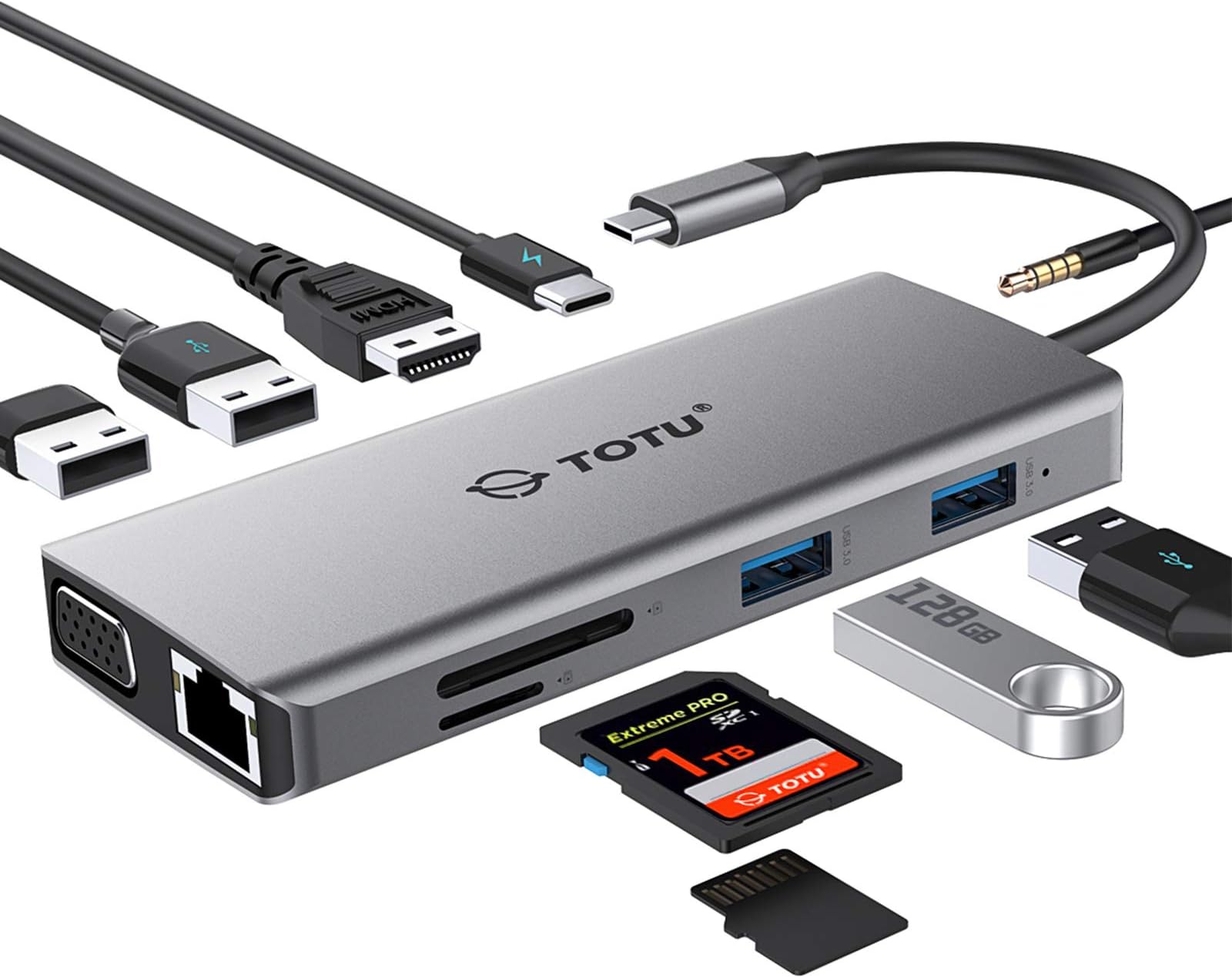
🔌 Power, ports, and pixels—unleash your productivity in one sleek hub!
The TOTU 11-in-1 USB-C Hub is a compact, multiport adapter designed for professionals who demand seamless connectivity. Featuring 4K HDMI output, dual display support, 87W PD fast charging, and a comprehensive suite of 11 ports including Ethernet, USB 3.0/2.0, VGA, SD/TF card readers, and audio jack, it ensures compatibility across Mac, Windows, Linux, and popular smartphones. Perfect for on-the-go managers and creatives seeking to streamline their workspace with a single, powerful device.


| ASIN | B07M8HLGBF |
| Additional Features | Powered |
| Best Sellers Rank | #5,595 in Our Brands ( See Top 100 in Our Brands ) #15 in Computer Networking Hubs #637 in USB Hubs |
| Brand | TOTU |
| Built-In Media | no |
| Color | Grey |
| Customer Reviews | 4.4 4.4 out of 5 stars (1,929) |
| Data Transfer Rate | 5 Gigabits Per Second |
| Enclosure Material | Aluminum, Plastic |
| Global Trade Identification Number | 00788000917138 |
| Hardware Interface | Ethernet, HDMI, USB 2.0, USB 3.0, VGA |
| Item Dimensions L x W x H | 4.7"L x 1.9"W x 0.5"H |
| Item Weight | 113 Grams |
| Manufacturer | TOTU |
| Mfr Part Number | TT-HB002D |
| Model Number | TT-HB002D |
| Number of Ports | 11 |
| Operating System | Chrome OS, Linux, Mac OS, Windows |
| Total Usb Ports | 4 |
| UPC | 788000917138 |
| Unit Count | 1.0 Count |
A**A
iPad Pro 2018 tested, compatible!
I bought this for my iPad Pro. I searched far and wide for this particular hub, and it wasn’t an easy find, but I would say this is the best hub by far, for the iPad Pro. My requirements were that it have hdmi, 3.5 mm jack, at least one usb type a port for charging my phone, and support for charging the iPad while using other accessories, as well as not being flush with the side of the iPad due to the case I use. For me, the Ethernet, VGA, and other ports are bonus. Regardless, this hub works great. I have tested most ports and as long as the iPad supports them, they work. I have not specifically tested the Ethernet or VGA, but from what I have read otherwise, they should work well. I know specifically that both SD card readers, 3.5 mm jack, HDMI, and all the USB A ports (note: none of these work to attach external storage except for importing compatible photos, this is due to a lack of iOS support) work well, simultaneously, while charging the iPad through the one USB C port. The build quality is solid and lightweight. The little travel case is a nice gesture but ultimately useless. It is portable enough for me with a backpack, but if you are looking for something very portable, this isn’t it. This is more a do-all hub rather than a minimalist hub. Overall, this is well worth the price for what you get. Everything you have been missing since the advent of USB C is here, in a solid package and well-manufactured.
H**E
Top Dog
This is my second USB C hub that I purchased, so this will be somewhat of a comparative review. TOTU's USB C Hub comes with 11 total ports, which are: 1) 1 VGA 2) 1 HDMI 3) 1 Ethernet 4) 1 Audio/Mic 5) 1 SD Card 6) 1 Micro SD Card 7) 2 USB 3.0 8) 2 USB 2.0 9) 1 USB C Charging Port - 87W Max This hub has practically everything you could want in terms of ports, and if you're someone who likes to future proof in case the need arises for another particular port, you can't go wrong here. The build quality is actually quite nice. Coming in at 2" x 4 3/4", with a wire length of 5 1/2", it's definitely quite compact and shouldn't be a bother to travel with. I posted a photo of it next to a 2018 13" MacBook Pro for reference. It also has a nice weight to it, where unlike my other hub, it doesn't feel cheap. One standout feature is that there's an indicator light when plugged in. This gives you a peace of mind that the hub is in fact working, and was sorely missed on my other hub. It comes with this really cool traveling pouch to protect itself and whatever else may be thrown within your bag. It also has a unique design that allows you to bend the wire and put it into a little side slot next to the main one, something I've never seen before. Most USB C hubs I've looked at, even the other one I purchased, don't come with a pouch, so it's definitely a nice bonus to consider. Through my testing, everything works as you would expect it to work. All that's left for you to do is really compare other hubs in terms of price per port, and try to get the most optimal value for your needs while factoring in the extra features this one has to offer.
M**A
Worked Better Than Expected
I was skeptical that this one single hub would work well with all different attachments (ie. USB3, USB2, SD cards, etc), but I have had this hub for a couple weeks now and have been able to use the USBC, USB3, USB 2, and SD card slot successfully. I bought this specifically for my new 2018 MacBook Pro which only has USBC ports. While I love this computer, I hate that I can't plug USBs and SD cards directly into it like I could with my last 2010 MacBook. Having this one attachment that can can accept inputs from a wide range of devices will be incredibly helpful moving forward, and now I don't have to worry about storing and searching for individual attachments as well. This comes with a cute little faux suede drawstring bag to store the hub in and keep it safe, and it is easily accessible and takes up little room inside by top desk drawer. This hub will be used a lot, and I am pretty sure that it will stand the test of time because it seems pretty durable. Other people have reviewed that the things you plug into this port don't go in all the way, and I have experience this as well. It's not that you can't push them in all the way, it's just that you only need to insert a small part of your cord or card into the hub for it to work. The one problem I had was not anything to do with the hub. I have a Seagate external hard drive for all of my pictures, movies and other files that take up space on computers. When I plugged it into this hub, my computer didn't recognize the external hard drive. I found that I had to go to Seagate's website and download updated software to make my external hard drive work on my new MacBook (which has newer software and OS), and then I was able to successfully mount the drive to my computer when plugging into this hub. I was also able to plug in an additional external hard drive to the hub at the same time so that I could back up the first external hard drive to the other one. (I take a TON of pictures and videos, so I am very cautious about having backups). I was able to copy about 1T of data through the hub in about 3 hours, which is pretty standard if not faster than standard. Everything works great! Thanks!
R**O
Packaging unit is a bit small, but everything fits inside. The quality of the adaptor is nice - matches Apple's MacBook Pro "Space Grey" color -, and can be seen in the pictures. The USB-C little cover is a nice touch as well. I have not tested all the ports yet, but the charging port and the 2 USBs 3.0 work well. If anything doesn't work as expected, I will write afterwards, but I don't expect any issues. The tiny sleeve package is nice, though the design for the cable inside doesn't really make much sense to me. Good value for money.
N**U
Nous avons acheté un nouvel appareil Apple sans entrée USB. Comme nous en avions besoin pour utiliser nos clés USB pour notre travail, nous avons acheté cet adaptateur qui est très utile et facile d'utilisation.
W**.
I am really disppointed with this HUB, my hdmi keeps disconnecting and a lot of noise in the display -- it seems faulty. I tried another hub that is half the price (£20) and it works just fine.
G**Z
Macht was es soll. Bin zufrieden.
T**M
An und für sich kein schlechtes Produkt. Eines der wenigen mit insg. 4 USB-A Anschlüssen (2x USB 2.0 und 2x USB 3.0). Wird relativ schnell sehr warm, aber das ist anscheinend normal. Leider funktioniert der Hub aber nicht mit einem Acer Travelmate p2 und Windows 10. Es verhält sich hier so als ob man den Hub im Sekundentakt aus- und wieder einstecken würde. Habe alles versucht (Bios Update, Windows Updates, sämtliche Device-Treiber Updates), nichts hat geholfen. Auf anderen Notebooks (Lenovo T470, Lenovo T490s, HP Pavillon) hat es problemlos funktioniert. Daher musste ich ihn leider zurück schicken da wir es grad für einen Wechsel der Geräte (HDMI Monitor, LAN, USB Eingabegeräte) zwischen dem Acer Schulnotebook und HP Gamingnotebook gebraucht hätten .... Der Anleitung liegt zwar eine Liste von inkompatiblen Geräten bei, der Acer ist da aber nicht aufgeführt.
Trustpilot
1 month ago
2 days ago