Label Your World with Style! 🎨
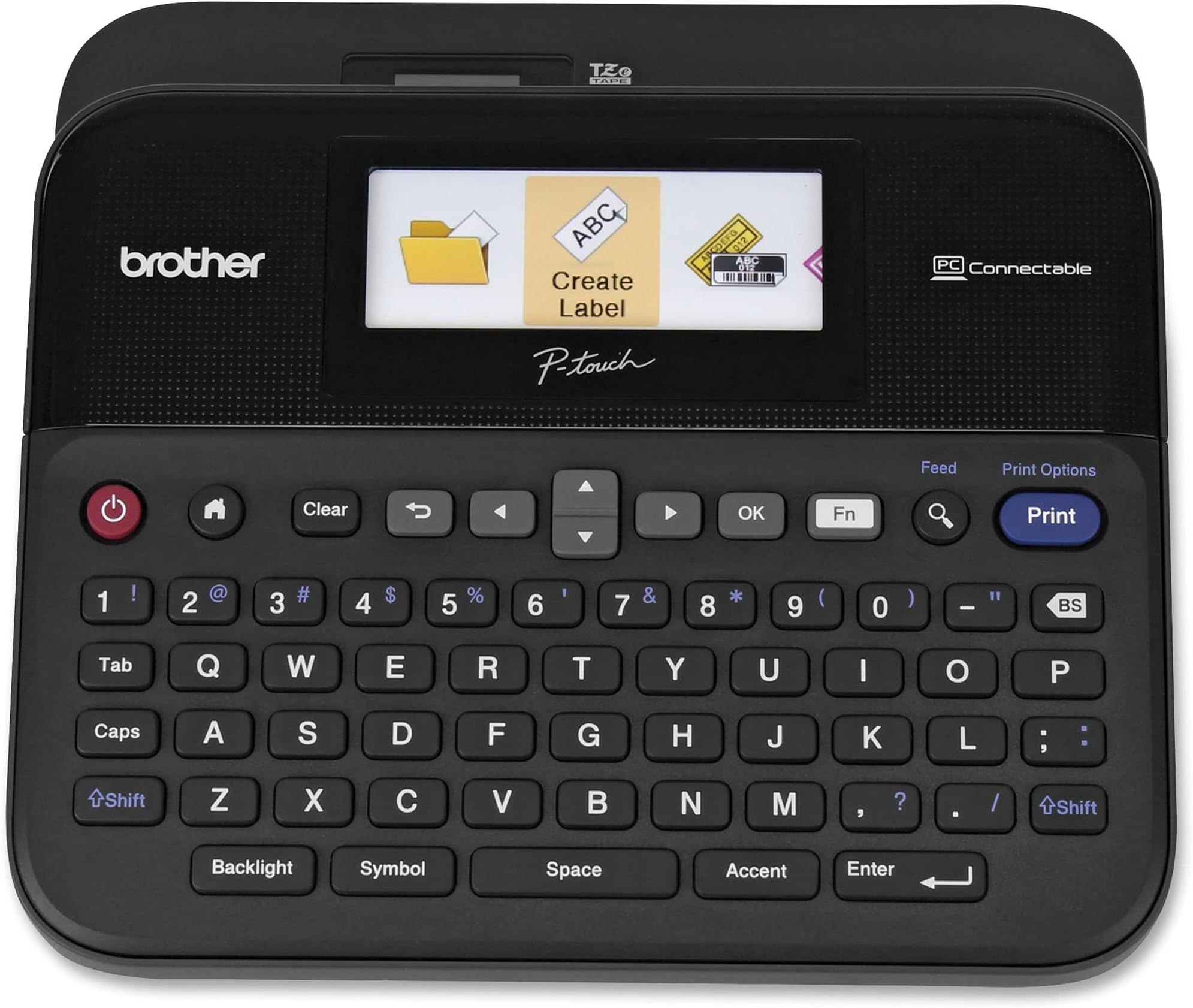
The Brother P-touch Label Maker PTD600 combines a smart compact design with a high-resolution color display, allowing you to create professional labels effortlessly. With PC and MAC compatibility, this labeler offers versatile functionality for both home and office use. Its portable design ensures you can label on the go, making it an essential tool for any organized professional.


| Maximum Print Resolution Black and White | 400 dpi |
| Is Electric | Yes |
| Duplex | Automatic |
| Dual-sided printing | Yes |
| Color | Black/gray |
| Maximum Sheet Capacity | 1 |
| Media Size Maximum | Paper Roll |
| B&W Pages per Minute | 1 |
| Color Pages per Minute | 1 |
| Total USB 2.0 Ports | 1 |
| Total Usb Ports | 1 |
| Hardware Connectivity | USB |
| Connectivity Technology | USB |
| Ink Color | Multiple (black, red, blue, etc.) |
| Warranty Type | limited warranty |
| Control Method | Touch |
| Controller Type | iOS |
| Print media | Labels |
| Display Type | LCD |
| Compatible Devices | PC, Mac |
| Printer Type | Thermal |
| Additional Features | Internal Memory, Display Screen |
| Printer Output Type | Monochrome |
| Item Weight | 2.1 Pounds |
| Item Dimensions D x W x H | 7.6"D x 7.9"W x 3.4"H |
R**.
A Very Useful Label Printer That Can Be Connected To A Computer To Make Labels
This printer replaced a 12 year-old Brother P-Touch printer that died. I like that fact that this one can be hooked up to a computer, and, by way of included software, and an included USB cable, can print labels by using my computer keyboard. The software allows the user to see how the label will look when printed. The user is able to select from about 10 fonts, font size, multiple borders, and even the ability to print UPC and EAN product barcodes, as well as other industrial barcodes. The printer also has the capability to print multiple lines of type, such as an address label., depending on the size of tape cartridge installed into the printer. The printer also has a relatively large color screen for easy reading, when the printer is not hooked-up the a computerI am a huge collector of movies on DVD and Blu-ray, and have run out of storage space, so I have to stack the movies in their factory cases, in alphabetical order, cover-side down, to make more room on the shelves. Originally, when video discs first were released , the plastic cases were all labeled across the top edge with the title and other information, pertinent to the movie, such as whether it was a "director's cut," or "widescreen," etc., but, I suppose, to save on production costs, more and more discs have been released without a title sticker attached to the top edge of the plastic case. So, with this Brother label printer, I am able to put titles and UPC barcodes on all of my movies and other videos in my collection, so I can find a particular video when i want to play it.The printer comes with a starter 11 millimeter tall TZe white tape cartridge (which is what I am using for my movie case tagging project), that is plenty big for most other projects around the house, such as labeling the contents of tool drawers and cabinets, etc., and a taller, 24 mm TZe tape cartridge that can print larger labels, such as tagging the individual circuit breakers for the house, or labeling storage boxes and crates. The version I bought, the PTD600VP, has a nice, heavy duty, black plastic carrying case that hold the printer, several printer tape cassettes, the USB and power cords, which is nice to have, should I ever need to use it away from home.Oh. and BTW, as much as I like this printer package, I have found that the aftermarket TZe-compatible tape cartridges, sold in bulk, here on Amazon, from various vendors, are just as high quality as those made by Brother. at a much more economical price. Except, maybe, for the cartridge color, and the omission of the Brother logo, they look and perform the same as the OEM tapes. I bought several 10-count packages of the Zencoma compatible TZe tapes for $28.99 each, compared to a 4-package of Brother tapes, which I bought at Costco, for over $45.00, or even more, bought individually at Office Depot or Staples.
S**S
Good label maker, great value
This is a great label maker with lots of functionality. It automatically cuts the label for you, but be aware of a couple of things. First, there is a minimum length of the label so if you want to make a label with one short word, there will be a gap at the end and the word won't be centered. Second, it will almost always cut anbout an inch off the tape before it prints and cuts the actual label, so you have to factor in some product loss as a result.There's another issue I discovered. When I downloaded the printer driver and software to my laptop, it completely reset not only my default printer to the label maker, but it also completely reset the printer properties and preferences (print quality, etc) so that I had to redo my printer defaults in order to print docs from my laptop to my regular printer. Just be aware of that.The carrying case is handy, but the first few times it takes a bit of an effort to open the case. It gets easier each time you open and close it. Major flaw in my opinion is that, while there is a recessed area in the case for the cartridges, it does not fit one cartridge of every size that the label maker can use. I like to have every size available to me, and it would be convenient to be able to put all the cartridges inside the carrying case for safekeeping and ease of use. Instead, I'll have to keep all but 3 or 4 cartridges (depending on the width) in a different place. It is convenient that there is automatic detection of the width of the tape, so you don't accidentally try to make a label bigger than the cartridge that's in the label maker.I use this label maker mostly to label my binders and folders of sewing patterns and recipes, and to label objects in Polish so I can remember vocabulary words in my efforts to learn the language. Very convenient that I can use the unique letters that are part of the Polish alphabet!
J**N
Overall good
Great product but a little bit pricey. Printing quality is good and the font size is adjustable. I also bought the transparent label but found the white label is more useful, especially for sticking on dark color surfaces.
Trustpilot
3 weeks ago
2 weeks ago
3 days ago
2 months ago