Desertcart purchases this item on your behalf and handles shipping, customs, and support to Cyprus.
💾 Unlock endless storage — because your data deserves the best!
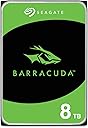
The Seagate BarraCuda 8TB Internal Hard Drive (ST8000DM004) offers a colossal 8TB storage capacity with a reliable SATA 6 Gb/s interface and a 256MB cache for optimized performance. Designed for desktop and gaming setups, it delivers sustained transfer speeds up to 190MB/s, backed by two decades of Seagate innovation. Ideal for professionals managing large media libraries or multitasking workflows, this 3.5-inch mechanical drive balances capacity, reliability, and value, all in eco-conscious packaging.


| ASIN | B07H289S7C |
| Additional Features | Data Recovery Service |
| Best Sellers Rank | #4 in Internal Hard Drives #25 in Computer Internal Components |
| Brand | Seagate |
| Built-In Media | BarraCuda® Pro 8TB SATA |
| Cache Memory Installed Size | 256 |
| Color | PC |
| Compatible Devices | Desktop, Gaming Console |
| Connectivity Technology | SATA |
| Customer Package Type | Frustration-Free Packaging |
| Customer Reviews | 4.7 out of 5 stars 105,030 Reviews |
| Data Transfer Rate | 190 megabytes_per_second |
| Digital Storage Capacity | 8 TB |
| Form Factor | 3.5-inch |
| Global Trade Identification Number | 00763649129548 |
| Hard Disk Description | Mechanical Hard Disk |
| Hard Disk Form Factor | 3.5 inches |
| Hard Disk Interface | Serial ATA |
| Hard Disk Rotational Speed | 5400 rpm |
| Hard-Drive Size | 8 TB |
| Hardware Connectivity | SATA 6.0 Gb/s |
| Hardware Platform | PC |
| Installation Type | Internal Hard Drive |
| Item Dimensions L x W x Thickness | 5.79"L x 4"W x 1.03"Th |
| Item Type Name | Seagate BarraCuda Internal Hard Drive 8TB SATA 6Gb/s 256MB Cache 3.5-Inch - Frustration Free Packaging (ST8000DM004) |
| Item Weight | 1.5 pounds |
| Manufacturer | Seagate Bare Drives |
| Mfr Part Number | ST8000DMZ04 |
| Model Name | ST8000DMZ04 |
| Model Number | ST8000DM004/ST800DMZ04 |
| Number of Items | 1 |
| Read Speed | 190 megabytes_per_second |
| Special Feature | Data Recovery Service |
| Specific Uses For Product | business, personal |
| UPC | 763649129548 |
| Unit Count | 1 Count |
| Warranty Description | 2-year limited |
I**S
Perfect for combining multiple hard drives of data.
The Seagate ST8000DM008 BarraCuda 8TB is a standard 3.5-inch internal hard drive designed for mass storage needs in desktop computers. In this unbiased review, we will assess its various aspects to provide a comprehensive overview. **Storage Capacity (4/5):** With a whopping 8TB of storage space, the BarraCuda offers an abundance of room to store your files, games, and media. It's an excellent choice for users who require extensive storage for large media libraries, backups, or extensive data. **Performance (3/5):** The BarraCuda 8TB is primarily designed for storage purposes, so it's not as fast as SSDs or high-performance hard drives. It operates at 5400 RPM, which is a bit slower compared to 7200 RPM drives. While it provides decent performance for sequential data transfers, it may not be the best choice for tasks that demand quick access times or frequent data retrieval. **Reliability (4/5):** Seagate, as a well-established manufacturer, has a history of producing reliable storage devices. The BarraCuda series is known for its durability and dependability. However, like all mechanical hard drives, it is subject to wear and tear over time, and there is always a risk of failure. It's advisable to have proper backups in place when using any mechanical drive for important data. **Noise Levels (3.5/5):** The BarraCuda 8TB is relatively quiet during regular operation but can produce some noise, especially when accessing data. This may not be an issue in a desktop setup but could be noticeable in a quiet environment. **Installation (4/5):** Installing the BarraCuda is a straightforward process. It utilizes the standard 3.5-inch form factor, making it compatible with most desktop systems. Users with basic knowledge of PC hardware should have no trouble fitting it into their setup. **Value (3.5/5):** In terms of cost per gigabyte, the BarraCuda 8TB offers a reasonably good value, especially for users who require a large amount of storage space. However, it's important to remember that the price of SSDs has been steadily decreasing, and if you value performance and responsiveness, you might consider investing in a smaller SSD for your primary storage and supplementing it with a secondary HDD like the BarraCuda for mass storage. **Conclusion:** The Seagate ST8000DM008 BarraCuda 8TB is a capacious internal hard drive, well-suited for users with substantial storage needs, such as media enthusiasts, content creators, or those who require extensive backups. It offers reliability, straightforward installation, and decent value in terms of storage capacity. However, it is not the fastest drive on the market, and its performance may not meet the expectations of users who prioritize speed and responsiveness. Consider your specific storage requirements and performance expectations before deciding if the BarraCuda 8TB is the right choice for your computing needs.
S**E
Large capacity in a good price. Should last for another 7-10 years.
In short: I’m an IT guy and I find this drive highly recommended for local storage at home. I have many Barracuda Seagate disks of an old models and very happy with their performance and durability and they serve me for years… If you don’t like the idea of storing your precious data in the cloud (safe and sound as it may seem) then managing a local storage is the way to go. And these Barracuda Segate 4TB drives are great for that purpose as they have enough capacity for most users while their price tag is affordable. Keep in mind that having local disks require maintenance, and that hard drives do fail when they wear out – it’s not IF they fail but more of WHEN, as they all die eventually; even the enterprise level ones. So if you consider the route of a local storage \ backup server then you’d better make a backup plan in advanced for redundancy – if you only need 1 drive for your data then buy 2 drives. If you need 2 drives then go with 4. And so on… The rule is to always have an exact copy of your data in 2 separate (physical) places, either by manual copying between disks, or for the advanced users between us to setting up a RAID 1 array for automatic clone (mirror) of one disk to the other; even if it costs somewhat more (if not doubled) at first, in the long run when one of your precious disks fail you’d be very happy that you had a backup. So besides of the loss of the actual disk, your data is safe and sound since it is stored on the second disk you aimed in advanced for this very scenario. And in such scenario it’s a good time to go shopping right away for a new drive to replace the one that failed, since you no longer have redundancy once one had failed. And when it arrives don’t challenge your fate and waste time - go ahead and copy all your data from the backup drive to it to have redundancy once again. My own story and experience: I have many Barracuda Seagate disks. About 10 actually. From my experience with mechanical drives and with Seagate brand in particular is that they *last for about 7-10 years. And when we speak on mechanical hard drives it's quite good. I had an old Seagate disk I stored data on, which was about 7-10 years old, and it failed about 2 weeks ago. I'm very glad that I spent some extra when I bought it and purchased a second one to serve me as a backup. So besides of the actual disk that died I didn't lose any data. This one came to replace it and I’m writing this review while it copies my data from the backup drive. I trust that it will give me another 7-10 years of quiet before it fails too. I'd recommend to check your disks health every now and then and to pay attention for any "clicking" sound from your computer case - even after my rich experience as an IT guy I fell for that very scenario because I was too busy to open my computer case and check where the clicking sound had come from, and thought that it's just from a dying fan... If I was paying more attention and take responsibility I'd probably replaced the disk before it finally died. There are many free tools out there that you can use to check your drives health and to let you know in advanced when a disk shows bad signs and needs a replacement. I'm using CrystalDiskInfo and I set it to launch at startup. So every time I restart my machine it pops-up and shows the actual disks health. *Hard drives will last depending on the user's usage. If you're only storing files on them for accessing later then they will more likely last longer. On the other hand if it's your "scratch disk" for video editing or you create and delete huge amount of data on it on a daily basis and the drive is under a heavy load then it may last less. It also depends on the environment the hard drive is located and the airflow in your computer case. Here are some tips as an IT guy: carefully clean your computer case interior from dust with air spray cans or oil-free dental compressor every 3-4 months. Make sure all fans in your case are working correctly – ventilated computer case will make your entire system and disks to last longer and to perform better; computers don’t like heat. Don’t keep computers in cabinets that have no airflow from the front and back. Don’t force shutdown your computer by holding the power switch unless it’s your last result (if let’s say it hanged or crashed). If you take these tips into consideration then your hard drives will last longer.
D**E
Great for storing media files. Decent speeds.
Bought the 4TB to hold a bunch of pirated media. My previous media drive , a 2tb SSD, died recently and I was looking to also expand the drive size. I forgot how big in dimensions these older type of drives are. This thing is a beast. Hefty. Since I only needed a drive to store movies, books, music and such, I didn't need a fast drive. But honestly this seems to be fine for data transfer. It's actually a lot faster than I was expecting. Less than a minute for a few gigs. I can run torrents and I've not seen any slow down from using this drive compared to my last one. I use this in a desktop PC with a big tower with a rack for these type of hard drives so I didn't have any issue getting it to fit or connect. This one was like 100$ less than a 2Tb SSD. Since it's a disk drive I wouldn't recommend packing it around a lot but it's great for a PC or extra home storage. Save your media while you still can before it disappears off the Internet or gets edited with ai nonsense.
R**N
Works great for UGREEN Nas
It worked great with my UGREEN NAS. It’s compact and fit perfectly. Doesn’t heat up. Very easy install. It’s compatible with various Nas options. Very happy so far.
E**N
More room to Game!
The Seagate BarraCuda is a great storage option for your documents and media. It has decent speeds for the price. Drive quality is good. It’s a top tier budget HDD for those who don’t want to take out a bank loan to buy an SSD. Just store all your apps and media and leave your SSD for your OS and Games. I’ve tried using it to store Windows 11 on it. It works. But the read and write speeds are a little too slow for me. Very Easy to install and a Great option for a gaming pc to store your games xtra files on, leaving more room for your games on your ssd.
J**A
The fastest & quietest of my 3.5 Sata HDD's
Dang, some of you scared me with your reviews! I'm sure there's a faulty drive every now and then but am pleasantly surprised with how fast and how quiet the Seagate is compared to my other HDD's. I have a Mac and am using the Inateck dual bay HDD sata docking station (https://amzn.to/2mMQMw6). When I received the drive, I unmounted drives for safety and mounted the Seagate. It took less than 10 seconds to setup and really was frustration free. I will include a beginners quick setup at the bottom of this review. For those debating drives, I have a 2TB Hitachi (https://amzn.to/2lSalTx) and a 2TB WD Blue (https://amzn.to/2lGOzSW)... The Hitachi works but it's loud and has me frequently staring at the stupid beachball (mac's hourglass load icon for PC users). This stalls the entire mac as it wakes up, gets coffee, and does its makeup before deciding to startup again. If you are looking for a cheap drive just for backups that you don't plan on plugging in too often and are strapped for the extra $12, then sure, get the Hitachi, I bought it 3/13/17 and it's still working as of 9/25/19. The WD Blue is 5400 RPM and weighed down with about 1400 GB of files, so naturally the Seagate should be faster at 7200 RPM with nothing on the drive but the difference seems pretty significant, so I don't see any sense in spending more money for a slower drive unless Seagate has reliability issues that I don’t know about. I produce TV shows and digital content so I need fast and reliable drives for editing and running larger applications; so the Seagate BarraCuda is now my go-to HDD. If anything changes I’ll be sure to update but it's safe to assume the drive is still working if there's no update to this review :) Quick Setup for Beginners Using Mac: 1. Quick Search for "Disk Utility" by pressing, Command+Spacebar. 2. Select the new Seagate drive from the "external" drives list (make sure you are 100% certain you've selected your new drive and nothing that says "Macintosh HD" or "Macintosh SSD". Unmount all other drives to avoid confusion so you don't accidentally erase the wrong drive. 3. With your new drive selected, click the "Erase" button, choose format "Mac OS Extended (Journaled)", and click "Erase". That's it!
G**N
Cool HDD
Easy to install, 3.5 inch drive, was able to setup a RAID 0 Array with an identical one, fairly lightweight, works well , fits inside case
A**R
FAILED PRODUCT
I received the HDD happy to use it and when I unpacked it, IT DID NOT FUNCTION. It was dead, no matter how much I tried to revive it, it never functioned. What a pain, since I live outside of US, I had to pay for stamps, Insurance, certification in order to send it back to US. The worst part is that Amazon does not provide a way to send back a failed product to US. It, used to be that they had a procedure, no only drop off boxes. So I had to talk to a person -in India- for about an hour, to make her understand, that in this country they don't have the boxes, and that I had to send bu traditional mail. Finally, I had to give her an address where the product was supposed to be delivered in US, and finally she understood. So she sent, by mail. the documentation in order to proceed. I don't know why they -amazon- since they say are an international company, why the eliminated the procedure to send a failed product from outside the US. Finally I want the money back from my product. PLEASE. ASAP. They say that it can take up to three months. INCREDIBLE PLEASE MY MONEY BACK.
K**P
Excelente.
Espaço top para guardar meus gameplay em 4k, indicado para coldstorage.
C**L
Harika orjinal Seagate box paket içinde geliyor.
Model numarasındaki ST8000DMZ04 farkı 75x155x230 Seagate box paket olarak geldiği için değişmiş. Yoksa bilinen ST8000DM004'ten bir farkı yok. Gayet sağlıklı bir şekilde elime ulaştı. Tavsiye ederim....
A**M
Item received and working 100%
I was a bit worried when the HDD arrived and the box was dented (signs of 'mishandling'). Did a validation (unRAID preclear) which ran over 49hours to test each sector of the hardisk and I am glad that it pass 100%! Note: Got this at a very good price but remember this is SMR disk. It fits my purpose for archiving data. IF you are using this as a NAS (e.g. in synology NAS) you are better off looking for a CMR disk (google the difference). Putting this disk for RAID purpose will be a disaster! Take note.
J**I
Ottimo HDD per archiviazione, server e uso quotidiano
Ho acquistato il Seagate Barracuda 2TB per espandere lo spazio di archiviazione del mio PC, e sono pienamente soddisfatto. Punti positivi: Capacità: Con 2TB, offre ampio spazio per salvare file di grandi dimensioni come video, foto e giochi. Ideale per utenti domestici e professionisti. Affidabilità: La serie Barracuda è nota per la sua durata nel tempo e la qualità costruttiva. Finora, non ho avuto problemi di malfunzionamento. Prestazioni: La velocità di rotazione di 7200 RPM garantisce tempi di accesso e trasferimento dati più rapidi rispetto ai modelli a 5400 RPM, pur rimanendo silenzioso durante il funzionamento. Compatibilità: Funziona perfettamente con Windows e Linux, ed è facile da installare grazie all’interfaccia SATA. Punti da migliorare: Velocità rispetto agli SSD: Essendo un HDD tradizionale, non è veloce quanto un SSD per il sistema operativo o i programmi più esigenti. Tuttavia, è eccellente per l'archiviazione di massa. Conclusione: Il Seagate Barracuda 2TB è un'ottima scelta per chi cerca un HDD affidabile e capiente a un prezzo competitivo. Consigliato per chi necessita di uno storage aggiuntivo senza spendere troppo.
C**N
je recommande
très bonne qualité
Trustpilot
3 weeks ago
2 weeks ago