Desertcart purchases this item on your behalf and handles shipping, customs, and support to Cyprus.
🛫 Take command of the skies with pro-grade precision and style!
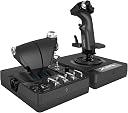
The Logitech G X56 H.O.T.A.S is a high-performance flight simulation joystick and throttle combo designed for both VR and traditional gaming. Featuring 6 degrees of freedom, 189 programmable controls, and customizable RGB lighting, it offers professional-grade precision with 16-bit axis accuracy and independent twin throttles. Compatible with Windows 7 to 11 via USB, it delivers an immersive, customizable experience for serious flight sim enthusiasts and gamers alike.


| ASIN | B079Z3DSBK |
| Country of origin | China |
| Customer reviews | 4.2 4.2 out of 5 stars (2,637) |
| Is discontinued by manufacturer | No |
| Item model number | 945-000059 |
| Product Dimensions | 18.5 x 22.5 x 26.6 cm; 2.28 kg |
| Rated | Not PEGI rated |
| Release date | 24 Aug. 2018 |
G**G
Logitech HOTAS X56
PROS • Ergonomic feel • Many customisations, hundreds of programmable controls • Easy plug and play, might need to tweak keybinds/settings • 30 buttons, some with multiple functions including: two way switches, knobs, triggers, hats, joysticks and sliders. • Compatible with many games including MSFS, DCS, Star Citizen, War Thunder, etc. • Split throttle, allowing for intense combat mechanics. CONS • A bit expensive for budgets, but I recommend as it is worth it. • Throttle is a bit stiff, even at the weakest setting, sometimes it moves across my desk. • Supposed reports of ‘ghost inputs’, I haven’t had a problem with these yet, pretty decent otherwise. OVERALL REVIEW The Logitech HOTAS X56 is a great hands-on piece of flight simulator hardware, with an excellent design and features for customisation. It has customisable RGB and is a great medium budget option for sim users. RATING - ⭐️⭐️⭐️⭐️⭐️ EDIT (1 year later) - The stick and throttle are still working perfectly fine, definitely no ghost inputs, still a 5 star worthy product, 100% worth the money.
J**L
Great bit of kit
Nice joystick , the throttle is a little tight even on a loose setting but can be worked back and forth to loosen . The app to set up the RGB could be a bit better but works fine. And you can address the switches and buttons to keyboard bindings.
S**R
Perfect companion for VR and space sims.
Love the features and the feel of this HOTAS. I've clocked a couple of hundred hours in Elite Dangerous and its still holding up just as well as when I first got it. No real concerns with build quality just yet. Just started playing Evochron Legacy with this HOTAS after a break from using it for a year or so and have fallen back in love with playing with it. Decided to write this review. Playing a game with this HOTAS transforms it entirely, makes mundane tasks like switching on lights and lowering landing gears feel alive and epic. Good stuff: - Great feeling materials. Nice resistance on the throttle. - all Buttons are very tactile and clicky. - Controls are easy enough to feel and locate when in VR, owed to them having unique shapes and textures - Metal switches feel great and have mappable inputs for clicking both upwards and downwards with thoughtfully placed shielding bars on teh lower switches to prevent accidentally hitting them. - At least two of the hats are 8 way and not just 4, i only just found this out recently! - Sheer variety of different input types allow you to map controls to things that make sense and feel right. - SO MANY BUTTONS. Cons: - some controls are a little hard to reach, can be a bit of a problem while in a fight. - The tiny thumbsticks feel a little loose/weak and catch/feel a little scratchy when rotating around the edge. - the latch that connects the two halves of the throttle can feel a little loose
M**S
Disappointed with the quality, needs a design overhaul and refresh.
Ok, so I have played with other HOTAS systems, some cheaper and some more expensive, and I can honestly say I am quite disappointed with the quality of the X56. The only reason I went for this is because I have no room under my desk for rudders, so a premium system wouldn't work for me, I needed the Z axis on the stick. The Throttle Unit:- Unless you are built like a weight lifter and have this screwed to your desk or clamp, you will find this completely unusable, the friction adjuster does let up the play a bit, and after a few wiggles to and fro, it does free up, but over a period of several minutes, the throttle settles back into stiff mode and you have to wiggle it again to free it up, absolutely pointless and of no use whatsoever if you require precise control of your throttle inputs. The switches, knobs and dials are great, there are a lot of them so you can bind plenty of assignments to your preferred sim and with the 3 mode switch, you could potentially triple your inputs with the right programming. The Joystick:- The X & Y axis is sticky from the immediate centre, more so on the pull back, but once you pass the initial bite, it is quite fluid and precise, I've had to set my input curves quite wide to ensure I don't 'over input' whilst moving from centre, and with a bit more tweaking, I think this will work quite well. As with the throttle, there are plenty of hats and buttons you can program up, but there is a lot of room for improvements. The trigger only has a single detent, why? . . . . The thumb mini-stick (C) needs to be swapped for a 4 way directional switch so you can rest on it without it moving. Hats 1 and 2 are the wrong way round, the more prominent castle should be at the top and not at the bottom as you have to clamber over it to get to hat 1, and the POV and button A should be swapped to as you clamber over the POV to press button A, if you were to swap them around, button A would be in perfect reach from the thumbs resting position on the mini stick (C), maybe I am being a little picky but the fact is, sim equipment is getting more advanced and the X56's are sadly being left behind. Overall, the 'Black Friday' sale price (in my personal opinion) reflects it realistic/ true value against other systems on the market, and definitely falls into the average category, if the throttle system was better designed and operated properly, I would have bumped another star on, but the fact is, when you have to prime the throttle to free it up mid flight, you have to ask yourself, "what is the point?" Conclusion:- This is now falling behind in the technology and being out-performed by less expensive systems, I personally feel the X-52 Pro is better than the X-56, ok there are a lot of buttons on the X-56 that are not on the X-52 Pro, but buttons aren't everything, you first need precise controls and that is what lets the X-56 down. I'm glad I didn't pay full price for this system as I would have been very disappointed, the reality is that the X-56's are not high end, they are mid-range at best. Is the X-56 HOTAS system for you? Well that depends on what you operate and what level of immersion you are looking for. If you are whizzing around the clouds or galaxy throwing all cautions to the wind, then the X-56 is a good buy, as an arcade system, the X56 will more than meet the grade and will serve you well, and with the amount of buttons on it, you'll not need to much (if any) keyboard inputs. If you require precise input control for a carrier landing, or micro inputs whilst air to air refueling etc, then the X-56 will probably not meet your expectations, you'd be better off with a premium HOTAS system. The X-56 system is dated and needs a facelift, there are far better (and worse) systems out there and I think this could be a whole lot better, at the minute, there is no quality gap between the X52 and X56, and there needs to be one in order for customers to feel they are making a step up to a quality mid range HOTAS, fingers crossed for an X-58 system in the future.
J**N
Issues from 10 years ago present out of the box.
Without question the worst mid/high end purchase I've ever made for my PC. The ghost inputs from the throttle appear to have around 5 different fixes from what I can see online, from silly (having to plug one component into a case USB port and another in the back of the motherboard) to downright ridiculous, (Having to set the LED's to a specific shade of red. I wish I was joking but that's the one that cleared them up for me.) to the absolutely obscene (People having to actually solder connections properly themselves.) This HOTAS is NOT supported by Ghub for some reason, and the replacement software they come with looks almost identical to Ghub's layout with the glaring exception of any calibration options, while the manual procedure for calibration does not work. The LED's themselves are mismatched in colour, the lights on the throttle being almost what you set them to look like whilst the stick lights are a much much lighter colour, barely resembling what you selected. When you twist the joystick to the right in lieu of a rudder controller, it does not return to the centre, returning instead to just right of centre instead, meaning if you are using them for a precise game such as DCS, you cannot trust your input to actually be where it should be if you release it. Before buying this HOTAS, do yourself a favour and look up "x-56 ghosting" or "x-56 calibration and look at the swathes of people complaining about all the methods they've tried and how so many people are horribly dissapointed with their purchase, just like me. Utterly unnacceptable for this price tag and from a company who's entire catalogue is making PC peripherals. A crying shame because the actual units feel like good quality, high precision equipment being horribly let down by awful QA and corner cutting. I simply could not tell you how this has 60%+ 5 star reviews. I guess they got lucky with their purchase.
S**E
Best HOTAS in its price range
After a year with the X56, I'm really happy with my purchase. I use this for DCS in VR and it works really well. The joystick is too big for my hands and I had to artificially raise the palm rest at the base (using layered cardboard) by about 1 cm so that I could rest my palm and still reach all the buttons but you have to be careful not to raise it too high as you can cover up the button at the very bottom of the actual stick. Once I found the right level to raise the palm rest then it was comfortable but be careful with this if you have small hands. The throttle is built really well and is comfortable. It also has heaps of buttons and switches which is excellent! It does have 3 things that you need to consider - The throttle movement is a little on the heavy side and doesn't slide easily. I would have liked it if it was a little easier but that's a preference thing and you get use to it. - The throttle doesn't have an afterburner indent. For those flying fighter jets, that means you won't get the physical nudge on the throttle once you've hit afterburners so might not realise they're on. Not the end of the world but something to think about. - The throttle takes lots of power and people have had issues with buttons being triggered randomly due to using a non-powered USB hub. Make sure you have a reliable direct USB connection to your PC or a powered hub to plug it in to. Overall, the HOTAS is the best in its class and to get anything better you would need to pay ~2-3 x more for a professional Warthog, WinWing or Vipril Hotas so although not perfect, it does represent good value for money.
T**Y
Seems like the best value at this price point
In a nutshell I think this is probably the best throttle and stick at this price point. In fact it's a really good price for what you get. I'm very happy with this buy. The only negative thing I can say about the throttle is that it lacks 0%, 50% and 100% detents (e.g. for afterburner). Otherwise, tons of switches, ability to split the throttles, multiple modes.. all you need. The stick's great. Again plenty of buttons which feel really satisfying to use, the spring in the can be adjusted if you want an easier time moving the stick, or if you want to make it more difficult. In terms of feel it's good, but not incredible - going higher end would get you that, but we're in the mid-range. I am totally satisfied with the quality here. The software's garbage. You'll probably find yourself having to clear profiles every time you boot your PC, since you'll be using the ones in the game. Don't discount the X56 just because of the two clicks it takes to do that.
R**Y
A Very Different Beast Since LogiTech Took Over Saitek.
I wanted to buy a HOTAS for use in DCS World on Steam, the excellent Combat Flight Sim. The best tutorials come from youtube performed by Grimreapers. The instructor uses a Saitek X-56 Rhino HOTAS and tells you how to map out the most important controls onto your HOTAS for each aircraft. I therefore searched Amazon to buy the Saitek X-56 Rhino, but none were on sale. However, the reviews for this HOTAS complained of the flimsy switches and poor/weak build quality by Saitek. I then found that the X-56 Rhino can be bought, but this time it is made by Logitech. I purchased it and it arrived the very next day with PRIME. I have to say, I was pleasantly surprised by the excellent build quality of the two parts (Throttle Section/Stick Section). They are heavy, robust and very high quality. The switches, everything built just the way one would expect for that price. All keys, switches, wheels, 4-point switches, etc very easy to map. Even the back-lights (LED) can be customised in any colour or shade you would like. Only one slight criticism though, there are no instructions for assembly. I was slightly confused as three spare stick springs come with the package. I wondered how I was to fit them. However, after watching an assembly tutorial on youtube (not by Logitech) I found they were simply spares of differing strength/stiffness for you to customize your stick to your liking. The standard spring was already fitted and the stick simply screws onto it's base with that spring. Also, it is not explained in the packaging that there is a Logitech website to visit and download software for testing and tweaking the settings on your HOTAS. A slight grumble for an excellent piece of kit.
R**O
Recensione Dettagliata del Logitech G X56 H.O.T.A.S.
Funzionalità e Prestazioni Utilizzando il Logitech G X56 H.O.T.A.S., ho scoperto che offre un controllo avanzato con sei gradi di libertà (6DoF), che includono pitch, roll, yaw, movimento avanti, indietro, su e giù. I mini stick analogici aggiungono ulteriori assi di controllo, rendendo il dispositivo ideale sia per simulazioni spaziali complesse che per il volo atmosferico, permettendo un’esperienza di gioco altamente immersiva e realistica. Vantaggi • Configurabilità Estesa: Con 189 controlli programmabili, tra cui 31 pulsanti, 5 hat switch e numerosi dial e switch, posso personalizzare il dispositivo per adattarlo alle mie esigenze di simulazione, utilizzando il software incluso. • Versatilità delle Molle: Le quattro molle intercambiabili mi permettono di regolare la tensione del joystick, adattandosi perfettamente alle diverse preferenze di controllo e ai vari tipi di aeromobili. Le molle con tensione più bassa sono ideali per i velivoli più piccoli, mentre quelle con tensione più alta sono perfette per quelli più grandi. • Design e Estetica: Il design moderno con illuminazione RGB personalizzabile crea un ambiente di gioco visivamente accattivante. Ho potuto abbinare l’illuminazione alla mia configurazione di gioco per un look davvero unico. Svantaggi • Qualità Costruttiva: Anche se il dispositivo è robusto, è realizzato principalmente in plastica, con solo alcune parti in metallo. Ho notato che il dispositivo può sembrare leggero e le ventose incluse non sempre garantiscono una stabilità perfetta durante l’uso intenso, soprattutto se non fissato saldamente alla scrivania. • Problemi di Drift: Ho riscontrato problemi di drift sia nel joystick che nei mini stick analogici. Per migliorare la precisione, è stato necessario impostare delle dead zones nel software. • Assenza di Detent Centrale: Il throttle non dispone di un detent centrale, complicando il passaggio tra spinta avanti e indietro. Ho dovuto fare movimenti aggiuntivi per essere preciso nel cambio di direzione della spinta. Esperienza Utente Utilizzando il Logitech G X56 in combinazione con i pedali rudder Logitech, ho trovato che migliora significativamente l’esperienza di simulazione di volo su Microsoft Flight Simulator. Questo setup completo mi ha permesso di godere di un’esperienza di volo immersiva e realistica. Conclusione Il Logitech G X56 H.O.T.A.S. è un dispositivo versatile e altamente configurabile, perfetto sia per principianti che per piloti virtuali esperti. Offre un ottimo rapporto qualità-prezzo, specialmente se confrontato con alternative più costose. Nonostante alcuni piccoli difetti, come la qualità costruttiva e i problemi di drift, il Logitech G X56 è sicuramente un’opzione da considerare per chi cerca un sistema H.O.T.A.S. completo per i simulatori di volo e di spazio. In sintesi, se stai cercando un sistema H.O.T.A.S. che offra una vasta gamma di controlli e personalizzazioni per migliorare la tua esperienza di simulazione, il Logitech G X56 è un’ottima scelta.
N**G
Bästa leveransen
Leveransen var super snabb och produkten motsvarar våra förväntningar!
D**Y
Toller HOTAS
Nach Jahren der Verwendung eines Saitek X45, war es mal Zeit für ein neueres Gerät. Hauptsächlich spiele ich nur Elite Dangerous und Microsoft Flight Simulator. Ja noch nach 11 Jahren spiele ich Elite, und das 2-3x die Woche. Mein alter HOTAS gab (natürlich) nach 11 Jahren irgendwann den Geist auf. Nun aber zum HOTAS: Der macht einen guten Eindruck, ist Stabil und hat eine Menge an Knöpfen. Das was man für Flugsimulatoren und Space Simulatoren benötigt. Der Stick besitzt - 4 Knöpfe - 1 Ministick (analog) - 3 Hats (digital) mit je 8 Kontaktpunkten. Das Throttle besitz: - Auf dem Boden des Throttle - - 7 Schalter, je 2 Positionen - - 2 Drehregler - - 1 Moderegler für 3 Modis (für Programmierbare Funktionen) - Am Throttlehebel - - 3 Knöpfe - - 1 Schieberegler - - 1 (ich sag mal) Schieberegler der wieder zur Mitte springt - - 1 Rädchen auf der Linken Seite des Hebel - - 2 Analoge Regler rechts, welche zusätzlich noch eine Knopffunktion haben - - Noch mal 2 Hats (digital) mit 8 Kontaktpunkten - - 1 analogen Ministick So lassen sich sowohl Spiele wie E:D als auch Flugsimulatoren keine wünsche mehr offen. Die digitalen Hats und Schieberegler verwende ich als Knöpfe so hat das Hotas insg. 60 Knöpfe. Dazu die analogen Steuerungen, welche dann eher für analoge Flugzeugeinstellungen wie z.B. bei Flightsimulator Landeklappen oder Störklappen und Trimmung verwende. Zusätzlich besitzt der Throttle an der Seite eine Feder, womit das Gleitgefühl eingestellt werden kann. Hier habe ich auf ganz leicht gestellt, so bleibt das Throttle auch an der Stelle auf meinem Schreibstisch. Anordnung der Steuereinheiten (Throttle): Je nach Stellung des Throttle, sind die Kippschalter am Boden schwer zu erreichen (beschriftet mit TGL1-4), daher habe ich dort eher unwichtige Funktionen oder Funktionen welche ich nicht im Flug benötige. Anders sind die Kippschalter unterhalb des Throttle, die sind gut erreichbar. Ich spiele oft mit einer HTC Vive (VR Brille) und auch mit der VR auf dem Kopf sind die Schalter eindeutig und sofort zu finden. Anordnung der Steuereinheiten (Stick): Auch hier sind die Knöpfe gut angeordnet. Ich habe aber relativ große Hände. Mit dem Daumen kann ich gut die 3 Hats erreichen, auch den Knopf über den Linken Hat. Ich kann mir vorstellen das hier allerdings Spieler mit einer kleineren Hand den rechten unteren Hat auf dem Stick als unangenehm finden, da dieser al Scharfkantig empfunden werden kann. Wenn ich hier den oberen Hat nutzen möchte, berührt ungefähr die Mitte des Daumes das untere Hat. Der kleine Finger liegt gut auf den Unteren Knopf auf dem Stick und erreicht noch den etwas weiter entfernten unteren Knopf. Neben den Hats auf der rechten Seite ist noch ein Knopf der leicht vom rechten Zeigefinger erreicht werden kann, sonst ruht der rechte Zeigefinger auf dem Trigger. Der Stick kann leicht in allen Richtungen Bewegt werden. Allgemeines: Ich hatte ja vorher ein sehr altes Modell (X45) dort war das Throttle per Kabel am Stick angeschlossen und nur der Stick per USB am PC angeschlossen. Der X56 benötigt 2 freie USB Port, da sowohl der Stick als auch das Throttle direkt am PC angeschlossen werden. Da ich viele USB Geräte verwende habe ich mir auch ein USB Hub mit eigener Stromversorgung zusätzlich bestellt. (Nicht nur für das HOTAS sondern auch und einfacher an USB 3.1 zu kommen, aber dazu gibt es eine Rezession an anderer Stelle) Nice to Have aber meines Erachtens völlig unwichtig ist, wenn der Treiber direkt von Hersteller verwendet wird kann die Farbe eingestellt werden in der die Bedienelemente leuchten. Die Treiber des Herstellers sind nicht nötig, da Windows 10 diesen korrekt erkennt.
B**B
Uitstekend
Heel tevreden met aankoop alles werkt naar behoren
G**N
Good Quality
Use it for DCS world can’t complain it’s pretty good.
Trustpilot
3 weeks ago
5 days ago