🚗 Diagnose like a pro, drive with confidence—your car’s health in your hands!
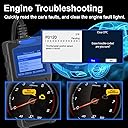
The Topdiag T100 OBD2 Scanner is a lightweight, multifunctional diagnostic tool compatible with 97% of OBD2 vehicles worldwide. Featuring over 15 diagnostic services including I/M readiness, Mode 6 & 8 tests, real-time data streaming, and DTC lookup, it empowers vehicle owners to quickly identify and understand engine and emissions issues. With shortcut buttons for instant ECU info and emissions status, plus multilingual support, the T100 is a cost-effective, professional-grade scanner designed for proactive car care and peace of mind.


| ASIN | B0DM1V3L6H |
| Brand | TopDiag |
| Customer Reviews | 3.9 3.9 out of 5 stars (27) |
| Date First Available | 15 June 2025 |
| Item Weight | 240 g |
| Item model number | Topdiag T100 |
| Manufacturer | Topdiag |
| Manufacturer Part Number | Topdiag T100 |
| Model | Topdiag T100 |
| Package Dimensions | 17.2 x 13.49 x 3.71 cm; 240 g |
I**I
Turned on every single dashlight in two of my cars and wasn’t able to remove it. Had to use my other $200+ machine to remove it all.
B**B
I plugged it in, and it worked. There were many different screens where you can scan different components of your car. It said everything was okay on my car, so I can't say it caught anything, but I do maintain my car. It is a handy item to check on things if you are worried there is a problem. You just scroll through different menus and check things from the battery to sensors to general issues. The little pamphlet guides you through how to get to the different tests. It works fast with the press of a button. It was compatible with my Toyota Yaris. I think it is cheaper than having a mechanic to screen your codes, though they will do that if there is an issue. I have seen these costing a lot more. So for only $30, it is a low cost option. It is convenient to keep it in your car or home to run out and check any time. You can get a free scan at some auto parts stores, but it is nice to be able to do your own and even compare.
E**A
Accurate engine diagnostic. Functions well and easy to use. Simple to connect and clear codes
J**S
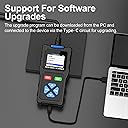
This is the first OBD2 tool I've used so I'm coming at this from a genuine neophyte's point of view. First of all the documentation is actually more extensive than I'd expected but it's still just a small fold-out sheet. It does cover the highlights and I guess it's adequate. Using the device is simple, just plug it in to the port on your car and the tool automatically powers on. The cable is long enough that I could sit in the driver's seat and fiddle with the device, sitting in the passenger seat would work too but it's not long enough for much else. You won't be watching the screen while bent over the engine or anything. The screen is nice and bright, colors are good, text is clear. The screen refresh can be a little weird when changing pages or moving the cursor but it's still functional. The large buttons are easy to use even gloved, and indeed the whole device should be comfortable to handle and use in gloves. Well, maybe not boxing gloves. Now most of the diagnostics and readouts are beyond me at the moment and I can't speak to their accuracy or usefulness, but it did seem comprehensive. I just don't have another frame of reference to which I can compare. I also don't have any trouble codes at the moment so I don't know if this unit will comprehend them or give any useful information. I bet it does though, it did recognize the ECU in my Nissan. Every screen I looked at seemed to work except for the oxygen sensor screen which said wasn't supported for my car. Otherwise all the data showed up and clicking on some items switched to a graphing view so you can see voltage levels or torque or what have you, all very neat to a dummy like me. One thing I'm confused about is the USB-C port on the bottom of the unit. It doesn't appear to be mentioned in the 'manual' and plugging it in to power doesn't do anything, the unit doesn't turn on. I'm a bit nervous to plug it in to a PC because you know how it is, never plug strange devices in to your computer. I'll try it on a more disposable computer later. Says it supports firmware updates but I have no idea where to even look for updated firmware. That reminds me, I'm glad this is fully functional without needing some awful phone app with 1.5 stars on the Play Store or worse, something you have to download from a shady site and sideload on your phone like some of these low cost gizmos. I mean, it would be notionally nice if you could immediately export data over Bluetooth or something but that's not a feature I need. Anyway I'm happy with this and I'm glad I got it though I'm hoping it'll remain a toy, a curiosity, for the foreseeable future, rather than something I actually need to use to figure out a problem with my car.
L**E
As someone who likes to understand what's going on with my vehicles and prefers a DIY approach to basic diagnostics, having a reliable OBD2 scanner is essential. The Topdiag T100 OBD2 Scanner with its promise of "All Mode" diagnostics, I/M Readiness, Mode 6 & 8 support, DTC Lookup, ECU Info, and Shortcut Functions definitely sounds like a step up from basic code readers. What I Liked (Based on the Description): * "All Mode" Diagnostic Capability: This is a significant selling point. Supporting all 10 OBD2 modes means it should be able to access a wide range of diagnostic information beyond just reading and clearing trouble codes. This includes live data streams, freeze frame data, oxygen sensor tests, and more. * I/M Readiness: This is a crucial function for anyone needing to pass an emissions test. The ability to quickly check the status of the emission control systems can save time and prevent unnecessary trips to the testing center. * Mode 6 and Mode 8 Support: These modes delve into specific system tests (Mode 6 for on-board diagnostic monitoring test results for specific components/systems, and Mode 8 for requesting control of on-board system, test, or component). Having access to this level of detail can be invaluable for pinpointing more complex issues. * DTC Lookup: A built-in DTC (Diagnostic Trouble Code) lookup function is incredibly convenient. Instead of having to search online for the meaning of a code, the T100 should provide it directly on the screen, saving time and effort. * ECU Info: Accessing Electronic Control Unit (ECU) information (like VIN, calibration ID, etc.) can be helpful for identification and when looking up specific repair information. * Shortcut Functions: The mention of shortcut functions suggests ease of use and quick access to commonly used features. This can make the diagnostic process more efficient, especially for frequent users. * Car Scan Tool: The general description as a "Car Scan Tool" implies it's designed specifically for automotive diagnostics and should offer features tailored to this purpose. Potential Considerations (Things I'd Want to Know More About): * Ease of Use and User Interface: While feature-rich, the scanner needs to be intuitive to navigate. A clunky or complicated interface can negate the benefits of having so many functions. I'd be interested in user reviews regarding its ease of use, especially for those who aren't professional mechanics. * Screen Size and Clarity: A clear and adequately sized display is essential for reading codes, live data, and other information. I'd want to know about the screen's resolution and if it's easy to read in various lighting conditions. * Update Capability: OBD2 standards and vehicle systems evolve. Knowing if and how the T100 can be updated with new codes and vehicle compatibility is important for its long-term usefulness. * Vehicle Compatibility: While it's likely compatible with most OBD2-compliant vehicles (typically post-1996 in the US), it would be good to know if there are any specific vehicle makes or models with which it might have limited functionality. * Build Quality and Durability: A tool used in potentially grimy environments like a garage needs to be reasonably durable. I'd be interested in the build quality of the T100. * Live Data Stream Display: How is the live data presented? Can it display multiple parameters simultaneously? Is it easy to read and interpret? Graphing capabilities would be a significant bonus. It Worked Flawless also Great Money Value
Trustpilot
3 weeks ago
2 weeks ago