


🚀 Triple your screens, triple your productivity!
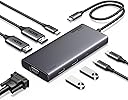
The UGREEN Revodok USB-C Docking Station is a versatile 7-in-1 hub designed for professionals craving efficiency and speed. It supports up to three 4K@60Hz displays simultaneously via 2 HDMI and 1 DisplayPort, offers ultra-fast 10Gbps data transfer through USB-C and USB-A ports, and delivers up to 100W Power Delivery charging. Built with durable aluminum alloy, it ensures optimal heat management and broad device compatibility, making it the ultimate productivity booster for laptops, tablets, and smartphones.


| ASIN | B0CR6KNF3X |
| Amazon 売れ筋ランキング | パソコン・周辺機器 - 82,151位 ( パソコン・周辺機器の売れ筋ランキングを見る ) ノートパソコン用ドッキングステーション - 392位 |
| HDMIポート数 | 2 |
| USBポートの総数 | 4 |
| USBポート数 | 4 |
| おすすめ度 | 5つ星のうち4.3 521 レビュー |
| カラー | グレイ |
| ハードウェアインタフェース | USB-C |
| ハードウェアインターフェイス | USB-C |
| パック数 | 1 |
| ブランド | UGREEN |
| ポート数 | 9 |
| メーカー名 | Ugreen Group Limited |
| メーカー型番 | 35588 |
| ワット数 | 100 W |
| 互換デバイス | テレビ, デスクトップパソコン, プロジェクター, マウス, モニター |
| 付属品総数 | 1 |
| 保証内容 | 2年間のメーカー保証 |
| 品目寸法(L x W x H) | 13長さ x 23幅 x 2.5高さ cm |
| 商品の寸法 | 13長さ x 23幅 x 2.5高さ cm |
| 型番 | 35588 |
| 対応デバイス | テレビ, デスクトップパソコン, プロジェクター, マウス, モニター |
| 色 | グレイ |
か**ん
ポート数と組み合わせがよい
ノートPCと3画面にするのにUSB一つ抜くだけで済むようにしたかったので、HDMIが2ポート、さらにDVIもあって便利です
A**ー
とても便利
使いやすい。 複数PCで試しましたが、どのPCでも問題なく使えている。
G**I
互換性の有無は買わないとわからない?
PCとの相性があるのでしょうか?私物ノートPCでは1本のUSB-Cケーブルによる接続で、3画面+本体1画面の拡張に成功しました。しかし、勤務先から貸与された社用PCでは、4画面のうち1つが無効になっていました。添付画像でいうディスプレイ1が無効になっていて、すべてを使うことができません。設定の問題なのかよくわかりませんが、期待外れでした。
ミ**ト
反応が悪く造りも荒い
デュアルモニターとtype-c、USB一体型に惹かれて購入しましたが、PCとtype-c接続が不安定。何度か抜き差ししたり、PC側のType-cポートを変え再接続すると認識したりとストレスを感じる。またUSBの差込口の処理が荒く、ねじ込むような感覚あり。価格は安いが別のものに入れ替えを検討します。
T**R
Does what it needs when I am setting up at work.
Allows me to quickly connect the keyboard, mouse and monitor to the work laptop when I am at work at a different office.
R**1
Amazing product and great HD display
I bought this to allow me to to have 2 displays for my work laptop via USB C ports . The device is plug And play and works a charm. This does not have a switch so wouldn’t work for two laptops or PCs in case you want to use for that reason . One can still do this by spending a bit more and get a switched dual display ones or follow this below instructions /// If your screen support dual HDMI ports or has 1 HDMI port and 1 analoge VGA ports , there are ways you can do this for your home PC and have it working . All you need is get a UGreen switched USB ports for camera , keyboards and mouse , speakers ie anything USB device . Now The switched Ugreen ports are about a tenner these days and have two usb outbound wires. Plug one to PC and one to to the display device I am writing about . Connect all the HDMI wires for the PC directly into relevant ports on the PC directly . Use the switched ugreen device to flip the USB input devices . Rem you don’t need to do this if you spend a little more and get a dual PC switched ugreen docking station . I have done this as I already had a ugreen usb switched device and didn’t want to spent a fortune . The current device is about 30 quid and worth every penny . Rem if you want your laptop to charge , one will Need to provide a 100W power input and it is not inbuilt into the device . I also faced problems with keyboards not working and once display wasn’t either . I thought it was this device . I then ordered another new brand and connected it to my Dell laptop and faced similar problems with display but keyboards worked then . This made me think as a laptop issue rather than a device issue . I rebooted my laptop and has been great since . I also observed as part of PnP ( USB C plug and play) feature sometimes the keyboards are not identified and all we need to do is wait and logon using laptop and it will auto fix itself after . It has been 2 weeks since I have been using this device and has been sailing smooth. Hope this helps.
A**O
GRAN DOCK STATION, COMPLETA
En la era de los portátiles ultradelgados y minimalistas, la disponibilidad de puertos en los dispositivos ha disminuido considerablemente. Esto puede resultar en un desafío para quienes necesitan conectar múltiples periféricos simultáneamente, como ratones, memorias USB, monitores externos y cargadores. Es aquí donde entra en juego el Hub USB Multiconector, un dispositivo que promete ampliar las capacidades de conexión de cualquier portátil o equipo de sobremesa. Diseño y Construcción Este Hub destaca por su diseño compacto y elegante, lo que lo hace ideal para acompañar a portátiles modernos. Su construcción parece robusta y duradera, ofreciendo una buena resistencia al uso diario. Además, su formato ligero lo convierte en una opción fácilmente transportable, lo que es ideal para usuarios que se desplazan con frecuencia. Funcionalidad El Hub ofrece una variedad de puertos que cubren la mayoría de las necesidades actuales: - **Dos puertos USB-A**: Estos son los puertos estándar más comunes, compatibles con una amplia gama de dispositivos como ratones, teclados, y memorias USB. - **Dos puertos USB-C**: Cada vez más populares, estos puertos son esenciales para dispositivos más modernos, ofreciendo una mayor velocidad de transferencia y mayor versatilidad. - **Un puerto USB-C adicional para cargas de hasta 100W**: Este puerto es especialmente útil para cargar dispositivos mientras se sigue utilizando el Hub, asegurando que no te quedes sin batería mientras trabajas. - **Dos puertos HDMI**: Permiten conectar monitores externos con resolución 4K, lo cual es ideal para configuraciones de trabajo con múltiples pantallas o presentaciones. - **Un puerto VGA**: Aunque puede parecer algo anticuado, este puerto es esencial para conectar proyectores o monitores más antiguos, lo que añade una capa extra de compatibilidad. Rendimiento Los puertos USB-A y USB-C ofrecen velocidades de transferencia de hasta 10 Gbps, lo que los sitúa en la vanguardia de la tecnología actual. Esta velocidad permite transferir archivos grandes en cuestión de segundos, siempre y cuando el dispositivo al que esté conectado sea compatible con estas velocidades. Sin embargo, es importante tener en cuenta que, si el equipo no soporta estas velocidades, se producirá un cuello de botella, limitando el rendimiento. Conclusión El Hub USB Multiconector es una solución versátil y completa para aquellos que necesitan expandir las capacidades de conectividad de sus equipos, ya sea para trabajo, estudio o entretenimiento. Su variedad de puertos y la inclusión de opciones tanto modernas como tradicionales lo convierten en una herramienta indispensable para cualquier usuario que necesite conectarse a múltiples dispositivos al mismo tiempo. La alta velocidad de los puertos USB es un gran punto a favor, aunque la experiencia de uso dependerá de la compatibilidad del equipo con estas velocidades. En resumen, este Hub es una excelente inversión para mejorar la productividad y la funcionalidad de cualquier portátil o equipo de sobremesa.
C**N
Funciona para dos monitores
Excelente producto Ugreen siempre es calidad. Lo ocupo con una laptop con windows, para tener dos monitores adicionales. Todo funciona al a perfección.
A**N
Finally! Something that works as it says
After trying a lot of semi expensive hubs, I found that all of them are dated 4-5 years back in time, hence the functionality was, well, limited. This one however delivers on its promise, its works right out the box with both Windows and MacOS through USB C. Some of the others I tried always had a flaw and some even crashed my new Mac M3 (making it stall/freeze when plugged in). It looks nice and clean on the desktop too. Highly recommend UGREENs Products.
Trustpilot
1 day ago
3 weeks ago