


🔀 Master your network flow with LEAGY’s sleek 2-port switch—because control is the new cool.
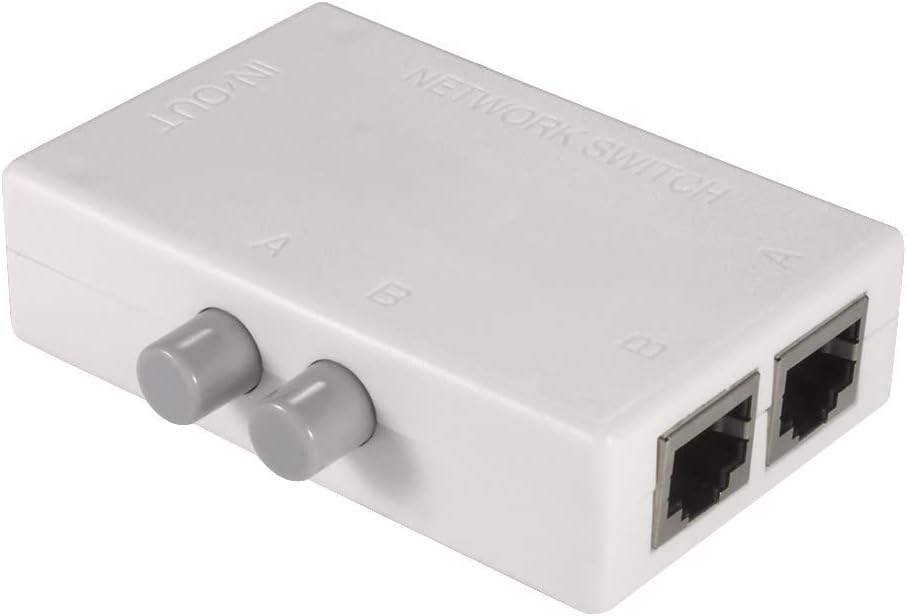
The LEAGY 2 Ports Network Switch is a compact, manual toggle hub that allows seamless switching between two network inputs or outputs at 100Mbps speed. It requires no external power, ensuring zero electrical interference through physical isolation. Designed for easy plug-and-play use, its mini form factor and IP54 rating make it a reliable and space-saving solution for professional network management.


| ASIN | B00DRG1SLO |
| Actuator Type | Hinge Lever |
| Best Sellers Rank | #1,311 in Computer Networking Switches |
| Brand | LEAGY |
| Brand Name | LEAGY |
| Circuit Type | 2-way |
| Color | White |
| Compatible Devices | Most devices with Ethernet connections and 100M speed support |
| Connectivity Protocol | Wi-Fi |
| Connector Type | Plug In |
| Contact Material | Copper |
| Contact Type | Normally Open |
| Control Method | Touch |
| Control Type | Manual |
| Controller Type | Push Button |
| Current Rating | 2 A |
| Customer Reviews | 4.3 out of 5 stars 1,592 Reviews |
| Included Components | Cassette |
| International Protection Rating | IP54 |
| Item Dimensions | 3.2 x 2.4 x 0.9 inches |
| Item Weight | 0.01 kg |
| Manufacturer | LEAGY MT-VIKI |
| Material Type | Plastic |
| Model | LEAGY FBA_MT-RJ45-2M |
| Mounting Type | Surface Mount |
| Number of Items | 1 |
| Number of Positions | 2 |
| Operating Voltage | 230 volts |
| Operation Mode | Manual |
| Part Number | FBA_MT-RJ45-2M |
| Specification Met | Rohs, Ip54 |
| Switch Type | Push Button |
| Terminal | Button |
| UPC | 799804375895 763250840733 |
| Unit Count | 1 Count |
| Warranty Description | 1 |
K**H
Works exactly as expected!
I had cable internet for years, but the price kept going higher and higher. I ended up canceling and switching to TMobile home wifi for $30/month. After about a year someone came knocking on my door from the cable company asking, practically begging to get my service back. I told them the price would have to be so low I'd be willing to pay it to keep both services, because I had no plans to leave TMobile. They obliged and gave me 400mbps AND a cell phone w/ unlimited everything (even data) for $20/mo total. I couldn't believe it. I bought this and have the single port connected to my PC, and the others go into my cable router, and the other into the TMobile router. If cable ever goes out, I can just switch to the "B" connection to use TMobile as my backup. The other night I was online around 2AM when cable went down for 30 minutes for scheduled maintenance. I looked at my router and saw the Internet light was orange (instead of green), so I just reached over and pressed "B" and within about 10 seconds I was back online using TMobile as my backup. This is way cheaper and easier to configure than buying a fancy business router with failover internet. I'm a Network Engineer, so I could have set up one of those routers no problem, but I really like this low-tech solution. One of the best things about it is that unlike a router that supports multiple internet connections, this doesn't require a power outlet. Just plug in your ethernet cables and you're good to go! It's a small, lightweight plastic thing. I'm sure it wouldn't hold up to a ton of abuse, but for something that just sits on the corner of my desk and will probably only get used 2 or 3 times a year, I'm not worried about the build quality. However, for the price and what I need, it's absolutely perfect. If you plan on switching between connections a dozen times every single day... I suspect it may possibly wear out within a year or so, but that's just a guess; your mileage may vary.
T**.
Cheap and It WORKS!
You just can't beat cheap especially when the product actually works as DESCRIBED in the description. This is a simple device that has one INPUT port and two OUTPUT ports and two BUTTONS. With the buttons, you can engage which OUTPUT port you want active one at a time or if you want both at the same time by pushing down on one or both at the same time. The output ports are marked as A and B respectively with the buttons. So, you know which button goes to which port. This device is so simply to use and install. Took it out of the box, plugged all the Ethernet Cables in the ports and pushed down on A button for port A. DONE!!! I recommend this product to EVERYONE... Happy Amazon Shopping.
J**E
Fast one day replacement
My earlier router switch broke Saturday morning and I ordered the replacement later that day. I received the replacement Sunday afternoon. Can anyone expect faster service? Thank you Amazon! I use this switch for my internet cable connection to my computer. It allows me to switch the connection to "void" and thereby removes my computer from the internet for enhanced security during use for gaming, etc. I especially appreciated it recently when I connected to a bad website and started receiving warning messages from Microsoft Windows about breached security. I was able to quickly break my internet connection with the switch and avoid further trauma. The device itself is very simple, and because it uses moving parts to accomplish it task, I expected a limited lifetime of use and this is true. But it is worth the cost. ( I did not purchase it's predecessor from Amazon.)
J**T
Switch Works As Described - With NO Speed Loss
I bought this switch because I ran only one cat6 cable down to my basement for my son's XBox - and now he also has a new gaming PC. I used the switch so he could select which device would receive the faster wired modem connection (A for XBox or B for Gaming PC). I ran pre-switch/post-switch speed tests on both the XBox and the Gaming PC (because one review on this switch said it slowed down his connection). I saw NO reduction in speed at all between pre-switch results and post-switch results. This switch does what it is designed for (A or B) and has no negative affect on the connection speed (at least for my cat6 cable application). The only minor "negative" feature on this switch - is that it is very light (since it is small and the casing is made of plastic) but I used wide velcro to fasten it down - so when the buttons are used - it stays secure in place.
E**K
Highly recommend if you have limited data!
This is a very handy and simple device. We use it as an on/off switch by labeling the buttons with "ON" and "OFF" and marking which of the two ports to plug the Ethernet cable into. I recently moved to the country and no longer have a landline. Decided to use a mobile hotspot through my cell phone provider. This works great, but we have a limited amount of data. Our desktop would burn through it pretty quick if we forgot to unplug or disable the internet and had the computer on (downloading pictures from a camera, working on a document, etc.). Using this switch made it extremely easy to turn the internet to the computer on/off. Labeling the buttons also made it easy to see whether it was on or off. No more waking up the computer to check the taskbar or reaching behind the CPU to check if the Ethernet is plugged in. If you have limited data or any other reason to need an on/off switch (or a/b switch if you need to be able to switch the internet between two devices), then I highly recommend this affordable solution. Just remember to label the buttons to make life easier.
B**E
Leagy 2 port ethernet cable mechanical switch
Product performs as expected but is a bit pricey for being a slide detent switch in a plastic box.
N**K
Simple to Use and Can be also used as a quick Disconnect from web device!
Simple to use and does what I wanted, and also a great low price! This switch allows you to plug in your PC and then with a simple push of a button change to a different internet connection, or plug in your internet connection and control which PC has connection to it, it's an A B Switch for ethernet ports, simple as that. Why would anyone need to switch internet connections I don't know, LOL. That's NOT how I use it. I plug my PC into the output and my internet connection into one of its inputs ( either A or B side) doesn't matter which side. Then i leave the remaining Ethernet input connection empty! So by connecting it this way, it effectively converts this "A" "B" type switch into a simple on/off switch for quickly disconnecting the attached PC from the internet. I find this much easier than fiddling with cables in the back of the PC. When would you want to disconnect from the internet? That's up to you. Some people might prefer to only connect when checking e-mail, or doing an update or web search and be disconnected the rest of the time when working on the PC, watching movies or listening to music, whatever you use the PC for other than internet access to be safer against being hacked. Or like me, I basically just disconnect when I see suspiciously large amounts of internet activity that I didn't initiate or after a reboot to prevent some virus' from sending out data to connect to certain servers etc... and once I feel it is fine and nothing suspicious is occurring then I press the button to connect to web again. I love how easy this switch makes that process, no wires to mess with and no relying on the computer software itself to disconnect because it might be compromised by a virus to prevent disconnecting or might have froze up and not accepting any commands from the user. This is when having a quick and simple physical way to disconnect from web comes in real handy. And at this low price it is so worth having on every PC in your home. I will order another now. :)
S**G
Phantom speed killer
Had this switch less than a year. Used it to kill internet connection downtime for security. Not used much as I tend to forget to disconnect. Lately doing speed test, results were extremely low - 90Mbps for a 500Mbps service. Called in the Cox field tech who said my modem was bad. Bought a new one. Speed returned but within a week was at 90 again. Went through more troubleshooting on the phone and now have another tech coming out. On a whim, I bypassed this switch and viola, speed is back. Something failed in the "A" port circuit because "B" works fine. But for how long? This will be replaced after I cancel the technician service call.
C**O
connecteur
Très bon rapport qualité prix
J**.
Funciona bien.
Es un aparato muy sencillo, es solo para switchear la señal de red hacia uno u otro destino, pero eso es lo que yo queria, un aparato compacto y de funcionamiento muy simple que funcionara bien, y si funciona bien.
D**I
Molto pratico maattenzione...
Avete due dispositivi e una sola presa rete sul muro? Bene, se ne avete bisogno sporadicamente di uno o l'altro .. per esempio io nel ripostiglio avevo il centralino (assistenza via web) e un nas per backup che va alla sera... per non mettere uno switch (altra corrente altro accessorio) che aumenta le cose da controllare, ho messo questo che in caso di emergenza lo giro per permettere al tecnico del centralino di intervenire da remoto. certo che se mi servono contemporaneamente non è il prodotto che fa per voi.
V**M
Perfect for dual network/internet LAN users
I recommend it to anyone who uses two network for different purposes. Clear port indications(A & B), Well built, durable, good button feel, foolproof easy switching, secure connection between Ethernet cable to port and most importantly no interference when in use. Great quality purchase.
T**C
Canvia rapidamente la conexión.
Muy buen interruptor
Trustpilot
1 month ago
2 weeks ago