✨ Protect your legacy MacBook like a pro — clarity and defense in one sleek shield! 🛡️
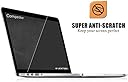
The LENTION Clear Screen Protector is a precision-fit, ultra-thin PET film designed exclusively for 13-inch MacBook Pro Retina models from late 2012 to early 2015 (A1425/A1502). Featuring a 4H scratch resistance rating and advanced hydrophobic/oleophobic coatings, it repels smudges and dust while maintaining 99% screen clarity with third-generation anti-reflective technology. Easy to install with bubble-free adhesion and residue-free removal, it preserves your MacBook’s pristine display and professional look.


| ASIN | B00HSGR7R8 |
| Color | MacBook Pro 13 with Retina Display, Model A1425/A1502 |
| Customer Reviews | 4.3 4.3 out of 5 stars (500) |
| Date First Available | June 19, 2014 |
| Is Discontinued By Manufacturer | No |
| Item Weight | 0.704 ounces |
| Item model number | ?? |
| Manufacturer | LENTION |
| Other display features | Personal Computer |
| Product Dimensions | 12.48 x 8.31 x 0.01 inches |
| Special features | Scratch Resistant |
| Whats in the box | screen protector |
S**C
Very clear, perfect fit, easy installment, perfection
I needed a new screen protector since the first one I bought didn't fit and since I trimmed that one and messed up, it made my screen look ugly hahah but I just decided to buy this cause I can't stand uneven or oddly stuff like that. This came packed in between two very thick cardboards which is very nice because it won't get damaged in shipping or anything so I thought that was nice. The screen protector is actually very clear and it fits perfectly on my 2015 macbook pro, the camera cut out is just a perfect slot too just pure perfectioN hahah (yeah I'm a perfectionist). It was very easy to install, I recommend peeling the top off first, sticking the top then slowly removing the #1 sticker from the bottom then it'll jjst nicely and smoothly fall into place. It comes with this blue sticker thing thst removes lint very nicely. Don't use the lint rag it comes it, I find it attracts even more dust which is weird but I'd say use the blue sticker thing and just go around the screen and stick it here an there and it'll remove every little lint or dust spectacle. Really recommended, it's very nice and clear; wOrth the price. My screen looks much better and perfected now. The screen actually looks more shinier and just glossy but it doesn't impact the image quality what's so ever.
G**U
No bubbles, love the material!
Nice thick material, helped eliminate the bubbles. I got the retail package which came with plenty of sticky pieces of tape that allow application and micro-fiber cloth for cleaning. Everything worked as expected. 99.999% bubble free (nothing visible to my naked eye) application in 7 minutes! NOTES: Lots of people complain about bubbles (this goes for ALL screen protectors). My suggestion please take the time to understand the process of bubble free application (or pay a teenager $2 to you apply it for you). I am writing a section on my technique of how to achieve bubble free application below. Hope somebody will find it useful. STEPS FOR BUBBLE FREE APPLICATION 1. Understand what causes bubbles. Two things -- dirt (see step 3), and air (see step 7). 2. Start with several 1-1.5 inch of clear tape cut into pieces, I suggest about 5-6. This is included with several pricey version of the screen protectors, otherwise you can use any clear tape. Cut them before you go to next step, and have them ready by sticking them on a piece of wood or metal that you can easily access. 3. Start by cleaning the screen surface with micro-fiber cloth, or you can use an old cotton piece of cloth that has been washed. Do not use paper towel. Goal here is to avoid the fuzz. You can use 1 drop of water (on cloth) to reduce static that attracts dirt. Be careful not to pour water into the sides of the screen! 4. WITHOUT taking any layers off, position your screen protector to your satisfaction. Now using cut piece of tape (from Step 2), hold the protector in place such that half the piece of tape is on the protector and half on your laptop edge. Use 2 or 3 pieces (ONLY on one side), so that you can swing the protector like opening a door. 5. Swing the protector away from screen. Clean the screen again to remove all visible pieces of dirt (don't work too hard). Apparently, rubbing causes static and pulls airborne dirt towards the screen. 6. Now take the layer 1 off the screen protector (this is between your laptop and the protector) while the screen protector is opened like a door. 7. Starting from applying the protector from side with temporary pieces of tape (see step 4 above) gently apply the protector to laptop screen. It should self stick, if you position it correctly. Move slowly. I recommend going at speed of about 2 seconds/inch. THE GOAL her is not let any air-pockets be created. If you do get trapped air or bubbles, pull back 1 or 2 inches of protector and apply again slowly. 8. Depending upon your patience level in last step, your environment, and the quality of screen material -- you will have some bubbles. I get about 1 small bubbles per 10-20 sq. inches at this stage. 9. If it is pure air-pockets towards edges, you are press with a credit card and they should go away. IF you have large air pockets, then I recommend going back and repeat step 7, and remove only half or more of the screen protector to remove the bubbles. 10. Now you can take the second layer of plastic off (layer 2) and this should remove the pieces of tape applied in step 4. You can remove the piece of tape from laptop now or later. - You should now have a satisfactorily positioned screen, with no air-pockets but may be small bubbles due to dirt -- 11. For removing pieces of hair/dirt (or fuzz, bread crumbs, silver, gold etc.), you need to use a small piece of tape on closest corner to lift the protector, and another piece of tape on other hand to reach the hair. Be patient and think of your happy childhood memories, and it will work. 12. Gently release the screen protector like Step 7 and things will work. 13. Enjoy your new screen protector! If these steps do not give expected results, I can say there can be at least three causes (in addition to thousands others). ONE: There is too much dirt in the room, or your screen and or screen protector is charged to attract dirt. Gentle cleaning with 1 drop of water (step 3) reduces static charge for me. TWO: The quality of protector is not good or thick enough :( THREE: You need more practice (sorry this is true, I use to think it was the problem with screen protector till my friend showed me and since then I am doing well).
B**R
Functional and Economical Screen Protector for Your Retina MacBook Pro
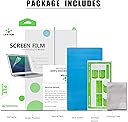
I recently got a new MacBook Pro with Retina and wanted to protect my screen for possible resale in a few years, and this protector had a good review average. I feel like the bad reviews are because people didn't know how to apply it on properly. There are tools provided to apply this screen protector and clear instructions on how to do it. There is a big blue sticker to grab any stray dust (because one speck can ruin it all!), and some strong stickers to hold the protector in place for proper alignment before finalizing anything. Being a perfectionist, you bet it went on flawlessly [see photos]. I used the front FaceTime camera as my main guide. There was a speck of dust on the edge, but I was able to lift off the protector with a knife and remove the speck with the dust sticker for a perfect finish. You cannot tell that the screen protector is there at all. I did remove one star because of a slight rainbow effect at certain angles, but I didn't want to remove it to compare it to the before. It's barely noticeable. — BONUS — As a bonus, it also comes with a thin silicone keyboard protector, but I gave that away because it was unnecessarily branded, but a plus if you don't mind that. For the price, functionality, and ease of application, this screen protector is a great value. Recommended. *** 10-YEAR UPDATE *** This screen protector is still on and looks like week one! My MacBook Pro is now running current MacOS Sequoia via Open Core Legacy Patcher, and Windows 11 Pro via Rufus and Boot Camp.
T**R
Excellent Protector for the value, don't listen to the 1 Star folks!!!!
I just got the package today. Installation was fairly easy and simple. I don't know why other reviewers complained that the clarity of the screen was hindered as a result of this screen protector. u can barely notice that its even on. Its a perfect fit and i didn't get any bubbles except one tiny one on an edge that i pushed out immediately. Quality is great. Resolution is clear like theres nothing there. It is quite fingerprint resistant, i was touching the screen and it didn't really smudge. only complaint is that it came in a huge box full of air cushions when it could've been sent in something smaller or slimmer. other than that i love it! don't hesitate. BUY IT!!!
V**V
Wonderful product but very difficult to apply though they give one extra sample to try. I got the screen applied through a professional and recommend the same
M**N
The protective film on the screen of my MacBook was starting to wear off and the damage was creeping from the bezels onto the screen. I was quoted $900 to get the screen replaced officially and $500 unofficially. Either way not worth it. So I reckoned a screen protector might solve the problem. I tried a tempered glass one to start being a bit wary about film protectors - always found them hard to fit. Didn't work - always seem to get a halo with them. So last resort was getting this protector. And it worked. Went on real easy and has pretty much dealt with the wear issue on the screen. Really good product but do make sure you follow the instructions when you apply it.
S**T
Great Product
M**Y
Good product and easy to install
Trustpilot
1 week ago
1 month ago