๐ฏ Own your game with the keyboard that adapts to your every move.
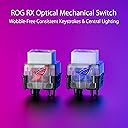
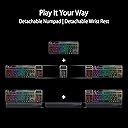
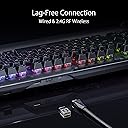
The ASUS ROG Claymore II is a premium wireless RGB gaming keyboard featuring modular removable numpads for versatile layouts, ultra-responsive ROG RX optical mechanical switches with a 100 million keystroke lifespan, and lag-free 2.4GHz wireless connectivity. Designed for pro gamers and multitaskers alike, it offers customizable AuraSync lighting, a detachable wrist rest, and USB pass-through for seamless integration into any setup.


| ASIN | B0BWS5SC27 |
| Amazon ๅฃฒใ็ญใฉใณใญใณใฐ | ใฒใผใ - 69,566ไฝ ( ใฒใผใ ใฎๅฃฒใ็ญใฉใณใญใณใฐใ่ฆใ ) ใใฝใณใณ็จใญใผใใผใ - 10,474ไฝ PCใฒใผใ ็จๅจ่พบๆฉๅจใปใขใฏใปใตใช - 13,373ไฝ |
| UPC | 195553393805 |
| ใใใใๅบฆ | 5ใคๆใฎใใก4.2 71 ใฌใใฅใผ |
| ใซใฉใผ | ใฌใใ |
| ใญใผใใผใใฎ่ชฌๆ | ใฒใผใ |
| ใญใผใใผใใใใฏใฉใคใใฎใซใฉใผใตใใผใ | RGB |
| ใญใผใใผใใใฌใผใ็ด ๆ | ใใชใใใฌใณใใฌใใฟใฌใผใ |
| ใญใผใใผใใฌใคใขใฆใ | QWERTY |
| ใทใชใผใบ็ชๅท | 2 |
| ในใคใใใฎใฟใคใ | ใชใใข |
| ในใฟใคใซๅ | ใฌใใในใคใใใ |
| ใปใฏใทใงใณๆฐ | 4 |
| ใใผใ | ใฒใผใ ็จใ |
| ใใใฏๆฐ | 1 |
| ใใฉใณใ | ASUS |
| ใใฉใณใๅ | ASUS |
| ใใฟใณๆฐ | 19 |
| ใกใผใซใผๅ | ASUS |
| ใกใผใซใผๅ็ช | MA02 ROG CLAYMORE II/RD/US/PBT |
| ไบๆใใใคใน | ใใผใใใฝใณใณ |
| ไปๅฑใใใใชๅๆฐ | 1 |
| ไปๅฑๅ็ทๆฐ | 1 |
| ๅฉใๆ | ๅทฆๅณๅ ฑ็จ |
| ๅๆขฑๅๅ | USBใฑใผใใซ |
| ๅ็ฎๅฏธๆณ๏ผL x W x H๏ผ | 54้ทใ x 19ๅน x 8.4้ซใ cm |
| ๅๅใฎๆจๅฅจ็จ้ | ใฒใผใใณใฐ |
| ๅๅใฎ่ฟฝๅ ่ชฌๆ1 | ใชในใใฌในใ, ๅ ้ปๅผ |
| ๅๅๅค่ฃ ็ด ๆ | ใใชใใใฌใณใใฌใใฟใฌใผใ |
| ๅ็ช | MA02 ROG CLAYMORE II/RD/US/PBT |
| ๅค้จๆฉ้ข่ชๅฎๆ ๅ ฑ | Nรฃo aplicรกvel |
| ๅฏพๅฟใใใคใน | ใใผใใใฝใณใณ |
| ๆฅ็ถๆ่ก | USB |
| ็นๅพด | ใชในใใฌในใ, ๅ ้ปๅผ |
| ่ฃฝๅใฎๆจๅฅจ็จ้ | ใฒใผใใณใฐ |
| ้ไฟกใปๆฅ็ถใคใณใฟใผใใงใผใน | USB |
| ้ต็คๆฐ | 104 |
| ้ฒๆฐดใฟใคใใๅฆใ | ้้ฒๆฐด |
| ้ปๆฐ | ใฏใ |
| ้ปๆบใฎใฟใคใ | ใใใใชใผๅผ |
J**N
Incredible
The ASUS company does a poor job at describing & educating the consumer about this amazing product. I am not a gamer, but I love high quality keyboards. I write for a living. Expect the keys to click; the keys do not bind-up ever, the spring back of the key is fast, & I love the L & R option number pad. I use the num-pad on the left because I use the mouse on the R & what a blessing that is. Be aware that the num pad does not stand alone it must be attached to the L or R side. I am not going to waste my time with all of the other incredible points. I say buy it & you will be amazed. PS: the keyboard does not slip on my glass desktop. The keyboard is very very heavy & will not move around.
P**Y
Poor warranty, product quality and repair service.
Gets stuck charging at 50% or 70%. Only 1 year warranty. Keys type on their own (e.g. "3") randomly - issues linger for years without being fixed by Asus. Hardware glitches cannot be repaired, no support for firmware bugs, so Asus charges more than new to exchange the unit (not returning your old one). Sadly, Asus has gone horrible in quality, warranty and support.
R**A
Red Optical Switches are incredible
Overall, this is one of my favorite keyboards. Previously, I had a Razer Black Widow Elite with Yellow switches and the Kinesisgaming Freestyle Edge with Red Switches. I use this keyboard for work, College, and gaming. My college courses involve a significant amount of typing. +Postives 1. The highlight of this keyboard is the Red Optical switches they are fast and incredibly stable. + Feels as though there is less pushback from the keys, leading to less finger strain than I had with the Razer. + Since purchasing this keyboard, my typing speed and accuracy increased slightly over the Kensisgaming and Razer boards. 2. The fit and finish are exactly what you would expect from a top-of-line keyboard. + Very easy to keep clean 3. The ability to move or remove the number pad is an innovative touch and part of why I switched from the Kineses which lacked a number pad. 4. The macros are a plus and work well 5. When attached, the magnetic wrist pad stays in place. - Negatives 1. (Nitpick) Careful resting your fingers on the keys, they are fairly easy actuate. - Takes a few weeks to get used to, but worth it. 2. The wrist pad could be a little bigger, when attached via the magnet, my hands barely sit on the pad. - Detaching and moving the pad back a little works well, but also causes the pad to move slightly while typing. All things considered, I recommend this keyboard.
E**G
Great keyboard
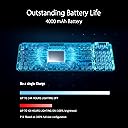
First wireless keyboard, looks great, heavy duty. The keys feel good. Pretty cool the numberpad is detachable, I use mine all the time, so it serves no purpose for me. Customize the whole thing in the Armoury Crate, and the RBG look good. I would say the only thing I wasn't impressed with was the battery life, sucker drains pretty darn quick in wireless, I gotta have it backlit. I rarely go wireless, so it's not a deal breaker, but I got it for convenience working in the studio. I like the wrist rest, pretty comfortable, the detachable magnetic feature is pretty slick. Expensive, but hey whatever.
A**X
Great Design! Mediocre Software Support. Very Bad QC.
This was my second Claymore II red switches keyboard. I had to return the first one only after a few days because I discovered the number keypad does not work on the left side of the keyboard and F1 key is randomly sending out keystrokes for no reason. Must be a bad apple in the bunch, right? So I ordered the second one because I do like the detachable number pad which is a perfect replacement for my very old Microsoft Sidewinder keyboard. Guess what! The second one also had almost the same issue just after a few days: The number pad works on both sides for the keyboard on this one but the ` key starts randomly sending out keystrokes for no reason. I did not realize this until I discovered that many of my notepad files start filling with ` far and between. Some texts were even replaced by ' entirely because I was highlighting them for copying without realizing these were being typed over while it was being highlighted with a mouse. The behavior of this keyboard was worse than a non-working number pad. It makes this keyboard unusable and worse, you could lost your data over it. I had to recovered some of my files from backups. This made me very mad. I have never experienced a keyboard behaves this way even on a cheap one. Asus QC really let me down on this one especially at this price point. I suspected that this issue could be due to the linear nature of the red switch which has no hump to cross over to trigger a keystroke and with a bad QC of a red switch, it could trigger a keystroke without a keypress. That was just my guess. Anyway, avoid this keyboard if you can. If you really like this style of keyboard just like me, I would try the one with the blue switches. A side note: Armoury Crate is workable but is not as stable as G Hub. Also, customized RGB also works as expected via Aura Creator. I would keep this keyboard if not for poor QC issues of the keyboard.
Trustpilot
1 week ago
2 weeks ago