Desertcart purchases this item on your behalf and handles shipping, customs, and support to Cyprus.
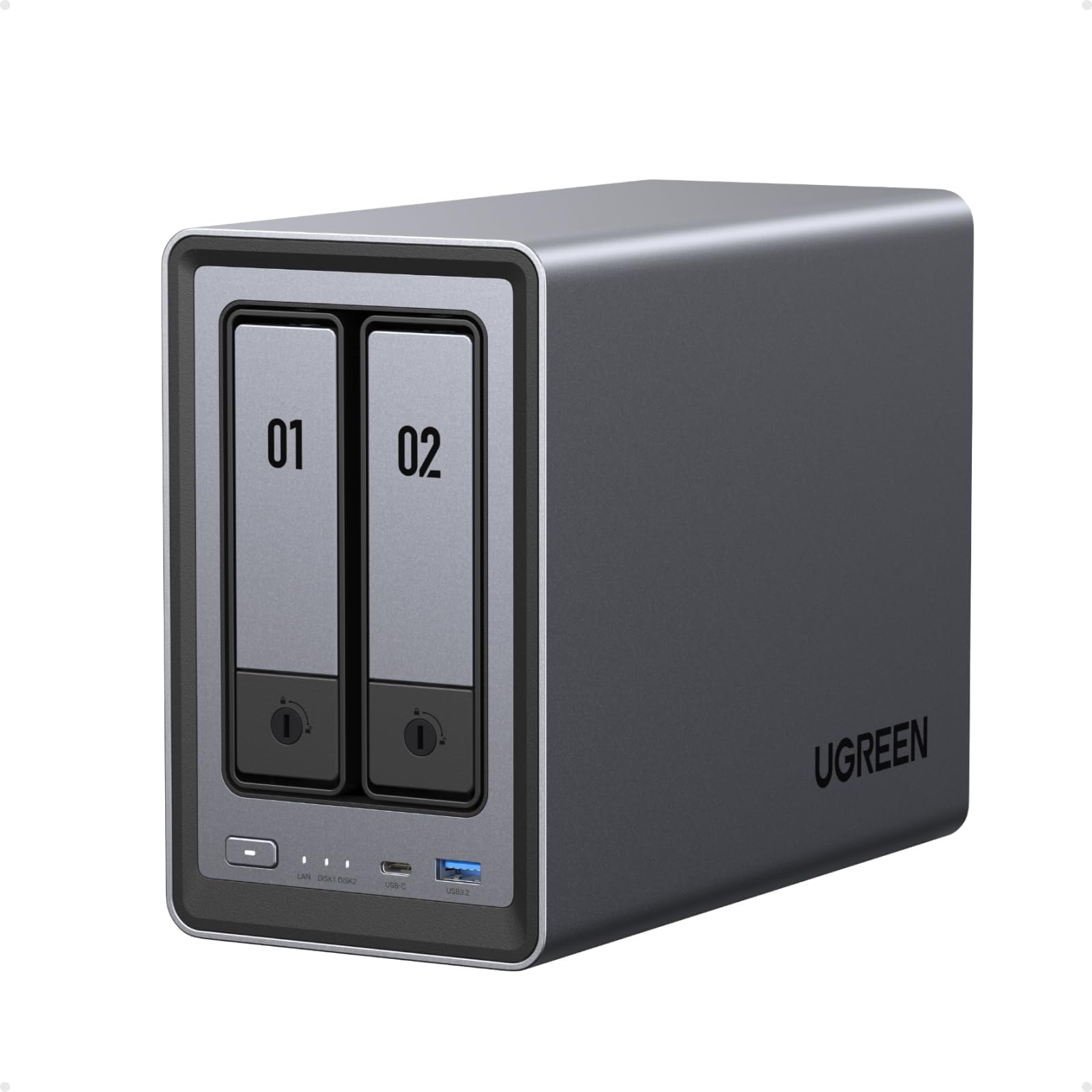
🚀 Elevate your storage game with UGREEN NASync DXP2800 — where speed meets smart, secure, and scalable storage.
The UGREEN NASync DXP2800 is a premium 2-bay desktop NAS featuring a 12th Gen Intel N100 quad-core processor, DDR5 memory, and dual NVMe plus SATA bays supporting up to 80TB storage. It offers ultra-fast 2.5GbE networking for lightning-quick file transfers, AI-powered photo management, secure private cloud access without subscription fees, and robust Docker and VM support. Designed for tech-savvy home users, content creators, and small offices, it combines powerful hardware with user-friendly software and reliable heat dissipation in a sleek aluminum chassis backed by a 2-year warranty.


| ASIN | B0DYCBTV78 |
| Best Sellers Rank | 2,465 in Computers & Accessories ( See Top 100 in Computers & Accessories ) 1 in Network Attached Storage (NAS) Enclosures |
| Brand | UGREEN |
| Brand Name | UGREEN |
| Colour | grey |
| Compatible Devices | Laptop, Desktop, Server, Smartphone, Tablet |
| Compatible devices | Laptop, Desktop, Server, Smartphone, Tablet |
| Country of Origin | China |
| Customer Reviews | 4.6 out of 5 stars 241 Reviews |
| Enclosure Material | Aluminium |
| Is Assembly Required | No |
| Manufacturer | Ugreen Group Limited |
| Manufacturer Part Number | DXP2800 |
| Material | Aluminium |
| Model Number | DXP2800 |
| Mounting Type | Tabletop |
| Mounting type | Tabletop |
| Product Warranty | 2 year limited warranty |
| Size | DXP2800 |
S**N
Its excellant, great OS, great apps - really recommended!!
Brought to replace my aging Synology NAS. This NAS is great, does the standard sharing drives etc as with all NAS's. But it does it so well! The OS is great, fast and responsive and well designed. Loads of great apps, like Jellyfin, video players, bittorrent client, VMs (not found a use for that yet) and Docker containers. The docker containers are brillant, so easy to set up and use. I have installed pihole (takes a bit of work to get it working but thats nothing to be with the NAS, tip - you need to use a docker macvlan to get a external IP address due to port conflicts), mealie (a great recipe database). Noise seems Ok, NAS itself is quiet just the hard drives that make any noise but thats probably the old crappy hard drives I have (when did new hard drives get so expensive?!). Setup, was so easy. When highly recommend, for the price, its amazing!!!
A**R
Does eveything I was hoping for.
Very pleased with this NAS, build quality is much better than Synology DS224+ which had an annoying fan noise. This DXP 2800 turns off the fan at low CPU usage and is silent with SSDs. I use it for Emby (docker) and Home Assistant (VM) with Sonoff Zigbee Dongle. The software is very similar to Synology and was a breeze to setup. I like that fact that you can treat it as a mini PC and install any OS if you prefer like Truenas. 10/10 for my use case, and thought I would be installing something like Truenas but the UGOS does everything I need. It does HW transcoding and everything feels snappy including Home Assistant. It is better that the OS runs on the unit so swapping drives is possible without having to set it up all over again.
E**L
A brilliant NAS
I've wanted something that acts as both a day to day storage and backup for photos and phone data which is why I delved into NAS. After looking at synologys offerings I was disappointed as even the most basic versions were expensive and seemingly quite cheap quality and so I was put off. Then one day I saw Ugreen, a brand I have come to love launched a Kickstarter for a NAS line up. I was annoyed they were only available to Germany and the US but I assumed one day they would do international and now they have. I immediately grabbed the 2800 and a couple 4tb nas drives and have it all setup in RAID 1 and I have to say that there are very few things that I can complain about. Pro's: - Very good build quality, almost entirely made of thick aluminium with no creaks or loose parts. - Great design as it's somewhat futuristic (An item from the Halo universe comes to mind) - I/O offerings are great on the back and front, with USB-A & C 2.0/3.2, HMDI and 2.5gb ethernet. - Software is clean and easy to use providing all the important features for users use cases. - The mobile app feels similar to the desktop version and works just as well - The TV app available from the NASync website is again clean and picked up the NAS instantly providing it's video contents straight away without any hassle and showcases the films very nicely. Cons: - The CPU even under a light workload (around 20-30%) likes to hover around the 72 degree mark which is hotter than I would expect it to be. This however does not affect drive temperatures which stay around 30/35 degrees. - Due to the high CPU temps it's means the exhaust fan will ramp up and down to vent the heat and it does so quite aggressively, something I hope an update will fix one day. - The TV app although works great when setup was a bit tricky when it came to installing onto my google tv chromecast as you have to download and install the apk file. best option is probably to turn on developer settings (to allow 3rd party app installs), download a browser on the Chromecast itself and get the apk saved locally. In conclusion, Ugreen offer something for everyone and what they do offer is very good, I would highly recommend it if you're thinking of investing in a nas yourself.
A**R
Easy to Program and get started
I've had a 2 disk Synology for around 5 years. the first few years (as a non IT expert), was getting to know what it can do for a home NAS. Managed to get most things running on my LAN, but remote access (ie outside the home), i never could achieve despite watching various Youtube videos, and even contacting Synology support (not that helpful). However in 2023/24 Synology removed Video Station from its system and this is what i used to watch my films and family videos. I found it impossible to get around this problem. With some trepidation i decided to purchase this Ugreen NAS as recent reports were good. I reused my SATA HD's that were in my Synology (to keep the initial cost down) and started setting up the Ugreen NAS. It took my system 8 hours to sync the drives, but after that i moved over a few films, MP3's and photos to see how it performed. This took around 10 mins and because i had pre-loaded the Ugreen app on my phone I could play it all with hardly any lag, So then tried turning off the wifi on my phone and low and behold everything played as it should (for being outside my LAN). What took me the last 2 years of messing about with Synology and never achieved, I did in 10 mins with Ugreen. Well worth the spend. Functionality for home use is great, it looks well made, little noise and loads quicker than Synology. I believe more updates to come for Ugreen as its quite new to the market, but first impressions are 10/10. RIP Synology.
F**G
Great first NAS
Simple to use, great hardware and easy to set up. I'm using it primarily as a alternative to backing up with iCloud or Google and it works smoothly with immich. Very intuitive GUI and compatible with both android and iPhone.
S**N
Amazingly quiet and better than synology where it matters most
For those wondering about noise level compared to synology. This thing is so damn quiet compared to the synology equivalent. I know because I had that, returned it and got this and I’m so happy I did. It has way better specs and also has nvme cache and expandable memory. I wouldn’t even say the software is worse I actually prefer the OS the only thing lacking is the number of apps but if u are techy and know how to use an ssh terminal session and docker compose I would say it’s actually preferable because there is less bloat and I have full control of what apps I have installed and how they are configured. If u don’t know docker or terminal u can get by just in the docker app and use chatgpt or Gemini to help with settings. Honestly I can’t stress enough this thing is better than the synology in every way I’m so blown away by it. Also last pro, they let u use any drive brands u like unlike synology. Can’t recommend this thing enough.
K**.
Best for new NAS owners
I'm pretty happy with it. I like that you can do what you want with it basically there's not any restrictions on features that you have to pay extra for, software is open for your use how you need to use it. You can even change software with an NVME SSD. It's a very nice unit, useful for what I need it for, mainly media and file storage/backup. It is a bit loud but this is not a problem if the device is not in any bedrooms. I like how it is simple to use through the app. I like the price and hardware. My only problem is ugreen does not prioritise features that consumers want added they seem to add irrelevant features with updates before adding useful ones.
L**S
Compact, quiet, and surprisingly powerful home NAS
This UGREEN NAS exceeded expectations. I’m running the DXP2800 model with 2x NVMe SSDs and it performs flawlessly for home media, backups, and Docker containers. The Intel N100 chip is efficient and responsive — perfect for tasks like Plex streaming, file syncing, and light virtualization. Setup was straightforward using the UGOS Pro interface, which is surprisingly polished. It supports Docker, Samba, snapshots, remote access, and more. I’ve deployed Jellyfin, AdGuard Home, and a few other containers without any issues. Thermals are well managed, and the fan is quiet — nearly silent even under load. Build quality feels premium, and the 2.5GbE port makes file transfers lightning fast, especially with SSDs. If you're looking for a quiet, capable NAS that supports NVMe and containerisation without breaking the bank, this is a fantastic option.
Trustpilot
1 month ago
3 weeks ago