

Buy anything from 5,000+ international stores. One checkout price. No surprise fees. Join 2M+ shoppers on Desertcart.
Desertcart purchases this item on your behalf and handles shipping, customs, and support to Cyprus.
๐ Elevate Your Connectivity Game!
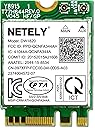
The IEEE 802.11AC NGFF M2 Interface 1200Mbps Dual Band WiFi Adapter is a high-performance wireless network card designed for laptop PCs. With speeds up to 1200Mbps and Bluetooth 4.2 support, it ensures fast and reliable internet access for gaming, streaming, and more. Compatible with various laptop brands, this adapter is perfect for users looking to enhance their wireless experience.


| ASIN | B07DB5MRZL |
| Best Sellers Rank | #1,235 in Internal Computer Networking Cards |
| Brand | NETELY |
| Built-In Media | 1X Antenna Protector, 1X DW1820 WiFi Module, 1X Mounting Screw |
| Compatible Devices | Laptop |
| Customer Reviews | 4.2 out of 5 stars 107 Reviews |
| Data Link Protocol | BT 4.2, IEEE 802.11ac |
| Data Transfer Rate | 1200 Megabytes Per Second |
| Hardware Interface | Bluetooth |
| Item Type Name | Internal Network Cards |
| Item Weight | 0.3 Ounces |
| Manufacturer | NETELY INC |
| Mfr Part Number | DW1820 |
| Model Number | DW1820 |
| Warranty Description | 1 Year Warranty for Limited Parts |
A**N
This worked fine as a replacement in my Dell laptop.
I had an issue where WIFI would go dead and my attempt at a solution was to replace the card. The new card worked fine.
R**N
Worked like a champ.
While updating 2-3 year old Dell laptop on which internal wifi had stopped working, this device was installed along with more ram and bigger ssd. The wifi worked the first time! Windows found appropriate drivers right away. Laptop is running like new!
R**S
Solved My Connection Problems
Item arrived quickly. Easy to install and solved my connection problems. My connection speeds have also increased dramatically
K**I
Not as advertised - NOT a PCI card
I searched for a wireless card for my DESKTOP Dell computer, and this one came up. It's NOT a pci card. It's a little chip type thing for a laptop or something. I had to return it, and order one that would work, so there was an entire week and a half turn-around for the exchange.... Delays like that drive me nuts.
N**.
Works just like I wanted it to
I bought this for a dell laptop that I wanted to upgrade to have the wifi AC ability. I had my doubts about it working because it is made by someone I have not heard of, NETELY. The previous wifi card in the laptop was only 2.4Ghz capable and didn't have Bluetooth. So getting this was going to be a great improvement. Installation was easy but I do recommend making sure you are buying the right product, this could easily be confused for a PCIe if you don't look/research for the right product. Once installed it worked without a problem, no updating needed (not to say that your laptop or PC doesn't need the drivers) It has been working fine for me without problems at all. Great to have the AC wifi and the Bluetooth.
K**V
Don't buy this if your internet connection with your internal wifi card is slow.
This product works fine, but looks like there's a software bug that slows down the internet speed if I am using the internal network adaptor. So when I switched it it was fine for a couple days and then it got back to being slow.
J**H
It installed and works the way it should
I was looking for a faster replacement wireless card for my new Dell notebook. Dell's higher-speed OE card was twice the price, but I knew the drivers were already on the machine. This card was listed as a replacement for the Dell but I thought I might have to seek out the drivers. Nope, Windows saw the card upon start and all was right in the PC world. Installation was fairly easy since I had the right tools to removed the bottom cover on the Dell. It's nice when something works as advertised,
R**D
It worked for my Dell 7390
I purchased this as a replacement for a card that I damaged on a Dell 7390 laptop. It worked perfectly and there was no software to install. Install was a breeze as there was only the bottom panel screws to remove plus the one screw on the unit itself. Push it into the slot and snap on the two wires and you're done.
Trustpilot
3 weeks ago
1 month ago