Desertcart purchases this item on your behalf and handles shipping, customs, and support to Cyprus.
🚀 Stream Smarter, Watch Better — The Future of TV is Ultra!
Roku Ultra 2024 is the fastest Roku streaming player, delivering lightning-fast 4K HDR10+ and Dolby Vision video with immersive Dolby Atmos sound. It features a rechargeable Voice Remote Pro with backlit buttons, hands-free voice control, and a lost remote finder. Equipped with Wi-Fi 6 and Ethernet, it ensures seamless streaming of live, free, and premium content from all major platforms, making it the ultimate entertainment hub for any TV setup.


| ASIN | B0DF44RTTP |
| Best Sellers Rank | #310 in Electronics ( See Top 100 in Electronics ) #11 in Streaming Media Players |
| Brand | Roku |
| Built-In Media | HDMI Cable, Power adaptor, Roku Ultra streaming player, Roku Voice Remote Pro (2nd edition), USB-C charging (for remote) |
| Color | Ultra (with Wi-Fi 6) |
| Compatible Devices | Smartphone, Tablet, Television |
| Connectivity Technology | Bluetooth, Ethernet, HDMI, USB, Wi-Fi |
| Connector Type | HDMI |
| Controller Type | App Control, Button Control, Remote Control, Voice Control |
| Customer Reviews | 4.4 out of 5 stars 8,895 Reviews |
| Form Factor | TV Box |
| Global Trade Identification Number | 00829610006888 |
| Item Dimensions L x W x H | 5"L x 4.9"W x 1"H |
| Item Highlight | HDR10+, Dolby Vision & Atmos - Bluetooth & Wi-Fi 6 - Rechargeable Voice Remote Pro with Backlit Buttons - Free & Live TV |
| Item Weight | 18 g |
| Manufacturer | Roku |
| Mfr Part Number | 4850R |
| Model Name | Roku Ultra 2024 |
| Model Number | 4850R |
| Number of Items | 1 |
| Other Special Features of the Product | Backlit, Parental Controls |
| Resolution | 4k |
| Special Feature | Backlit, Parental Controls |
| Supported Internet Services | Apple TV+, Disney+, Hulu, Netflix, Prime Video |
| UPC | 829610006888 |
| Video Codec | H.264/AVC, H.265/HEVC, AV1, VP9, HDR10/10+, Dolby Vision |
| Video Output Resolution | 3840 x 2160 pixels |
| Warranty Description | 2 Year Manufacturer Warranty |
D**.
Roku hookup problems
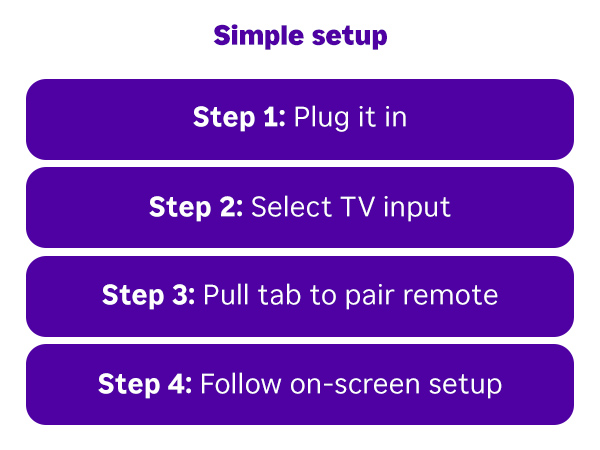
First off, I want to say that this Roku Ultra is fast, and has fantastic picture quality, and I am now very happy with it. Now the negatives. When you get it the first thing you will do is look for a manual. None, only a quick start guide with four steps on it. I have an older Vizio 60" smart tv that still works beautifully, and I have always thought it had a great picture. I also have an outside over the air antenna hooked up to my tv for local channels. I hooked the Roku up to an HDMI port and started. It came on in German so I couldn't get to the on-screen set-up. I could not find a way to set it to English and in order to get to settings where you can change the language you have to be well into the set-up process and have a Roku account set up, again well into the set-up process, here is where a manual would be helpful and only the beginning. I couldn't get the remote to pair with the device, and according to the quick start guide you hold down the home button and the back arrow for 5 seconds and it shows on the guide the white light on the remote flashing and then solid white, when done mine would flash and then go out. I contacted Roku and told them the issue, and they directed to their website where I could get the manual. I went there, and what they had was the same worthless quick start guide that came in the box, no help. Finally, after trying to pair for over an hour I found that if you release the two buttons while the white light on the remote is flashing, not solid as they show in the guide it paired. At that point I was still in German on screen and couldn't get to settings. I downloaded the Roku mobile app to my iPhone and was able to set up a Roku account which gave me access to settings. Without the mobile app and only my tv I would have been stuck at start in German. From that point I was able to go to settings and change to English and complete the set-up process. It is worth noting that during set-up, on screen the Roku told me that if my tv was capable and had the HDMI input rated at 4K, 1080p, 60fps I could get even better picture quality because I was currently hooked up to an HDMI port rated at 4K, 1080p, 30fps. I pulled the tv out from the wall and I did indeed have that higher resolution and frame rate port, so I plugged into it. In all of the years that I have had the tv I did not know I had that HDMI port. Kudos to Roku for pointing that out. I was on a roll and the rest of the set-up went relatively well. I had assumed that this Roku Ultra had the ability to toggle between the device and the external antenna connected to my tv for my local over air channels, it does not. I need to access my local over the air channels. I though no problem, if I can't switch to antenna tv from it I will go back to my actual tv remote, select inputs, and antenna should be there, it wasn't, stuck again. I need to receive my local channels also. I got on the internet, YouTube and countless forums to find a solution, but the only solution was to add a dvr, Tablo or other such device that is capable of switching between the Roku, and antenna that would be connected to it, and it connected to the tv. I am disabled from the Marine Corps on a fixed income and can't afford to purchase another unit just to be able to switch to my antenna for local channels. Out of frustration as a last resort I went to Co-pilot, the Edge browsers AI. I was amazed at how helpful it was, and, in the future, it will be my first stop when a problem arises. The troubleshooting began I told Co-pilot that there had to be a simple way to switch between the Roku and the antenna. The normal solution would be and should be that antenna tv would be accessed from the inputs button on my tv remote, but for some reason it was not there, only the HDMI ports. I tried re-scanning my local channels on my tv, still no input to select on tv for antenna. As I was getting ready to pack up the Roku to send back, shortly after re-scanning my local channels on my tv, an input on the tv came up not as antenna, but as one of my local channels. I selected that input and it took me that channel. From there I am able to use the channel up and down button on my tv remote to go to my other local channels. All is good as long as that input stays in my list of available inputs. I want to say that the reason that I purchased the Roku, because I have a smart tv with built in apps that worked perfectly fine, is that about a week ago I went to the YouTube app on my tv and an on-screen notification popped up that said, Yahoo provides the platform and updates for apps on the smart tv's and as of October of 2025 will no longer provide the platform. They have already eliminated all but 5 apps. The newer tv's almost all have Roku built in, which would be the ultimate solution, but I can't afford to buy a new tv. I always experienced time lags when selecting an onboard app on my tv including buffering at the beginning of videos when I did get there, even with 1=gig fiber optic internet and a direct ethernet hook-up to my tv. This is not the case with the Roku Ultra. It is fast and the picture quality is fantastic. I love the Roku and what it provides but I am disgusted by the lack of documentation and the lack of help from Roku customer service. In total I spent over 5 hours on hooking it up and my frustration level was through the roof. Now that it is done, I wish that I had this years ago, not because of its huge selection of things to watch, but because of the quality of the picture and over all speed. If my body and health hang in there a little longer, and I can eventually afford it I will get a new tv with Roku built in. With injuries sustained and my health I am pretty much homebound and my tv is my only entertainment. I know that this is a lengthy review, but I hope that this helps someone who may be having similar problems hooking it up. The bottom line, 5-stars for the unit itself, and 1-star for the lack of documentation and help from Roku.
L**Y
Love the Roku Ultra 2024!
I absolutely love this! I have the Roku Express and even tho all of them were still going strong and still pushing out new software updates I got 2 of these. The picture is so clear and the sound is louder and crisper on these! I saw a few bad reviews but Idk why? I think it was mainly from ppl who weren't tech savvy or just had bad internet speeds cause I haven't had any problems at all! (Knock on wood!) Now, I did just recently buy 2 rechargeable remotes cause I just got sick of dead batteries every other week so not only do I have the remote controls that have the headphone jack but I have the ones that came with this which even has a back lit feature so I'm using them both. They definitely keep a good charge. I can use it for days and the battery barely drains and I use them a lot. If you're used to Roku devices they are very easy to set up once you have an account. Once you sign in all your apps sync to the device. A lot of the apps don't even need to be signed in except for a very few but with easy to use QR codes it doesn't take long to sign in. I did compare the speeds between the Roku Express and this one and I do see a slight difference. The processor is a bit faster. With the improved speeds and quality sound and clearer picture I believe it was worth the price but that's only cause I had some extra money. You honestly don't need to upgrade if you're older Roku is still doing the job and still has the latest software updates. I've had my Express devices since 2021-2022 and they still never failed me but I still have a few in other rooms. Also, I might add that the Roku boxes do come with ethernet slot and a USB port and on the side of the box it has a button to press when you're unable to find your remote control. I never lose mine but I did test it and they all went off so if you have different types of Roku remotes that you use they will all go off. It's pretty loud so you definitely will hear the alert. A few ppl griped about the ads on the home screen but I barely notice them so that wasn't a deal breaker for me. There are a lot of free apps and channels but also if you like premium apps they are easy to find. If I do come across any issues I will come back and do another update. Btw, this is an update for the 2024 Ultra not the earlier version just so no one gets it confused. I'm coming back after a few weeks of owning these and honestly I think the sound was better on the roku express 4k but that may be cause my soundbar is a few yrs old and my TV may not support Dolby also the closed captioning on every app doesn't work like it should unless you FF or rewind I've also had issues where if I don't get done watching a show and come back to it later I'm stuck FF over it cause it's at the beginning again. I called roku about these issues and they said they're aware of the issues. Idk if I should take both back? I spent $80 on each when the roku express had no issues. I only got them cause I figured after having them for close to 4-5 yrs I thought I would upgrade. Coming back for a 3rd time to review and I decided to keep both. There were a few fixes but there's still a few bugs they need to iron out but it's not a deal breaker. If I were to go back and do it all over again I would have never spent $80 a piece on them. That's nuts! You can get way cheaper rokus for way less than half that but you live and learn. Still a stellar picture tho.
E**N
Impressive performance
After using streaming sticks for many years, with the amount of use they got we decided to upgrade to a more premium version when we started having problems with our last one. When I did a bit of product research I was surprised to find that a Roku device came more recommended than a Fire TV or Apple device, as Roku was not a brand that I mentally associated with product quality, but I decided to try it out anyway and I'm very impressed. I can't say how it performs as compared to other devices in this size and price range, but the performance difference between the Roku Ultra and our old streaming stick is quite significant. I do think that the position our TV is in is a bit rough on the sticks, as in plugging directly into the TV they have to be in a space that is both poorly ventilated and still exposed to harsh desert sunlight. The less compact design is therefore actually a benefit in our case, as the cord lets us set it in front of the TV where it's both exposed to less heat and sunlight, and given a less obstructed wifi signal. I know this could be done for a stick with an extender, but having to deal with that does take away a bit from a stick's appeal both as a dirt cheap option and as a minimal setup plug and play device, whereas with a larger set top box style device it's expected. Aside from performance, the user experience is a bit better in general, navigation is easier and the UI is more attractive and less peppered with ads. As best I can tell all major streaming services support both Roku and Fire TV, so other than the unavoidable process of having to log into everything on a new device, there were no issues picking up right where we left off on our previous device. I think I would still recommend a cheap stick device for people who only stream on their TV occasionally and want something quick and easy, but with the amount of use ours gets, I think paying extra for a device with better performance was a great investment. It's undergone heavy use in the month since we bought it and we've had zero issues with it in that time. Playback is smooth, loading is fast, there's no hanging or freezing, and the remote connected very easy to the TV. The only issue we've had at all is with volume getting stuck in place on a bluetooth speaker, and I'm not sure if that's the fault of the Roku or the speaker, not to mention that bluetooth tends not to be the most reliable technology in the first place, but the way the Roku handles volume management might make it somewhat more prone to this sort of issue than a Fire TV Stick. That very minor issue aside, the Roku Ultra works impressively well and in my opinion is more than worth it if you stream video frequently and your TV doesn't have the function built-in. For the price (100 dollars at time of review) it feels like a very premium and well-made product, and I highly recommend it to anyone looking to upgrade from the a streaming stick to something nicer.
S**R
Great streaming device, best value when picked up on sale.
This box was exactly what I needed. My TV is old, and the streaming stick I was using previously was also old and tired. Decided to move to a device over another streaming stick for a few reasons, with the biggest being responsiveness. Right out the gate this thing is snappy. Real quick response times, no signs of noticeable buffering (though I can only watch 1080p with the current TV). It's also extremely easy to set up and get going right out of the box. The UX on their setup is top notch, in my opinion. There are a lot of 3rd party applications through the storefront, but Roku also offers their own flavor of channels so there's no shortage of things to watch. You get your standard selection of things like Netflix, Hulu, Prime, but there's also free platforms like Tubi and Pluto. The Roku channels I haven't checked out much, but there was a new one that popped up on my homescreen called 'Roku Yeehaw!' ? No idea, there. There's also options to connect it wirelessly to a home NAS/PLEX setup, I think, with their options for Photo Library and (I think, not 100% sure since I removed the app) Video Player. You'd have to do some research on that if that's what you're aiming for. I'm honestly not sure on the remote's battery life, as I only watch for an hour or two most evenings and charge it bi-weekly, but it seems to hold a charge fine and could definitely go longer between charges than I plug it in. However, I do have the voice/microphone feature turned off so that probably saves some battery life, and once I'm watching something I don't fidget with the remote to keep the backlight on. The only issue I really have are the volume buttons on the Roku remote. It doesn't always register a press on those buttons, but it does work, in general, when you sync the remote with your TV. The size of the streaming device is perfect; it's a small square that isn't very high. Small enough to fit under the lower edge of your screen or, in my case, attach it to the back of the TV to reduce wire clutter with some velcro tape. I'm not sure how hot the device gets, but the tape has held so far with minimal viewing each night. There's no active cooling, so I imagine it does get warm. Overall, I don't think you can go wrong with this if you have multiple streaming subscriptions. I don't know if the MSRP is wholly worth it when there are so many other devices we have in our lives that stream, but it is a solid little device to plug into the TV. I would just wait for a Prime Day sale to give it better value for what you're spending.
H**T
Despite ads, I’m happy with it
The interface on this Roku is so much better than a fire stick. All the apps seem to work correctly and seamlessly. Those are two things I haven’t had to this point. It’s not perfect. There are a lot of ads and despite trying to remove them from the high usage area they do return. But overall, I’m happy with my purchase.
T**O
The Ultimate Smart TV Upgrade: Saved me from a sluggish UI!
If you are fighting with a smart TV that has a slow, clunky, and unresponsive interface, stop suffering and just buy this. I bought the Roku Ultra to replace the built-in operating system on my smart TV, which had become incredibly painful and sluggish to navigate. The difference is night and day. The Ultra is lightning fast, apps load instantly, and the navigation is completely fluid. It feels like I upgraded to a brand-new, high-end television without the massive price tag. Beyond the massive performance boost, the newer remote is a game-changer. The automatic backlighting is incredibly convenient for late-night viewing, making it effortless to find the right buttons in the dark. Between the seamless, lag-free performance and the excellent backlit remote, this is easily one of the best upgrades you can make to your home entertainment setup. Highly recommended!
M**T
Great, except for YouTube compatibility issue
UPDATE! Sort of bad news, but the ultimately probably good news. Roku has "broken" even regular speed YouTube audio playback, introducing about a half second delay. Try this query on Google AI: "has Roku Ultra fixed it s YouTube 1.5x faster audio problems" The good news is that Roku has been working the high-speed playback issue. And that this particular normal speed glitch is so impactful, it must be very temporary! Based on the stereo / volume leveling workaround I am purchasing the unit again, because I now need it for it's reputedly excellent support for USB external drives, and the rest of my family doesn't use the high-speed playback! ORIGINAL POST BELOW I was already operating for Roku streamers, and have owned an older version of ultra. One was occasionally giving an overheating warning, so I was ready to spring for this high performance Ultra. Everything was as promised, and it was dazzlingly faster. Even YouTube played well until I tried playback at higher speeds, like 1.25 and 1.5. the audio was glitchy with breakups. Every other streamer I had had no problem with it, so I investigated with the Google browser AI. There were other reports of this problem, and they were attributed to the multi-channel audio chip that was being used. Since this appeared to be intrinsic to the design rather than just a defective unit, and I found no reports that Roku acknowledged the problem and had a fix coming soon, I have returned my unit for a refund. This was a deal killer for me because with all the bloated AI generated videos on YouTube being able to play back at higher speed and get to whatever the hyped headline was important. Maybe there is a fix coming, but without an announcement, I did not want to wait. If my assessment was incorrect and this feature works on your units, then I was wrong.
C**E
Love these drvices
I have 4 of these. They work great, are easy to use, and pretty reasonably priced. The remote for this latest one is backlit, which is a nice feature, and you connect Bluetooth headphones. Worked well with my Shokz.
T**.
A more than capable streamer.
This is a fast streamer, which had a few good bells and whistles too. If you are based in the UK, as I am, then this particular syreamer does not support the following apps: U, My 5, BBC iPlayer and Channel 4. ITV X is supported along with STV. All other major platforms work too, this includes Now TV. If you require a streamer which supports all of the UK platforms, then you would be wise to look elsewhere. But if the lack of support for the vast majority of the UK streaming platforms is not important to you, then this streamer will not disappoint. Update: As of January 2026, Both Channel 4 and Channel 5 streaming apps now work on this device. This may have something to do with the 15.1 update. However, BBC iPlayer and U still don't work
S**O
Buena señal y facil de instalar
Muy facil de instalar, la entrada LAN me sirvio perfectamente con muy buena señal, los videos e imagenes con muy buena calidad, cumple con las aplicaciones que necesito, muy recomendable!
U**T
Dishonest seller, wrong and older model
تاجر غير امين بعت موديل اقدم وغير مطابق للمواصفات المعروضة I was sent the cheaper Ultra LT, not the Ultra model.
W**M
Unable to install Disney+ and Prime Video
Both Disney+ and Prime Video are not installed and cannot be installed. The remote has the dedicated buttons and the box shows the picture so it should have it. I have researched extensively and tried every solution available but nothing worked. Also the system does not have a search function. I dont recommend
V**R
El Mejor ROKU
La mejor versión de ROKU. Es Ultra rápido, Ultra fácil de usar, todo Ultra. El control remoto con Control por Voz es una maravilla. Y consume muy poca electricidad en general.
Trustpilot
1 month ago
2 months ago