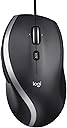
๐ฑ๏ธ Elevate your desk game with precision, speed, and comfort โ because your workflow deserves the best!
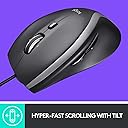
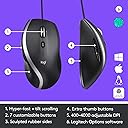
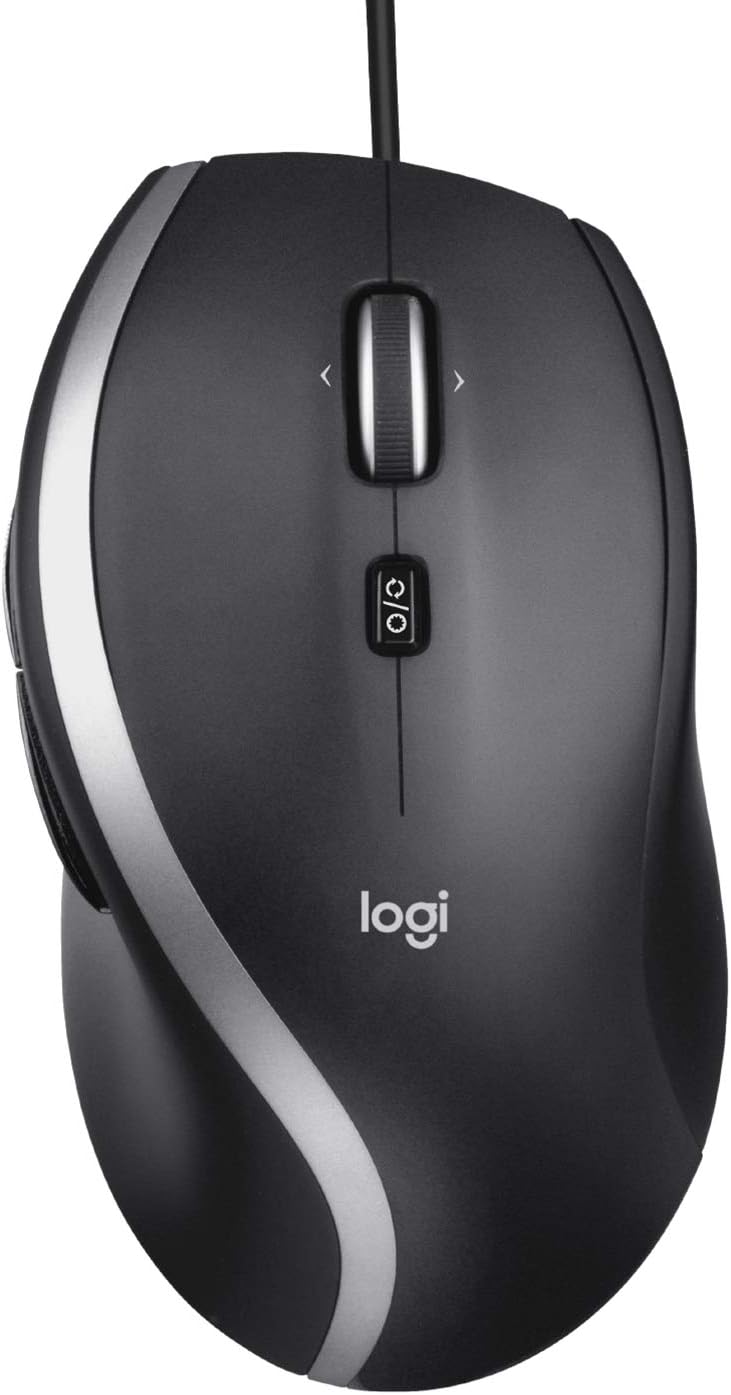
The Logitech M500s Advanced Corded Mouse combines hyper-fast scrolling with adjustable 400-4000 DPI optical tracking and 7 customizable buttons, all wrapped in an ergonomic design. Its plug-and-play USB connectivity ensures hassle-free setup, making it the ideal wired mouse for professionals seeking precision, comfort, and productivity without wireless interference.


| ASIN | B0D9FCG4GN |
| Additional Features | Ergonomic Design, Lightweight |
| Antenna Location | Gaming, Office |
| Are Batteries Included | No |
| Are Batteries Required | No |
| Best Sellers Rank | #579 in Computer Mice |
| Brand | Logitech |
| Built-In Media | Logitech M500s Mouse |
| Button Quantity | 7 |
| Color | Graphite |
| Compatible Devices | Laptop, Personal Computer |
| Connectivity Technology | USB |
| Customer Reviews | 4.4 out of 5 stars 2,183 Reviews |
| Enclosure Material | Metal, Plastic |
| Hand Orientation | Right |
| Hardware Platform | Linux, Mac, PC |
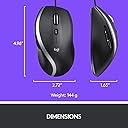
| Item Dimensions L x W | 4.96"L x 2.72"W |
| Item Weight | 5.08 Ounces |
| Manufacturer | Logitech |
| Mfr Part Number | 910-007476 |
| Model Name | M500s |
| Model Number | 910-007476 |
| Mouse Maximum Sensitivity | 4000 Dots per Inch |
| Movement Detection | Optical |
| Movement Detection Technology | Optical |
| Number of Buttons | 7 |
| Operating System | PC, Mac, Linux |
| Power Source | Corded Electric |
| Range | 1.8 meters |
| Special Feature | Ergonomic Design, Lightweight |
| Style Name | Box Packaging |
| UPC | 097855200853 |
| Unit Count | 1.1 Count |
| Warranty Description | 1 Year Limited Hardware Warranty |
Z**F
Excellent quality and good value for money
Works just as described. None of the random problems sometimes experienced with some wireless mice, but with all of the functionality. Fast, accurate and with programmable buttons. Even works well on Linux (buttons programmable after installing a small piece of software). Excellent value for money compared to wireless mice of this quality.
M**D
The best!
First of all, I want to be fair. Logitech is the only mouse brand I've ever used, therefore, I have nothing to compare it to, but I must say a few words. Fit and grip are great for my big right hand. And because it's a laser mouse, accuracy isn't an issue either. So, you might be wondering, why am I writing a review? Simply this, I will never use a wireless mouse, as I once did, but the problems started almost immediately. 1, connectivity. Doesn't work on all work surfaces! 2, interference from other electronic equipment. Everything is electronic these days, so if you happen to be on a cell phone, for example, or another household appliance is running nearby, the mouse will "forget where it is!" 3, batteries! Batteries aren't cheap anymore, and when they run down, the signal is lost. Connectivity again, and this is called Lag! So, I believe in wired keyboards and wired mice! And I think Logitech makes a great brand. Never had any problems with their equipment. Done!
M**I
Love my new Logitech mouse.
I ordered this mouse to replace a Microsoft mouse that I had for many years. It's a really good one but I wanted a change. This mouse so far is great. I have had it for about a week now and my hand is so comfortable on this mouse and it is so easy to scroll with the wheel on top. I can go back to whatever I was look at before with the up, down buttons on the side. I will order again but I am hoping this will last me for a couple of years.
A**Y
A classic is Back and better than ever!
At last an upgrade for my favorite mouse! I got the original M500 mouse back in 2007 and used it right up until this arrived! Its amazing how much better this is than my old trusty mouse. I have stuck with this design for so long due to it fitting my hand and multi-grip style well and not causing cramps and pain that more ambidextrous and gaming mice cause. I work with computers all day for work and all night for my hobbies, so comfort comes first for me. Gaming performance is a huge leap forwards over the old 800dpi laser sensor of my old mouse even when ran at the same 800dpi. Though i do have to give that it is not intended for gaming. It is utterly amazing to me how much easier it is to play precision classes in Overwatch and games where pin point mouse accuracy is required! Being able to set higher DPIโs is a nice feature, though the software to do so is incredibly frustrating as it obfuscates everything. Additionally it makes no mentions on what the native dpi of the sensor is, and if its even adjusting the sensor dpi sampling instead of just changing a multiplier like windowโs mouse speed setting. Mouse build quality is alright, i have used far better mice but they also were two to three times more expensive than this mouse. For the price, i find this mouse really hard to beat. The infinity scroll toggle is a mushy mess, but it is functional and the rest of the buttons feel solid and clicky. The cord is rather stiff and gets caught on stuff easily, I really wish it used the higher quality plastics that the original 2007 model had used or was braided. Itโs bad enough i am asking myself if I should spend the money for a good wireless mouse... Overall, an easy 4/5 but that last star is worth considering if you use the mouse for anything other than office work and are not on a tight budget
E**.
My Favorite Mouse
I love not having to charge my mouse or replace dead batteries. This one works every time, always. I never have to think about it or do anything to maintain it. The functionality is fantastic. I love the feel of the wheel (and of the whole mouse).
T**.
BRING IT BACK!!!!
Has been on all of my machines for years. Five in total. Three used daily depending on task. Feels great in the hand. Awesome tracking. (replacement mouse on one machine has poor tracking) viva M500s!!
P**K
middle mouse button is abysmal
This is so close to a great mouse. It's comfortable and I mostly like how there's a button to turn the middle mouse button from freewheeling to clicky. This would be a five star mouse except it needlessly decided to be a "seven button" mouse instead of five -- the mouse wheel you can click like a normal third mouse button except it also has a misfeature where you can move it left or right for two other "buttons" except in reality it makes it so it's difficult to actually click the middle mouse button because it'll often register as a "move the mouse wheel to the left" button (button 6) instead. You can remap the "move the mouse wheel left or right" buttons to all be the middle mouse button, but that defeats the purpose and the whole feature introduces the likelihood that the entire mouse wheel clicking situation is going to end up breaking. Who actually wants this feature? It's terrible. Such a shame because otherwise I love this mouse.
P**R
For corded computer rodents ... best I ever used
This impressively made and ergonomically shaped item felt perfect from the first use. I got it as an experiment to see if it would show less latency then most other wireless mice (and it did) ... but also having back and forward thumb buttons make it an up-to-date must have for almost anyone bothered by unnecessary delays ...
Y**N
At last, a worthy replacement for the Logitech Mouseman
TL;DR if you are looking to replace an old Logitech Mouseman M-BA47 and are looking for a wired mouse, this is the one. The good: - I finally found the perfect replacement for my old Logitech Mouseman M-BA47 from decades ago. I don't know if it's exactly the same shape and size but if it's not, it's extremely close. (update: it is not. it is a bit shorter in length and height, but overall not enough to be aware of the difference after a few weeks). And the only reason I replaced my old mouse is because the plastic legs under the buttons are so worn out that they cannot click the Omron microswitches correctly anymore. Hopefully this new mouse will last as long as the old one it replaced, i.e. more than two decades. - The sides of the M500s are made of rubber, like my old M-BA47. - There is one more side button compared to the M-BA47. - You can easily switch between clicking and smooth for the scrollwheel via a mechanical button right under the scrollwheel itself. - I finally switched to an optical mouse (yes, the M-BA47 uses a ball) and this new mouse works fine on the generic foam padded blue fabric mouse pad I already have. - Like my old mouse, this one "just works" with macOS, no special driver required. You may need to reconfigure some buttons (#3 and higher). The bad: - Unlike my old Logitech Mouseman M-BA47 which worked fine when connected to one of the USB ports of my Apple aluminium keyboard (A1243), this one does not. Upon plugging it in, I received a notification about the device requiring more power which means I had to connect it directly into my Mac mini. UPDATE: for some reason I'm not getting the "more power needed" warning anymore and the mouse works fine in either USB port of my A1243 keyboard. The major differences: - The side buttons are at the top of the side, unlike the single side button of the M-BA47 which is at the bottom. It's also near impossible to only hit the front side button while holding the mouse. As a bonus, though, it means I will be able to hold my thumb lower on the mouse which is probably a plus, ergonomically speaking.
L**T
Great replacement mouse
A great low cost replacement corded mouse.
C**N
Works great!
very comfortable. Hyper scrolling works great! No battery to worry about.
B**H
Fantastic product!
I am a Hardcore gamer and Graphic Designer and this mouse does its job. It's very comfortable, easy to adjust the button settings on your Mac or PC and it's useful for all types of laptops with USB A ports. My only regret is that I wrote this review two years late. The M500s from Logitech are excellent for any users who are working in the field of business, software coding and just for personal use. It's still an affordable mouse to operate. Please ignore other people here complaining about the packaging, you'll have to be careful when opening the box, just look through carefully to see the cord area then cut the side area to the right and slide your finger to pull open the plastic box. It's not that hard. Overall, I give this mouse four out of five stars.
T**N
Quality product!
Very happy with the mouse performance. Feels very fluid while moving on desktop and screen. Extremely comfortable in my hand. High quality!!!!! Great price!
Trustpilot
2 weeks ago
1 week ago