Desertcart purchases this item on your behalf and handles shipping, customs, and support to Cyprus.
🌟 Stick your story in full colour—no ink, no limits!
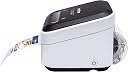
The Brother VC-500W is a compact, wireless full-colour label and photo printer using ZINK Zero Ink technology to deliver smudge-free, water-resistant prints without cartridges. Compatible with smartphones, tablets, and computers, it offers continuous roll printing in multiple widths up to 42cm, supported by a free app for real-time customization. Ideal for professional labels, signage, and personalized photo projects, it combines convenience with vibrant, durable output backed by a 3-year warranty.


| ASIN | B07DJ2TGQL |
| Additional Printer Functions | Print Only |
| B&W Pages per Minute | 30 |
| Best Sellers Rank | 9,545 in Business, Industry & Science ( See Top 100 in Business, Industry & Science ) 75 in Label Makers 137 in Labels & Labelling Equipment 1,150 in Inkjet Printer Ink Cartridges |
| Box Contents | Brother VC-500W; Cartridge(s); Cables: AC,USB; Warranty card; AC adapter; Drivers |
| Brand | Brother |
| Brand Name | Brother |
| Color Depth | 24 bits_per_pixel |
| Color Pages per Minute | 8 ppm |
| Colour | Black,Grey |
| Compatible Devices | Smartphones |
| Connectivity technology | USB, Wi-Fi |
| Control Method | App |
| Country of Origin | China |
| Customer Reviews | 3.7 out of 5 stars 186 Reviews |
| Dual-sided printing | Yes |
| Duplex | Simplex |
| Global Trade Identification Number | 04977766780544 |
| Hardware Interface | USB 2.0 |
| Ink Colour | Colour |
| Item Dimensions D x W x H | 25.5D x 24.8W x 10.9H centimetres |
| Item Type Name | Label printer |
| Item Weight | 1239 Grams |
| Manufacturer | Brother |
| Maximum Copy Resolution Black and White | 200 dpi |
| Maximum Copy Resolution Color | 300 dpi |
| Maximum Copy Speed Black and White | 30 ppm |
| Maximum Print Resolution Black and White | 300 dpi |
| Maximum Sheet Capacity | 10 |
| Maximum Supported Paper Size | 50cm x 50mm |
| Maximum print Resolution Color | 600 x 1200 dpi |
| Model Name | VC-500W |
| Model Number | VC500WZU1 |
| Model Series | VC |
| Model name | VC-500W |
| Network Connectivity Technology | USB, Wi-Fi |
| Number of Drivers | 1 |
| Number of Trays | 1 |
| Other Special Features of the Product | Wireless,Compact |
| Output sheet capacity | 15 |
| Paper Size | 9, 12, 19, 25, 50 millimeters |
| Power Consumption Size | 500 Watts |
| Print media | Labels |
| Printer Output Type | Colour |
| Printer Type | Zink Technology |
| Printing technology | Zink Technology |
| Product Warranty | 3 year manufacturer |
| Resolution | 300 x 300 |
| Special feature | Wireless,Compact |
| Specific Uses For Product | Label printing, office use, wireless printing |
| Total USB 2.0 Ports | 1 |
| Total USB Ports | 1 |
| Warranty Type | Limited Warranty |
| Wattage | 500 watts |
J**W
Cheap Colour Prints
Ok this is a entry level full colour printer. Print quality is fairly good but some colours are a little dull. Not a problem for me printing simple labels where the exact colour is not needed. Prints photos out quite well too and quite passible for small stickers Paper is more expensive as it contains all the ink. Generally happy with this printer.
A**R
Terrible print quality
I was really looking forward to using this printer. I have a couple of Brother printers including a label writer, so I know how good their print quality can be. I build custom fishing rods for a living and am in desperate need of a new type of label to put on them to show the rod specifications. The first issue I had was the fact that it would not connect to my 3 week old computer, I spent over 2 hours trying to connect it and just would not happen. I ended up sending the image to my phone and printing from there which only took 4 attempts to connect to my phone. I soon realised that the frustration of trying to connect the printer would pale into insignificance once I saw the quality of the print. Honestly, this is the first time I've ever said this, but the photo of the print actually does it justice. The print quality is utter trash. The first photo is a snapshot of what I designed on the computer, the second is the actual print. It's criminal how far out the colours are. And in fact, although the text looks a little like gold in the photo, it's not, it's brown, it fades from brown to almost white. I can't describe how disappointed I am.
D**Y
Great little printer, very professional vendor, good experience
I purchased this printer a couple of weeks back - I used 3WM Office Supplies and for those considering making a purchase I would highly recommend using 3WM. I have owned a VC-500W before, sadly it was broken during an office accident but was very happy with it. I have a new product being launched and as per the past this printer was great for launch items which fit the size parameters this printer works to, which I believe is 50mm (H) - I also used both 26mm and 19mm iirc. Sadly upon receiving the printer and changing the label sizing slightly it did not look as expected, so I had to return it. The vendor 3WM were extremely professional at all times - I also have the Brother PT P900W which I purchased from 3WM over a year ago which I am very happy with - and when dealing with the return and refund, were very quick in all communication and dealt with return and refund promptly and efficiently. This printer is tiny in physical form, yes it may appear expensive but it is a reliable bit of kit and you will, if using for work purposes, get a return back in time. Excellent print quality - do not expect the quality of a professional printers, but for small batch runs, product start ups, it is superb. Hopefully if you do use it for products you are newly launching, that they sell very well, at which point you will likely need the use of a professional printers, by then however the printer should have paid for itself. Overall great product, great vendor, shame the product, this time around, did not quite meet my requirements.
S**C
Impressive machine, Few probs with installation
I could not find any reviews of this item anywhere so this is quite a detailed review to help would be purchasers. FIRST IMPRESSIONS. The machine comes beautifully packaged and contains everything you need to create your first labels, including instructions, a one inch tape and all connecting leads. The machine is surprisingly small and neat (approx. 4 inches wide and tall and 5 inches front to back). Solidly built with a bit of weight to it so not flimsy. SETTING UP I tried to install it with a direct USB connection to my PC but unfortunately this did not work. The printer software and driver all installed correctly but initially the printer showed up with an error. I reinstalled the driver but although the error disappeared it was impossible to print to the machine in this configuration. The first label seemed to print but never reached the printing queue (Using a PC with Windows 10 64 bit). I tried many options including direct print but without success. It was not possible to send anything, not even a test print. Frustrating. Digging deeper I received a message that the machine could not print via USB3 - however it was not connected via USB 3 - it was in a USB2 port. There were no errors showing up in the devices of the computer and the printer appeared OK in the list of printers, reporting that it was working correctly. I could not overcome this problem. Instead I connected via Wi Fi and the machine then worked properly. This was disappointing hence only 4 stars instead of 5 but I would not like to say it was definitely a Brother fault as Windows 10 can be temperamental. However I think this would frustrate day to day users. SOFTWARE I have not tried printing via an iPad app yet, but have used the Brother P-Touch Windows program successfully. I was already familiar with this as I have another Brother label printer. I have no issues with this program as it works pretty well for me. RESULTS The labels print clearly and in good colour. The colours are strong but not as vibrant as shown on the screen. For example a brilliant green comes through pretty dense and a bright red is slightly on the pink side. However the finished label is indeed colourful and sharply printed. The media which Brother refers to as "paper" seems far better than that. It is a good stout plastic and certainly cannot be torn. It has a good glossy surface and though Brother caution against water, there is no immediate danger from, for example, smearing or staining with a wet cloth or spillage. I guess they would not stand up long term to outdoor usage. The adhesive is strong but as the tape is pretty robust it might be difficult to apply to a sharply curved surface. I tried on an AA Eneloop battery (which has a difficult plastic sleeve) and found the lebel began to slightly detach overnight - this is an extreme test and I do not think it would be a problem with something less difficult - eg a bottle or jar. The ZINK technology is pretty remarkable! The tape is plain white but is heat activated to produce the different colours. Trying with a warm soldering iron I found the colours are produced using different temperatures - least warmth seems to being out yellow, magenta comes with higher temperature and cyan with the highest. It is a very ingenious process to drive the tiny print heads to the specific temperatures to bring out the tiny colour dots which make up and overall image. Viewed under a microscope there is minimal colour bleeding between areas of different colours and this is not discernible to the naked eye - not mine anyway! As it is necessary to adjust the temperature for each pixel, printing is not as fast as an ordinary label printer with a separate colour ribbon but it is still acceptable. As the colours are formed from dyes, naturally colour fastness in brilliant sunshine might be an issue and Brother recommend the labels should not be exposed long term to that light. This is basic common sense with anything of this nature (incidentally the colours do not appear until a pretty high temperature is applied so I would not expecta colour cast would appear in normal usage. When the label is ejected, you will find that the printer has formed a little tab on each end which can be used to detach the label from the backing sheet - very convenient. HINT I pulled some tape from a cassette to try my experiments and found the hard way that the tape must be entirely within the cassette when it is loaded, otherwise it will not feel through the printer. Follow the instructions!! You MUST unload a cassette using the button on the printer to retract the tape first otherwise you may jam the printer when next reloading. That then could unduly wear the tape feeder roll leading to longer term problems. Someone has already asked it the inbuilt cutter can be replaced and the answer is no. Shame but is this really an issue? I have used Brother label printers for years and never had the need for that functionality so I don’t know if it is really an issue. TAPE PRICING True the tapes are a bit pricy and are probably 50 - 70% more than ordinary Brother TZ label tapes. However when you consider you are getting full colour printing as opposed to single colour, and do not have to purchase additional colour ribbons etc this is not so unreasonable if you really want colour. OVERALL Great little printer that produces good quality full colour labels. Easy to use once the initial software setup was overcome. Recommended.
M**S
Very Useful Piece Of Equipment
It took a while to set it up as you have to install software on computer and apps on mobile devices. I have now got it up and running and it is an excellent piece of equipment, I have even made labels from photos on my phone. It is going to be useful to help me personalise my cards, gifts and jewellery that I make as well as thousands of other uses that I can think of. The auto cut feature is not available if printing from your computer software which would have been nice to have as then its fully automatic.
M**M
Colours you see are not what you get but a useful label machine for everyday labelling
Labels printed did not have the same colours as in the design screen app basically red doesn’t exist- it looks pink- and bright yellow is more orangey - photos printed on the label come out with a pinkish tinge - even on the vivid colours setting which is a bit disappointing - called Brother technical support who had a trial run on their own machine and called me back agreed that there is a discrepancy in colour on screen to what is printed but could not do anything about this as a generic problem and not unique to me (thought something was wrong with my machine). Black comes out ok and other colours like green or purple are alright. The attached extract photo of part of label shows the pink but this is actually bright red on screen and the yellow should be lemon. Photos will have a pink tinge and will not be the true colour. The colours I think would fade gradually as quality is not vivid to start with and is thermal but need time to confirm this. The printer only comes with one roll (other is a cleaning roll tape) so if you want to buy the size range to widen your option for projects it can be quite expensive. Still an ok label printer if not too fussed about the colours- as have kept ours for basic labels for books and belongings and small projects. It’s easy to use if used to using a computer and the library categories of clip art, frames and borders are varied from skyscrapers to cars and graffiti creatures etc.. which is great. In summary - What you see on screen is not exact so if a perfectionist and want to use this for professional creations don’t use red and yellow or try and live with how the colours print for what is quite a considered purchase to print labels.
D**D
great colour printing
This is a great kit makes my handmade candles look so professional. well worth the investment. So easy to setup and use and the software is good
J**S
So frustrating...worked once...that's it.
Seems a great bit of kit, sadly it make me want to play baseball with it... Got it to work after much trail and tribulation on first day after delivery...then went to use it again and wont do anything....at all....The brother website just asks to check paper length...which is correct...it just is not talking to the computer....can see a list queue .... but won't connect or obviously print. When you turn the unit it off and on again it costs you about 30p as it spits out a 50mm blank sticker. Have installed and uninstalled all the software, alas to no avail.... Plus the replacement cartridges are around £30 each....for 5meters....come on... This will be winging it's way back on Monday...hopefully it wont' be in too many tiny pieces after the final attempt as still need a printer....
A**I
Bad Decision
I bought it few days ago and i only print 5 or 6 labels and now it’s always showing that there is no cassette and the cassette is inside and cannot print anything
A**.
Prodotto buono ma...
La stampante è buona, la risoluzione è buona, i colori non sono fedelissimi ma direi che il tutto è più che accettabile e si possono fare belle stampe. Non è veloce, ma non dovendo stampare etichette in quantità va benissimo. Unico neo che mi sento di segnalare è che l'installazione non è fra le più semplici, soprattutto se volete collegarla al Wifi, ma basta seguire le istruzioni e tutto va secondo i piani. Una volta installata va benissimo. Il problema per me invece è stato un altro, che la stampante inviata era con ogni probabilità un reso, e questa cosa non mi è piaciuta per niente. I sigilli erano ovviamente tutti tagliati, all'interno i cavi erano arrotolati in qualche modo, le fascette non c'erano più, la pellicola protettiva della stampante mezza staccata, e mancavano del tutto le istruzioni (il comparto istruzioni all'interno del coperchio della scatola era vuoto). Dato che come ho detto l'installazione non è semplicissima e quindi le istruzioni sono fondamentali, per poterla installare sono dovuto andare sul sito Brother e scaricare il PDF. Ora, niente di chè, però siccome era venduta come nuova, tutto ciò non mi è molto piaciuto. Ultima cosa, ok che nel titolo c'è scritto "provenienza inghilterra", però l'alimentatore ha solo la spina inglese, io un adattatore in confezione l'avrei inserito, giusto per mettere il cliente in condizioni di utilizzarla subito. Detto questo, ripeto, la stampante funziona bene e alla fine ne sono contento.
Trustpilot
4 days ago
1 month ago