Buy anything from 5,000+ international stores. One checkout price. No surprise fees. Join 2M+ shoppers on Desertcart.
Desertcart purchases this item on your behalf and handles shipping, customs, and support to Cyprus.
⚡ Upgrade your network game — because buffering is so last decade.
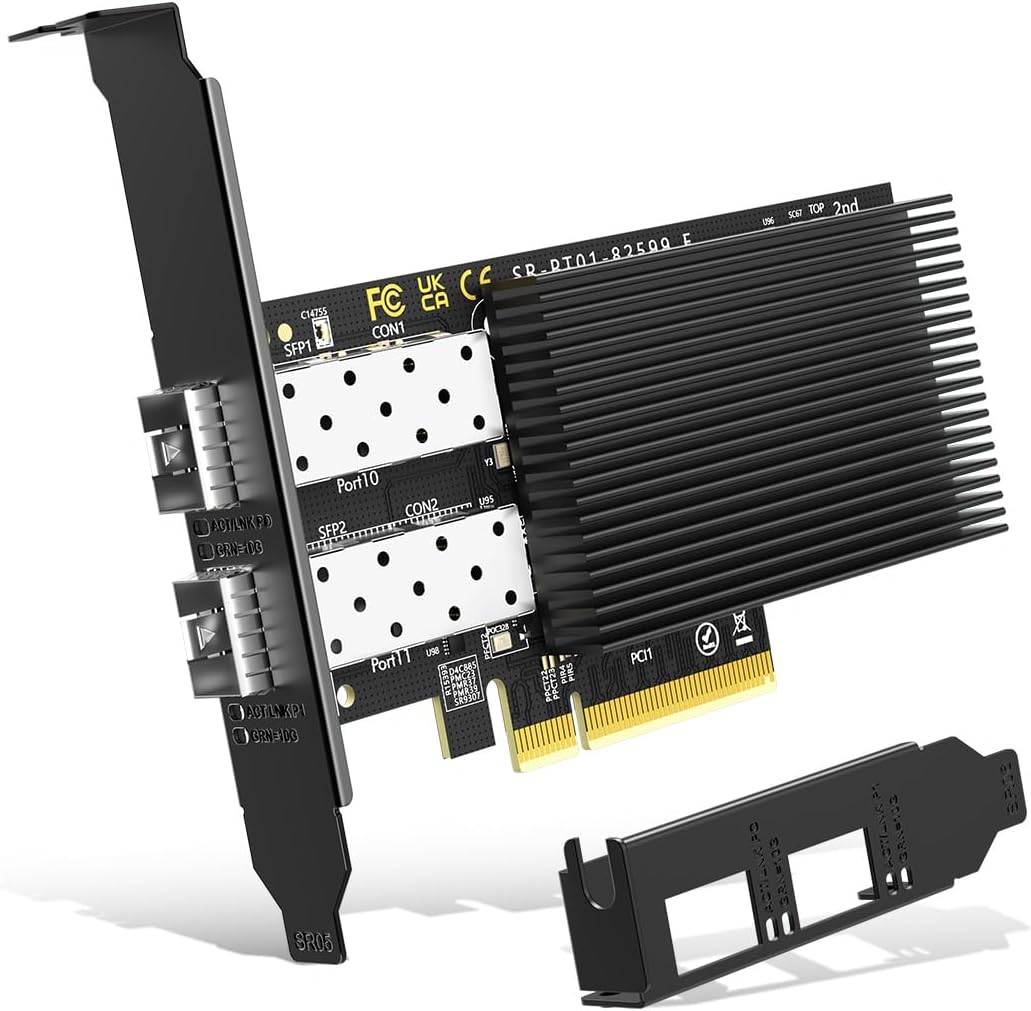
The NICGIGA 10Gb Dual LAN SFP PCI-e Network Card leverages the Intel 82599 (X520-DA2) controller to deliver dual 10Gbps Ethernet ports via PCIe x8 interface. Designed for professionals demanding ultra-fast, stable, and low-latency connections, it supports major OS platforms including Windows, Linux, and VMware. Its adaptive heat dissipation and backward compatibility ensure reliable performance across desktops, servers, and workstations, making it a future-ready upgrade for high-speed networking.


| ASIN | B0D6XW52PM |
| Best Sellers Rank | #15 in Internal Computer Networking Cards |
| Brand | NICGIGA |
| Built-In Media | X520-DA2 |
| Compatible Devices | Desktop |
| Customer Reviews | 4.4 4.4 out of 5 stars (734) |
| Data Link Protocol | Ethernet |
| Data Transfer Rate | 10 Gigabits Per Second |
| Hardware Interface | PCI Express x8 |
| Item Weight | 0.23 Kilograms |
| Manufacturer | NICGIGA |
| Mfr Part Number | X520-DA2 |
| Minimum Required Operating System Version | Windows 10, Windows 11 |
| Model Number | X520-DA2 |
| UPC | 790885826061 |
| Warranty Description | 1 Year Manufacturer |
W**L
Great little NIC
No fuss with windows 11. Installed the card and it just works. Purchased the 2.5gb model and speeds are as advertised. I also like the black finish since I have a black case and motherboard. Very inexpensive card. I can’t speak to the longevity of the product since I haven’t had it that long.
J**N
It's a Little inconsistent
Out of the box this was not running at the 2.5Gb speeds (even though Windows reported it as running 2.5Gb) it was staying around 900mb with iperf3 test between 2 other machines on network that both have 2.5Gb NICs. Using the QNAP 2.5Gbe unmanaged switch for 3 PCs that all have 2.5Gbe NICs. They are segmented on their own VLAN coming from pfsense firewall appliance which also has 2.5Gbe. After updating the drivers from the Realtek site as per the pamphlet that came in the box along with a small form factor screw driver and 2 screws (using case screw to match black aesthetic) and the 2 I/O plates, then it unlocked the full menu in the interface's controller properties. Also was getting closer to the 2.5Gb speeds on local network, RDP feels smoother and stable connections without drops. There is some irregularity in the iperf3 tests though. Not getting the irregularities from 3rd PC to main PC so not sure if it's driver related or just an issue with the Realtek chipset of this card. Overall though satisfied with the price to performance and hope there will be future driver updates, not counting on it though. For what I need it to do, be a stable RDP connection it seems to be holding strong and helps not feel laggy like it did with the default 1Gb port on the X370 Taichi Mobo. This is an improvement. If you do want a blacked out PCB and the bright green LED isn't visible while doing work then this is a good 2.5Gbe card. Also make sure you get the latest driver from Realtek, out of the box is not fully unlocked. Happy packets :)
M**N
Works great, plug and play
I needed a second network card for my pc and this does the job. It’s pretty fast, didn’t need any extra drivers (I run windows 11) and works well. I use it to directly connect my NAS. No issues at all.
T**E
Works as advertised.
Works well in my home lab.
H**A
Great product!
Good product but it seems to struggle to fit into the case Io panel
S**C
Plug and play with speeds as advertised
I installed this into my AMD motherboard on Windows 11. It was immediately recognized on my machine -- with no drivers needing to be installed -- and easily achieved over 2 Gbps. It has a very small footprint with no heat issues.
K**E
Good card
It works at 5gig but ONLY if you install the offical realtec driver. Sticker to download driver on the bracket has a typo so never works. Nothing a quick search didn't fix. Has really good throughput when paired with a 5gb SFP in my Cisco Meraki switch. Does run hot but the heat sink helps
J**Y
Failed After 4 Months
I bought this 10GbE Base-T adapter for my OPNsense firewall. It worked perfectly at first and was immediately recognized by the system. Performance was great for the first few months. After four months, my firewall suddenly stopped processing traffic. The card is still detected correctly by OPNsense, but there are no link lights, and it will not recognize any connection. I am very disappointed in the quality of this card. It worked well at first, but it failed far too quickly. Consider this a warning if you plan to rely on it for more than a few months.
P**K
Works nativelly on linux, on windows drivers are required to be installed.
J**P
In case you don't want to read the full review the short version is: Good card, worth the money, fully recommended. The problem: The first picture shows the problem: a 1Gbps connection that only reaches just over 300Mbps, with a wired connection. Having checked every piece of equipment between modem and motherboard, including running a CAT 7 cable directly between the two the problem was finally identified as a dodgy Intel chipset on the ASUS B550-F motherboard. In other words the onboard LAN was just unable to deliver the full broadband speed - and had been delivering substandard speeds for some time. The solution: pictures 2-4: a NICGIGA 2.5Gbps PCI-E card with a Realtek chipset. Why this card? Well, simply put, it has a black backplate that fits in with the motherboard's black backplates. I know, not the best reason but it also has a known chipset, a decent heatsink on the main chip, an handle over the 1Gbps bandwidth, future-proofs to a certain extent and is at good price point. (A quick note about the future-proofing: a 1 Gigabit connection can potentially deliver over 1Gbps - up to 1.3Gbps - whereas a 1Gbps card stops at 1Gbps. This card is 2.5Gbps and so will handle over 1Gbps and provides some future-proofing for when the next major speed increase comes in.) Install: was really simple: unscrew a backplate, install the card, screw in the card, close the case and plug in a CAT 7 cable bought at the same time - KINBETA high speed 10Gbps 2 metre CAT 7 flat braided cable - and switch on PC. See pictures 6-8. The result: picture 9 shows the result. As soon as the PC started the card was recognised, no driver download was needed. The download speed jumped from 321.5Mbps to 925Mbps (picture 9) solving the problem in a most elegant way. It is interesting to note that the ping was 9ms both before and after upgrading the NIC and upload also remained the same - the 52Mbps which was the expected speed and initially highlighted the problem. For those with a small form factor PC it is worth noting that a smaller backplate is provided (see picture 5) as well as a screwdriver and two screws. Overall very happy with this purchase it solved the problem at a reasonable cost and I can feel the difference the higher speed connection makes. Definitely recommend this card.
L**.
Acquistato molto tempo fa e funziona ancora perfettamente. Non ho avuto nessun problema ad installarlo. Rispetta la descrizione. Consigliato
B**A
Suite au passage à la livebox 6 j'avais besoin d'une carte 2.5Gbps pour profiter du débit. J'ai choisi celle-ci car c'était l'une des moins chère avec la puce Realtek RTL8125B. Carte bien emballée, installation simple, petit tournevis offert. Pas besoin de nouveau driver si vous étiez en Realtek 1Gbps car il est commun aux deux cartes (1G et 2.5G) Elle fonctionne parfaitement, je profite bien du débit de mon offre fibre. Même le wake on lan (WOL) , qui semble poser problème sur d'autres cartes, fonctionne ici parfaitement. Très satisfait.
V**V
Worked for 2 days, then spopped. Do not buy.
Trustpilot
2 days ago
2 months ago