Buy anything from 5,000+ international stores. One checkout price. No surprise fees. Join 2M+ shoppers on Desertcart.
Desertcart purchases this item on your behalf and handles shipping, customs, and support to Cyprus.
📚 Scan Smarter, Work Faster, Impress Always!
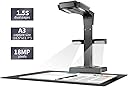
The CZUR ET18 Pro is a professional-grade document scanner featuring an 18MP Sony camera and patented auto-flattening technology that transforms curved book pages into perfectly flat scans. It supports A3-sized documents and offers lightning-fast 2-second scanning speeds. With ABBYY OCR supporting 186+ languages, it converts scans into searchable, editable PDFs and multiple file formats. Compatible with Windows and MacOS via USB, it’s the ultimate tool for digitizing thick hardcovers and large documents with precision and speed.


| ASIN | B07JMTPJ8S |
| Best Sellers Rank | #19,492 in Computers & Accessories ( See Top 100 in Computers & Accessories ) #16 in Document Scanners |
| Brand | CZUR |
| Brand Name | CZUR |
| Color Depth | 24 bits |
| Connectivity Technology | USB |
| Country of Origin | China |
| Customer Reviews | 4.3 out of 5 stars 205 Reviews |
| Item Dimensions D x W x H | 35.1D x 36.2W x 14.9H Centimeters |
| Item Type Name | Scanner |
| Item Weight | 2 Kilograms |
| Manufacturer | CZUR |
| Media Type | USB |
| Minimum System Requirements | Windows 7 |
| Model Name | ET18 Pro |
| Network Connectivity Technology | USB |
| Optical Sensor Technology | CMOS |
| Product Dimensions | 35.1D x 36.2W x 14.9H Centimeters |
| Resolution | 4896*3672 |
| Scanner Type | Document |
| UPC | 782938041231 |
| Unit Count | 1 Count |
K**Y
Quality product and easy to use
We purchased this scanner to digitize high school yearbooks for placement on our website. The yearbooks are in a variety of formats, sizes and print quality and we needed a scanner that was of good quality. We are very pleased with the ET18 Pro. It has proven to be perfect for our application. We have found it easy to use and the support from CZUR has been very good and our questions quickly responded to. The equipment is easy to set up and arrived in good working order. We are pleased to have purchased this product.
-**W
A very fast, efficient scanner.
I have thousands of documents and other paper items to digitize, including many oversized sketchbooks that my mom illustrated - these don't fit in a regular size scanner without doing multiple scans and stitching the pages together - which takes a lot of time with mixed results. The ET-18 Pro was a Amazon Lightning Deal and $100 off. So I decided to give it a try after doing some research and watching 3rd party reviews. I was very impressed with the packaging, very sturdy and well organized. The unit itself is very well made and sturdy. The side/auxiliary lights are perfect for eliminating glare. There are two triggers, desktop and foot. Both are well made and work well. Scanning is fast and the auto straightening is a fantastic feature, saves the effort of trying to align the page before each scan. Basically you can scan as fast as you can turn pages, change documents, the foot pedal really helps with this. I cleared one large file drawer that was FULL in just under an hour. I would not have gotten through 10% of that done with my flatbed scanner. Now for the software. As many reviewers have said, it is not the most intuitive and it took me a little bit to figure it out. There are a lot of features and I have not delved into many of them. So far I have not been able to find the way to scan directly to a PDF without having to convert from TIFF - which is easy enough and goes quickly, but it's one more step. Maybe there is a way to do this and I haven't figured it out yet. As I said, not the most intuitive. However, when it comes to quickly producing quality scans of books, magazines and oversize documents, the ET-18 Pro does a fantastic job. I have not had cause to use many of the features - searchable text, etc, I will as I get to scanning older documents with family history. Again, this is a very well made unit and well worth the investment, I imagine the software will continue to improve over time.
B**I
Good product
Fast and easy to use
M**G
this is a serious case of "shut up and take my money!"
I got this scanner for humanitarian reasons: We're all out of space at home. Our house is filled with thousands of books, most of whom can just as easily be read in PDF, and the books keep multiplying when we're not watching... I was looking for a means of eliminating most of the physical books and replacing them with PDF files that I can then read on my tablet. Some books will have to remain: Reference books, certain textbooks, dictionaries... But most other books can be replaced with PDF files. And this is where CZUR ET-18 Pro comes in. It's a life-safer, it's a must. If you have too many books at home, just get it. Cons: - The scanner is not cheap. But if you take into account that you're recovering square feets in your apartment or house, the cost of the scanner becomes negligible. If you plan on scanning books (e.g., from a library or books borrowed from friends) then the scanner will pay for itself rather quickly. - The software that comes with the scanner is not of great quality: It will crash after scanning a large number of pages (between 450-500 seems to be the magic number). The solution is simply to save every 300 pages, and then use other software to combine the documents into a single book. - The software lacks many options that come with software made for other scanners. It's ability to edit the document is poor. The user-interface is not very friendly. - The documentation that comes with the scanner is rubbish. - There is a certain learning curve to operating the scanner and the software properly: You will need to learn how to switch between different options, e.g., for the cover of the book vs the inside. You will need to learn how to hold the book open using the plastic finger thingies that are provided. You will need to learn at what speed you can scan. This takes time, and you're going to mess up the first N scans. But then your hands and foot (yes, it's operated with a foot pedal) will get the hang of it, and your copies will come out perfectly. Pros: - Less than 1.5 seconds for scanning two pages. I don't know of any other scanner with this speed! - The foot pedal is pure genius. That said, the pedal is too light, and the cable is a bit on the short side. I'd rather they made the foot pedal much heavier so that it would be stabler... - The software, as clunky as it is, actually does a fantastic job when one needs to replace sheets, and this can be done in much less time and with no hassle. - The scanner lives up to its promise: You can scan a 350+ page book in under 10-15 minutes, and get a perfectly usable PDF file. - Even though the software lacks OCR for right-to-left languages (Hebrew, Arabic, Farsi, etc), it does handle right-to-left documents well in terms of splitting and ordering pages in right-to-left books. - The scanner is very forgiving when it comes to page size: It handles page sizes from very small to A3! If you check youtube, you'll find ways of using this scanner for even larger documents, simply by elevating it a bit above the scanning surface, using, e.g., a small stack of books. The scanner lends itself to a crazy workflow & reading schedule: - I scan books at full speed - While I scan books, I'm listening to ebooks from my tablet - When I'm done scanning a book, I add it to my tablet. ☺ I've increased my rate of reading dramatically since I started using this scanner. My advice is to get yourself tiny rubber thingies you can place on your finger, to help you turn pages. They're dirt-cheap, available online on aliexpress and ebay, and will really speed-up page-turning. If you don't want to get these or can't find them, make your own by cutting a finger off of an ordinary latex glove, and using it to turn pages… In two days of casual scanning, I've managed to scan well over 20 books, and read 4. This is becoming my weekend hobby! If you love reading books, but are running out of physical space for all the books you've collected, you really owe it to yourself to have them scanned! You can fit thousands of books on a micro-sd card in your tablet, and carry your library with you!
C**I
Not Loving It -- UPDATED
First, the good: The device was VERY well-packed. The box it came in was padded to a significant extent. And since the USPS tried to destroy the box, this was just as well. Secondly, setting up the device was simplicity itself -- in spite of the paucity of instructions included in the box. It was easy to load the software. I hated that the serial number was on the bottom of the device, but that is a minor annoyance. The mechanics of scanning a book could not be easier. (Though the ergonomics is not great -- you will need a chair.) But, alas, once you get your book scanned in, there is absolutely no indication of what to do next. There are no software instructions in the booklet, and the 4-minute video on the website doesn't give enough information. When I pay this much money for a scanner, I want INSTRUCTIONS! I do not want to have to spend hours combing the internet trying to find out how to work the software. When I figure out how to use the software, I will probably change the review, and I will try to leave instructions in my update. Until then, I'm not loving the CZUR ET18-pro. UPDATE: The CZUR support people answered my email very quickly. Unfortunately, all they would tell me is that there was a video I could watch. I replied that I had watched the video and that it was not helpful. I suggested some sort of software manual or at least help file. They replied that they were NOT going to create any manuals or help files, and basically, I was on my own. After several days of experimenting, I managed to figure out how to work their software. The video is helpful when it comes to the mechanics of scanning a book. That part is easy, and with a little bit of practice and by paying close attention to what you are doing, the scanning process becomes relatively painless. The key to the scanning process is to wait until the computer you hook the scanner to actually completes the processing of the scanned page. This takes a few seconds. After you scan all the pages, there is a small black arrow on the left of the screen. It says, "BACK." That is the button you want to press. It takes you to a page where you can review your scanned pages and export them in the desired format. I have checked the DOC format and the searchable PDF. The OCR is pretty good, but not perfect. There are occasional artifacts of the scanning process in the margins of the DOC file. The PDF is not great about removing the edges of pages. But you should be able to live with that. Will it live up to its advertised 300-page book in seven minutes? No. But it is a decent scanner that needs a little work on its user interface and help files. If you want to scan books, it is worth buying.
Trustpilot
2 weeks ago
3 weeks ago