


Desertcart purchases this item on your behalf and handles shipping, customs, and support to Cyprus.
🚗 Upgrade your Mazda’s IQ with wireless CarPlay — because your drive deserves to be smarter, faster, and effortlessly connected.
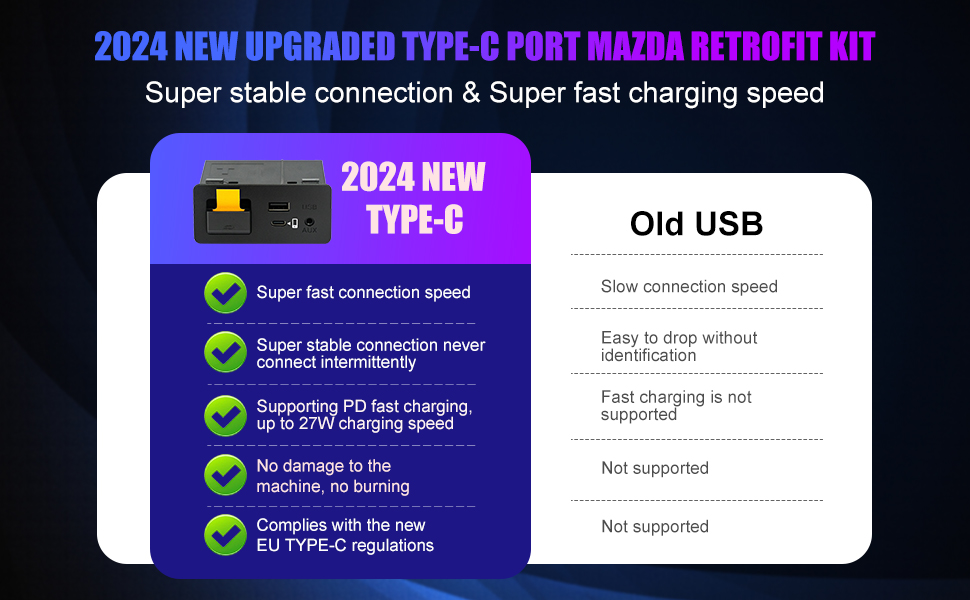
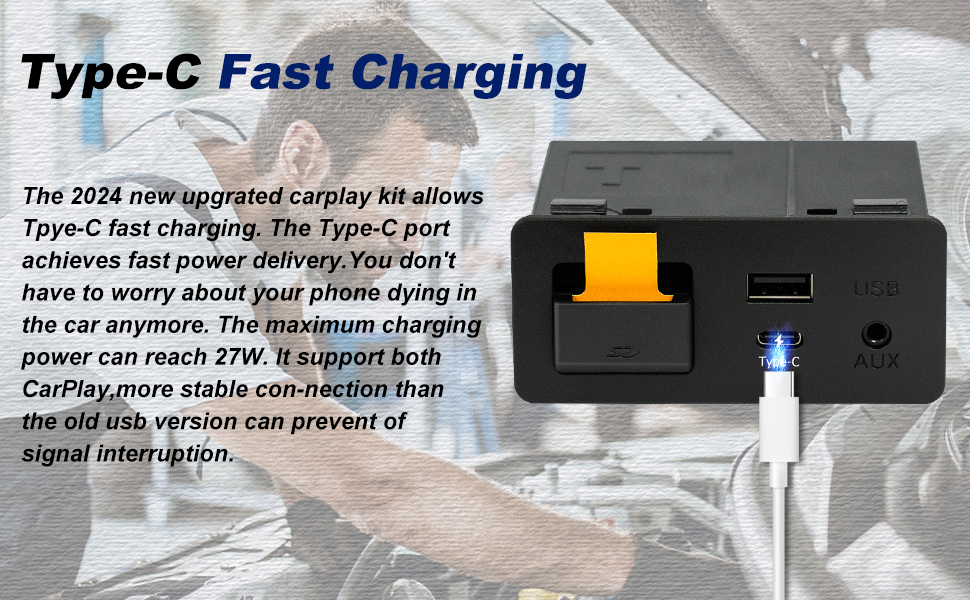
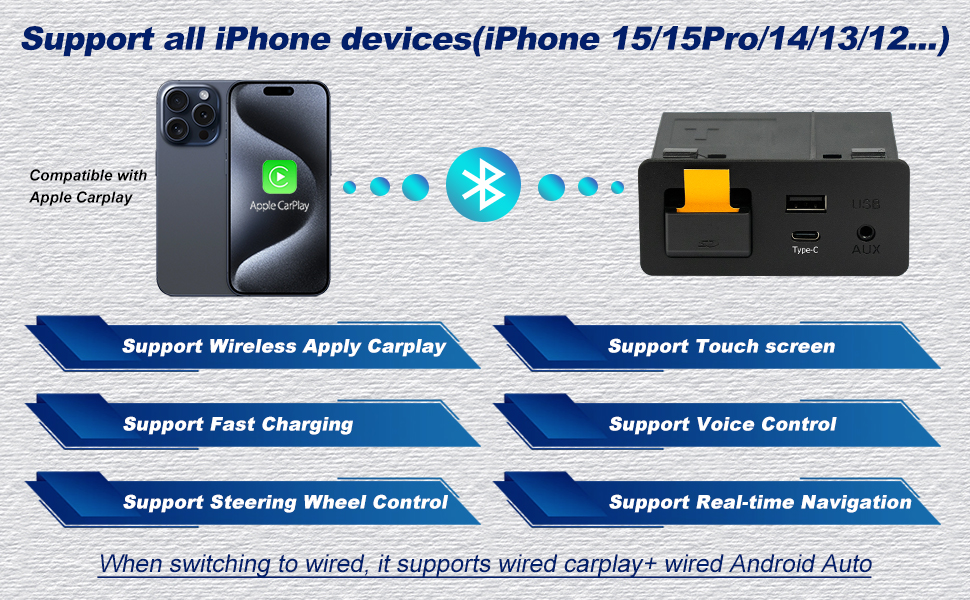
The Mazda Type-C Wireless CarPlay Retrofit Kit (TK78-66-9U0C) transforms compatible Mazda models (2015-2020) into a wireless Apple CarPlay powerhouse. It offers seamless wireless connectivity, 25W fast charging, and full integration with the original Mazda Connect system, preserving all factory controls and navigation features. Backed by a 24-month warranty and professional support, this OEM media hub upgrade elevates your driving experience with smarter, safer, and cable-free technology.




| ASIN | B0D25GKH2Y |
| Additional Features | Wireless Carplay |
| Best Sellers Rank | #16,038 in Electronics ( See Top 100 in Electronics ) #89 in Car Audio Receivers |
| Brand | HMYC |
| Color | TYPE-C Wireless Carplay |
| Compatible Devices | Mazda CX-3 All models 2016 to 2019 CX-5 All models 2016 to 2017 CX-9 All models 2016 to 2020 Mazda3 4-Door All models 2014 to 2018 Mazda3 5-Door All models 2014 to 2018 Mazda6 All models 2016 to 2020 MX-5 Miata Club / Grand Touring 2016 to 2020 MX-5 Miata RF Sport 2018 to 2019 MX-5 Miata Sport 2018 to 2020 Compatible Devices Mazda CX-3 All models 2016 to 2019 CX-5 All models 2016 to 2017 CX-9 All models 2016 to 2020 Mazda3 4-Door All models 2014 to 2018 Mazda3 5-Door All models 2014 to 2018 Mazda6 All models 2016 to 2020 MX-5 Miata Club / Grand Touring 2016 to 2020 MX-5 Miata RF Sport 2018 to 2019 MX-5 Miata Sport 2018 to 2020 See more |
| Customer Reviews | 3.9 out of 5 stars 160 Reviews |
| Data Transfer Rate | 5 gigabits_per_second |
| Enclosure Material | Plastic |
| Hardware Interface | USB 3.0 Type C |
| Item Weight | 14.4 ounces |
| Manufacturer | huazhi technology |
| Mfr Part Number | TK78-66-9U0C |
| Model Number | TK78-66-9U0C |
| Number of Items | 1 |
| Number of Ports | 2 |
| Operating System | iOS |
| Special Feature | Wireless Carplay |
| Total USB Ports | 2 |
| Total Usb Ports | 2 |
| UPC | 724320932574 |
| Unit Count | 1 Count |
| Warranty Description | 24 month warranty |
J**Y
All good - easy upgrade
The gadget works as intended in my 2017 CX-9 GT. It was plug and play. Build quality is excellent from my POV. The device came with the necessary cables and foam stickers with which to wrap them. The instructions are clear. Removing the trim in the car is a tricky and at times delicate affair, but there are plenty of tutorials online. It bears repeating: update your infotainment system firmware BEFORE you install the new hub! The built-in wireless module boots up instantly and CarPlay is running within 15 or so seconds of starting the vehicle. Could have gone for wired but I pike a clean center console. It’s been a game changer (but I can’t give this hub credit specifically for the ability to install CarPlay - credit is to Mazda). Where this shines is the builtin wireless card and the Type-C port. I haven’t tried that but understand if the wireless card is selected (the little switch hidden under the SD cover), then the Type-C port only serves to charge your device. For those who care: note this is a p3.1 hub. I went with this because, based on my research, although the following iteration (p3.2) includes wireless Android Auto (only wired on p3.1), it does this through some chip baked into the hub with Android OS on it — which boots on ignition and then emulates CarPlay. On the forums, people have described this software implementation as slow and unreliable. tl;dr if you are on the fence, don’t think just buy. The price is fair for this aftermarket replacement with extra bells and whistles.
K**A
Absolutely amazing.
Worked out really well. I’m very happy with how this turned out. Working well now for 7 months
B**L
Malfunctioning after only a month of use. No customer support.
Worked great for about a month before it started malfunctioning (right after return window ended). Randomly cuts out of CarPlay every couple of minutes while driving, when plugging in charger, or when generally touched at all. I cannot trust it for following GPS directions as it is liable to cut out at any moment . Sometimes will reconnect, sometimes will say “no CarPlay device detected” or “CarPlay not responding” and take minutes to reconnect if it does at all. Perhaps I just had bad luck receiving a faulty product, but with no customer support option after purchase, I’d save the money and buy elsewhere rather than hoping you get a functioning one.
M**G
Great Product So Far! Read this to for everything you’ll need to know to install and set up!
My car: 2016 Mazda 3 2.0L sport manual 4-door How to install! Before you do anything, go into your cars settings and in the about section check for the version. It needs to be at least v70.0…. Or it will not work. Next, google how to update Mazda firmware and look for the YouTube video that provides links for the files. These include extremely clear step by step instructions and warnings that the email you get from this company doesn’t have. It also has newer firmware versions. Read the instructions carefully before doing anything. They are very specific to avoid ruining your vehicles computer. Also, don’t get too impatient. The update will take a longgggg time. Mine took close to right at an hr from the point where I pressed begin install to the point that it finished. So if you think it’s frozen it’s not. Once you have updated your firmware, now is the slightly tricky part. This will be for my Gen Mazda3s only bc idk any other models. Watch YouTube videos on how to take out the trim pieces. The clips are strong so don’t just yank on it or you’ll break it. But you still need to use force. Pull where the clips are, not on the ends. Then remove the infotainment screen. You’ll need a 10mm socket with a long extension to reach it. Then remove the old USB hub. I actually found this way easier than anyone else was saying it is. You don’t need to remove any center counsel pieces. But you do need some hook tools. They look like screw drivers with dentist cleaning ends. Pull down the SD slot cover and insert a hook in the middle most small hole and gently yank off the face plate. Then use the straight pointy tool to pick at the clips (starting on the bottom) holding them in until you can lift it high enough to get a flat head screw driver wedged in there. With the screw driver holding the bottom clip, use the straight pointy tool to compress the clip directly above. While holding that down, use the hook tool to grab the side of the wall and pull, carefully so it doesn’t slip and gouge. Once you’re able to pull it a couple mm s out enough so the clips are no longer locked in, do the same for the other side. Takes some dexterity but this is much easier than taking everything apart and also better than drilling into it. The next hardest part was fishing the wiring through. If you know someone with small dexterous hands, get their help for this. Good luck! I was able to first time everything (including update) just over 2 hrs. So happy with how integrated it feels. Four stars because it doesn’t include any detailed instructions except what to do once you have it installed. Which was by far the simplest part. I will update this if I notice any future issues.
M**N
Just buy it
Added USB C and wireless carplay, the two things I was really missing out on with my car. Installation was very easy and I have had no reliability problems.
A**A
Installation requies effort, but doable.
You need to do a firmware update if your version is old(below 70). Installation takes some time and skill, there are plenty of tutorials available on YouTube, but it is definitely doable. When I first installed it, it would phase between the Mazda and the Apple CarPlay system, this is because the system conflicts with both. A simple solution is to go to Bluetooth and forget your device, reconnect it, and it should work just fine. Overall, great product.
C**Y
Not the best, but better than nothing
Connection with wireless CarPlay is intermittent when temperatures are high (which they always are in the summer) but the longer I’ve had this installed the better it’s gotten. I’d rather have CarPlay 85% of the time than never.
D**M
Fantastic Upgrade
I just out this in my 2016 Mazda CX9 and I could not be happier. Easy to install, just make sure you have the most up to date software for the entertainment system. It can be found on YouTube. The guys name is Kilo-Byte. Once the software is the latest, you can install the unit. The connectivity is perfect and works every time. It fits well and quality is exceptional. I wish I knew about this sooner.
G**S
No major issues
wasn't diffcuilt to install once car's firmware was updated, i do loose connection sometimes but restores shortly after. Other then that it works well
U**N
Wireless carplay
Makes life easy. Works smoothly as described.
B**N
Prima werkende apple carplay
Werkt prima! Inbouw in Mazda RX3 20218 met wireless CarPlay connection. Inbouw zelf gedaan met behulp YouTube. Aanrader.
F**X
Funciona a la perfección, buen upgrade para un Mazda
Funciona a la perfección, la instalación puede ser algo complicada pero para eso hay que ver videos de Youtube ya que no vienen instrucciones. Llevo dos semanas usándolo, la calidad del audio es mejor que antes, y la calidad en las llamadas también mejora muchisimo. Con el puerto usb c se carga muy rápido. Aun no he intentado usar el modo carplay por cable, ni el android auto, pero por lo pronto todo funciona muy bien, desde que prendo el carro en maximo 10 segundos se abre solo el carplay
E**A
Ideal
Funciona muy bien
Trustpilot
3 weeks ago
3 weeks ago