


✈️ Work, Present, Travel—All in One Sleek Pen Grip Powerhouse
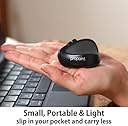
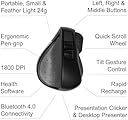
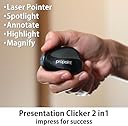
The Swiftpoint ProPoint is a revolutionary wireless ergonomic mouse featuring a pen grip design that reduces wrist strain, making it ideal for long hours of use. Lightweight and compact, it supports Bluetooth and USB receiver connectivity, compatible with Windows, Mac, iPad, and more. With ultra-fast charging and up to two weeks of battery life, it’s perfect for professionals on the move. Its built-in gyro technology doubles as a presentation clicker with laser pointer and spotlight functions, empowering you to lead meetings and presentations with confidence.





| ASIN | B07MQ2L7ZY |
| Antenna Location | Office |
| Are Batteries Included? | No |
| Are Batteries Required | No |
| Battery Average Life | 2 Weeks |
| Brand | Swiftpoint |
| Brand Name | Swiftpoint |
| Button Quantity | 3 |
| Colour | Black |
| Compatible Devices | Tablet |
| Connectivity Technology | usb receiver dongle, 2.4ghz |
| Customer Reviews | 4.1 out of 5 stars 337 Reviews |
| Enclosure Material | Strong & Durable Plastic |
| Global Trade Identification Number | 00857737002186 |
| Hand Orientation | Right |
| Hardware Platform | PC |
| Item Dimensions L x W | 5.6L x 4.4W Centimeters |
| Item Type Name | mouse |
| Item Weight Unit of Measure | 24 Grams |
| Manufacturer | Swiftpoint |
| Manufacturer Part Number | SM600 |
| Minimum Required Operating System Version | Windows 7 |
| Model Name | Propoint |
| Model Number | SM600 |
| Mouse Maximum Sensitivity | 1600 Dots per Inch |
| Movement Detection | Laser |
| Movement Detection Technology | Laser |
| Network Connectivity Technology | usb receiver dongle, 2.4ghz |
| Number of Batteries | 1 Lithium Ion batteries required. |
| Number of Buttons | 3 |
| Operating System | Linux, Windows 7, Windows XP |
| Power Source | Battery Powered |
| Product Features | Wireless |
| Range | 33 feet |
| Special Feature | Wireless |
| Style Name | Modern |
| Theme | PC Accessories |
| UPC | 857737002186 |
| Unit Count | 1 Count |
O**0
値段高いけど高さの理由がある
17000円台で高いですが、素晴らしいクオリティです ・ペン持ちマウスがこんなに快適だとは思わなかった ・クリックは全て人差し指だけど、ボタンの位置、形状は押しやすいように素晴らしい設計している ・ティルト機能が最高です。ちょっと傾けてスルスルスクロール。動作に慣れたらかなり仕事効率UPする ・USB無線LAN+充電ドックUSBドッグに乗せるだけで充電は感動です。ただし、充電したままPC持ち運びするとたまにマウスが落ちます。 もう少し改善のポイント ・マウスのソールが硬めなのでソールシールを貼ればほぼ完璧な滑り具合です。 ・プレゼンテータモードはあくまでおまけのような気がします。
A**O
Uno non basta
Ero indeciso se prenderlo visto il prezzo iniziale di per sé elevato. Poi è arrivata l'offerta e l'ho preso immediatamente perché curioso di provarlo. Premetto che mi sono interessato a questo mouse perché ho problemi di dolori alle articolazioni delle mani ed ho provato varie soluzioni tra le quali: il mouse verticale (pesante e con necessità di affaticare il pollice per premere i tasti); un trackball che mi faceva utilizzare in modo eccessivo il pollice; un "trackball" della Kensington orizzontale che però mi forzava la rotazione della mano e spesso schiacciavo i tasti senza volerlo perché tenevo in tensione le dita sollevate (click leggeri). Detto questo il ProPoint mi ha stupito perché leggero e facile da usare con tre sole dita; non mi fa sentire la fatica nel tenere la mano diritta al piano come succede con un mouse normale o quello verticale; grazie al dongle ed al bluetooth per la connessione lo posso utilizzare su più PC e posso spostarlo dove più mi comoda nella scrivania; essendo molto leggero non si fatica a muoverlo ed i tasti sono facili da trovare e premere; con il software scaricato dal sito poi si aggiungono numerose funzionalità tramite combinazioni di tasti + inclinazione (si perché, inclinandolo leggermente, di base lo si può usare per scorrere le pagine in verticale ed orizzontale); dispone di una rotellina comunque fisica sempre per lo scrolling; ha la funzione per gestire presentazioni tipo PowerPoint. Provato anche tramite bluetooth e non perde un colpo. Anche quando va in standby ci vuole poco perché si ricolleghi. Ricarica tramite dongle collegato alla USB ma per ora non ne ho avuto bisogno (lo uso da 4 giorni e la batteria è al 70%). Che dire di più: ne acquisterei un altro anche per il lavoro. Davvero ottimo e comodo. CONSIGLIATISSIMO!!!
K**K
Expensive but worth it
My mouse wrist and arm are happier since using this mouse and I like the presentation mode. Could do with becoming a tad cheaper though.
D**4
Great mouse for on-the-go working or travel!
As a grad student in architecture, I am constantly switching between multiple design and presentation software typically on the go or in a confined, lecture hall setting. This mouse was suggested to me by a friend and I have to say, while initially skeptical of its small size, I found it unbelievably comfortable and adjusted to it quite quickly. The compact size is incredibly convenient for classroom settings where you might use your laptop surface as a mouse pad and while the buttons aren't totally silent they do not produce that obnoxious heavy clicking sound of a typical mouse (another plus when you are trying to work quietly). The button layout can be configured but I have left mine as the default and the absence of the typical left/right buttons are no problem at all and I adjusted almost immediately. The tilt roller is a really nice function also. Switching the button on the bottom of the mouse turns it into a laser click/pointer which is great for switching through presentation slides and eliminates the use of trying to use a conventional mouse to do the same. Also really like that it seems to work on multiple surfaces with no problems at all. By and large, though, the compactness and comfortability of this mouse are its greatest strengths. Highly suggest giving it a try! (Bonus points for the charger being on the USB too!)
A**D
Ergonomische Minimaus für unterwegs und daheim
Die Swiftpoint Propoint ist die dritte Generation der Minimaus von Swiftpoint. Sie kommt in einem kleinen Hardcase mit einem USB Receiver und kann unter Verwendung von Bluetooth 4.0 auch ohne den Receiver benutzt werden. Die sogenannte Tilt Funktion (Maus auf die Seite kippen) klappt erstaunlich gut und auch Links- und Rechtsklick mit den übereinandergelagerten Tasten klappt sehr gut. Die Maus liegt angenehm zwischen den Fingern und auch nach längerem Arbeiten zeigt sich keine Ermüdung. Man merkt, dass hier ordentlich nachgedacht wurde. Die Gyrofunktion im Präsentationsmodus ist nett, auch die Maussteuerung von Windows lässt sich damit teilweise übernehmen. Das Unterstreichen wie im Video von Swiftpoint gezeigt erfordert allerdings einige Übung. Der Akku ist leider fest verbaut und hält angeblich 3 Wochen. Hoffentlich hält er vor allem ein paar Jahre. Die iPad Funktionalität beschränkt sich aktuell auf ausgewiesene Remote Desktop Apps (nicht MS RDP), hier wird aber durch iOS 13 ggfs. auch das Alleinstellungsmerkmal wegfallen. Das Mausrad sowie der Schalter zum EIn/Ausschalten und Wechsel in den Presentermode ist etwas schwergängig. Hier muss der Langzeittest zeigen, ob die Komponenten irgendwann nachgeben. Bei dem Preis sollte die Maus durchaus eine Weile halten.
Trustpilot
1 week ago
2 weeks ago