🎬 Elevate your video presence—because your image deserves the spotlight.
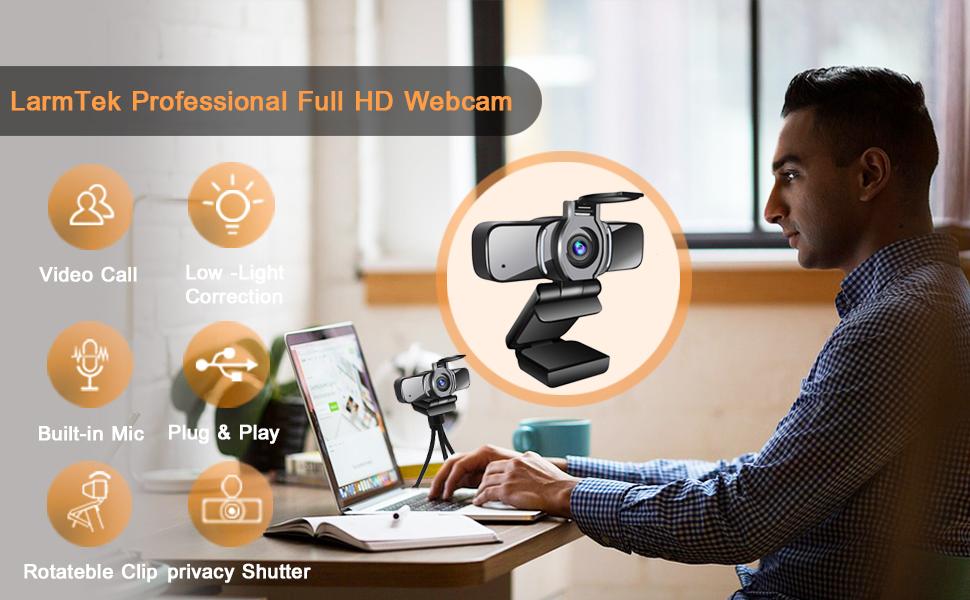
The HOBFU 1080P Webcam combines manual focus precision with full HD 1080p video at 30fps, a wide-angle lens, and a built-in noise-reducing microphone. Compatible across multiple operating systems and streaming platforms, it offers plug-and-play convenience with low-light correction, making it an essential tool for professionals seeking crisp visuals and clear audio in remote work, live streaming, and video conferencing.

| ASIN | B07P84DN2K |
| Antenna Location | Video Conferencing and Calling |
| Are Batteries Included? | No |
| Best Sellers Rank | 67,570 in Computers & Accessories ( See Top 100 in Computers & Accessories ) 487 in Webcams |
| Box Contents | webcam, webcam bracket ,webcam cover |
| Brand | LarmTek |
| Brand Name | LarmTek |
| Camcorder Type | Video Camera |
| Colour | White |
| Compatible Devices | Laptop, Personal Computer |
| Customer Reviews | 4.1 out of 5 stars 15,230 Reviews |
| Effective Still Resolution | 1080 MP |
| Effective Video Resolution | 1080 Pixels |
| Exposure Control Type | Automatic |
| File Format | JPEG |
| Flash Memory Bus Interface Type | SD |
| Flash Memory Type | Micro SD |
| Flash memory type | Micro SD |
| Focus Type | Manual Focus |
| Form Factor | Compact |
| Has Image Stabilization | No |
| Image Aspect Ratio | 16:9 |
| Image Capture Speed | 30 fps |
| Item Weight | 0.3 Pounds |
| Lens Type | focus |
| Manufacturer | LarmTek |
| Maximum Aperture | 150 f |
| Maximum Display Resolution | FHD |
| Maximum Focal Length | 10 Millimeters |
| Maximum aperture | 150 f |
| Maximum focal length | 10 Millimeters |
| Minimum Aperture | 1.8 Millimetres |
| Minimum Focal Length | 5 Millimeters |
| Model Name | LarmTek |
| Model Number | LarmTek |
| Network Connectivity Technology | USB |
| Number of Speakers | 1 |
| Optical Zoom | 10 x |
| Photo sensor technology | CMOS |
| Product Features | Low Light |
| Screen Size | 2 Inches |
| Sensor Type | CMOS |
| Shooting Modes | Automatic |
| Style Name | Full-HD |
| Supported Audio Format | [AAC, MP3, PCM, FLAC, Dolby Digital/AC-3] |
| Supported Image Format | JPEG |
| UPC | 191006804201 191006804225 |
| Video Capture Format | MP4 |
| Video Capture Resolution | 1080p |
| Video capture resolution | 1080p |
| Water Resistance Level | Not Water Resistant |
| Wireless Compability | 2.4 GHz Radio Frequency |
| Zoom | Optical |
E**O
Excellent product and very cheap. Excellent if you teach or work from home (Zoom and Teams)
I’m gutted because for a while I was searching for a good and cheap web cam due my work. I bought one that was pretty good but my partner needed a webcam, too. After some research I found this web cam! Is cheaper and better than the one I’m using for myself. He is chuffed with his camera!!! It’s a ver good webcam, small and compact but with a really good image quality and sound! It comes with a camera cover that it’s a bonus!!!! Also when you put on the camera it has a small lights on that always helps to improve the image. Really easy to install, well in fact you just plug into a USB and job done! No need to read any instructions, it works straight away. It comes with a long cable and it helps to put in wherever you want. The camera position is flexible, you will find it really helpful to find your perfect angle for your video conferences or for teach. Also you can leave a the camera sat on its own, thing that it’s quite handy. Also the camera can be put in a tripod! You can use this camera with any devices and in any angle. In my humble opinion, overall is a good product, very easy to install and use. It has a good image and microphone sound. I highly recommend it.
C**S
Great HD Webcam but not Perfect
Larmtek HD USB Camera So recently picked up a new webcam for my home/office. With the current working from home requirement, I needed something more than the basic built-in laptop camera I currently use. I also didn't want to spend the earth getting a new camera especially as I was predominantly going to use it for work and occasionally streaming. So enter the Larmtek HD USB Webcam I picked this up for less than £25 and was initially impressed with the overall feel and weight of the product. Simply plug and play, correct mounting on to my screen aided by the rubber/foam pads, check a couple of settings and I was away. Initial image quality results in conferences were great and it was easy to see that the 2.1MP lense was more than able to cope. I got 1080p at 30 fps and thanks to the wide-angle lens this captured my whole home office so I can see the benefit of using this camera in a small meeting room. Surprisingly even under low-light conditions, the camera was able to perform admirably so if you're streaming during the evening and don't fancy ring lights glaring into your face you might like this option. Unfortunately, it's not all good however as the audio quality from the built-in microphone is terrible and incredibly muffled, to the point that I would have to be taking right at the camera to get any meaningful results. The only other point of issue is that there isn't a swivel/rotation adjustment to the camera but given the wide-angle lens I see why this isn't present. Despite these shortcomings, there are a couple of really nice features that you wouldn't come to expect on such a budget product. One being the optional pricy cap to cover the camera when not in use. The other is the 1/4 inch tripod adaptor which is a great option if screen mounting isn't for you. So all in all the pro's certainly outweigh the con's, in my opinion, it's just whether the camera is going to fit in with your requirements. For myself I needed added image quality and although the microphone is something to be desired I use a headset or headphones usually with a built-in microphone so it's not an issue. For those that don't and do want to use this in a meeting room, I would ensure you have another microphone input as this just won't cut it. Pro's Under £30 Solid 1080p 30fps recording/streaming Good wide-angle camera Easy plug and play installation Additional privacy cover 1/4" Tri-Pod mount Con's No camera rotation or swivel Audio recording, not the best and sounds muffled
R**K
Good quality webcam
Good webcam at reasonable price. Arrived exactly at promised time, plugged in and worked just fine. There are adjustments for brightness, contrast, saturation ets, depending on the application you are using it with. It comes with no software, but is plug & play. I plugged the USB cable into my windows 10 PC, and it was installed in seconds i ran the Windows Camera app and there we were! Sadly it did not come with a small tripod but you do have the option to use one. The clamp fits on to my monitor perfectly. It produced a good quality image in varying light conditions. Sometimes it would be over exposed. So far i have tested the webcam with Discord and i will be testing it with other applications. I recommend this webcam for anybody without an integrated webcam as I tried this on my Windows 10 laptop also and it worked no problem. The only downside is that the microphone is very quiet (sounds like you are under water) and you have to speak very loud but at the end of the day it's a webcam, what do you expect?
E**Y
Fantastic upgrade from my Acer laptop cam and mic!
This camera is amazing! it really is a vast improvement from the built in Acer laptop cam i'd been using, in both sound and vision. At the time i bought it, it was reduced to £24.00 which is a joke to be honest. If I had paid 3 times that price I would still have been over the moon. Quality aside for a moment, it's also so easy to use! Just plug it into a spare usb port and thats it! The only little thing I could mention, is the little bracket that helps it sit onto the laptop screen is not very secure, it's more like balancing than securely gripping, and the threaded hole where you would attach it to a tripod, seems a little shallow? It might be my tripod screw is just too long? I don't know, but it does do up, just not tightly? Other than that I honestly can't say a bad word about it. One other thing though, I am not very good with computers and at first my lap top was still using the built in mic, but then it seemed to sort itself out without me doing anything and started using the webcam mic? Anyway, all in all, I would definitely buy this again if I needed another high quality camera, so very highly recommended! +++++
M**E
Quality depends on your software
This is a lovely little budget camera, bought, like most Im guessing, to handle meetings, working from home during all this Covid malarkey. In terms of setup its very much plug and play and no need for additional drivers or software to us. Camera audio does not present any issues and the mic seems to work well at a distance. When active the camera has a light ring to help distingish features and support the lens in recording you. One thing to absolutley bear in mind is the quality of this camera is VERY much dependant on the software your using for conferencing/video. If youre using software to control the video such as Zoom, Teams, Skype or even recording software such as OBS then the camera is great with nice 1080p and 720p framerates with little to no rendering issues and would absolutley recommend. If, however youre mostly going to be using web based conferencing such as Google Meet then unfortunatley the quality if shocking and I would not recommend.
M**K
Great webcam upgrade for a great price.
I, like almost everyone across the world, have been using online meetings for work a lot over the past 6 months. The webcam on my MacBook was ok, but not great. I wanted to try a cheaper alternative to some of the other pricier webcams out there, so went for this. I was not disappointed. The camera quality is a huge upgrade on the built in standard webcam on my MacBook Air. It’s very easy to setup, installs quickly and the quality was better than expected. The wide angle camera gives a great scope for group meetings, enabling it to be easier to conference call more effectively. The microphone quality is also great as it picks up everyone in the room really clearly (I have tested this whilst taking a call on a different laptop). For the price, this is a brilliant webcam, and I particularly like the optional shutter for increased privacy. If you want to upgrade the bog standard webcam and microphone for a decent price then this webcam will not disappoint. Great piece of kit that can be used on a desk, on a monitor or on a laptop 👍
F**H
Value For Money
Receiving it: This webcam arrived in rudimentary yet not unpleasant packaging; in a basic box, with no moulded plastic cradle. This isn't a complaint, it's the right way to do things these days. Looking at it: The cam itself is very similar in appearance to a leading manufacturer's pro model webcam which I happen to own, so have been able to a make proper side by side comparison. Working it: The cam worked straight away after being plugged in to my desktop computer; Windows 10 automatically set it up, and I was able to use it in Skype and Windows Camera. It was also used briefly for a Microsoft Teams meeting, where it was possible to jump between this webcam and my other webcam. Judging it: Initially, the picture using the Larmtek seemed over exposed and over sharpened. Interestingly though, the people on the other side of the web conference said it was better for them as it was a brighter image. So although I would rather a more natural image for using this cam to create digital content, for streamed conferencing the 'over cooked' image seems strangely preferable. During that particular test (MS Teams) it was noted by other call members that the sound was poor, especially compared to the other cam which had a good strong level. So, rather than writing it off straight away... Adjusting it: After the Teams call, I ran both webcams at the same time through a freely available webcam app (OBS) for a direct/real time side by side comparison. It was then I found that the Larmtek could be 'tuned' and so the picture was, for my personal taste, improved greatly. By reducing the sharpness value and adjusting gamut, exposure, and other sliders, the image was 'tamed' nicely. The microphone 'issue' was cleared up by Windows 10 audio settings, which for some reason had the Larmtek microphone volume set to just 50%. Setting it to 90% has helped it no end, and although at the time of writing has not been retested in a conference call, a rigorous comparison test using self recorded soundbites has shown it to now match my other rather more expensive unit. Other notes on it: The cam feels quite sturdy albeit not quite up to the 'feel' of my other (x4 the price) cam, and the clip has a good weight to it so is held securely on a monitor and is stable resting on a flat surface. The clip has a screw mount for a tripod, the same as my other cam; a great feature especially for multi-camera work or setting up a shot away from the machine. The 'privacy cap' is a separate item that comes loose in the box, and can be attached by simply peeling off the paper and sticking it over/around the lens (doing this with the flap open means it can be perfectly lined up); the flap can then be closed and opened easily. Don't forget to check it if you don't have a picture... #yesimadethatstupiderror To conclude, although my initial experience wasn't the best, a small amount of adjustment has proven this webcam to be quite a worthy piece of kit, especially considering its price against other leading manufacturers. Unfortunately those adjustments do have to be made every time the camera is reactivated, so can be rather frustrating in not being up to a usable standard straight away.
S**R
Well that was a whole lot of bother
I bought this webcam to use with my pc as, like many people, I'm working from home right now. This looked a good one for my budget so I was happy when it arrived. It was so much smaller than I expected! The first thing I noticed was the lack of the privacy cover. One of the reasons I chose this specific webcam was because of the privacy cover, so I was a little peeved it didn't have one. I double checked and there was no loose one in the box for me to fit either. No bother, I'll install it and ask Amazon to send me one. Well, that's where the problems began. I'm running Windows 10 on a standard tower PC. There are no built in webcam or microphones to interfere with the one I bought. At first it seemed like everything was going okay, until I video called a friend to check. She couldn't hear me at all. The picture was reasonable, although I looked a little washed out, but I couldn't see much in the way of fish-eye distortion or anything like that. Abandoning my call, I went looking for the settings. I found the webcam under 'Audio devices' and checked the settings. All okay there, so I tested the microphone. The test detected 0% of the sound. Or so it told me. Disappointing, but not the end of the world. I have a set of earphones with a microphone that I use for occasional gaming which I plugged in. They normally work perfectly and I've never had any issues with them, but suddenly they wouldn't work either. So maybe I'm a techno-idiot? After hours of fiddling, I decide to give it up as a bad job. I unplug the earphones and the webcam. I restart the PC and plug the earphones back in. Still no luck with them. In my frustration I ask my husband to look over everything I've done. 2 hours later we find a tiny little 'mute' button that's 7 layers deep on a very obscure setting panel. And when I say tiny, I mean tiny. The little mute symbol was only about 3mm wide. I know I never ticked, or even saw, it before so somehow between the webcam and the earphones it's managed to tick itself. So now I'm thinking that maybe that was the problem with the webcam microphone. I get it all out the box again and plug it back in and go hunting for the obscure setting panel and it's millions of layers. I find the tiny little mute button, but it's FINE. So I go back to the regular Control Panel page>Devices>etc. and look at the devices list and see that this time the webcam isn't listed as an audio device it's just listed as 'other devices' along with my monitor. WTF? Now there's no sound setting for me to play with or do a microphone test as it doesn't even recognise that the microphone exists!! So, after nearly 5 hours (seriously, I started at 2pm and gave up at about 7pm) of faffing about I gave up. I'm sending this damn webcam back. Plug and play, my arse. Especially as it somehow messed with a really obscure setting that affect other peripherals! How does that work??
Trustpilot
2 weeks ago
2 weeks ago