Desertcart purchases this item on your behalf and handles shipping, customs, and support to Cyprus.
๐ฟ Label Like a Pro, Organize Like a Boss!
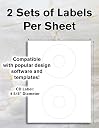
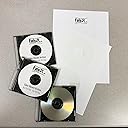
This pack includes 100 permanent white matte CD/DVD labels spread over 50 sheets, designed with large center holes and narrow spine labels for precise application. Compatible with both inkjet and laser printers, these high-quality labels are manufactured in the USA and come in reusable packaging to keep your supplies fresh. Ideal for professionals seeking an affordable, reliable way to customize and organize their disc collections.


| ASIN | B00J603QY2 |
| Best Sellers Rank | #94,139 in Office Products ( See Top 100 in Office Products ) #443 in Printer Labels |
| Brand | Blank Labels |
| Brand Name | Blank Labels |
| Color | White |
| Colour | White |
| Customer Reviews | 4.2 out of 5 stars 135 Reviews |
| Finish Type | White Finish |
| Finish type | White Finish |
| Item Shape | Round |
| Manufacturer | Blank Labels |
| Manufacturer Part Number | BL-CD |
| Material | Paper |
| Material Type | Paper |
| Model Number | LL*5824*50 |
| Number of Labels | 100 |
| Shape | Round |
| Size | 50 Sheets |
| UPC | 634392387489 |
| Unit Count | 100 Count |
J**H
A couple issues that can be easily lived with. Still the best "bang for the buck" on adhesive CD labels. See my template specs.
There are a couple issues with these labels: 1) The Avery 5824 template is NOT the right one for these labels. (And the template the seller sent me in response to a question doesn't fit correctly either...see image that I'm uploading.) 2) It's difficult to tell which side of these should be facing up in your printer. With that said...I will be buying more of these. They are a good quality label that, with just a little bit of tweaking in a Word template, work in both inkjet and laser printers, black & white or color. They stick on well and cover the entire printable area of the disk. The template the seller provided to me has the correct dimensions for the outer edge of the label, but the inner "cut out" isn't the same as the circle in the template, so if you crowd that inner circle, you'll lose some of your print when you peel the label off the backing. I used a ruler to tweak the document, then saved it as a Word template so I can go back and reuse it later. I suggest you do the same. I had a couple requests (and honestly, I should have thought of it myself earlier) so here is how I designed the template: Make sure you are using Letter paper and not A4 or any of the other sizes a lot of the Avery templates come it (i.e., I suggest starting from scratch). Use "Insert - Shapes - Basic Shapes" and select circle (with no fill) --- You'll need four circles. You'll be using "Drawing Tools" with "Position - More Layout Options" to size and position the circles. Circle 1: 4.5" diameter; Horizontal, Absolute position 1.95" to the right of Page; Vertical, Absolute position 0.49" below Page Circle 2: 1.62" diameter; Horizontal, Absolute position 3.39" to the right of Page; Vertical, Absolute position 1.93" below Page Circle 3: 4.5" diameter; Horizontal, Absolute position 1.96" to the right of Page; Vertical, Absolute position 6.01" below Page Circle 4: 1.62" diameter; Horizontal, Absolute position 3.39" to the right of Page; Vertical, Absolute position 7.47" below Page That layout perfectly aligns with the cutouts on the sheets I have...so I hope this will work properly for you. There is so much area on these sheets that isn't part of the labels, it would be nice for there to be a, "this side up" or "print this side" comment on the label side of the sheet. The cut lines are so fine and the front and back are exactly the same kind of paper, so you really have to check closely to make sure you're not printing on the back of the sheet. (Of course, if you do, you haven't ruined anything, just flip it over and send it through the printer again...but it's a nuisance.) Finally, I posted a question about the product and had an answer within an hour...I've also seen several comments to people on their reviews. I really like seeing a seller who takes the time to read and respond to the questions and comments.
B**W
Blank Labels BL-CD2 (100 Sheets)
The positive side of these CD/DVD labels is their price. If you are accustomed to purchasing big name brand disc labels (Memorex, Stomper, etc,) you will remember you could get a pack of 100 sheets for $15-20. Sticker shock reveals these brands now cost as much as $80 for 100 sheets. What happened? They were neatly packed in a cardboard packet adorned with nice graphics. The packet served as a convenient storage container until you used the last sheet. You got 100 sheets that ran through a printing press with the manufacturer's instructions and indicators printed on every sheet. Therefor several processes added to the cost. They may or may not have been on heavier paper stock than these blank labels. (I owned a quality printing company for a number of years.) For personal use I bought many of the Memorex and Stomper brands in the past. But I am not willing to pay the prices being asked today. As for quality of the Blank Labels, I see no difference in the end use of the product. What I have used so far have presented no problem in my color laser printer. The price is very reasonable. My order was shipped by Amazon, so I had no contact with the seller. As for the Avery compatibility, the pack I received were not compatible with the Avery template. But one can easily make a template with any "publishing" program, which I did.
S**E
Excellent!
I used these to label some old blank CDs and they worked amazingly well. Very pleased with this purchase.
D**G
Accuracy
These labels are off. The center hole is too large and my labels cut off part of my information. I ordered the ones that have the three little strips on the side and that's not what I received
A**Z
Cd labels
It would be nice if they had a template for a printer but that said, my printer isn't working so I am writing the info on the labels so it works good for me.
Trustpilot
2 weeks ago
1 month ago