🎨 Calibrate like a pro, see the difference everyone’s talking about!
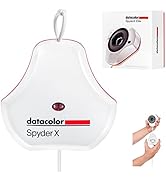
The Datacolor Spyder X2 Ultra Colorimeter is a cutting-edge calibration device designed for HDR and high-brightness displays up to 2000 cd/m². Featuring advanced display mapping and a user-friendly interface, it delivers precise color accuracy and unlimited customizable settings, making it an essential tool for photographers, game developers, and hybrid creatives seeking consistent, professional-grade color across multiple devices.


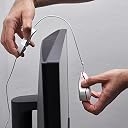


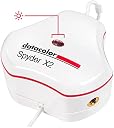


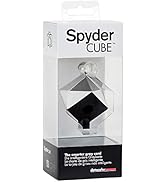


| ASIN | B0C1LKJ3VK |
| Best Sellers Rank | #435,592 in Electronics ( See Top 100 in Electronics ) #11 in Colour Calibration Charts |
| Brand | Datacolor |
| Brand Name | Datacolor |
| Clarity | 99 |
| Colour | White |
| Compatible Devices | Desktop |
| Customer Reviews | 4.2 out of 5 stars 148 Reviews |
| Finish Type | Matte |
| Importer Contact Information | Green Terrace Building, Lane Number 5, South Koregaon Park, Pune 411001, MH, India., Email ID:- [email protected]., Number:18002668571 |
| Included Components | 1x Datacolor Spyder X2 Ultra Colorimeter, 1x USB-C to USB-A Adapter |
| Item Dimensions L x W | 12.1L x 12.1W Centimeters |
| Item Hardness | 9H |
| Item Type Name | Colorimeter |
| Item Weight | 5 Ounces |
| Manufacturer | DATACOLOR, Datacolor |
| Manufacturer Contact Information | DATACOLOR |
| Material | Plastic |
| Material Type | Plastic |
| Model Name | SXU200 |
| Model Number | SXU200 |
| Number of Items | 1 |
| Packer Contact Information | Green Terrace Building, Lane Number 5, South Koregaon Park, Pune 411001, MH, India., Email ID:- [email protected]., Number:18002668571 |
| Part Number | SXU200 |
| Product Dimensions | 12.1L x 12.1W Centimeters |
| Screen Surface Description | Glossy |
| UPC | 875720002326 |
| Unit Count | 1 Count |
| Warranty Description | 1 year manufacturer |
B**E
Finally bought it.
Have heard about Spyder for ages, and finally bought this X2 for Rs.32,660.00 back in April (2024). I had to buy it because of my ASUS (TUF VG27AQL1A) monitor showing garbage colors compared to my old DELL monitor (which was designed for artists), forcing me to adjust brightness inside games and colors looking weird in Photoshop vs websites. Anyway, calibrated both my monitors (ACER is secondary monitor) and both look same. Color scheme matches, every image looks same on both monitors and I don't have to worry about brightness/gamma in-games, which you usually have to when your monitor is poorly calibrated. As a game developer, this is a must have piece of hardware. Actually, if you're using computers for gaming and editing, get Spyder and do color calibration. Everyone else can ignore this.
M**H
Super easy to use now. Great to see what my prints will look like properly.
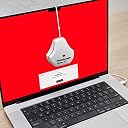
I was first introduced to a Spyder calibration tool quite a few years ago at college when I was doing design. A few years on and I am impressed to see how much improvement has gone into this new version. It is so much easier to use. I don’t do much design now, but I do photo restoration and digital imaging as well as photography. Aimed at beginners and experienced users this really will help everyone get the best from their prints. I fall in between those two categories so while I will experiment with the pre-sets as well as fine tuning to my own taste. This is the ultra-version which can calibrate regular and HDR/high-brightness monitors. I am using a full HD monitor at the moment but plan to upgrade in the summer. It is easy to use, to start download the software and pop in your licence number which is located under the Spyder on the bottom of the inside of the box, the software tells you exactly what to do and most is automatic with no user intervention needed. You just need to physically plug it in and adjust the cable to the length suited to your display. I like that I can save different profiles, different programmes handle colour differently and I can save separate profiles for them. I had struggled with colour for printing, so this makes a wonderful difference. I am at the moment editing some amazing shots that were taken outside and getting the tones and temperature correct is fantastic. What a treat to not be disappointed by my prints not turning out how I seen them on the monitor. Now if they look rubbish on the monitor I don’t print them and if they look great on the monitor I know they will look great on paper. No more wasted photo paper and expensive ink. The software has come on leaps and bounds since I had previously used this type of calibration, very impressive. Happy that this is future proof for a lot of years to come.
C**N
$400 Paperweight
Got off to a rough start; the device wouldn't work at all; kept throwing errors in the middle of each calibration attempt. So, I reached out to the company's support team, and - to their credit - they were quick to respond, and were able to get me up and running after a full re-installation of my GPU drivers. Their rapid and courteous response is why this is a two star review instead of one. But, even once I got it working, the results were just.. Noticeably terrible. I tried every possible permutation between the calibration presets and my monitor presets, tried studio match instead of individual calibration, tried every gamma variable, tried every white point variable, tried re-calibrating over and over until my eyes bled. I tried as hard as I could, for as long as I could (before my return policy evaporated,) but I just could not get this thing to work as advertised. Invariably, it would leave whites with a strong hue in one direction or another; reddish; magenta-ish; yellow-ish ,etc. Adding to the frustration, as you go through the calibration process, and it finishes 'scanning' your monitor, you click next, and end up on a 'save preset' screen, where, things will look great - briefly. But once you save the profile, then click 'next' (which loads up the post-calibration adjustment screen,) the great looks are *gone*, replaced with an drastically-hued mess, and the provided adjustments fail to make any reasonable dent. These folks clearly have a market. Maybe I'm just the wrong user with the wrong equipment. But, for this kind of money, I expected an easier user experience, and - more importantly - a result that was better than before I bought the product. I didn't get either, so I'm returning the unit for a refund, and I can't reasonably recommend this product to anyone.
T**S
Calibrador perfecto
El Datacolor Spyder X Pro es un calibrador de pantalla eficiente y asequible que mejora significativamente la reproducción de colores en monitores. Su interfaz sencilla y gran velocidad de calibración lo convierte en una herramienta muy práctica y versátil tanto para usuarios profesionales como amateurs. Este dispositivo es especialmente útil para aquellos que pasan muchas horas frente a la pantalla, ya que una mejor calidad de imagen reduce la fatiga visual y mejora la experiencia de trabajo y ocio. Además, evitamos la subjetividad a la hora de calibrar nuestro dispositivo, que siempre es algo muy peculiar entre fotógrafos y que se acentúan en monitores HDR. Es un dispositivo muy polivalente y que está pensado para una amplia gama de monitores, el Datacolor Spyder X Pro es compatible con paneles IPS y VA, y ofrece una cobertura de color sRGB precisa. A nivel de presentación, el dispositivo se entrega en una pequeña caja de cartón duro con una imagen del calibrador en la portada y la información de requisitos del sistema en el lateral. Quizás echo en falta una funda rígida para poder protegerlo. En cuanto a su diseño, es una herramienta con un gran diseño, muy elegante y práctico, con una forma de pera y una línea roja que lo rodea. La lente del calibrador es convexa y está alojada en una pieza negra con escalones concéntricos, rodeada por un anillo de gomaespuma negra que evita la interferencia de la luz ambiente durante la medición. El software Spyder X Pro requiere registrarse utilizando el número de serie del producto, que se encuentra en la parte inferior de la caja. El proceso de calibración es rápido y eficiente, tardando aproximadamente 75 segundos para el modo más completo (FullCAL) y unos 35 segundos para las calibraciones posteriores (ReCAL). Esto facilita la recalibración frecuente de la pantalla, algo esencial para mantener la precisión del color. Además, el sensor de luminosidad ayuda a ajustar el brillo en función de la luz ambiente. Una vez finalizada la calibración, el software presenta informes detallados que permiten analizar la precisión de la reproducción de colores. Estos informes incluyen comparaciones del espacio de color medido con los espacios de color más comunes (sRGB, NTSC, AdobeRGB y DCI-P3). 👍 Puntos fuertes del producto: -Precisión de color: ¡adiós a los tonos verdosos en mis fotos! -Facilidad de uso: como si fuera un juego de niños 🎮 -Rapidez en la calibración: antes de que te des cuenta, ¡listo! -Compatibilidad con múltiples tipos de monitores: ¡sí, incluso ese antiguo CRT que no quieres soltar! -Estabilidad y confiabilidad 👎 Puntos de mejora: -Precio: un poco elevado, pero ¿quién dijo que la calidad es barata? 💸 -Software requiere actualizaciones frecuentes Con todo ello, se puede decir que el Datacolor Spyder X Pro es una gran herramienta muy valiosa y apreciada dentro del mundo de los expertos en fotografía, videógrafos o gaming ya que nos ayudará a mejorar la calidad de la reproducción de colores en monitores, dando siempre los mejores resultados, y si bien es cierto que su precio es algo elevado, si te dedicas profesionalmente a estos sectores, lo valorarás mucho.
C**Z
Buen producto
Buen producto
E**O
Usado
Usado
Trustpilot
2 months ago
2 weeks ago