Desertcart purchases this item on your behalf and handles shipping, customs, and support to Cyprus.
โก Elevate your MacBook gameโpower, speed, and style in one sleek hub!
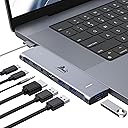
The LIONWEI USB C Hub is a premium 7-in-2 multiport adapter designed specifically for MacBook Pro and Air models (2016-2022). Featuring a 4K HDMI port, Thunderbolt-enabled USB-C port with 100W power delivery and 40Gbps data transfer, plus multiple USB 3.0 ports and a 3.5mm audio jack, it enables seamless expansion of your MacBookโs connectivity. Its aluminum build and magnetic-friendly design ensure a perfect fit without blocking charging ports, making it an essential accessory for professionals seeking high performance and sleek aesthetics.


| Additional Features | Fast Charging, Fast Data Transfer, Plug and Play, Portable, Video Transmission |
| Asin | B0BSFD1DBG |
| Best Sellers Rank | #352 in Computers & Accessories (See Top 100 in Computers & Accessories) #11 in Laptop Docking Stations |
| Brand | LIONWEI |
| Color | USB C Hub Adapter (MacBook) |
| Compatible Devices | Laptops |
| Customer Reviews | 4.3 4.3 out of 5 stars (13,358) 4.3 out of 5 stars |
| Data Transfer Rate | 40 gigabits_per_second |
| Enclosure Material | Aluminum |
| Hardware Interface | USB 3.0 Type C |
| Item Type Name | macbook pro adapter macbook accessories |
| Manufacturer | LIONWEI |
| Mfr Part Number | MUC2201 |
| Minimum Required Operating System Version | Mac OS X 10.0 Cheetah |
| Model Number | LIMUC2201 |
| Number Of Items | 1 |
| Number Of Ports | 7 |
| Operating System | Mac OS |
| Total Usb Ports | 4 |
| Unit Count | 1 Count |
| Upc | 768587480461 |
| Warranty Description | 2 year |
User
Great port expansion for my home office setup
I recently picked up this LIONWEI 13-in-1 Docking Station to help consolidate my desk setup, and it has been a solid addition. Iโve been using it with my [Insert your laptop, e.g., MacBook Pro / Dell XPS] to connect multiple peripherals and monitors, and overall, it works exactly as advertised.Port Variety: The selection of ports is excellent. Having 2 HDMI and a DisplayPort made it very easy to connect my external monitors, and the additional USB-C and USB-A ports mean I donโt have to constantly swap cables for my mouse, keyboard, and external drives.Performance: Iโve found the Ethernet connection to be stable and fast, which is a big upgrade over relying solely on Wi-Fi. The power delivery feature keeps my laptop charged while I work, which is one less cable I have to worry about plugging in directly.Compatibility Note: Itโs worth noting that this is a great solution for expanding ports, but if youโre a Mac user, keep in mind that [Mac OS typically only supports extending one monitor / specific display configurations]. Itโs been perfect for my needs, but it's something to double-check before you buy if you plan on running a triple-monitor setup on a Mac.Build & Heat: It feels well-made and doesnโt get excessively hot even after a full day of use.Bottom Line: This dock is a great, cost-effective way to clean up a cluttered desk. Itโs highly functional, easy to set up (plug and play), and offers more than enough ports for a standard home office. Highly recommended if you're looking to turn your laptop into a full workstation.
User
Straight forward USB C docking station.
Excellent USB C docking station. USB C connects to laptop. Has total of 5 USB 2.0 and 3.0, which was what I needed. Works well, fast, audio input for speakers. Two HDMI connections work well. So far so good. Would recommend
User
Yes! Works from a USB Lithium Power Bank Passing Power To The Host Computer!
12 March 2025 (Just got it today)Review for ASIN B0BNTHWWMY Described as: USB C Hub USB C Docking Station Dual Monitor 13 in 1 Triple Display Multiport Adapter with 2 HDMI+DP+8 USB C/A Ports+Ethernet+Audio, USB C Dongle for MacBook/Dell/HP/Lenovo ThinkPad/SurfaceIt does that which I truly needed. It will pass power from a USB Lithium Power Bank through itself to the host computer. That means it will work in a power outage or it will work when I have to go to an office or to court where no AC outlet is available. Not all of these USB-C Docking Stations will do that. I have a recently purchased Orico that will not do that so I have to return the Orico now that I have this Lionwei.This one is a Lionwei brand: Not known to me but I'll be keeping my eye on the brand from this point onward. It's a solid feeling item made of metal. I guess aluminum? I don't know.I'm not going to be using multiple monitors. Today, my first day of ownership, I only had time to test the things I need most:(1) USB Lithium Power Bank providing power to the host through this docking station. That works great. My little HP notebook requires 45W ( 3 amps at 15 V). My RoMoss 65W power bank does that for sure and obviously there's an additional 20W overhead to also power the Lionwei docking station. Works great. My old trusty HP Elite X2 1012 G1 Notebook is charged while using it when connected to the power bank through this Lionwei dock.(2) RJ45 Gigabit LAN - worked fine.(3) Several USB drives. 1-USB3 Sandisk flash; 1-USB 10Gbps M.2 enclosure; 1 WD MyPassport 2TB Hard Drive and all worked as expected and all at the same time.(4) Just for a test, I connected a HDMI 1080p TV. It worked fine.And all of the above were attached and running while the HP notebook was being powered and charged by the RoMoss 40,000mah 65W power bank through this Lionwei USB dock. That should give me about 60 minutes from the power bank before the notebook battery begins to drain and then I should have another 60 minutes from the internal battery.Excellent for my needs. I try to avoid giving 5 stars because people tend to consider that a 5 star rating is the beginning of an untruthful review that was bought and paid for. So, 4 stars is as good as it gets most of the time from me and this is 4 stars for sure.And...yes, I bought it with my own money. I just wanted to put up a review immediately because I have spent well over 12 hours over many days trying to find a docking station that advertises it will work from a lithium power bank. None of them seem to want to advertise that they will work from a lithiuim power bank. Why? I don't know. But, this Lionwei does it and does it well.Now, when the tornado rips my house to shreds, I can still hotspot my phone to my notebook and power them from a lithium backup...if....I can find those devices in the rubble. Or, I can take them to a remote location away from AC mains and still get work done as long as I have a cell signal. I've also got a 30,000mah RoMoss power bank to power my phone.The RJ45 LAN is mostly for connection to my Synology NAS. The NAS is connected to a Cyberpower UPS that will power the NAS for about 18 hours. So, if the power is out, I can still get needed files from my home NAS.Good luck to all. If anything goes wrong, I'll come back to update.01 April 2025UpdateNothing new to report. Still works as expected. Nice product.
User
13 in 1 = Great Purchase!
I have had to be remote lately and was concerned about not having the same set up as I do in my office. I was at a competitor shopping around for something similar but I was like, โAmazon has not let me down and I know I can find something better and as functional than what the company that rhymes with West Why sellsโ!Interesting this 13-1 docking station is so much smaller than I envisioned, and that actually worked out much better. I may never return to my office with neat set up I have at home.This is a great product. Easy to install, ports are what I needed for multiple screens.
User
HDMIs Stopped Working After ~6 months
Edited Review: I think Amazon makes it really hard to contact your merchant to discuss troubleshooting issues. Fortunately, the merchant/seller was able to offer me a full refund or send a new one. I opted for a new one because I really did like it when I initially had it. Hopefully, it won't have the same issue again 6 months later. I will update if that's the case. The merchant also showed me some steps, but it still didn't work on the old one. However, on the newer one it did work. Thanks!--Previous Review--Product Bought: 13 in 1 USB C Docking Station - Dual Monitor, Triple Display, 8 USB C/A Ports, Ethernet, Audio for WindowsI had bought this back in September 2023. It was working GREAT and worked with my KVM switch so it made it easy for me to switch between my work laptop and my personal desktop. I used the docking station for my work laptop since I require more USB ports. It stopped working all of a suddenly today.I know:It's not my KVM switch because the dual monitors work fine when I switch to my personal desktop.It's not the HDMI cables because when I plug each one individually into my work laptop, they still appear as an extended monitor.It's not my work laptop because it turns on and can recognize the other USB devices in the dock station.For some reason, it's ONLY the HDMI ports. Everything else like the USBs work just fine and my work laptop can recognize those. However, the HDMI ports are broken.So beware! I tried finding tech support, but it's no longer available since I am past the return window. That's what I get for being cheap. I guess I should find the original OEM dock stations for my work laptop now.I really liked the quality of the material if it did work. It's not some flimsy plastic although it could be a mix of metal and plastic. It keeps cool.
User
Multifunctional, very short USB-C cable. Potential lag issues with wireless devices.
Just set this up and all my devices connected flawlessly. I would give a 4 star review because of one significant design flaw. The USB-C cable that connects to the computer definitely could be much larger, it's only like 6" which really limits the placement of the hub. Basically has to be right next to the device whereas my prior hub had an 18" cable and I was able to install it in a hidden location.This hub IS powered though that's hard to tell as none of the ports are clearly marked for that purpose. The product photos on Amazon do show you how to connect to AC power via one of the USB-C ports. I saw other reviews that complained about lack of power pass-through but I used the power cable for my laptop and everything works fine.Edit 1: After less than a day of usage, I experience a highly frustrating level of lag with my wireless mouse to a degree that makes it impossible to do work. I moved my wireless dongle from a USB port to a USB-3 port, which after a couple hours of use seems to have alleviated the problem to some degree. I noticed other reviewers raised a similar concern.Edit 2: The company proactively offered a full refund, which I highly appreciate. I continued to use the dock, however after one month of daily use the ethernet adapter on the dock also failed. I have concerns about the HDMI ports as well because on two occasions the connected monitors have simply gone to a black screen and wouldn't acknowledge input until I used the button on the hub to cycle through the display options.
User
Economical docking station that works Flawlessly!
I am currently using this with my Lenovo Thinkpad, but this also works great with other laptops that utilize USB-C for charging. I am running (2) 24" monitors via HDMI without any issues at all. The white cable is the power cable that supplies power to the dock so that you can charge your laptop. I have a wireless keyboard and mouse dongle that I leave plugged into the dock so that whenever my laptop is plugged back into the dock, everything works seamlessly. I highly recommend this docking station!
User
Works Fine, But May Not Be Powerful Enough For Your Setup
I bought this to allow me to extend my laptop display onto two external monitors and plug in peripherals for when I am home and able to sit at a desk to do my work. It is light weight and easy to travel with, but due to my laptop's USB-C port limitations (this hub only plugs into your device via USB-C), the hub is not able to display my second monitor. After doing a little digging with the help of Gemini, I realized that I would need to acquire a hub that would support all of the functions I want it to and step in for my laptop's limited bandwidth USB-C ports.Technically, I have encountered nothing wrong with this hub. The only downside is that the setup I had in mind is not compatible with my laptop without the help of a more powerful USB hub. I will be returning this as I have no real need for it when I am out and about, but I appreciate the learning experience it has given me.
User
Great integrated and low profile Macbook Pro 16 USB C hub with necessary functions and good quality
TL;DRGreat USB C hub for Macbook Pro 16. It has all the necessary adaptors and it has a good low profile shape which can be integrated smoothly with the MBP 16. (See uploaded video) I will highly recommend this hub.Pros:1. I purchased this usb c hub to convert the my MBP16 usb c to USB-A and sd card reader. And it works great, every usb converting function is working as expected. In the meantime, the hub won't get extremely hot (my previous adaptor does). It will keep in a warm temperature which is acceptable.2. I occasionally use its HDMI adaptor to connect my MBP to a 1080P monitor, and the monitor can work smoothly in 60HZ.3. I really like its low profile design and it can be connected/integrated with my MBP smoothly. The hub is tightly connected with my mac and they are almost in the same level, I can put my mac on the desk and do not need to worry if the hub has bump or create uneven point.Cons:1. The hub's power light won't turn off, even I shutoff my laptop. It maybe because I have my mac's power cable always connected, but I think it makes more sensor to shutdown the hub if the laptop is in sleep mode or shutdown.2. It lacks DP adaptor. I think this "Con" belongs to Apple. I cannot find a usb c to hdmi adaptor that support 4k 60Hz output. So to use mac with 4K 60Hz monitor, it needs to be "usbc to usbc" or "usbc to dp". In general, I think a DP adaptor is more preferable than a HDMI for a Mac.
User
Doesn't fit if you have a protective case on your Macbook
So far this product has been really good for all the uses I needed out of it.The build quality is really great, all the ports work really well and are sturdy. There is no part of the product that is creaking or a loose piece of plastic.It fits really well if there is no protective case on your Macbook, which I didn't mind removing but some people might.The best feature about this product is the Hdmi port. The resolution on that port which the monitor receives is really good in quality.This is definitely a good buy. The only thing that is left to be spoken for is the life of this product.So far it has been really good.
User
Funciona perfectamente
Funciona a la perfeccion
User
Covers the head phone jack
When updated from my 2014 MacBook, I ended up with four thunderbolt micro usb-c ports and no USB ports at all. This gadget is a must and not realising I already had a smaller version and thought I had lost it have ended up with two but I use both with one each side of my MacBook, unfortunately the one on the right covers my headphone socket but not really a big problem (nobody's fault) but in the daytime I use all the sockets to drive my extra monitors each side of my computer giving three screens to use for my music pro midi software - brilliant product
User
Best one i've tried
i love the fact that you can charge your mac at the same time, this is a must have feature for every hub adapter. it's sturdy as well
Trustpilot
2 months ago
2 weeks ago