We remain fully operational. Our teams are working around the clock to ensure your deliveries continue safely.

DOWNLOAD THE APP


Copyright © 2025 Desertcart Holdings Limited
DOWNLOAD THE APP
Buy anything from 5,000+ international stores. One checkout price. No surprise fees. Join 2M+ shoppers on Desertcart.
Desertcart purchases this item on your behalf and handles shipping, customs, and support to Cyprus.
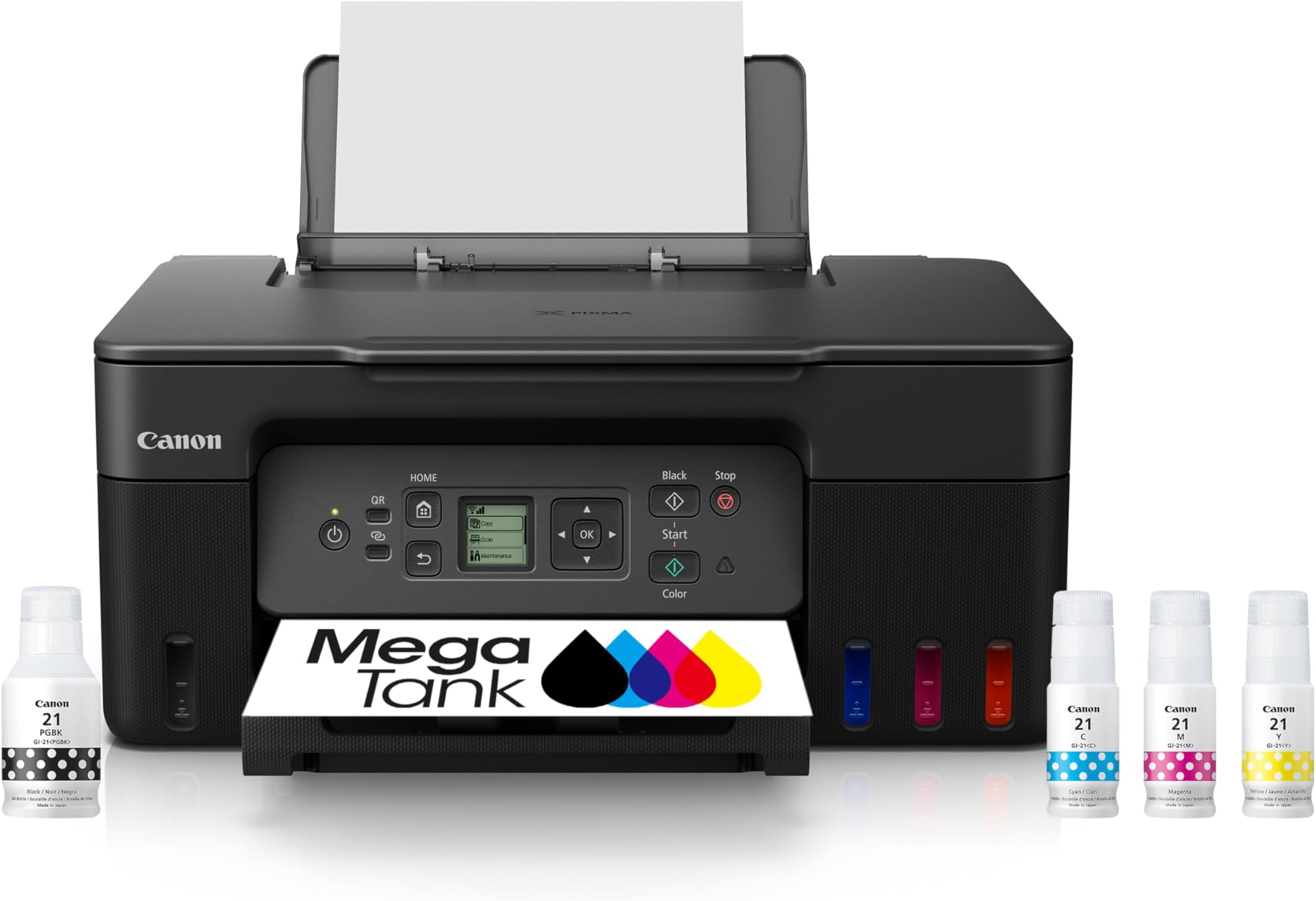
🖨️ Print smart, save big, and stay connected—your all-in-one productivity powerhouse!
The Canon MegaTank G3270 is a wireless all-in-one inkjet printer designed for home and home office use. It delivers sharp, high-resolution prints with vibrant colors and includes up to 2 years of ink, enabling up to 7,700 color pages or 6,000 black and white pages per refill. Featuring a user-friendly LCD display, wireless connectivity, and a cost-effective refillable ink tank system, it offers professional-quality printing, scanning, and copying with significant long-term savings.


| ASIN | B0BSMSYM9N |
| Additional Printer Functions | Copy, Scan |
| B&W Pages per Minute | 11.0 |
| Best Sellers Rank | #1,267 in Office Products ( See Top 100 in Office Products ) #4 in Ink Tank Printers |
| Brand | Canon |
| Built-In Media | PIXMA MegaTank G3270 Wireless All-in-One Printer, Set of Ink Bottles (GI-21: PGBK, C, M, Y), Print Heads, Documentation, Power Cord |
| Color | Black |
| Color Depth | 16 Bits |
| Color Pages per Minute | 6.0 |
| Compatible Devices | Smartphones, Tablets |
| Connectivity Technology | USB, Wi-Fi |
| Control Method | App |
| Controller Type | iOS |
| Customer Reviews | 4.1 out of 5 stars 4,639 Reviews |
| Display Type | LCD |
| Dual-sided printing | No |
| Duplex | Manual |
| EU Spare Part Availability Duration | 5 Years |
| Global Trade Identification Number | 00013803351507 |
| Hardware Interface | USB |
| Ink Color | Black |
| Item Dimensions D x W x H | 21.9"D x 16.4"W x 10.6"H |
| Item Type Name | Inkjet Printer |
| Item Weight | 13.2 Pounds |
| Manufacturer | Canon |
| Maximum Copies Per Run | 99 |
| Maximum Copy Resolution Black and White | 4800 x 1200 |
| Maximum Copy Resolution Color | 4800 x 1200 |
| Maximum Media Size | 8.5 x 14 inch |
| Maximum Print Resolution Black and White | 4800 x 1200 Dots Per Inch |
| Maximum Sheet Capacity | 100 |
| Maximum print Resolution Color | 4800 x 1200 Dots Per Inch |
| Model Name | PIXMA G3270 BK |
| Model Number | 5805C002 |
| Model Series | PIXMA G3270 |
| Number of Trays | 1 |
| Other Special Features of the Product | Borderless Printing, Display Screen, Energy Star, Epeat Qualified, Network-Ready |
| Output sheet capacity | 100 |
| Paper Size | 3.5” x 3.5” (Square), 4” x 6”, 5” x 5” (Square), 5” x 7”, 7” x 10”, 8” x 10”, Letter (8.5” x 11”), A4, A5, A6, B5, Legal (8.5” x 14”), U.S. #10 Envelopes, Card Size (91 mm x 55 mm), Custom size (width 2.1–8.5 in, length 3.5–47.2 in) |
| Power Consumption | 16 Watts |
| Print media | Card stock, Envelopes, Glossy photo paper, High-resolution paper, Paper (plain) |
| Printer Connectivity Type | USB, Wi-Fi |
| Printer Output Type | Color |
| Printer Type | Inkjet |
| Printing Technology | Inkjet |
| Resolution | 600 x 1200 |
| Scanner Type | Flatbed |
| Special Feature | Borderless Printing , Display Screen, Energy Star, Epeat Qualified, Network-Ready |
| Specific Uses For Product | home, home office |
| Total USB 2.0 Ports | 1 |
| Total Usb Ports | 1 |
| UPC | 013803351507 |
| Unit Count | 1.0 Count |
| Warranty Description | 1 year |
| Warranty Type | Limited |
| Wattage | 16 watts |
A**5
Much easier to setup using the Windows app!
Since 1995 I've used many printers starting off with a Canon bubble jet. Since then I've used Brother, Canon, Lexmark and Epson. Admittedly for print quality Epson's sub lim dye is the best printing you're going to get. Their ink also lasts longer in regards to photo-life. As far as cost and availability of their ink at stores though is another question. Cost-wise they're all pretty much on par with each other for all brands these days. You can improve the print quality on Canon printers but you'll have to fool with the settings to get there which I don't mind doing. You'll also use a little more ink but that's the cost of quality. The Windows App made setting this printer very easy and kudo's to Microsoft and Canon for that. This is my first tank printer which I'm looking forward to using but you have to keep in mind that if you don't use the printer at least some what regularly, the ink to the printhead WILL dry out if you leave it idle for too long. Keep that in mind for EVERY printer unless you're using a laser jet. After adding the ink and updating the software I printed out my test page, simply scanned it and the printer itself set the print alignment to it's best settings. Super easy! Print outs aren't the fastest which is fine I'm not looking for speed to be honest. Print quality is very good on standard settings but I'll probably set it for best print quality later. Canon printers inherently have a sequence of sounds that hasn't changed in 28 years lol. Same for most other brands too. Not annoying but not silent either so don't expect that. It's no louder than the other brands. Canon has always done good black and white printing well before the other printer brands and their color quality has improved significantly as well. Having tanked ink versus having to buy cartridges is VERY cost effective! You essentially pay double for the printer but save long-term in the amount of printing (the REAL cost). We used to have a Cartridge World store that would sell refurbed ink tanks that worked 100% of the time but that location closed recently and sadly. If you have one near you I highly recommend them! I had recently bought an Epson XP4200 AOI printer but finding the cartridges took some time and forget locating them in your local store unless you get lucky, then came the cost. The XL cartridges range $30-$50 which is about what I paid for the printer new. Even off brand ones aren't that cheap. Having a tankless printer saves me time in finding ink and saves me a ton of money over having to buy overly expensive cartridges. Many of the 3rd party ones don't always work either so it's iffy in regards to cost savings. If at some point I have to do the printhead bath to clean them I don't mind, it's well worth it for not having to buy outrageously expensive cartridges. I'm done with them! I definitely recommend this printer even if you're only doing average home use. Just remember to use it every week even if just once.
M**N
Just what I was looking for.
Works as described. Good price. I watched a YouTube video for setup. The included paperwork wanted me to QR scan to go to a website for how to operate. Why? I use the plug direct-to-laptop verses wireless options. It takes trial and error to operate, but relatively easy to use. It makes some noise, and does not operate at lightning speeds, so don't buy this if that's what you're looking for. I scanned a piece of fabric and it was nice quality. I just can't figure out how to reduce the storage space MP's.
C**A
So disappointed:(
Terribly inefficient connection, unreliable color accuracy, and confusing support from Canon (or lack thereof) I thought I had found the perfect budget printer for starting my art business.. the glowing reviews online and the promise of longlasting inks compared to other companies. Suffice to say, after hours of frustration, bouts of rage and wasted paper, I am extremely disappointed. I think the ONLY net positive about this printer is the fact that the inks look like they will outlast any of the cartridges from other printers like Epson, while also being so much cheaper to refill. Which is WHY I am so angry and disappointed at this piece of junk. Unfortunately, I'm going to have to go back to Epson, which I DID NOT WANT! And here's why: 1. Excruciatingly slow and inefficient wifi: This printer's ability to connect to wifi and stay connected is ABYSMAL, it constantly goes offline between prints, it struggles to reconnect and you will spend up to 30+ minutes waiting for a single sheet to print while having the dreaded "Unable to Locate Printer" screen loading forever and ever. As a small business owner with deadlines, the constant connectivity issue is impossible to sustain. To top it off, it doesn't come with any ethernet port, and you're forced to buy a special printer/usb cable just so you can reliably use this printer. I don't want to have to pay an additional cost for something that should have been included with this printer, just to fix a problem that shouldn't even exist! I never had this issue with my Epson, or any other device! It makes no sense! 3. But this was the dealbreaker: DULL, WASHED OUT COLORS AND INCONSISTENT RESULTS ACROSS ALL SETTINGS AND PAPERS!! I have tried every single iCC that canon offers (which by the way, are not available in photoshop for some weird reason, despite all the epson paper settings being there without me having to do anything. I've installed the driver on my mac and even had to ask chatgbt for help to no avail) and different papers. My blacks are printing gray on cardstock, then brown on another paper, no matter what I did, it never prints black correctly!! I printed another design with the same exact paper on Epson, and compared that with Canon. The Epson print looks vibrant and matches the colors on my monitor perfectly, while the Canon print is COMPLETELY WASHED OUT AND DULL by comparison. Same exact settings, same exact print, tried all the other settings, NO IMPROVEMENT! There was like 1 print that came out where the blacks were close to accurate, yet with the same exact paper and settings it has never happened again! I've wasted so much paper for nothing!! 4. Lack of a physical manual or a link to an actual guide, you are forced to download their app and go through several hoops to find a visual setup procedure. There are no videos or troubleshooting steps I could find from the website. The printer automatically comes with a useless feature that tells you there is no paper loaded when there is, and you're forced to figure out how to turn it off on your own. Navigating the settings on the printer's tiny screen is equally confusing. Now, I can suffer through this thing's abysmal wifi by paying extra for that cable, I can suffer through the lack of a physical manual and useless/confusing setup guides from Canon's app, but the color inaccuracies and lack of steps to fixing them are a huge no for me. The only reason I returned my Epson was because it smears any paper with gloss in it, and there is no fixing that. The massive HEADACHE and mental turnoil I've suffered from having to DIY my way out of every endless caveat with canon's pixma g3270 is simply not worth it. I'm returning this thing ASAP
T**.
Pretty good all-in-one ink tank printer.
When my 3-year-old Epson Eco tank AIO printer gave out I did some research online and this printer kept coming up with consistent 5-star ratings, so I thought "why not"? Now first off, I have to say Amazon REALLY messed up the delivery! The day it was supposed to arrive I got a text saying it had been delayed in transit and was going to be here the following day. When it didn't arrive, the Amazon driver stated he couldn't "gain access" to the apartment. Further investigation determined he "got lost", and these drivers have a satellite map system in their delivery trucks? When it eventually arrived another day later (2 days late in all) one corner of the packing box was damaged and there was no Styrofoam "peanut fill" inside the box, and as the packing box was much larger that the printer box, I was worried about damage to the printer from it sliding around in the packaging due to the rigors of transportation. Fortunately, there were none. SO, for all the mess up with delivery, sorry, but Amazon only gets 1 star for their role in this. Unpacking the printer was easy, and after placing on the printer stand section of my computer desk, I started the installation. No instructions are provided - you are directed instead to Canon's website for installation and setup instructions. As I did not want this taking up bandwidth on my Wi-Fi I used a USB cable; BEWARE, if you want to do the same as no cable is provided, but fortunately I had one hanging around to do the job. Following the installation instructions online was pretty simple as was filling the ink tanks, however, DON'T use ALL the ink in the bottles, but instead watch closely on the outside "windows" for each color ink tank until the ink reaches the clearly marked "FULL" line and then quickly remove the ink bottles. The rest of the set up was pretty straight forward, downloading software, drivers etc., but for some reason Windows 11 didn't auto detect the printer the first time I went to use it, so I had to shut the printer down and re power it up for before Windows found the printer. The print test was perfect, and the auto alignment also set the thing up perfectly. I scanned a document and a picture, and both appeared to be reproduced faithfully when compared to the original documents. I deducted 1 star because unlike most AIO ink tank printers in its class, it doesn't print on both sides, but I was aware of that before purchase, and the issue of initially failing to find the printer in Windows 11 also factored into that 1-star deduction. As I said, I use mine plugged into a multi-USB port extender bank so I can't speak to ease of set up for Wi-Fi. I also don't do any highly sophisticated color printing, such as high-res photos, so I'm not sure if it will hold up to that type of usage but it certainly meets my needs. Conclusion? A pretty good ink tank All-in-One printer for home and home-office use, and it goes without saying that in common with all these ink-tank printers available now, this will save a TON of $ compared to the old inkjet cartridge system available on other inkjet printers on the market. Will it last as long as its predecessor? Don't know obviously but the initial build quality appears to be top notch.
K**N
Optimal home printer
It's been a smart purchase. Printer works excellent for my home needs. Easy to setup and connect to the wifi. Color images are not the best but optimal for my kid usage.
J**E
My Printer for Life!
This printer is awesome! I love the ease of replenishing the ink, the start up instructions and the support staff at Canon. This is my first canon printer and it is so easy to deal with paper jams. I also need the duplex printing and it is easy to use after the first time. As always, time and familiarity make any task easier. This sleek black printer does a lot of things and is so well designed. After using other brands, this is my comfort zone and the cost is nominal considering the ease of use and quality printing it puts out.
C**N
Revised review : call support from Canon!!
Revised review: I was ready to return it, but something told me to call support ,I did and someone from canon helped me ..I set up my printer and everything is printing with good quality 1st review: I am about to return it ,it is hard to connect and when finally did the colors were not what I expected ,used the laptop and phone and connectivity is an issue even using the two apps they have
L**I
Great printer, super value
I've had Canon printers for years. I prefer the ability to remove the print heads, when needed after a few years of use. This model also does that. Don't worry about it only being four colors; Canon has won "shootouts" for photo quality against 6 color printers many times before. Most importantly, for me, was that this G3270 is backward compatible with older operating systems in my Macs. If you have older standalone photoshop versions, you will love this model. It prints photos on Glossy paper with amazing quality. I was so sick of dealing with cartridges(aftermarket etc.) on my older I850 and I9100 Canons. Having bulk tanks is HUGE for me. People complaining about wireless issues should just use an USB cable. These new devices in our lives are not yet "toasters" and require a bit of reading and getting used to protocols on this model's LCD. It's actually fairly Logical, IMHO, to scroll through settings on this printer. ONE thing I found a bit annoying is that you have to turn off it's paper detection setting, so that you can switch papers from plain to glossy without the printer halt and needing to click "Use set paper" in the LCD's dialogue box. I would recommend this printer to any person who knows their way around printers or connectivity stuff.
Trustpilot
1 month ago
2 weeks ago