


🧊 Cool, Clean, and Captivating — The Ultimate Canvas for Your High-Performance Build
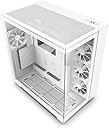
The NZXT H9 Flow is a premium mid-tower ATX gaming case designed for professionals and enthusiasts who demand superior airflow and aesthetics. Featuring a dual-chamber layout, perforated top and side panels, and seamless tempered glass front and side, it supports up to 10 fans and multiple 360mm radiators for exceptional cooling. Its spacious interior and intuitive cable management system ensure a clean, high-performance build that stands out on any desk.


| ASIN | B0BG1GQKKY |
| Antenna Location | Gaming |
| Best Sellers Rank | #4 in Computer Cases |
| Brand | NZXT |
| Case Type | Mid Tower |
| Color | White |
| Compatible Devices | ATX, Micro-ATX, Mini-ITX motherboards; 2.5", 3.5" hard drives; Bottom-mount power supplies |
| Cooling Method | Air |
| Customer Reviews | 4.8 out of 5 stars 1,474 Reviews |
| Enclosure Material | Tempered Glass |
| Fan Size | 120 Millimeters |
| Global Trade Identification Number | 00810074842495 |
| Hard Disk Form Factor | 3.5 Inches |
| Internal Bays Quantity | 1 |
| Item Dimensions D x W x H | 18.9"D x 12.4"W x 19.9"H |
| Item Weight | 12.1 Kilograms |
| Manufacturer | NZXT |
| Material | Tempered Glass |
| Model Name | CM-H91FW-01 |
| Motherboard Compatability | Micro ATX |
| Number of Fans | 3 |
| Other Special Features of the Product | Built In Fan |
| Power Supply Mounting Type | Bottom Mount |
| Recommended Uses For Product | Gaming |
| Supported Motherboard | Micro ATX |
| Total Expansion Slots Quantity | 7 |
| Total USB 2.0 Ports | 2 |
| Total USB 3.0 Ports | 1 |
| Total Usb Ports | 2 |
| UPC | 810074842495 |
| Warranty Description | 2 Years |
J**D
NZXT H9 (UPDATE)
I love this case. The H9 is how best to put it, an inspired design from one of the most popular PC cases on the market the Lian Li O11. All I can say is if you come for the king you best not miss and NZXT hit their mark. The case is high quality, spacious to work in, versatile and elegant. I find the aesthetics of the case to be vastly superior to the 011, the case allows for nearly every part to be easily removed toollessly to make things easy to work on and offers tons of preplaced cable guides to make cable management as easy as possible. This brings me to some of the things I don’t like, I wish the USB were front facing instead of top mounted like on the O11 EVO, Hyte Y60/70 or NZXT’s own H6. I would have liked some rubber grommets covering the cable management holes to make the cables that run to the board look even cleaner. Lastly I would have liked some Velcro straps at the bottom of the case as well for managing things like a multi connection SATA cable from my PSU as well my fan cables/controller. Overall I highly recommend this case or cases like it for first time builders and experienced builders alike. The case offers so many great features and tons of mounts for fans for adequate cooling. It also takes NZXT’s minimalist aesthetic and creates something super elegant that can be a showcase for your build while not sacrificing things like airflow and function. It’s got some quirks but I am just happy to see NZXT whom I consider to be on of the best quality case manufacturers finally making good cases after years of just sticking with the H510. UPDATE: Given some of the let’s say less than savory tactics NZXT has been found to be doing with things like their predatory PC leasing program it might be best to start looking elsewhere in the future and customers should know about this. Won’t change the rating because the product itself is good even if the company that makes it has decided to go down a less consumer friendly avenue.
H**E
My dream case ❤️
I’ve had this for 7 months now, and I think it’s time I finally write a review. I get compliments on this case ALL. THE. TIME. My setup looks soooo clean now and this case really ties it all together. There’s so much space for airflow and cable management, and the size of the case made it easy to get in and assemble. I’m fine with the fans it came with, and haven’t bothered swapping those out because it stays pretty quiet and stays cool. I love the magnetic mesh top that pops off for easy cleaning in-between deep cleanings, and the mesh tray at the bottom that slides out. I love how many configurations there are for airflow or for your radiator, and I LOVE how the PSU gets hidden in the back alongside the cables. Maybe I’ll update this review with a picture of my cable management, because I’m really happy with that too. I love that the windows are glass panes instead of plastic/acrylic that might scratch easily. Everything about this case just feels high quality.
B**E
Beautiful, Airy, and Easy to Build In
The NZXT H9 Flow is hands down one of the best cases I’ve ever built in. The dual-chamber design makes cable management incredibly easy and clean. The airflow is excellent, especially with the perforated top panel — my temps stay low even under load. The tempered glass front and side panels show off your build beautifully, and there’s tons of room for fans or a 360mm radiator. It’s well thought out, sturdy, and looks amazing on my desk. If you're building a high-performance rig, this case is 100% worth it.
A**G
Great case, easy to work with and looks nice
The NZXT H9 Flow (2023) is a great case that rivals other high-end PC cases in my opinion. My experience building with NZXT cases has been nice, especially this case. They all feel high quality. There is enough space for cable management, and it is easy to work with. The view of the PC after it is done looks great with the glass side and front. There is space for 10x total fans: 3x fans at the top, 3x fans on the side, and 3x fans on the bottom, plus space for a single fan at the back. There are holes on the top, bottom, back, and whole side of this case, with dust filters included. My PC stays cool. For storage, there is a bracket that swings out and holds 5x 2.5" drives on the inside. There is a hard drive bracket that holds 2x 3.5" drives and 1x 2.5" drive. I think it would be nice if there were space to add one or two more 3.5" drives, though it is okay and should work for most people. Although with the AIO setup and this case, the PC is now heavy and not very portable. The top front I/O has: Power Button 2x USB 3.2 Gen 1 Type-A 1x USB 3.2 Gen 2x2 Type-C (20 Gbps) 1x Headset audio jack Overall, I really like this H9 Flow PC case, the way it looks and to build with it.
J**A
Fun and exciting case!
Great case, pretty to look at and spacious enough for the latest hardwares including the newest 5090 cards. Airflow feels amazing, comes with 4 fans which is enough to make my pc to regulate temperature, with obvious additional parts like a cpu water cooler and radiator. My only issue which isn’t a huge problem is the center piece for cable management makes a right squeeze for my GPU, but that can easily be fixed by removing that one piece by unscrewing 2 screws. F panel is also really nice and easy to install, rather than the old system with multiple tiny plugs for power, reset and LED, it’s all one simple plug, saves a bunch of time and makes cable management so much easier! 9.5/10
A**N
A PC Enthusiast's Case!!
The Dual chambers of this case make building in it that much more convenient cause of how spacious it is inside. It can properly fit a few different motherboard sizes, including Mini-ITX, Micro-ATX, and ATX with some reporting E-ATX as well after removal of the cable management tray. A couple standoff screws I had to remove took some fiddling with a wrench but that's to be expected. The cable management is on another level, there are useful velcro straps in the rear chamber that go up and around the top of the case, with all of the case's front I/O Input cables and stock fans' cables routed through them already. The build quality of the case itself is awesome to behold, it reminds me of a fish-tank, but it's for your computer! It definitely has some heftiness to it, the tempered glass panels have a black border around 2/3rds of the panel, but it's pretty easy to get your fingerprints on them at one point before putting it all together, so have a lint-free micro-fiber cloth at the ready and maybe some Isopropyl alcohol. When it all comes together, an Intel i9-12900k sits around 35C at idle during the spring time thanks to the NZXT Kraken 360mm AIO liquid CPU cooler. The GIGABYTE Aorus GeForce RTX 5070 Master sits near 32C at idle with help from three 120mm bottom intake fans. I also ran a few recently released or demanding games at the highest settings possible at 1440p at a max of 165FPS to monitor how temps were: Marvel Rivals - Temps were under 58C and CPU temps hovered around 45 capping at 49C in the Practice Range area at high GPU/CPU loads. The Elder Scrolls IV Oblivion Remastered - GPU at 98% load and temps didn't exceed 58C while taking down the yellow team in the arena and traversing Cyrodiil. CPU temps were consistently under 55C as well. Throne and Liberty - CPU Temps hit 67C max during shader optimization and GPU was mostly around mid 50s, capping at 58C while running around in shapeshift form. CPU didn't exceed 58C during normal gameplay either. Call of Duty Warzone: CPU max temp was 62C and GPU's was 59C. God of War Ragnarok: GPU and CPU temps didn't go above 60C during multiple Valhalla runs. My one caveat with this case: The side panel can be tough to get properly seated after opening. The two glass panels meet and there's a bit of a gap, which is normal, especially since it comes shipped with a piece of cardboard between the two, but I noticed the gap was slightly bigger than when it shipped, and that the bottom circular shaped rubber notches weren't properly inserted. I think I ran into this issue during my first attempt to re-insert the panel cause I had the case vertical. I then turned it on the perforated mesh side of the case and figured out the method that worked for me to get the panel back in properly. Solution to re-insert glass side panel: I had to basically angle the tempered glass panel towards the bottom to fit the circular notches at the top correctly, then lower the panel to the bottom of those lower notches while pushing the top of the panel inwards so that the topmost spherical notches insert into the corresponding circular cutouts there. (Doing all this while avoiding leaving any fingerprints and smudges on the inside of the panel can be tough!) tldr: Great case to build with, display, and admire! One caveat: the glass side panel is a bit tough to re-insert.
J**U
Almost perfect.
Pros -Good airflow -Simple yet elegant design -Good Lian Li alternative features -Great tool-less latch design for the panels for easy access. -Filters are easy to clean and to access -Preinstalled mounts for ATX motherboards -Lots of room to work with. Cons - No HDD indicator LED light - Came with 3pin 120mm Fan no PWM fans -120mm rear fan instead of 140mm -Can only fit 2 140mm fan on top and bottom instead of 3.
A**R
Top tier case for custom builds
Excellent space to work with, good pre-stage cable management and fan setup. A pleasure to build in. Can easily handle large GPUs and full 320 radiators. Solid and sturdy. Requires very little cleaning after a full year of use.
Trustpilot
2 months ago
2 weeks ago