Desertcart purchases this item on your behalf and handles shipping, customs, and support to Cyprus.
๐๏ธ Relive your past in HDโbecause memories deserve the spotlight!
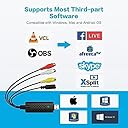
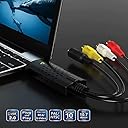
The VIXLW USB Video Capture Card is a compact, plug-and-play device that converts analog RCA and S-Video inputs from VHS, VCR, Hi8, and camcorders into 720p HD digital files. Compatible with Windows and Mac OS, it supports NTSC and PAL formats and captures audio without a sound card, making it the perfect tool to preserve and digitize your vintage video collection effortlessly.


| Antenna Location | Video Recording |
| Asin | B0BLNPCK82 |
| Av Output | USB |
| Best Sellers Rank | #16 in Internal TV Tuner & Video Capture Cards #47 in Video Converters |
| Brand | VIXLW |
| Built In Media | Installation Guide, USB Extension Cable, USB Video Converter |
| Compatible Devices | Television, Laptop, Desktop, Monitor, VHS player, VCR, DVD Camcorder, Projector, Digital Camera |
| Customer Reviews | 4.3 4.3 out of 5 stars (745) 4.3 out of 5 stars |
| Hardware Interface | USB |
| Item Dimensions | 3.5 x 0.98 x 0.59 inches |
| Item Type Name | USB Video Converter |
| Manufacturer | VIXLW |
| Mfr Part Number | 116 |
| Minimum System Requirements | Windows operating system with USB port |
| Model Name | Video Capture Card |
| Model Number | USB2.0 |
| Number Of Items | 1 |
| Number Of Packs | 1 |
| Operating System | Windows |
| Other Special Features Of The Product | Wide Format Support, Audio Capture without Sound Card, Real-time Performance |
| Platform | Windows |
| Tuner Type | NTSC, PAL |
| Unit Count | 1 Count |
| Upc | 768459719958 |
| Video Capture Resolution | 720p |
User
Worked flawlessly with my MacBook Pro
The VHS to Digital Converter (RCA to USB Capture Device) is an incredible tool for anyone looking to preserve their cherished memories stored on VHS tapes. I was able to digitize my old home videos with ease, and the results were fantastic!Pros:1. User-Friendly Setup: The device was incredibly easy to set up. It came with clear instructions, and I was able to connect my VCR to my computer in just a few minutes.2. High-Quality Transfers: The converted digital files retained great video and audio quality. It brought back my old recordings in a new, accessible format.3. Versatile Compatibility: It works seamlessly with different operating systems and various media formats, making it versatile for all kinds of projects.4. Compact and Portable: The device is small and lightweight, which makes it easy to store or take with you if needed.5. Affordable Solution: For the price, this is an amazing value. I saved so much money compared to professional digitization services.Cons:None worth mentioningโit worked perfectly for my needs!Overall, the VHS to Digital Converter is a fantastic product for preserving priceless memories. Itโs easy to use, works as advertised, and delivers high-quality results. Highly recommended for anyone looking to future-proof their old videos!
User
Did exactly what I needed it to!
After finally being given the โkeys to the kingdomโ of my childhood, consisting of a board of Hi8 tapes, DV tapes and VHS tapes, I had my work cut out for me when it came to digitizing everything.After being quoted over $2000 for them to be converted by a local shop (please for the love of god, do your research as some of these places suck. Check YouTube for proof if you need it), I decided to purchase a Hi8 tape player, a DV one, and VCR from eBay and Facebook marketplace. This little gadget was the only missing piece of the puzzle. The picture quality, connectivity and quality of the cable itself seemed outstanding given its small and convenient size.In terms of โease of setupโ, I would say that it really depends on your operating system, tech skills, common sense, and willingness to possibly run to the store for an additional cable when needed. I was able to watch a helpful YouTube video that outlined exactly what cables I SHOULD have needed. But, this little guy eliminated the need for 2-3 of them.If you are planning to digitize your repertoire of old tapes and go the route I did of buying your own cameras, I CANNOT stress enough the importance of not only purchasing a working camera, but one with a clean โHeadโ to it. A tape used to clean the head of a Hi8 camera can run up to $100. Look it up if youโre unfamiliar and do your research.These are your memories and likely most treasured possessions and I was very pleased with this cable and its ease of use. In total I spent MAYBE $250, a far cry from the couple grand a local shop wanted to charge (with no guarantees theyโd actually be able to successfully get everything from each tape.)
User
Functioned as expected
It was able to transfer data with no issues. Speed was suspect.
User
Happily digitizing old VHS videos
I connected my old VHS player to my MacBook Air. Iโm using QuickTime to see old video tapes and recording small clips of beautiful memories showing my baby daughter (20 years ago). I have been doing this for two weeks. Everything is working fine. Twice I couldnโt record. I thought I had a problem with the old VHS player or the adaptor that I bought was not working because it was a little hot. But I found that it was not correctly plugged in. The connection has come out a little because of my activity near these cables.After I extract my family memories from my old VHS, I can trash them!!!I will keep the video captures in my computer and back ups.
User
Great for conversion
Perfect for converting from miniDV tapes to MP4 or MKV files. I just connect the extension to the USB capture card, then connect the AV cable that the camcorder to the USB capture cord RCA together. I then download OBS studio and configure it to record from the camcorder through this capture card and it works. Remember to set the audio mixer setting in OBS to monitor and output the video source. I accidentally added an audio input layer thinking it only record video but having just video source already have audio.
User
It Worked!
Okay, now I had my doubts about this do-hicky, but it worked! I had many VHS " posterity" videos transferred to DVD; there was one I missed. I didn't want pay the high cost of shipping for just one. Thought I'd give this a go.These are the cons, but it was due to my inexperience with this product and probably some user error:The software takes a bit of time to download.Be certain that you have recording volume all the way up ( I had it set a 50%)Adjust the size of the picture.These may seem like stupid things to mention, but just in case...ProsThis product was way inexpensive.Super easy to use.I am going to make another copy. This was well worth the time and you can't miss with the cost.
User
Piece of crap with BS advertising.
Worthless. Does absolutely nothing. Went into W11 Task Manager and camera is not even recognized nor is the unit. What a waste of time on this do noting unit! Then did YouTube videos and they said the same thing/ WORTHLESS. Reviews saying it works great are just AI BS selling features. 3 diff different PC's with W11 I tried. Crap. Don't buy it!
User
Great device for capturing old videotapes (including interlaced footage!)
I couldn't be happier! After Windows and macOS both abandoned Firewire, I've been looking for a modern USB device to capture old SD videotapes. This works brilliantly. I've seen some YouTube videos that disparage this device by saying it only captures at 30pโฆ and that's nonsense! On my Mac, I downloaded the free recommended OBS capture software and tweaked its settings to 640x480 and 59.94fps. This device successfully captured both fields of every frame and generated a true 59.94p video file, preserving that "analog video" motion from my old VHS or 8/Hi8/Digi8 tapes (you can use any old deck or camcorder with composite video/audio RCA outputs). You can then re-interlace the video to 29.97i in Media Composer, etc. if you wanna burn a DVD, or leave it at 59.94p for computer playback. Either way, this just works.
User
Perfect
As per my expectations
User
Go for it!
Great piece of kit. Great price. Works straight out of the box with Windows 11 and OBS Studio capture software (free)
User
Drop video file blue screen
The recording lasted only two hours. after that, the video was not visible.
User
Defective card not working
Not working
Trustpilot
3 weeks ago
2 months ago