🚀 Scan smarter, not harder—your portable office powerhouse!
The Canon imageFORMULA P-208II is a compact, lightweight portable scanner designed for professionals on the go. Featuring a 10-sheet automatic document feeder and double-sided scanning at 8 pages per minute, it delivers high-quality 300 dpi scans powered solely via USB. Its driverless CaptureOnTouch Lite software enables quick, hassle-free setup and OCR capabilities for searchable, editable files. Ideal for home, office, or mobile use, this scanner combines Canon’s renowned reliability with ultimate convenience.


| ASIN | B00SOL9SFU |
| Best Sellers Rank | 16,494 in Computers & Accessories ( See Top 100 in Computers & Accessories ) 11 in Document Scanners |
| Brand | Canon |
| Brand Name | Canon |
| Color Depth | 24 |
| Connectivity technology | USB |
| Customer Reviews | 4.1 out of 5 stars 1,329 Reviews |
| EU Spare Part Availability Duration | 7 Years |
| Global Trade Identification Number | 04528472106366 |
| Greyscale Depth | 8 bit (256-level) |
| Item Dimensions D x W x H | 9D x 31.3W x 4H centimetres |
| Item Type Name | Canon P208ii Portable Scanner |
| Item Weight | 600 Grams |
| Light Source Type | LED |
| Manufacturer | Canon |
| Media Type | Embossed Card, Photo |
| Minimum System Requirements | Compatible with Windows and Mac |
| Model Name | P-208II |
| Model name | P-208II |
| Network Connectivity Technology | USB |
| Optical Sensor Technology | CIS |
| Paper Size | A4 |
| Product Warranty | 1 year |
| Product dimensions | 9D x 31.3W x 4H centimetres |
| Resolution | 300 dpi |
| Scanner Type | Embossed Card, Document, Photo |
| Scanner type | Embossed Card, Document, Photo |
| Standard Sheet Capacity | 10 |
| UPC | 735858286299 |
| Unit Count | 1.0 Count |
| Wattage | 10 watts |
N**N
Good things do come in small packages!
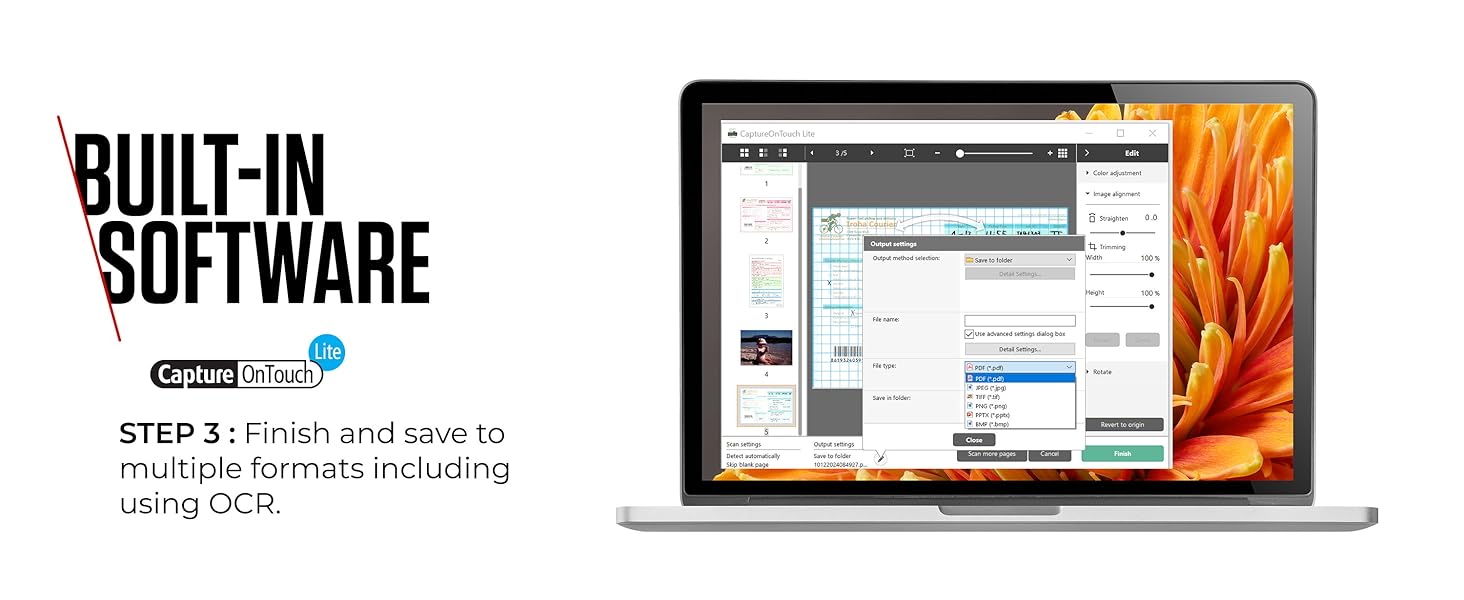
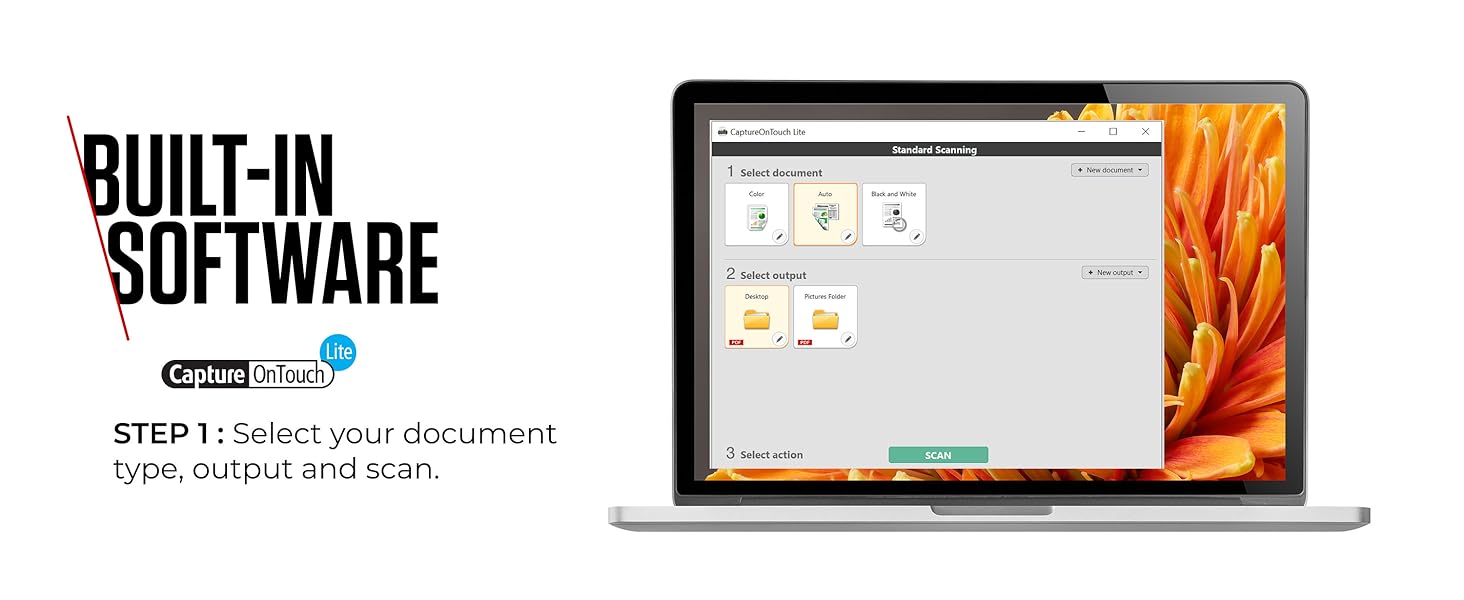
This is such a good little portable scanner. In a world of CamScanner and similar, sometimes people can think "what's the point of something like this", but actually it's such an amazing device, I wanted to go into a little more detail about it. PROS 1. It's lightweight and very portable (more about that below) 2. It scans as well as other more expensive high quality scanners 3. It can scan duplex (double sided) 4. It can scan more than one document at once (believe it or not, it has like a small sheet feeder) CONS 1. It's not a high speed scanner like in an office (but it's not slow either). USES (as promised) 1. We used it in the office to scan everything from A4 to little petrol receipts 2. I use it when going to help relatives with scanning important documents - here is the even better part - within the scanner is a small disk drive which will get found when you plug it in to a USB port of someone's computer. On the drive is software and the drivers to run the scanner, so no need to take discs, download software, search for drivers, take a separate USB etc, it's all within the scanner. 3. It's robust, and because it's so simple to use (one button operation) it's easy for anyone.....however, the software allows you to configure so many options, so when the button is pressed, you are getting exactly what you want and how you want it. I would have given it 5 stars on "Easy to Use", except it took a little while to realise about the scanner having the internal drive with everything you need on it - once you figure that part out, it's 5 stars across the board. This is definitely worth the money, and highly recommended.
C**A
Brilliant scanner and good price
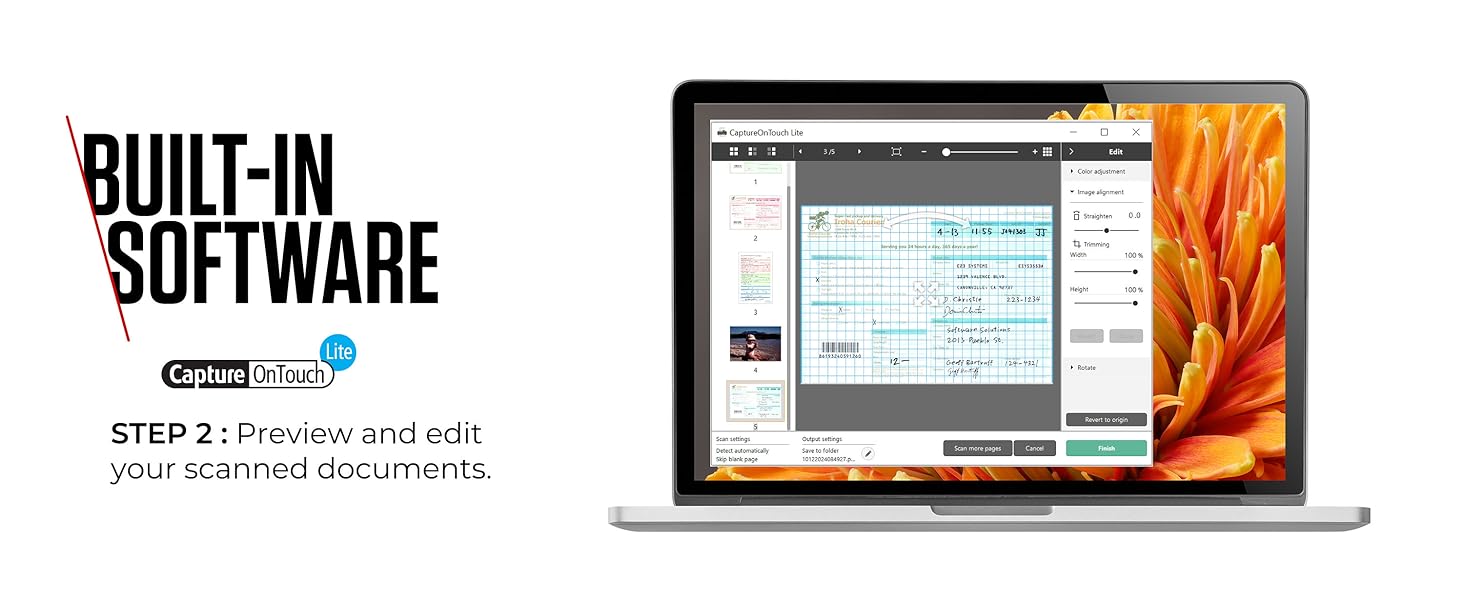
I unpacked and commenced setting it up today. It took 5 mins. But I posted a community question saying I had Windows 10, it scanned but wouldn't save the photos. One response said it was a waste of money. Well, I'd like to report that my own stupidity was the reason. I wasn't fully following the instructions. Once I'd got over the teething problems, I scanned about 150 photos in no time. Easy to pop into files so I'm hoping to complete 7 boxes of photos onto my PC in about another 4 days of scanning. It is so quick at scanning. And senses if a document is double sided so scans back and front just by popping the document in. I could scan multiples of photos - just feed them through one after the other. It's quiet, efficient and has capability of altering the clarity, brightness etc of images. Also you can rotate the images. I would thoroughly recommend it for sorting all your photos. We have a scanner within our printer but this little one just connects right next to my laptop without me having to leave my desk. Added advantage is because it only needs to connect with my PC I can use it anywhere. A brilliant buy and I would thoroughly recommend it.
R**H
Like having an admin assistant in your bag!
I bought this to replace a previous Canon scanner that I had stolen. This is better than before - plug and play (but has driver disc included) and powered by the USB cable. The options for scanning are easy to follow - you can pick the quality for text or photos and it is quicker and easier to file than the previous model. Also gone are the little sticky out paper feed arms - but at no detriment to the feeder. I use this daily for work and would not be without it. You can put up to 10 pages in the paper grab and it will feed happily. If you are sneaky you can top this up as it goes along if you have more pages. You can single sheet feed and file multiple pages into one document and it is easy to delete any pages that are not right, re scan and reorder them. It is no good if you wish to scan from books or magazines unless you tear the pages out! The carrier bag (which is extra) is well worth the money for keeping dirt and dust out of it in your bag and keeping the cable with it! To me, comparing it to a flat bed scanner, would be like comparing wifi to dial up! Slick, quick, quiet, light and easy to use. A winner winner in my book!
R**G
Excellent little Scanner
I bought this little gem as I had a growing collection of old documents that I didn't need a paper copy of any more, yet didn't want to just bin. This scanner seemed to fit the bill as it was small (I really didn't want computer desk real estate taken up by a massive flatbed scanner), seemed to have a lot of functionality and was at a good price ......and it didn't disappoint! First Impressions: As soon as I opened the packaging I knew that I had make a good choice. The scanner is very sturdy and has some heft to it, so you get the instant impression that it's made to last. It comes with a cd (which you don't actually need, more on that later), a USB cable, and that's pretty much it! Functionality: As I said above, it comes with a software disk where you can install the scanning software and read through and online user manual. That said, there seems to be absolutely no need to. As someone who grew up in the 80's when photocopiers and scanners too up practically a small room, what this thing can do is amazing for the size. The software is embedded into the scanner itself, so unless you want to actively tweak the default settings you can literally just plug the scanner into any home computer, put the paper into the feed, press the button and seconds later a pdf appears on your desktop! The scanner automatically reconises two sided documents and can scan both sides simultaneously. So, so impressed. Software: The software that comes packaged with it is pretty good. Fairly straightforward to get up and running with it. Found I didn't really need to use it other then setting the filename (though I could easily have done a rename once the file landed) and auto-aligning the scans where the feeder caused the document to scan in at a very slight angle. The paper feeder though, is excellent. Despite being such a small, narrow scanner, the feeder easily and flawlessly feeds a stack of 7-10 pages through one at a time without clogging up or accidentally feeding two through at a time, very impressive. Bad Points: Not a bad point per se, however the scanner (as mentioned above) can sometimes feed the paper in at a very slight angle which if your have an eye for detail you might spot on the scan itself. The software can realign this easily though and I guess it's a consequence of the scanner being so narrow. Storage: The scanner comes with a handy pouch that can hold the scanner and the USB cable to is can be out into a drawer/laptop bag neatly knowing that it's covered and protected. Overall: All in all, very impressed with this scanner, taking one star off for the less than perfect paper alignment but wouldn't let this put you off from buying this machine, it really was a close cut thing to a full 5 star review. Hope you guys find this helpful.
S**S
Disappointing
The package reads or infers cable connectivity to Windows or Mac; but the package that I received presented only a cable for Mac. Disappointing in the extreme!
D**Y
Utterley useless on Mac
A brilliant product that has worked near flawlessly for years. Until Canon decided they no longer wanted to support it on OSX. It's now just another piece of plastic to add to the mountains of plastic waste. Awful. Do not buy this.
S**G
I like this scanner a lot.
I have a scanner on top of my Epson printer complete with an automatic document feeder. The document feeder will only work properly with A4 paper. Anything else has to go on the flatbed. As I get a lot of small instruction sheets with products I review, I found this a fiddly process. I like to scan instructions so that I can read them digitally. So searchable PDF files are what I’m after. So I was in the market for a low-cost scanner that wouldn’t take up too much desk space. After a fair bit of research, I settled for this Canon P-208II portable scanner. It seemed to fulfil my requirements. It arrived in a decent retail box, but I would expect this from a company like Canon. In the box are the scanner, a carry bag, a USB lead, a CD and all the usual paperwork. The carry bag is handy if you want to transport the scanner from place to place. The USB lead is a standard plastic coated one and uses the mini-USB plug rather than the usual micro-USB or USB-C plugs. Come on Canon, this isn’t good enough. The scanner itself is solidly built. It just has one single control button that can be used to start a scan. The unit automatically powers up when the flap is lowered on the front of the unit. Opening this flap gives you access to the scanners rollers where your documents are placed. There are guides that slide to set the document width. You can place up to ten sheets of standard paper at the same time, and they will feed in one by one. The pages feed in from the bottom of the pile first. Documents should be placed face down. The scanner can read both sides of the paper at the same time. However, page one will be the face down side and that’s why you should place the document face down. There are two ways to use the scanner. One is to use the inbuilt software that sits on a read-only drive on the scanner. This will only work for a Windows computer as far as I can tell. The software can be run straight off the scanner’s internal disk. No drivers need to be installed for this method. The more comprehensive way to use the scanner is to use the software on the CD or download from the Canon website. You need to install a driver that will make the scanner available as a TWAIN device making it compatible with a large range of software. You can also install their CaptureOnTouch software that makes scanning a breeze. You can set up shortcuts using this software. My first job was to create a shortcut that would do a colour scan and create a searchable PDF file. This was easy to do and works a treat. You can create different shortcuts for different jobs like scanning photos for instance. It’s possible to set the destination of a scan to go straight to your printer making a quick and easy photocopier. Overall, I like this scanner a lot. I hope that helps.
D**H
Excellent hardware & software for managing paper documents
EDIT: What I wrote below was valid in 2016. 8 years on, Canon are still selling the product, but haven't upgraded the CaptureOnTouch app for Mac users for several years. Consequently the software is unstable, heading towards unusable. What a shame - it turns a brilliant little product into another obsolete piece of electrical waste. But they're still selling it... This is one of those rare tech purchases where the product doesn't only meet your expectations, but exceeds them. Generally duplex scanners with ADF cost £150-£300. I decided to take a bit of a punt on this. After all, surely a small, portable, USB-powered scanner couldn't really be up to much, could it? In fact it's a brilliant bit of kit. Don't let the size fool you. It scans A4, both sides simultaneously, taking a few seconds per sheet. The ADF function works better than averagely well, with few misfeeds. (If you've not used an Auto Document Feeder before, it means you can put in up to 10 sheets at once (perhaps a few more) and the scanner will automatically pull them through in sequence, scanning both sides of each sheet automatically.) The manufacturer's Mac software is very well-designed and easy to use, with options to scan to PDF, or direct to email, Evernote, Dropbox, OneDrive, Google Drive, or a printer. If you choose the automatic settings, it will automatically detect page orientation (even when it varies within the same document), and even discard blank pages - ideal when scanning things like multi-page pension statements where half the pages are single-sided and half are duplex printed. When scanning to PDF, the software automatically OCRs the document and embeds the text data within the PDF, making PDFs fully searchable with the ability to copy and paste text from the image on screen. This is a valuable bonus as it takes out a step and another piece of software in your workflow. Scan quality can't be argued with; I've not tried photos, only documents, but for documents it's great. If you have bits of paper lying around and find manually scanning & filing them a chore, this is a great investment in time-saving. I used to scan hundreds of pages, one side at a time, in a manual flat-bed scanner. I can probably do with the P-20811 in ten minutes what used to take me a couple of hours.
Trustpilot
2 months ago
1 month ago