Desertcart purchases this item on your behalf and handles shipping, customs, and support to Cyprus.
🎮 Dock, Charge, and Dominate Your Gaming Setup!
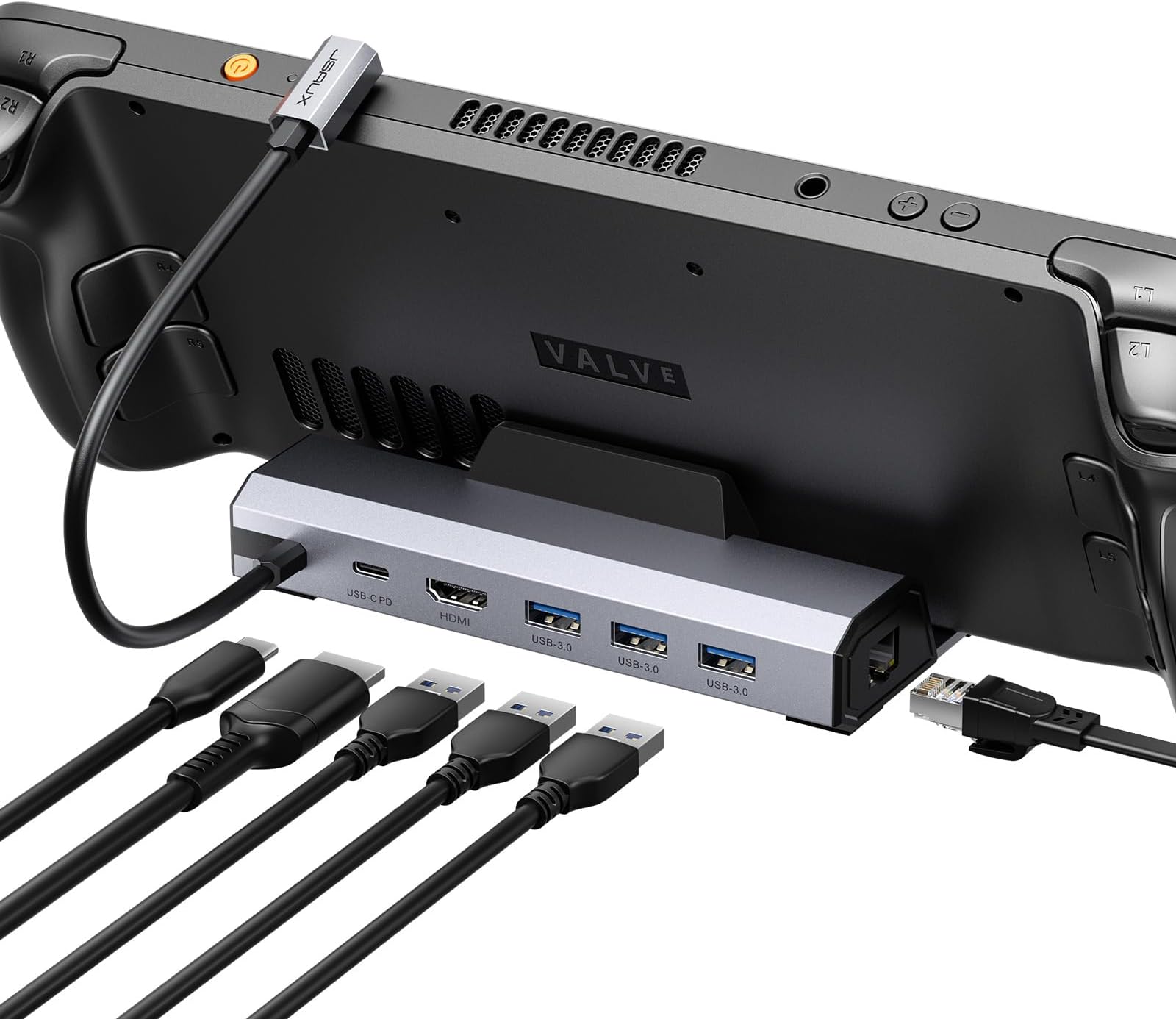
The JSAUX 6-in-1 Docking Station is a versatile, high-performance hub designed for Steam Deck, ROG Ally X, Legion Go S, and other handheld gaming devices. It features an upgraded HDMI 2.1 port delivering 4K resolution at 120Hz for ultra-smooth visuals, a powerful 100W PD charging port to keep devices powered during intense gaming sessions, and a gigabit Ethernet port for stable, lag-free online play. With three USB 3.0 ports and broad device compatibility, it streamlines connectivity and workspace organization, making it an essential accessory for serious gamers and professionals alike.


| ASIN | B0B7HVZNMB |
| Best Sellers Rank | #149 in Computers & Accessories ( See Top 100 in Computers & Accessories ) #16 in Laptop Docking Stations |
| Brand | JSAUX |
| Color | 6-IN-1 |
| Compatible Devices | Steam Deck OLED/LCD, ROG Ally / Ally X, Legion Go / Go S / 2, MSI Claw / 8 AI+, and OneXPlayer |
| Customer Reviews | 4.3 out of 5 stars 4,243 Reviews |
| Hardware Interface | Ethernet, HDMI , USB 3.0, USB Type C |
| Item Dimensions L x W x H | 1.26"L x 4.29"W x 6.02"H |
| Item Weight | 170 g |
| Manufacturer | Shenzhen Wuyishi Technology Co.,Ltd |
| Mfr Part Number | HB0603 |
| Model Number | HB0603 |
| Number of Ports | 6 |
| Product Dimensions | 1.26"L x 4.29"W x 6.02"H |
| Total Number of HDMI Ports | 1 |
| Total USB Ports | 4 |
| Total Usb Ports | 4 |
| Unit Count | 1 count |
| Wattage | 100 watts |
M**E
Regarding Couch Co-Op...
Okay, it works! Beautifully. I have a 62" TV and it's beautiful. Playing solo, it's flawless. No issues at all. Couch co-op? It also *works! *You'll need more than the dock. Here's what I got to make it work (links below): - 3 8bit Ultimate 2C Wireless Controllers: $89.97 ($29.99 each) - SABRENT 4-Port USB 2.0 Data Hub: $7.95 - Amazon Basic 2-Pack USB-A 2.0 Extension Cable, Male to Female, 3.3 foot: $8.09 ---------------- Total: $106.01 Why?: The Bluetooth in the Steam Deck is not designed to take the bandwidth of several controllers. After one connection, each subsequent controller gets increasingly more lag. By the fourth, it's so lagged it's unplayable. What?: You need to bypass the Bluetooth for all but at most one controller. That means you need a wired connection, or a controller with a USB dongle that will connect directly to the dock (if that's you, keep reading). A wireless controller with a USB dongle mimics a wired connection, so it won't overload the Steam Deck. I didn't have that. I had one Xbox controller and three Nintendo Switch Pro controllers. (Of note here, Nintendo controllers send BT signals that are both proprietary and condensed, making them the worst to use but there are workarounds. I do also have another Xbox controller, and the second one still had lag when both were connected). I bought three 8bit wireless controllers to fix the problem. But, it didn't. The controllers would each constantly disconnect and reconnect while playing. Apparently, it's this dock's USB 3.0 ports. The USB 3.0 ports project a slight radioactive signal that disrupts the 2.4G wireless signals that go from the controller to the dongle. Some USB 3.0 ports have proper shielding built in to dampen that radioactive interference, but not this dock. The best solution is to move the USB dongles away from the dock and connect them to USB 2.0's. So, I got the SARGENT 4-Port Data Hub with USB 2.0 ports (THIS IS THE MOST IMPORTANT THING). That helped, but still I was getting intermittent disconnections. The port's wire is not long enough to avoid all interference. So, finally, I got a USB 2.0 extension cable. I have my Steam Deck dock on one side of my TV stand, and I run the extension cable to the other side where I have the USB Data Port with my 3 8bit controller dongles plugged in. It works!! In the end, I'm using a single Xbox controller for myself and 3 8bits for the other players. And I make my friend with a Nintendo Switch 2 jealous of all the Steam games I can play on my TV. Links: 8bit Wireless Controllers: amazon.com/dp/B0FX3TJ5RX?ref=ppx_yo2ov_dt_b_fed_asin_title SABRENT 4-Port Data Hub: https://www.amazon.com/dp/B00BWF5U0M?ref=ppx_yo2ov_dt_b_fed_asin_title&th=1 Amazon Basic 2-Pack USB-A 2.0 Extension Cable, Male to Female, 3.3 foot: https://www.amazon.com/Amazon-Basics-Extension-Keyboard-Transfer/dp/B00NH13Q8W/ref=sr_1_1_ffob_sspa?
A**T
Versatile and Reliable Docking Station - Perfect for Steam Deck, ROG Ally, and Work Laptop
The JSAUX Docking Station has proven to be an exceptional addition to my setup, accommodating my Steam Deck, ROG Ally, and work laptop with ease. I have absolutely no complaints about this versatile docking station and highly recommend it to anyone in need of a reliable solution. Allow me to share my experience and highlight its notable features. First and foremost, the build quality of this docking station is remarkable. It feels sturdy and well-constructed, providing a sense of durability and reliability. I have confidence in its ability to support and protect my devices during use. The docking station's Ethernet functionality deserves special mention. The connection is lightning-fast, allowing for seamless online gaming experiences and speedy downloads. Whether it's for multiplayer sessions or streaming content, the Gigabit Ethernet ensures a stable and lag-free connection. One of the standout features is the compatibility with both the Steam Deck and ROG Ally. This versatility is incredibly convenient, allowing me to dock and charge either device effortlessly. The docking station accommodates the unique requirements of each device, providing a seamless connection and charging solution. I must point out that while using the docking station with my ROG Ally, I encountered a "not compatible charger" error, resulting in the device not receiving the full 30w charging profile while docked. However, after conducting thorough research, I discovered that this is likely a software issue with the Ally itself, and not a flaw in the docking station. Therefore, I don't deduct any points from my rating for this particular compatibility hiccup. In addition to gaming devices, I also utilize this docking station for my work laptop. The convenience of consolidating multiple cables into a single USB-C connection has been a game-changer. Previously, I had to manage five separate cables, but now, with this docking station, I enjoy a clean and clutter-free workspace. The ease of grabbing my laptop and going has been a significant time-saver. In summary, the JSAUX Docking Station is a versatile and reliable solution that caters to the needs of Steam Deck, ROG Ally, and work laptop users. The sturdy build, lightning-fast Ethernet, and seamless compatibility make it a standout choice for docking and charging multiple devices. While the ROG Ally compatibility issue exists, it's important to note that this is likely a software-related matter and not a fault of the docking station itself. With this in mind, I wholeheartedly recommend the JSAUX Docking Station to anyone seeking a cleaner, more efficient setup for their devices. Experience the convenience and simplicity of this docking station, and elevate your gaming and work experiences to new heights.
N**S
Way worth the price
Fantastic, package was small and had very little trash and needed stuff. Just plugged it in and I was rocking, works really well and works fast. I would reccomend it
K**K
Great for rog ally
A must have for the rog ally. Works perfectly and very durable.
S**S
Worked well until my cat got the zoomies and broke it
It connected well with my TV and I was able to play some Baldur's Gate 3. For a little bit. Until my cat crashed into the cord connecting my controller to the dock (I was having bluetooth issues with my controller) and ripped it off the TV stand. The USB plug that goes into the steam deck got bent and everything started glitching. I hooked it up again and got it working. But then my cat did the same thing again (I should have learned the first time around). The point of this story being, I wish the cord connecting the Steam Deck to the dock was detachable or interchangeable so that I could replace it without replacing the whole dock. (My Steam Deck was just fine after falling on the hard floor twice. Those bad boys are thankfully built like tanks. My cat even threw up on my Steam Deck once and it was easy to clean. But this is not a Steam Deck review, or a cat review, so I will stop writing now.)
A**I
Does its job!
It does its job perfectly, it’s a great size for my desk and has lots of ports for my headphones, storage ect.
K**E
Good
This docking station is very useful and works really well. The transfer speed is fast, and I have not noticed any delay. It also has many ports, which makes it very convenient. I use it to connect my Steam Deck and laptop to my monitor, and everything works smoothly. Overall, it is easy to use and worth buying.
E**T
Intermittent connectivity from hdmi and charging usb
Does not connect or passthrough charging consistently with my original steam charger. I've gotten it to work only by unplugging and plugging seemingly at random. The build feels fine, but the electronics aren't working well for me.
A**N
Funciona super bem
Muito bom. Atendeu bem as minhas expectativas.
G**Y
Great device!
Pretty good build quality, outputs 4K 120hz, usb slots for wireless mouse and keyboard. Ethernet for faster speeds. Can't got wrong!
H**A
Mas de un mes de uso hasta el momento
Hace un mes que lo recibí y no eh tenido problemas hasta la fecha, sigue funcionando perfectamente para hdmi y carga (no uso nada mas aparte del control bluetooth para mi Steam Deck). En un principio batalle para comseguir imagen en la pantalla pero fue solo configuracion del steam deck. Buen producto
S**U
Works as expected. Love it.
This allows me to game with my Steam Deck on my Mac Mini's external monitor. This is perfect for games with on-screen text, as sometimes it is difficult to read on the smaller OLED screen.
M**N
Great utility for the price.
The item was delivered in one day and it has matched my expectations. I also connected my keyboard and mouse which works perfectly fine. The HDMI connection to the television was also seamless. Excellent utility for the price which is worth the money.
Trustpilot
2 weeks ago
2 weeks ago