Label Like a Pro! 🏷️
The Mr-Label A4 Self-Adhesive Cable Label pack includes 600 versatile labels across 20 sheets, designed for easy printing with both inkjet and laser printers. Featuring a waterproof finish, these labels are perfect for both professional and personal use, allowing for custom designs with barcodes, logos, and more through a free online tool.
| ASIN | B073PS498M |
| Brand | Mr-Label |
| Brand Name | Mr-Label |
| Colour | white |
| Customer Reviews | 3.8 out of 5 stars 36 Reviews |
| Finish Type | Self-Adhesive |
| Finish type | Self-Adhesive |
| Item Shape | Rectangular |
| Item Weight | 250 Grams |
| Manufacturer | Mr-Label |
| Manufacturer Part Number | LAP20032J |
| Material | Polypropylene , Acrylic latex, Glassine paper |
| Material Type | Polypropylene, Acrylic latex, Glassine paper |
| Model Number | LAP20032J |
| Number of Labels | 600 |
| Shape | Rectangular |
| Size | 20 Sheets (600 Labels) |
| Unit Count | 600 count |
T**B
Good labels, easy printing.
I ordered 20 sheets (600 labels) of MR182 labels in A4 format through Amazon.co.uk the other day. Tonight I got the first few sheets printed. I used your A4 Word template to create all the labeling. I just have to say that this is one of the easiest, best and most affordable solutions I have ever used. It worked perfectly! Thank you very much for a wonderfully practical and smart solution. Good labels, easy printing. What more could you wish for?
B**S
Brilliant.
No just for cables. You will use these for stuff you haven't yet thought of. Up's = Almost indestructible & non tear. BRILLIANT VALUE. Easy to use download for printing Downs- So sticky they are hard to line up when you fold the over. Use scissors to trim
M**1
Label's worked perfectly fine on my Ink-Jet printer though the documentation states "Don't ...
Label's worked perfectly fine on my Ink-Jet printer though the documentation states "Don't use for Ink-jet I think the company need to have the instructions sorted out as this may put some people off from trying them, though outside of that I can confirm with my Ink-jet they worked perfectly fine!
T**R
Does what it says it does.
Took my time to go through the comments on this but bit the bullet to give it a try. Labelling circa 100 cables several times under a model railway. I downloaded the template and read the instructions. Tried printing a sheet of labels to see what would come out. So - they do print on an ink jet printer, there is a small problem with the space allowance with the far right column but by lowering the font size it is easy to overcome plus it is easy to modify the column width, they do print fairly quickly but you must tell the printer to get on with the job and ignore the print margins according to those set by Mr and Mrs Microsoft 's offsprings. Then to use them. They do stick to your fingers and there is a knack to using them. But, they do stick which is the what I wanted them to do. I learnt the way to apply them reasonably easily and only lost 3 in the first four sheets. Visibility when in place. I decided to stay black on white and it does the job brilliantly but I wish in hindsight that I had gone colour coding as well. Price, why pay for a separate label printer when this method works very well on the average home ink jet printer and PC. The labels are cheap not twice the price of the special label printer. This really is amongst the best label productions system out there. As with most things though you do need to read the instructions (unlike some that write comments on products such as this) and be prepared to follow them. Rarely give anything full marks but this really does deserve it.
M**S
Do not buy these labels
The first sheet added to my laser printer and the labels lifted from the sheet and stuck to the drums of the toner. Now the drums are screwed. Learnt a hard lesson today, pay more for labels from a proper company. This has cost me more in the wallet now.
K**D
Not suitable for InkJet no matter what the description says
Description says suitable for InkJet or Laser, product arrives with documentation saying that it's only suitable for Laser; since confirmed.
K**E
Mr-Label Kabeltags
nützliche haltbare bedruckbare Kabeltags, die überall, wo viele Kabel liegen, Übersicht schaffen. Für den Druck via Laser gibt es Online- und Offline Vorlagen.
F**X
Buena relación calidad precio
Cumple lo que necesito, envío muy rapido.
E**R
Printable (as described) and durable
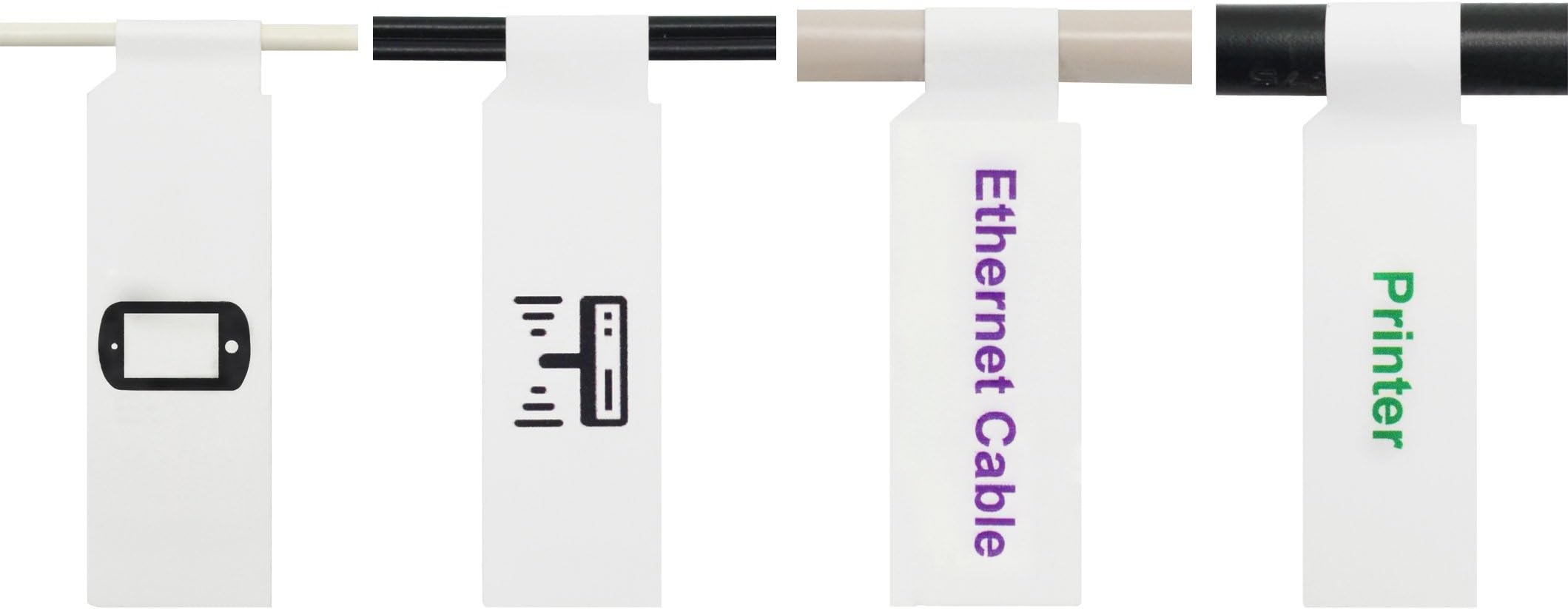
These label sheets were exactly what I wanted for labelling my various cables. They were printable as per the product description, and fairly easy to fold and stick onto the cables. I was also able to write on them using a regular ballpoint pen, as well as an extra-fine-tip permanent marker. I found the ballpoint pen worked better than the extra-fine-tip marker, as the surface coating of the label sheet seems interfere somewhat with the ink flow on the marker. Probably a less fine tip marker would work better. The labels were also a good combination of sturdy enough to withstand a bit of physical duress, and not too difficult to remove if/when required. I found I definitely had to put some effort in to detach the labels, but not an unreasonable amount. The packet of labels came with sheet of printed instructions that explain where to download the corresponding templates for printing. The templates are available as Word document (.docx) and PDF. The instructions on how to use the templates were probably the most complicated part. Having previous experience with customising and printing labels from templates, I was able to navigate the templates, and with a bit of experimenting, find what worked best for me (using the PDF as a base-layer in a vector graphic-editing program like Inkscape/GIMP/Photoshop). However, for users with less time and/or experience, all this can be a bit of a nightmare. To cut to the chase, if you have the experience and/or time, - the PDF template is the best option for customising labels for personal use; - the Excel + Mail Merge template combination is better suited to mass-printing more utilitarian labels for business purposes. If you don't have the experience and/or time, - the Microsoft Office template is the better choice for making simple but functional labels if you have Microsoft Office on your computer; - the LibreOffice template is also available if you don't have Microsoft Office, but requires you to have/download LibreOffice.
O**R
Todo OK.
Llegaron en el tiempo indicado y se corresponden a la descripción. Se proporciona el link a la plantilla, lo que hace muy fácil imprimir etiquetas.
R**V
très pratique avec un petit mais ...
Hyper pratique même et faciles à poser, très polyvalent quel que soit le cable. Le sul petit "mais" c'est que l'adhésif pourrait être plus puissant
Trustpilot
1 month ago
3 weeks ago