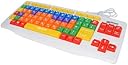
⌨️🌈 Empower young minds with every keystroke!
The Playlearn Special Needs Children's USB Keyboard features large, double-sized keys with clear uppercase and lowercase letters, enhanced by vibrant color coding to support early literacy and computer skills. Its splash-proof polymer casing ensures durability, while plug-and-play USB connectivity offers immediate usability. Designed specifically for children and special needs users, this keyboard transforms learning into an engaging, accessible experience.
| ASIN | B00T4GJNLI |
| Assembly Required | No |
| Batteries Required? | No |
| Batteries included? | No |
| Colour | [VARIOUS] |
| Customer Reviews | 4.0 4.0 out of 5 stars (212) |
| Date First Available | 3 Feb. 2015 |
| Item model number | skb |
| Material Type(s) | polymer |
| Product Dimensions | 48.2 x 18 x 4.6 cm; 740 g |
| Radio Control Suitability | Gaming |
| Release date | 2 July 2023 |
| Remote Control Included? | No |
C**2
Great item for my daughter!
Just what i need for my daughter to start learning how to type. Item is quite big, but great for that purpose. Easy to use, and just like photos.
A**H
Great product
Bought this for my 5 year old to use with the laptop as she gets confused with uppercase letters. Keys display both lowercase and uppercase letters which is helping. Keys are quite large compared to a standard keyboard, but my daughter finds this much easier to use.
M**S
it's ok
Pictured next to a normal keyboard for size comparison. My daughter has a visual impairment, so wanted a keyboard with large keys and colour coded. Overall ok for the price. Looses a star because it feels cheap compared to the cheapest Logitech pictured (less than half the price of this). Keys are a bit wobbly, and plastic feels thin. Looses another star because white text on yellow is impossible for her to read, is difficult for me. Even the orange could do with being darker to make the text easier to see. Also, backspace is a small key instead of double sized, which makes it harder to find. Probably still worth buying of only because all the alternatives seem to have the same issues. I'll just have to go over the white text with a black marker.
A**V
Not happy at all
The USB charging stopped working. It was meant for my son who has special. It didn’t help much as it dint get charged by the USB charger. Extremely disappointed
K**K
Good keyboard
Great keyboard for Children. Works on both PC and MAC - When mine arrived some of the print was missing on one of the keys but we just used a sharpie and put it on.
R**0
Very helpful
This has been very helpful for my autist son and also his younger sister who is still learning to recognise capital letters especially with homeschooling during lockdown where they spent more time on the computer . Great purchase
C**A
Like the fact that it has a qwerty keyboard to ...
Rather large being meant for children. Granted it's also supposed to be for visually impaired but I still feel little fingers could do with keys smaller and closer together. Like the fact that it has a qwerty keyboard to get them used to where letters are on a normal keyboard.
H**T
fire
im gonna be using this for hardcore gaming.
S**U
Gut. Leider fehlen die Aufdrucke der Umlaute... Haben wir gesucht und dann dazu geschrieben...
K**J
This keyboard is great for new typers! It is light-weight, easy to use and has simple assembly! The keys are color coded and help with letter recognition. Great product for beginners!
R**A
Seems to be decent quality but one key is mislabeled. Whilst an @ appears on the key it does not matter if shift is pushed or not, an @ does not appear. Yet shift and the number 2 will put an @symbol. Given it’s a learning keyboard this isn’t ideal and will provide some confusion. The number 2 key does not have an @ symbol. I haven’t tested all symbols yet but found that one out straight away.
M**O
Très bon clavier pour les « petits doigts ». Ce clavier est pratique pour les jeunes enfants du premier cycle ( 1re et 2e année). C’est dommage qu’il ne soit pas adapté pour la langue française. Le « y » n’étant pas considéré comme une voyelle en anglais n’a pas la touche de la même couleur que les 5 autres touches. Il n’y a pas non plus de touches apparentes pour les accents ( é, ê, ë), l’élève doit s’approprier le clavier et se rappeler les touches qui offrent les différents accents.
M**O
0ttimo quality prezzo. È funzionale.
Trustpilot
2 weeks ago
1 week ago