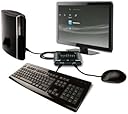

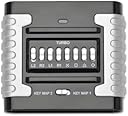
PS3 Eagle Eye Mouse and Keyboard Converter
Product ID: 48111048
⚡Plug and play setup
⌨️USB keyboard support
🖱️USB mouse compatibility
🎮 Elevate Your Game: Own the battlefield with precision!
The PS3 Eagle Eye Mouse and Keyboard Converter allows gamers to seamlessly convert their USB keyboard and mouse into a PlayStation 3 controller. With a focus on first-person shooter games, it offers customizable controls, lag-free performance, and a quick setup, making it the ultimate tool for serious gamers looking to enhance their gameplay.
R**D
Very good product, does take time to set up, and you may need another purchase
The Eagle eye does exactly what it says it does. So far off all the frag devices I have used, this is by far the best. I have only used it with COD Black ops on a PS3 so far, however it works great. I have been playing with a "Controller" for over 10years, I was reasonably good, but was looking for an edge. So, when I first got the Eagle Eye I thought, "yep its going to take a while to get used too", and was prepared for my kill ratio to drop dramatically. However day 1, hr 1, 1st online game, I was still managing to get a good kill ratio!! Amazing. With this product though its not just a "Plug and Play" It take some effort from you too tweak it to be right for you, however the forum is awesome, full of tips and advise and even keymapping so you can use other people's and custom the to you. The actual setup is very easy and fast. For instance I can have the device in the PS3 and playing, then decided to change a setting on the EEC, and it takes less than 1 min to pop it out of the PS3, into the PC, and then change the settings, and pop it back into the PS3 and I am playing again all tweaked! Also, IF you do not have a "Gaming Mouse" it will be VERY jerky, HINT: Standard mouse has around 800DPI, you are going to need 1600 DPI as a MIN. You can pick mice up for £9.99 in store that do this sort of DPI. You can also spend £££ on mice that have 4000+ DPI. If you have one already, you ok. The final note, its now been around 1 week, and I have been playing for about 4-5hrs total play time, and I am still adjusting it to get it perfect! So BE PREPAIRED to invest the time into it to get it the way you want it. Over all it is VERY good. I hope this helps! Cheers R ALSO, I noticed a reviewer said you can only configure 2 mouse buttons, this is incorrect, you can only do 3! :) Shoot, Aim, Melee! What else do you need!!!
D**N
Product has huge potential. Software / CD is it's weak side
The product works, getting it to work is a headache though, but once it works it works. It comes with config software that just reminds me Of Visual Basic 6 days, If you buy the PS3 version you still get xbox instructions. When you try configure the software it has little boxes you click in that are all over the place and you end up having to kill extra braincells trying to figure which belongs to which button. If you want to upgrade the firmware you can't with a 64bit OS... If it wasn't for the software issues I'd probably give it 5 stars. Other than that it comes packaged nice, the item itself is made well and an extra bonus is the USB cable is pretty long :D
M**S
Absolutely useless
Bought this for a new PS3 slimline along with compatible mouse and keyboard. However never got it to work. In fact never got my PS3 to even aknowledge it was connected. Went on the makers forum pages and read some amazing stuff including suggestions that you have to leave it plugged in for 30 mins before the PS3 would "see" it ! No matter how ludicrous this seemed I tried it and everything else I could find suggested. Updated the firmware about 5 times exactly as described, tried attaching without mouse and keyboard then with just keyboard then just mouse then waiting until maybe I saw the PS3 hard drive flash then leaving it plugged in for 30 mins then tried it all again and again - wasted best part of a day and PS3 never registered the slightest knowledge of connection. Rubbish - anybody wanna have a go ! Would give it zero stars if I could.
P**H
Does the job, but didn't overly impress.
It seems to do the job, but I've found it a little over complicated to get set up right. Some issues I've had; - The software is PC only, i had to run it under a virtual machine on my Mac. - The config software looks like it was pulled together in a couple of hours.. it does the job, but doesn't seem very professional. - The software to perform the firmware upgrade wouldn't install for me. I found some reference to the issue on their forums, but no solution. In the end I found a comment suggesting my device came with the latest firmware, so there was no need to upgrade. - I have no idea how to determine the firmware version on the device. - The effectiveness of the device varies between games - it's not great for killzone. - It's a little tedious to have to set up key mappings that work well with each game.
C**C
i thought i needed it but i didnt
As a long term PC gamer I was having a hard time playing console FPS games with a standard gamepad controller so I thought I would try this. Didn't really work out. Despite spending some time with the set up this really does not replicate the experience of mouse movement. The main problem is the lack of acceleration you would typically find with a mouse. Either the view moves too slowly with too much accuracy or the opposite is the case. The emulation is simply not the same as real mouse control. Also some games like the Killzone series require you to make use of the motion detection in the gamepad controller to turn wheels, which the Eagle Eye cannot emulate. In the end I gave up and really put the effort in on the gamepad controller on Killzone 2 and eventually I mastered it so I am actually comfortable playing console FPS games now. It's true I don't play online and I am more interested in the journey than the difficulty so tend to play on easy, but still I now find the gamepad easy to use with the usual 'extras' that console games include such as a wider hit box than you would see on a PC FPS game, and AI which is based on cover / shoot mechanics. So a bit of a waste of money, but glad I tried it because as this is consistently the highest rated device of this type for the PS3 I now know that it still a worse experience than the provided gamepad.
D**S
Great Product.
I have been a computer gamer since 1983, BTW I'm 60 yoa, and am extremely competent with a mouse and keyboard. I had bought the PS3 about 3 years ago as a Blue Ray player as I knew I was worst than rubbish with the consoles controller. Within the last couple of weeks I saw several YouTube videos about this device and decided to give it a go. This converter is fantastic! I was extremely sceptical about how this piece of equipment would work, but it does exactly as they claim. Let's just say it brought my time in MW2 "The Pit" down from 2mins 11secs to 38secs within a day. EEC (Eagle Eye Controller) has no mouse lag (as far as I can tell) and is very easy to set up. You do need a computer of course and if your lazy key/mouse setup files can be downloaded from the net. The new version 3.0 firmware enables even more precise dead zones and sensitivities to be set up to get it just right for you. Note that not all keyboards may work with the EEC. My logitech G15 didn't so I bought a Cyborg V5. Compatible keyboards and mice are itemised at Penguin Uniteds' forum. Don't despair as a PS2 keyboard connector with a usb adapter works. I've tried it. Many people ask why go PS3 gaming when you could play the game on a computer. My reasons were that all PS3's are identical as far as hardware is concerned. So no turning down eye candy to have a reasonably fast game. It also takes hardware differences out of the equation as regards "lag". I am absolutely delighted with the EEC. 10 out of 10 for everything. I've had it for 4 days and am still putting the final touches to my settings. I also bought the Logitech G500 mouse with the EEC. A great mouse perfect when paired with the EEC. If you want to game on a PS3 with a mouse and keyboard buy the EEC. You will NOT be dissapointed.
N**S
Very good, a little hard to configure
I've bought this product a few days ago, in order to play games such as BF3, CoD, and so on, and it works perfectly. I can play BF3 now and defeat my friends. ;) It's a little hard to configure at the begining, like the mouse sensivity, but after that, it's great.
S**S
i fought it will be great cus i like to sit on PC but problem ...
i fought it will be great cus i like to sit on PC but problem is mouce is moving like a analog not like a normal pc mouce it not count a distance what you did but the speed you move the mouce its horible....
Trustpilot
2 weeks ago
2 months ago