๐ Upgrade your home network to pro-level speed and stability with goCoax MoCA 2.5!
The goCoax MoCA 2.5 Adapter (2-pack) leverages existing coaxial cables to deliver a robust 2.5Gbps Ethernet connection with ultra-low latency (3ms), ideal for 4K/8K streaming, online gaming, and high-speed data transfer. Its shielded coax technology minimizes interference, ensuring reliable, wired-speed performance across your home network. Easy to install and scalable up to 16 devices, itโs the cost-effective upgrade for millennial professionals demanding seamless connectivity.
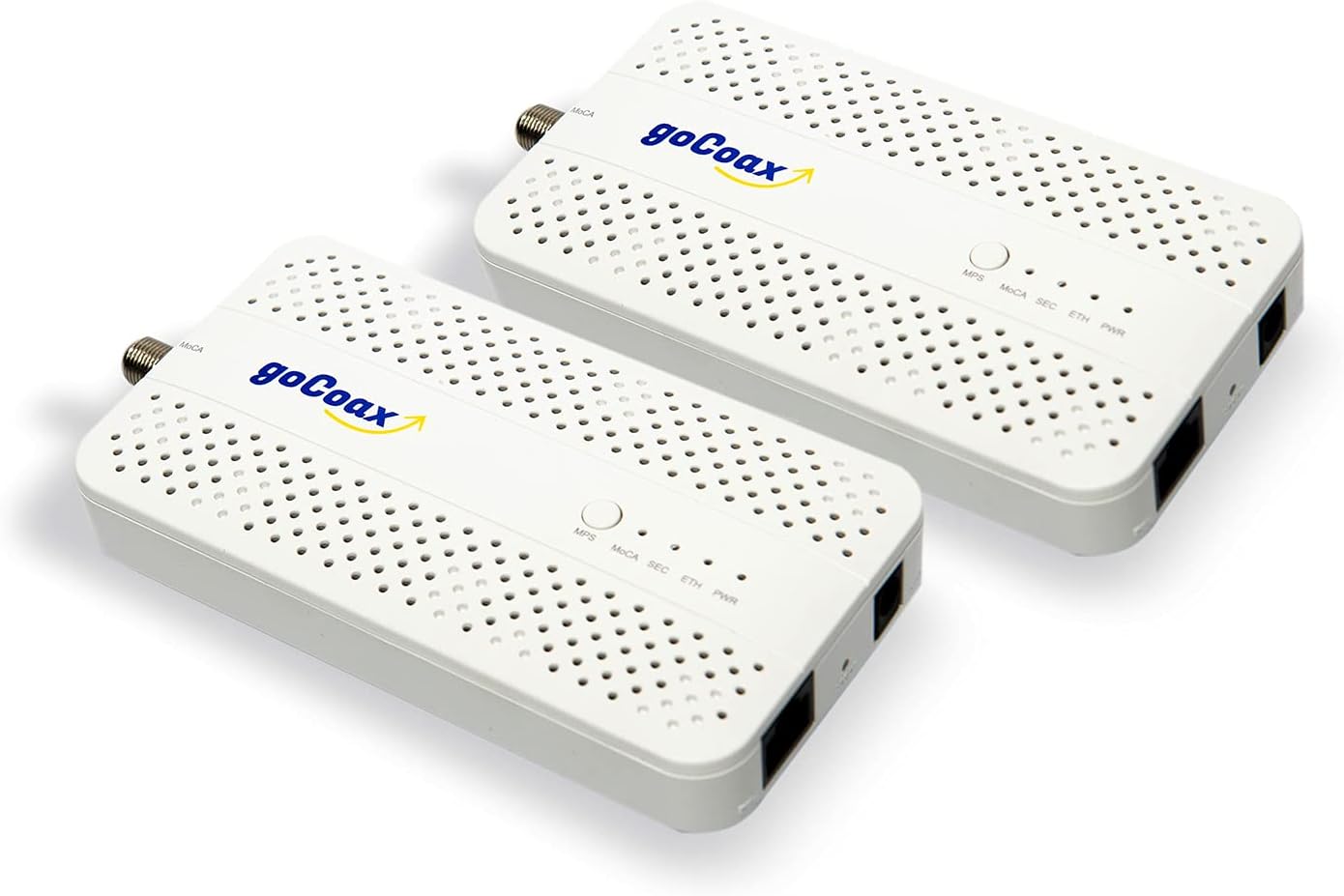


| ASIN | B09RB1QYR9 |
| Best Sellers Rank | 73,275 in Electronics & Photo ( See Top 100 in Electronics & Photo ) 1,274 in Coaxial Cables (Electronics & Photo) |
| Brand | goCoax |
| Brand Name | goCoax |
| Color | White |
| Colour | White |
| Compatible Devices | Desktop |
| Compatible devices | Desktop |
| Customer Reviews | 4.5 out of 5 stars 611 Reviews |
| Data Link Protocol | Ethernet |
| Data Transfer Rate | 2.5 Gigabits Per Second |
| Data link protocol | Ethernet |
| Hardware Interface | Ethernet |
| Hardware interface | Ethernet |
| Item Dimensions L x W x H | 13.9L x 13.9W x 1.8H centimetres |
| Item Weight | 0.72 Kilograms |
| Manufacturer | goCoax |
| Manufacturer Part Number | WF-91HG-ZM71 |
| Model Number | WF-91HG-ZM71 |
| Number of Items | 2 |
| Number of Packs | 2 |
| Product dimensions | 13.9L x 13.9W x 1.8H centimetres |
| Unit Count | 2.0 count |
K**N
Worked perfectly in the UK
I live in the UK so there was a risk that my coax cable wouldn't be high enough quality to support MoCA very effectively. I decided to take the plunge anyway and thankfully it paid off. These worked perfectly to get a wired network up into the loft. I have a 900 Mbps fibre connection to the house and the coax seems to cope with that just fine. I've not bothered testing higher speeds because most of my network equipment is rated for gigabit ethernet. Note that you will need to buy plug adaptors, but the devices support UK voltages so no need for transformers.
H**S
Power Supply is NOT UK compliant
This item is not supplied with a UK compliant Power supply.
A**R
Die Lรถsung
Um WLAN im ganzen Haus (massiv, Stahlbetondecken) verfรผgbar zu machen habe ich jahrelang mit Repeatern und DLAN experimentiert, eher wenig erfolgreich und sehr schwankend von der Signalqualitรคt. Dann nutzte ich die vorhandene FM-Verteilung, um mit mehreren Access-Points auf den Etagen zu arbeiten. Die Signalqualitรคt hat sich verbessert, aber der Datendurchsatz war aufgrund der verbauten CAT5-Kabel auf 100mBit/s begrenzt. Bei einer Renovierung fielen mir die alten, seit Jahren ungenutzten SAT-Dosen ins Auge und die Frage stellte sich: kรถnnte man vielleicht...? Bei den bekannten Elektronikspezialisten bin ich zwar fรผndig geworden, aber dort handelte es sich hauptsรคchlich um Gerรคte, welche einen Breitbandfilter/-splitter integriert haben und dadurch recht kostenintensiv waren. Schon eigenartig, dass es wohl nur dieses amerikanische Produkt gibt, aber gesehen und bestellt. Die passenden Steckeradapter gleich dazu, da auf den Fotos klar das Netzteil mit US-Stecker zu sehen war. Der Rest ist plug & play. LAN-Kabel vom Router zum goCoax, dann COAX-Kabel am Multischalter ab- und an den goCoax angeschraubt, Netzteil eingesteckt. Im Wohnzimmer mit beiliegendem COAX-Kabel an die SAT-Dose und den goCoax, AP per LAN-Kabel angeschlossen, Netzteil eingesteckt und Injektor des AP mit Spannung versorgt. Die Verbindung kam in Sekunden zustande und es stehen jetzt die vollen 400Mbit/s vom Router stabil zur Verfรผgung. Inzwischen kam noch ein Switch hinzu, um die Gerรคte im Heimkino direkt mit LAN zu versorgen. Ich bin begeistert und empfehle gerne weiter.
K**B
Perfect for Verizon FiOS โ Keeps TV Guide Working Without Using the FiOS Router
I purchased the goCoax MoCA 2.5 Adapter with 2.5GbE specifically for my Verizon FiOS setup so I could use my own router and still retain full TV functionality, including the program guide and On Demand. It worked exactly as intended. Instead of being forced to use the FiOS router just for MoCA, this adapter provides the MoCA network over my homeโs coax while my own router handles the internet. My FiOS TV boxes get guide data, updates, and On Demand services just like they would with the Verizon router, but without the monthly rental fee or network limitations. Setup was very straightforward. I connected the adapter to the coax near the ONT and my personal router, and everything came online quickly. The TV guide populated normally, channel data loaded fast, and there were no issues with DVR or interactive features. The 2.5GbE port is a big bonus, especially on a gigabit FiOS plan. Network speeds are extremely stable with low latency, and it provides a reliable wired backbone across existing coax lines in the house. Itโs essentially the best of both worlds: full FiOS TV functionality plus the performance and control of a high-end third-party router. If you want to eliminate the FiOS router but still keep the TV guide, On Demand, and MoCA connectivity for your set-top boxes, this adapter is an outstanding solution. Rock-solid, fast, and a smarter long-term setup for FiOS households.
A**ใผ
Great
This is a great item for people who dont have a waiting wall conduit or a lan outlet. Seller was also helpful with the shipments. Worth the price
M**E
Minimal setup, Decent Connectivity
After working out how to connect Coax end to end I was able to use this kit to connect two ends of my house. The coax cable run is probably 150ft. I connected my equipment with CAT5e cables into the adapters and initially did not see any traffic. I power cycled one of the adapters and it all came up. Speed tests were good (only tested to internet and it maxed out my 300Mbps service) and only 4ms latency is added. So far it's been reliable so time will tell if these adapters hold up.
D**N
Fantastic, just do your homework beforehand
I'll start this review off by saying I'm super happy with my purchase. Setup took me, an IT professional, about an hour, but that will vary based on your local wiring. My biggest recommendation for any one purchasing is to do some homework first on setting up MoCa and what roadblocks you may run into. Below is a summary of my existing setup and a high level overview of the steps I took to get setup, along with my final thoughts. I include some basic latency testing and speed testing information near the bottom. For anyone interested in the MoCA splitter and filter I used, I have included links below. Background: I use an Asus AiMesh Wi-Fi system in a house built in the late 1800s. Basically every room was added on at some point by a person with some free time and spare lumber, so nothing is to code, or even remotely associated with any other room in the house. I've wanted to run Ethernet throughout the house since I moved in, but due to the inherent challenges of multiple, hard-to-access crawl spaces and no attic, I was left with very little options outside of my office other than a spotty mesh Wi-Fi system My goal: Having just upgraded to fiber, I had a house full of unused coax cable. I wanted to send Ethernet over this, and effectively "wire" in my access points. However, I wanted to ensure that if a future owner or myself wanted to return to copper/cable internet, that it wouldn't impact this setup. -- What I bought: - 2-pack of goCoax - 1 pack BAMF Coax MOCA-compatible Coax Splitter https://www.amazon.com/dp/B017T9KF1S - 1 pack PPC MoCA POE filter https://www.amazon.com/dp/B07SLD9QPH -- How I accomplished it: - OUTSIDE: First, I had to crack open the Spectrum box on the outside of my house. Inside, there were a bunch of disconnected coax runs and a single filter connection coming from the outside line to my internet line, along with another "filter"-type device that had a ground line connected to it. I removed their filter and ground connection, and replaced it with the BAMF 4 way splitter on the "In" connection. I also connected the PPC filter in between the outside line and the BAMF filter (so it looked like line from road -> PPC filter -> BAMF "in" port on 4 way splitter). Finally, and this is super important, I connected the ground wire I had removed from the Spectrum filter/bracket to the new BAMF splitter, which has two spots, one on each side, to connect the ground wire. While a ground wire isn't 100% required, it's very important to preserve your equipment. From there, I connected all of the coax runs I wanted to use to the "Out" ports on the BAMF splitter. I then made sure everything fit in the box and closed it up. - INSIDE: Took a two foot piece of Coax and connected it to the coax wall jack where my access point was. Powered up the goCoax unit, connected the two foot piece of coax to it, and ran the Ethernet line to my access point's WAN port. Where my cable modem was originally hooked up and my primary router was, I hooked up the other goCoax box, powered it up, and ran the Ethernet cable to a LAN port on my primary router. Power cycled my access point and waited. Within a few moments, the Ethernet and MoCA lights both lit up on both goCoax devices, and I ran some ping and speed tests. Was getting my max internet speed at the access point, with zero dropped packets. Pinging another device on my network, I averaged 3-4ms of latency with no jumps. Moved a large file between devices at 100MBps, not quite 1Gbps speeds but way, way faster than my Wi-Fi had been. That access point is now getting the fastest speeds I've ever had in that part of the house with super low latency, and I can use it as a jumping off point for additional Ethernet runs. -- SUMMARY: For $60 a piece, these devices are amazing. They required zero setup in terms of configuration, all plug and play, and the most time consuming part was prepping the existing coax setup in my home by adding the MoCA splitter and filtering the outside line. These two steps for essential for ensuring the coax was actually tied together, and that the MoCA signal was not escaping into the outside line. I have some other coax runs in my home and I'll absolutely be buying more of these goCoax units to equip there. I was skeptical at first, but now I'm a total believe in this product. If you have a house full of coax cable and want to put it to good use, this is absolutely the product to buy!
Trustpilot
1 month ago
3 weeks ago