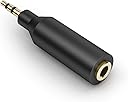
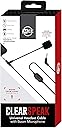
This aftermarket replacement headphone cable sports an ANALOG volume control slider knob, meaning it doesn't control your smartphone's digital volume, which pretty much makes it universal. Some might see this as a compromise and others a much-needed feature. I'm beginning to lean toward a much-needed feature, especially when it works on all your dozen or so legacy audio devices that have begun to pile up around the house over the years. You can tell the difference between a cable with an analog volume control and a cable with a digital volume control pretty easily: the analog one will have a mechanical slider along with a play/pause button, while the digital one will have two buttons usually to either side of the play/pause button; these three buttons send a signal back to the smartphone controlling play, pause, skip forward, activate mic, and volume up-down.. Regarding this cable, the single button controls all of the smartphone features [play,pause,skip forward,activate mic] on my LG G3 android smartphone. I tested the cable using my LG G3 and my son's BEATS SOLO HD headphones. BOTH THE OS AND THE APP MUST SUPPORT THESE FEATURES for them to work. Again, the volume control slider knob is ANALOG only, and it does not control the smartphone's volume. I tested the cable on my daughter's Google Android Nexus 9 tablet; all of these same smartphone features stated above worked on it as well. Push the button once for PLAY/PAUSE Double tap the button for SKIP FORWARD Holding the button down for a while will activate the MIC Sliding the volume control knob up or down will control ANALOG VOLUME The end that goes into your device is the angled 3.5mm TRRS pin. The end that goes into your headphones is the straight 3.5mm TRS pin My son has a pair of BEATS SOLO HD headphones. He likes to use them while playing PS4 online with his friends. The original BEATS headphone cable is of the digital volume type. It has the three buttons. Unfortunately, that part of the cable literally fell apart from too much use and abuse. I bought this cable to replace it. Now, here's where things begin to get a little wonky. The original BEATS headphone cable has the same 3.5mm TRRS pin on either end of the cable. This MEE cable, as I stated earlier, has a 3.5mm TRRS pin on one end (the end you plug in to your device) and a 3.5mm TRS pin on the other. Why the BEATS SOLO HDs have TRRS on both ends is mystifying. Is there a MIC feature built into the SOLO HD headphones that I am not aware of? Does the same cable get used on different models with more features? Does the fourth ring really make any difference at all? I have no idea. Anyway, after I plugged the angled end into the PS4's Dualshock controller, and the straight end into the BEATS SOLO HD headphones, I checked the both the MIC function and the headphones on the PS4......the headphones worked just fine, but the MIC wouldn't work. Luckily, my son had a short male to female 3.5mm extender cable handy. After I plugged the angled end of this cable into it and the other end into the PS4 Dualshock controller, the PS4's MIC function began to work. In fact, everything worked. MIC and headphones. Why this extender cable fixes the MIC function, I haven't a clue?!?! In addition, the MEE cable's digital button is not compatible with anything PS4, and of course, the analog volume control works regardless. My son likes being able to control the volume of the headphones.. See??? Analog!!! All this analog vs. digital volume control business along with the growing variables regarding different 3.5mm pin configurations, different pin sizes, Android vs. iPHONE, PS4 vs. XBOX, and one could easily get confused as to what works and what doesn't. Do your homework before you purchase. This is a great product. I like the analog volume control better than the limiting factors of digital-only volume control. The MIC works just fine and the cable seems to be solidly built. For the price, I couldn't be happier. Highly Recommended!!! UPDATE:5/12/2016------ I spent a little more time messing around with the PS4 Dualshock controller, this MEE cable (more specifically the MIC function), the short extender cable, and the BEATS SOLO HD headphones. First, I unplugged the headphones, just to take them out of the equation; I don't think they were the problem. Then I ((SLOWLY)) plugged the MEE cable only (not the extender cable) in to the Dualshock controller, and wouldn't you know it, the MIC function began to work. Then I plugged in the headphones, and the MIC function still worked, along with the headphones. When I unplugged the MEE cable and quickly plugged it back in......no MIC,,,again. Maybe 1 out of 10 tries with a fast plugin did the MIC function turn on. Slow plugin.....maybe 5 out of 10 times. Dismal results. Then I tried the extender cable again. I plugged in the extender cable - ((and only the extender cable)) - and the PS4's MIC function turned on, even without the MEE cable plugged into it. Then I plugged in the MEE cable with headphones.....everything seems to work just fine. I follow this simple protocol now: First, plug the extender cable into the Dualshock controller to activate the PS4's MIC and Headphones functions;Then plug in the MEE headphone cable into the extender cable (with headphones already plugged into the MEE cable). Without the extender cable, this MEE cable and the PS4's MIC function can't seem to play nice with each other. Even so with this weird quirk, I still like the MEE cable; it's better built than nearly anything I've seen. This strange behavior could be the fault of the Dualshock controller, the cable, or both, who knows. Until I find out, still......Highly Recommended. UPDATE: 10/1/16------- OK, so I bought a new PS4 Dualshock controller not too long ago from Toy 'R Us, and of course it's newer age-wise and perhaps even design-wise by about two and a half years when compared to the original controller that came with the PS4 and a second one I bought just afterward. Three controllers total. Now, interestingly, the new controller and the MEE cable work perfectly together. I don't need the short extender cable anymore, in other words, as the MIC function turns on without it. Mystery solved? I guess. My son uses this controller exclusively now when playing PS4 online with his friends. I'm stuck with the older ones.