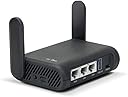
Desertcart purchases this item on your behalf and handles shipping, customs, and support to Cyprus.
🌍 Stay connected, secure, and in control—wherever your journey takes you!
The GL.iNet GL-A1300 Slate Plus is a compact, dual-band Wi-Fi 5 travel router delivering up to 1267 Mbps combined speed. It features a powerful IPQ4018 CPU, pre-installed OpenVPN and WireGuard VPN clients for robust privacy, and runs on the customizable OpenWrt 21.02 OS. Designed for professionals on the move, it supports USB-C power, network storage via USB drives, and advanced network segmentation with guest Wi-Fi. Ideal for securing public Wi-Fi connections in hotels, cafes, and airports, it offers a seamless setup experience and a 2-year warranty.


| ASIN | B0B4ZSR2PX |
| Antenna Location | Home |
| Antenna Type | Fixed |
| Best Sellers Rank | #1,178 in Computers & Accessories ( See Top 100 in Computers & Accessories ) #58 in Computer Routers |
| Brand | GL.iNet |
| Built-In Media | Ethernet Cable, GL-A1300 (Slate Plus) router with 2-year warranty, Power Adapter (US Plug), User Manual |
| Compatible Devices | Phone |
| Connectivity Protocol | Wi-Fi, Ethernet |
| Connectivity Technology | Ethernet |
| Control Method | App |
| Controller Type | Switch |
| Coverage | Standard indoor coverage |
| Customer Reviews | 4.2 out of 5 stars 1,558 Reviews |
| Data Transfer Rate | 1300 megabits_per_second |
| Frequency | 5 GHz |
| Frequency Band Class | Dual-Band |
| Item Dimensions L x W x H | 4.65"L x 3.31"W x 1.3"H |
| Item Weight | 429 g |
| LAN Port Bandwidth | 1000 Mbps |
| Manufacturer | GL Technologies |
| Maximum Upstream Data Transfer Rate | 867 megabits_per_second |
| Mfr Part Number | GL-A1300 |
| Model Name | GL-A1300 |
| Model Number | GL-A1300 |
| Number of Antennas | 2 |
| Number of Items | 1 |
| Number of Ports | 3 |
| Operating System | Linux |
| Other Special Features of the Product | Access Point Mode |
| RAM Memory Installed | 256 MB |
| Security Protocol | WPA2 or WPA3 |
| Special Feature | Access Point Mode |
| Unit Count | 1 Count |
| Voltage | 5 volts |
| Warranty Description | 2 year warranty |
| Wi-Fi Generation | Wi-Fi 5 |
| Wireless Communication Standard | 802.11a, 802.11ac, 802.11b, 802.11g, 802.11n |
| Wireless Compability | 802.11a, 802.11ac, 802.11b, 802.11g, 802.11n |
P**R
Better is the enemy of good enough
7/8/26: bought a second one for my sister, also on tds fiber, it works fine. She was initially given a tds router but it was not fully configured by the installer so rather than deal with them I replaced it with this. Updated to 5 stars for reliability and configurability. It’s not the fastest but it’s still plenty good enough. I still wish it had activity lights but the fiber media converter (ONT) does so that’s something. We have small offgrid cabins where power use is important and these sip power and can cover a 550sqft cabin with no problem. 6/15/26: moved the wan to a tds fiber connection that was recently made available in our very remote area. Works fine, zero hiccups. 2/20/26: It’s been chugging along for a couple of years now and has not given me any trouble at all. I have it plugged into an ATT Nighthawk hotspot from about 2017 that is troublesome but that’s because ATT likes to redirect us to cell towers that have terrible signal strength in an attempt to prevent us from actually using the data cap. They deny it of course but I’ve watched them doing it with other equipment. I also have a starlink mini and to switch I just move the routers wan cable from the hotspot to the starlink, works fine and doesn’t mess with the router setup. I have the starlink set to pass thru and I do not use its router at all. It’s just a modem. I finally looked into vlans with this router but couldn’t figure it out. The LuCi admin interface supports it but it’s complicated. I’m not using the Guest network tho so using LuCi I changed the firewall rule for the Guest network to send and receive from the lan but not the wan - that lets me connect some bad behaving stuff like amazon fire tablets without them using tons of my data plan doing things I can’t control. Now a cheap amazon tablet can display web pages served by my own rpi’s and thus function as annunciations for my solar panel system status without downloading 5Gb of movie trailers they think I might be interested in. Actually I HAVE had one problem - I have a pihole DNS and I point the router at it along with all the clients (manually in their wifi setups). Some of my apple clients can ping hostname.local but sometimes they can’t. Nothing on the Guest network can but all of my rpi’s can do it. It’s a pita to hardcode IP addresses in web pages not to mention poor form. 11/3/24: NOTE: to perform a factory reset press the reset button for 10 seconds. A led will flash slow for a couple of seconds, then faster and then blink rapidly. Release the reset button while it’s rapid blinking. If you keep holding it the device will not do a factory reset, it ignores you pressing the reset button. This worked for my slate+ and both 150M’s. original Dropping 2 stars: there are no activity/status lights on the ethernet connectors it’s a small thing but a big part of how I keep track of what is going on in my network. Also there are no traffic rate statistics for any of the clients other than a one-shot 10-second average - I want to know the cumulative numbers for each client. Both of these missing features are valuable tools for spotting unusual activity and in some circumstances they may be the only ones. The router is fast and has been reliable but these missing tools are very disappointing. On initial setup only the 5G wifi interface is active and this cannot be used with an iPad or iPhone for config - they never see the connection as active. The internet is not accessible on them until after the admin password is set. I had to break out an old win-7 laptop to configure it. (by 2026 I think this issue is corrected but I don’t know if it was in the router fw or in iPadOS). I hooked the wan interface to a GB switch on my existing network and using the iPad on 5G transferred large audiobook files from a WD NAS drive at about 13MB/s to a Samsung Bar thumb drive (~400mb/s) local to the iPad. During those transfers the power utilization bounced between .6a and 1.03a (at 5v) so reasonably miserly given the data rate.
O**O
A must for techie travellers!
The GL.iNet GL-A1300, also known as the Slate Plus, is a remarkable piece of technology that has quickly become an essential part of my travel kit. Here's why: Compact and Powerful: Despite its small size, this router packs a punch. It's simple to use, and its performance is consistently reliable, making it a favorite for me. Travel-friendly WiFi Solution: One of the standout features for me is its ability to create a new WiFi network in places like hotel rooms. This means I no longer have to go through the tedious process of reconfiguring WiFi settings on each of my devices. Even better, it effortlessly handles networks with login pages. Log in once, and all your devices are good to go! Versatile Power Options: The inclusion of a standard USB-C port for power is a game-changer for me. It means I can power the router using battery packs, which is incredibly handy in locations without readily available power outlets. VPN Integration: The easily configured VPN option is excellent for frequent travelers. Whether you're trying to maintain an IP from a different country or just value your online privacy, the Slate Plus has you covered. Its support for the OpenVPN protocol ensures compatibility with a vast array of providers. The GL.iNet GL-A1300 (Slate Plus) Router is a traveler's best friend. It's versatile, powerful, and incredibly user-friendly. Whether you're on a business trip or a vacation, this router ensures you stay connected seamlessly. Highly recommended!
M**O
Highly recommend
This is a great portable Router. Very feature packed and easy to use
S**2
Full judgement reserved until used on my trip
At this point, I give it four stars. Feels well built, connected quickly to the wired connection from the router to my laptop. It picked up my home network quickly. Overall the navigation is pretty good - better than my last one which was a $35 travel router. I guess it did the job - when I used it - but it was difficult to use and as a result I stopped using it. Now trying this one. I have tried powering it from an Anker power brick and also just connecting it to a USB A port on my laptop - that works also for powering it. I have now used it in the hotel and it is working well here as well. However, there are some hotels that it won't work at. For some reason they do something with their network that won't allow it. So, it may not work at every single location. As for documentation, it says there is a user manual included - ya, well, what they seem to consider a user manual is NOT a user manual. Call it a getting started manual. I would appreciate a user manual to have in my brief case. Their online stuff is pretty good, but hey, if I'm trying to get online that online material doesn't do me any good.
T**R
Complete unsupported crap
This thing has had problems after just a month of use. I contacted support and they provided a beta firmware from 2024 that is defective. So it's supposed to connect to 5G Wi-Fi and repeat it and created its own Wi-Fi 5G, but that doesn't work. If you set the repeater mode to automatic defaults to 2.4 gigahertz and if you force it to 5G then the 5G Wi-Fi that it creates fails to broadcast and you can't connect to it. It is completely flaky as a device. It seems to work one minute doesn't work the next constantly reconnects. It's just not as stable device. And it seems like they're not interested in supporting it anymore because they want you to buy the more expensive 1800 model. Which means that the company is not very great. Why you sell a device that you have no intent on supporting? When I first got the device the speed was relatively good. The Wi-Fi provided that it's connected to is over 200 megabits of speed, but it would only do about 90 megabits. I thought that was okay but it is slowly and slowly decreased over time. Now I'm lucky to get 10 megabits even though it still has the potential for 250 megabits. How do I know this? When I connect my phone to the Wi-Fi that this device is supposed to connect to I routinely get over 200 megabits. When I connect to this device right now I'm getting seven megabits. This thing is complete junk. There's no value for the money, it worked for a short time basically the return window normally. And then it's complete junk. Only because when I bought it I get the returning because of the holidays can I return it. Otherwise this would have been a scam to rip me off of the $70-$80 at this device cost.
S**R
Great little router for mobile Starlink setup.
This router is running on my 12v powered starlink setup. I'm using 12v to 9v buck converter to step voltage down. This thing powered right up and talked to the starlink dish right out of the box. With a few tweaks in the settings it's working perfectly. I chose this particular router for a few reasons. It has built in VPN compatibility so when we are outside the USA we can use VPN to localize our connection and still access things like video streaming accounts, VOIP/FaceTime calls using our US phone #, not to mention security when doing banking etc. In addition, it has both 2.4ghz and 5ghz capability so I can choose one to the other based on what is working best in wherever we are parked. It also has a guest network feature. We are often posted up in areas with no other Internet access and this allows me to share our internet with others without giving them access to our main network. I can turn the guest network on/off as needed. I have the router installed in a cavity between a couple of cabinets and the signal is strong and carries 50+ feet away from the camper. It is also full strength inside the cab of the truck so we have high speed internet in the cab while driving. This is a GREAT feature for off-road navigation as I can use Google earth or similar for top-down Satalite view of our location in real time. Can't beat that! Overall setup was easy, the admin menu is pretty simple, and the feature set is more than enough for me. The ONLY thing that I wish it had built in was the ability to block websites on the guest network. We end up places where I don't want to allow others to post to their 'effing social media accounts. I prefer some places to be left for others to discover on their own instead of blasted out for the world to see. But hey, that's just me. Overall this is a fantastic little router for our mobile setup.
J**H
worked as advertised
Love this thing. A bit of a learning curve but makes it easy for the family to connect on the road or in a hotel. Works well using a VPN service, sometimes connecting to the hotel's internet is hard when the VPN is turned on. Turn it off when connecting the first time and everything's good. Small footprint, sits out of the way. Only issue is that it does require USB power, so I have a dedicated wall plug I carry with the unit. Remembers your settings so if you return it automatically connects.
D**O
Great travel router; fast, nice features, great VPN support
I bought this for use on an overseas trip, as well as for RV camping. It's proven itself nicely on a recent overseas trip. Why I like travel routers, in general: (1) Connect all my devices to the router before leaving for a trip, and then when I arrive at a destination, I only have to connect one device (the travel router) to the Internet. This allows me to use multiple devices where some destinations limit the number of connected devices. It also allows family members to not have to connect their own individual devices to the wifi. (2) Use a VPN when connecting to WiFi hotspots of unknown quality. I don't know how safe a hotel's WiFi is, or a campground's WiFi. Some may be great, but some may be run by people who aren't very good at securing the network. By connecting my devices to the travel router, and having it set up to use a VPN, I'm establishing my own security. I can also choose a VPN server in the region of the world that makes the most sense for my use case. (3) Range extension: Whether I'm plugging into a network jack in a hotel, or connecting the router wirelessly to the hotel or campground's network, the router has better antennas than some of my devices, and can be situated in a location that gets better signal. In my RV I can put it near the ceiling or near a window, for example. Then I'm able to rebroadcast my own wifi bubble that my devices connect to with fewer problems. The reason I like *this* travel router are: (1) Size. It's slightly larger than the previous travel router I used, but still compact enough to take anywhere. (2) Capabilities: Adguard, DNS over HTTPS, Wireguard / OpenVPN, and the configurability of OpenWRT. It's a full-featured router. (3) Range: Its antennas seem to work very well to pull in wifi signals in tricky places like campgrounds. (4) Speed: On my recent trip overseas I was able to stream movies over WireGuard VPN (using ProtonVPN) without any difficulty, while other devices still were browsing the internet fine. It's the fastest travel router I've ever owned (it's my 4th travel router). I really was surprised at how well it performed with WireGuard VPN. Its speeds with WireGuard are as fast as the unprotected speeds of my older travel routers. Places where this router is a perfect fit: (1) 3-bedroom or smaller apartments. I've set up good quality travel routers as the primary routers in apartments before, and have found them perfectly satisfactory. This, being the fastest travel router I've used, and having very good range, is ideal in such situations. Why mess with a big ugly router in a small apartment when this will do the job just fine? (2) RV camping in campgrounds that provide Wifi. Often these locations have difficult wifi. So placing the router in a position within the RV that seems to get the best signal, can help in rebroadcasting a usable signal to the rest of your devices. (3) Travel to hotels that limit number of devices. (4) Anywhere a VPN can be useful. Sometimes I'll leave this router running at home so that if I want my device to connect through a VPN I just select this router's wifi SSID. When I don't need the VPN, I select my home's router's SSID. It's often useful to be able to select VPN points of presence in other parts of the world. (5) Sharing a hotspot. I can allow several devices to connect to my phone when it's on hotspot mode. But it's sometimes easier to just connect a travel router to my phone's hotspot and let family members connect to the travel router; stronger signal, for example.
J**F
Nice travel router - even better with real OpenWRT onboard
Used on several work trips so far. Immediately installed full OpenWRT and was able to do some pretty funky networking with it to allow access to internet, but also connect into customer network. Myself and my fellow worker could connect to both via Wifi, all while not concerned at all about the Wifi security, or about having to VPN back to our company and then out to the site we were at. Very nice.
T**E
This is the 2nd one of these travel routers that I’ve bought so obviously I recommend it.
This is the 2nd one of these travel routers that I’ve bought. That’s the best recommendation I can give. I’m using my first one as a router for Streamlocator where it performs very well. It also performed well on the few occasions when I had the opportunity to use it as an actual travel router.
L**S
Top Router!
Der GL.iNet GL-A1300 (Slate Plus) Router ist eine ausgezeichnete Wahl für Reisende oder als Ergänzung im Heimnetzwerk, dank seiner einfachen Einrichtung, schnellen Verbindungsgeschwindigkeit und vielfältigen Einstellungsmöglichkeiten bereits in der Standardoberfläche. Positive Merkmale: 1. Einfache Einrichtung: Die Einrichtung des Routers ist unkompliziert und schnell, was die Nutzung sofort ermöglicht, ohne lange Konfigurationszeiten. 2. Schnelle Verbindungsgeschwindigkeit: Der Router ermöglicht eine schnelle Verbindungsgeschwindigkeit, was für reibungsloses Streaming, Gaming oder allgemeine Internetnutzung entscheidend ist. 3. Vielfältige Einstellungsmöglichkeiten: Die Standardoberfläche bietet zahlreiche Einstellungsmöglichkeiten, um den Router nach individuellen Bedürfnissen anzupassen und zu optimieren. 4. Guter Support: Der Router wird von einem guten Support-Team begleitet, das bei Fragen oder Problemen hilfreich zur Seite steht. 5. Integriertes VPN: Ein herausragendes Merkmal des Slate Plus, was ihn in seiner Preisklasse von allen Routern abhebt, ist das integrierte VPN, das zusätzliche Sicherheit und Privatsphäre beim Surfen im Internet bietet. 6. Geringer Stromverbrauch: Der Router benötigt wenig Strom, was ihn effizient und umweltfreundlich macht. 7. Tragbarkeit: Aufgrund seiner kompakten Größe und Portabilität ist der Router ideal für Reisen geeignet, insbesondere wenn der WLAN-Empfang begrenzt ist, z.B. beim Camping. 8. Gute WLAN-Reichweite: Die WLAN-Reichweite des Routers ist ausreichend, um eine Wohnung komplett abzudecken. 9. Preis-/Leistung: Absolute Spitzenklasse und zu dem Preis wirklich unschlagbar. Negative Merkmale: 1. Schwierigkeiten mit bestimmten VPN-Verbindungen: Es kann Schwierigkeiten geben, eine Verbindung zu bestimmten VPN-Diensten wie NordVPN über OpenVPN herzustellen. (Kann allerdings auch ein Problem vom Anbieter oder vom Benutzer sein!) Allerdings konnte eine erfolgreiche Verbindung über Wireguard von NordVPN (ja, das geht über einen kleinen Umweg) hergestellt werden, was eine Alternative darstellt. Hier läuft der Router immernoch sehr schnell (abhängig vom Internetprovider und der Leistung des VPN-Anbieters) und funktioniert einwandfrei! Fazit: Der GL.iNet GL-A1300 (Slate Plus) Router ist ein hervorragender Reisebegleiter oder eine ideale Ergänzung für das Heimnetzwerk. Mit seiner einfachen Einrichtung, schnellen Verbindungsgeschwindigkeit, vielfältigen Einstellungsmöglichkeiten und dem integrierten VPN verdient er 5 von 5 Sternen und eine klare Kaufempfehlung.
G**I
Topkwaliteit met eenvoudige VPN-bediening
Alles werkt perfect. De bediening is eenvoudig en intuïtief, ook wat betreft de VPN. Na twee weken gebruik ben ik erg tevreden.
P**A
Value for money | Connectivity | Functionality - 4.99/5
Awesome product, superb speed with almost no packet loss as if I'm connected with LAN (without vpn), and coverage, VPN (vpn cuts down speed as usual) is easy to setup as well. Please be aware that it's original power supply is a US plug (flat plug ends), so you will end a US-India plug adapter/converter.
Trustpilot
2 weeks ago
2 months ago