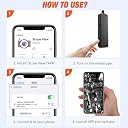


Desertcart purchases this item on your behalf and handles shipping, customs, and support to Cyprus.
🔍 Explore the unseen with clarity and freedom!
The BlueFire 33FT Wireless Endoscope Camera is a professional-grade inspection tool featuring a 2MP HD camera with adjustable resolution and LED lighting. Its semi-rigid 33-foot cable offers precise maneuverability into tight spaces, while wireless WiFi connectivity supports real-time streaming on iOS and Android devices. Rated IP67 for water resistance, it’s designed for versatile industrial and scientific applications, delivering high-quality visuals without the clutter of cables.
| Best Sellers Rank | #340,245 in Industrial & Scientific ( See Top 100 in Industrial & Scientific ) #15 in Endoscopes |
| Customer Reviews | 3.9 out of 5 stars 1,863 Reviews |
M**.
Worked GREAT - FINALLY, after I figured out the instructions.
Revised from 2 stars to 5 stars I received a new unit from the manufacturer promptly along with an email urging me to try the new one. My original problem was primarily due to poor documentation and my misreading of it. The PRODUCT IS GREAT! The SOFTWARE IS GREAT. The documentation is ... not so great - confusing. The instructions are poorly written by a non-native speaker, so here I am helping out North Americans: 1) Before you do anything, download the app with either the QR code (very handy) or at Google Play or the Apple App Store. DO NOT OPEN THE APP YET*****. 2) So you are sure the device has enough power, charge the endoscope at the mini USB charger port on the opposite side as the camera. After 15 or 20 minutes, you certainly have enough battery to test the device. 3) Turn the power on at the device. The slide switch is on one of the the long and narrow sides next to the charging port. The blue light indicates that the WIFI is communicating. The other light is red when the unit is on and green when the battery is charging. They are all off when the unit is off. The green LED comes on if the unit is off and charging on the mini USB charging port. 4) To communicate with the device, go to your PHONE's WIFI center and find the Jetion_???? SSID. This is your first sign on which you can change later. the password is 12345678. 5) Open the app you just installed ONLY AFTER YOU HAVE SIGNED IN TO THE Jetion_???? WIFI network. 6) The endoscope light is controlled from the roller wheel on the same side as the ON/OFF switch. Roll it Toward the switch for brighter, away for dimmer. 7) NOW OPEN THE APP - VOILÁ, you are looking through your endoscope. SOFTWARE CONTROL: If you press the gear Icon, you can CHANGE the name of the SSID and CHANGE the password if you wish. The top line changes the SSID - I changed mine to endoscope and also made the password endoscope since I was not worried about security. Use the red "X" in the upper left hand corner to go back to the endoscope screen. PHOTOS & VIDEO on iOS: Works REALLY well. When you give it access to your photos, it neatly puts them with your other photos and videos. Very convenient. Original Review: Received this unit and it worked as advertised for an iOS 10.3.3 iPhone 6+ ONCE. I shut it down and attempted to reconnect with the wifi and it would not connect. It was as if the password had changed itself. I tried over and over in the course of two days. RETURNED. ***** This happened because I accidentally changed the password because I opened the app before I knew the gear changes the password, it is not the place to sign in. You sign in on to the device your phone's WIFI settings, not the app settings. The device automagically works when you are on its WIFI.
C**N
Mostly good, software needs improvements
The camera itself is ok, it’s basically what you can expect from a snake camera of this price. Quality: Pretty good, it will do the job. It’s just about seeing where you can see, nothing more. Connection: Super simple, it creates a very stable wifi, you connect to it, and with the right app, it works right away. App: To download the app, you need to look for it in the market, because the QR code doesn’t work (at least on Android it doesn’t). It’s simple to use, but there are some weird stuff in there. If you look at the 2 screenshots with the resolution selection (both of them are showing all the options available, you cannot see more by scrolling), you will see that the resolutions available are different, and I have no idea why. Sometimes it just gives you a set of resolutions, and sometimes another set. This is leading to another issue: Specifications/manual: What is the resolution of this camera? How do you set it up? How to debug in case x and y happen? Impossible to know! There is no information whatsoever. The pictures I’m attaching include everything there’s to find about the product! If you look at the flyer which serves as documentation, you’ll see “LED light: 6pcs adjustable”. I guess they are talking about the little sticks in the plastic bag. I have absolutely no idea how to use that! Come on Guys, would it have been that difficult to add a video on Youtube explaining all of that? Also, why when I pick a high resolution like 1280x720, the image is actually smaller than when I take 640x480 (see pictures: where it looks zoomed on the bottle, it's because I selected the highest resolution)? That doesn’t make sense at all! The app needs to show the right resolutions. With a good software, this snake camera would be perfect!
R**E
Worked exactly as described.
Arrived on time as usual with Amazon Prime. We live on a large trawler here in the keys. We developed a pretty significant fresh water leak in a totally inaccessible part of the boat.. could not even see it with a powerful flashlight and mirrors. So I taped the endoscope to a 10 foot section of PVC pipe and was able to clearly see the leak itself but more importantly how the existing plumbing was attached to the hull along with various other t-joints. This made it clear I would need to run all new tubing and replumb the aft master head. Saved lots of time and frustration. Helped immensely to be able to review the video I had recorded. Already have several fellow boaters waiting to use it on their boats for various problems. The instructions are at best poorly written by a nonnative speaker so read the most popular reviews for how to set it up. Mainly.. after you download the app, then charge the device a few minutes minimum, turn it on and then go to your WiFi connection and click on the network it sets up. Then go to the app and enter the password.. 12345678 I recall and wallah your off and running. The supplied cable is somewhat stiff yet flexible but you will probably need to tape or thread through a piece of pipe for anything over 5 or 6 feet. I would definitely recommend this product. Reasonably priced!
Y**5
One time use then it is a paper weight.
**update** November 7, 2020. I needed another use out of this and did some research. Apparently there is a reset button you can get to if you open/break the electronics storage. In there you will fond a little reset button that is not accessible without opening the enclosure. I am still leaving this as one star even though it now works. I shouldn’t have to research how to reset this when a button could have just been added to the case. Also I have to constantly reset it after every couple of uses. So that is pretty annoying. I purchased this endoscope last year and only used it once. It worked great the first time using it. I now needed to use it again but now the WiFi functionality of the scope is not working. I cannot connect locally since this is only made for a WiFi connection. So after one use, I am not able to use this again. All the lights turn on as if it is working but nothing happens. I am looking the Jention_xxxxx WiFi but it doesn’t show up. I am not sure if I received a faulty unit but the fact that I was only able to get one use out of it is pretty ridiculous. Would give it 0 stars but it did work one time.
C**R
NOT a professional grade product, but works as advertised
First off, you will need to download a separate app in order to access the wireless video signal on your iOS or android device. I’ve got an iPhone X and it worked. Secondly, the camera cable is semi-rigid, but you won’t be able to thread this thing down a pipe or drain without a fish tape. You can pick a 50 ft tape up for about $15; you’ll be glad you did. Once downloading the app, you’ll need to perform a couple of steps to link the device to your phone/tablet: 1-turn on device 2-go to your device settings, wifi settings, identify the camera’s wifi profile, and link your phone to it. The ssid will likely differ from the instruction manual, but the password will remain 12345678. 3-Open the wifi view app. It should automatically link to the camera feed. So I bought this thing to shove down my french drains to see what I needed to fix. The camera worked well enough for what it is. It does not mechanically zoom or pan which increases the difficulty of making sense of what you’re viewing. Also the app has an adjustment for video quality, but the resolution doesn’t change between the settings. The light actually works very well and clearly illuminated our 4” drains. I did notice both the camera and controller base runs hot while in operation. The controller does feel cheaply made as if you would easily damage it if handled roughly or dropped, so care is needed when using and storing. Also, the cable itself was terribly wound. You’ll need to roll out and straighten it prior to your first use. I did use this for nearly 45 min straight without issue. Overall recommend this product for home use, and further recommend purchasing a fish tape.
P**T
Great quality for the price
Depending on what you are planning to do with this, it will either be sufficient or insufficient for your task. We purchased this to look into our pipes as our bathroom sink has a major clog. We had previously watched the plumber stick a camera into both our toilet and vents when the toilet got clogged so for the price I figured this camera was worth a try. While we couldn’t see what was clogging our sink drain, we were able to look into every vent from the roof, we were able to discern that the snake we were sticking in the drain might have been going in one of two directions (i.e. up the vent or down to the main line), and also looked at the pipe structure under the house (not easy since our house is on a hill and the crawl space is sloped). All in all, the camera is easy to use, gives pretty good images, lights up dark places well (see photo of one of our sludgey pipes. can’t imagine a darker place than a vent 25 ft down or so), and fits almost anywhere. You can capture still images or video from the app you use to view from the camera. The app is pretty self explanatory, no bells or whistles but you don’t really need any with a device like this. Start up is almost plug and play so long as the camera is charged and you can locate the wifi easily. I have no problem with either. I did notice that at first use the camera seemed to be fully charged yet turned off when we were using it. No problem, I just connected it to a battery pack since we wanted to use it right away.
A**R
Turns "I Have No Idea What's In There" Into "Oh, That's What's In There"
I had a drainage issue behind a wall, and my options were: call a plumber and pay a small fortune, or buy this and maybe figure it out myself. I chose the snake camera. Best decision. Setup is genuinely simple once you know the trick: connect your phone's WiFi to the camera's own network signal first, THEN open the app. If you try to connect from inside the app it can be confusing, going through your phone's WiFi settings first makes it click immediately. First-time setup takes about three minutes. The 33-foot semi-rigid cable is the real selling point of this version. The semi-rigid design means you can shape and steer the camera rather than having it flop around uselessly. For walls, pipes, engine bays, HVAC runs, and crawl spaces, the length and steerability together make it genuinely useful. Image quality at 2MP is adequate for most inspection tasks. The six adjustable LED lights around the lens handle dark spaces well. The best focal distance is about 3-8 cm from the object, so get it close to what you're inspecting. The IP67 waterproof rating on the camera head means pipes and wet environments are fair game. Note that the WiFi module box is not waterproof, so keep that end dry. Battery life runs a few hours on a charge, which is usually more than enough for a single job. The companion app (WiFiView) works, though it is basic. Video and stills both save to your phone. For the price, this is a remarkably capable tool. It paid for itself the first time I used it.
A**E
Works OK on Android
I tried and failed to get it working on an old MacBook, but it works fine on my Android S7 phone. I don't like having to use their app, but the Permissions aren't onerous. I'd prefer to have used it on the open source VLC app, but gave up after futzing with it a few minutes and just installed the app. The focus range is a little narrow, but adjusting the light level helps some. I got it mostly to record borescope stills and video in an air cooled engine using the supplied mirror but haven't done that yet. I did use it to check out the insulation in a vaulted ceiling by going past a ceiling light fixture and it was quite handy for that. Didn't test battery life, but it seems to work fine with external power. WiFi feature works fine and could be helpful, though the connection is an extra step. Well worth the great price if it lasts. Update: Finally tried it on the 4 cylinder air cooled engine today. Focus is a bit soft and the app defaulted back to 640x480 (VGA) so maybe it will be better next time if I can remember to set resolution to 720p every time I use it. Looks to me like the lens is the weak point though. I gave up on the mirror after five minutes of random thrashing around trying to figure out where the valves were. I pulled the mirror off again and just bent the wire back tightly about an inch from the long tip (easily fits thru the plug hole with clearance). That let me figure out how to maneuver it, though the videos are bad (jumping around, light changes, reflected glare, etc...). Still, I was able to ensure that none of the exhaust valves are heating unevenly (prelude to failure, so this good news easily paid for this tool). The battery lasted fine, and my S7 phone only used about 9% battery during the half hour or so I was fumbling with it (USB borescope would've probably used 30%). Still happy with it, though I might look for a worn out engine somewhere to practice on. Now that I've seen how helpful it is to have a borescope, maybe I'll even spring the big bucks for a fully articulated one to spend less time and get better video. You could do stills instead, but it takes two hands to maneuver the camera into position so it would probably move if you tried to reach over and tap the camera button. Easier to take stills from the video with your computer (or mobile) editing app, but I just trimmed the video to a clip showing the best views of both valves in each cylinder.
M**A
Fácil de usar
Quede gratamente sorprendido por lo fácil de echar a andar... funcionó perfecto con mi iPhone XS
A**N
Hi quality and the endscope camera
Wasn't expecting miracles, however this product is high quality :) worked flawlessly sinks with Wi-Fi to your phone it has a lovely feature to “flip the screen” so I have to work bending the cable around to find the right angle, worked every time flawlessly I’ve used it 12 times now back in its case ready for next time, I can highly recommend this product don’t pay top dollar this is a nice little unit works beautifully, if you want to view something even 4 feet away you’ll see that no problem but it works best within 5 inches to about 2 feet with HD Nice clear shot footage can highly recommend this camera - Andrew P
J**S
Bueno pero deberia tener mejor imagen
Es lo que ofrecen, pero segun la resolucion que ofrecen esperaba mejor imagen
H**Y
Value for money and great delivery
Given the price, I wasn't expecting to be blown away, but I was more than happy with the outcome. The picture is clear and wifi connection for both android and ios was a breeze and video feed was consistently reliable. Battery life is more than adequate, not sure how long it will last, but I didn't drain in the whole time I was using the device. Only two minor points are that the semi-rigid cable could be slightly more rigid, as it tended to buckle once you fed it a bit, but secured it to a fish tape and all was fine in that regard. The primary issue is that the LEDs are not too bright. They illuminate what is immediately in front of the camera very well, but no real visibility of anything that is more than a few inches in front of the lens in a dark space. All things considered, I am very happy with this unit and is great value money at less than $60. Also ordered on a Saturday lunch time and was on my doorstep by Sunday mid morning. Great delivery!
B**T
A Quality Endoscope thoroughly recommended
I originally bought this Endoscope to install new parts in my tight engine bay but have since found many uses especially since it has a very long access length.The wireless connection is crystal clear: I use an iPhone as my viewing window (just remember when first setting up, TURN ON the Black Wireless Bluefire device and then to go into Settings ON YOUR IPHONE and choose the to join a NEW network you will see called Jetion_***, Then use the Software App made for this device which you download from the App Store). After setting up I have found the device very easy to use with very clear images, especially in Dark and hard-to get-at places! Well recommended!!
Trustpilot
1 week ago
1 month ago